# How to rescale in color map editor
**URL:** https://discourse.paraview.org/t/how-to-rescale-in-color-map-editor/4203
**Category:** ParaView Support
**Tags:** python, vtk
**Created:** [April 28, 2020, 4:47pm UTC](https://discourse.paraview.org/t/how-to-rescale-in-color-map-editor/4203 "2020-04-28T16:47:02Z")
**Posts on this page:** 3
**Page:** 1
### Author:  [@Vaya\_Putra](https://discourse.paraview.org/u/Vaya_Putra)
#### Post date: [April 28, 2020, 4:47pm UTC](https://discourse.paraview.org/t/how-to-rescale-in-color-map-editor/4203/1 "2020-04-28T16:47:02Z")
Dear all
I am confused how to rescale my output used color map editor.
I have smooth changes data from 0.99730 - 1
but in visualize paraview It scale shown 1 - 1. even though I changed but always update with default scale
[alphae6biot03.vtu](https://discourse.paraview.org/uploads/short-url/tI8uFg3wpLKV6I5oanxBalxBTmG.vtu) (127.0 KB)
it happen only in phase-field data, the other is correct automatic.
thank you for help.
---
### Author:  [@mwestphal](https://discourse.paraview.org/u/mwestphal)
#### Post date: [April 29, 2020, 3:27am UTC](https://discourse.paraview.org/t/how-to-rescale-in-color-map-editor/4203/2 "2020-04-29T03:27:33Z")
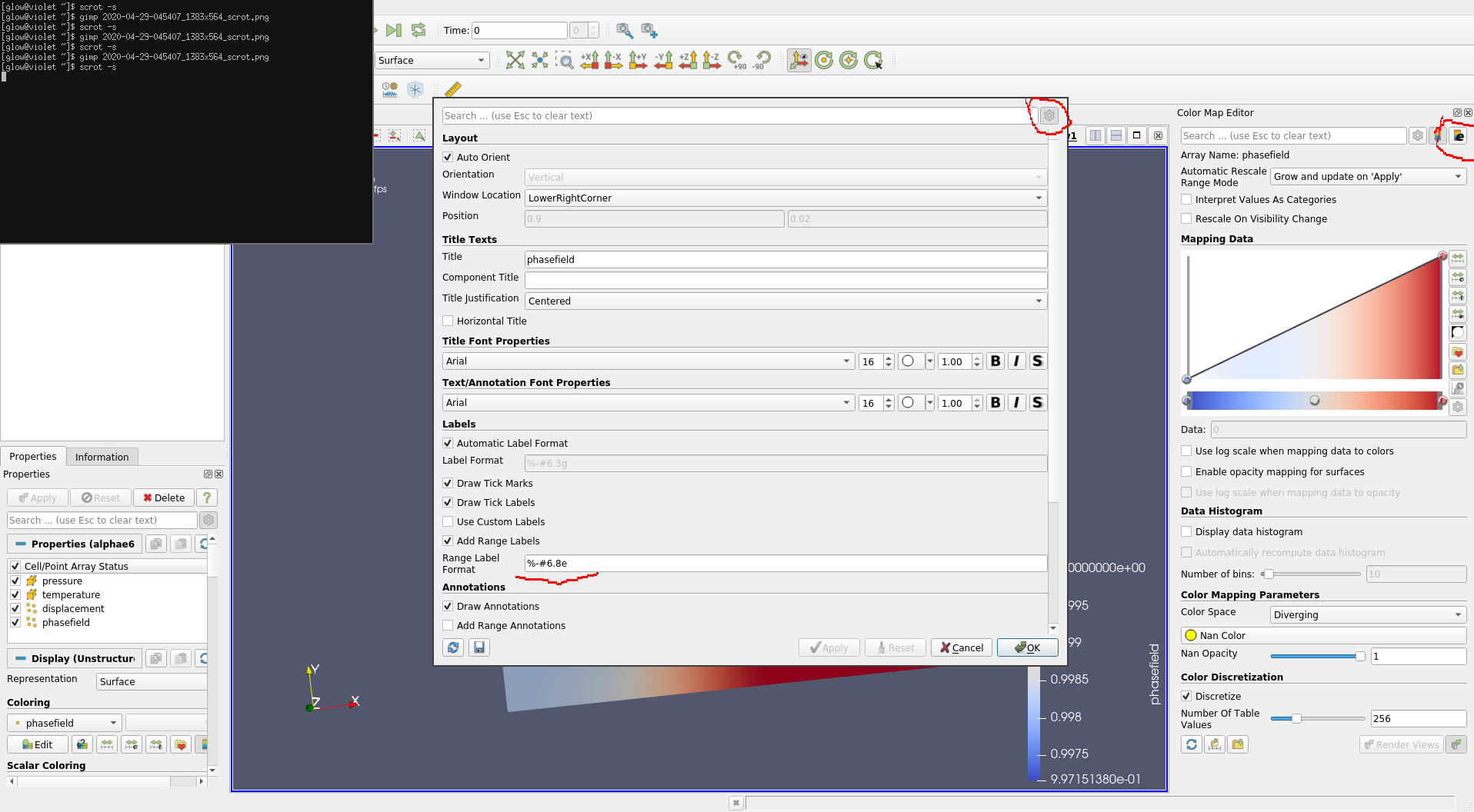
You need to increase the precision of the range label.
---
### Author:  [@Vaya\_Putra](https://discourse.paraview.org/u/Vaya_Putra)
#### Post date: [April 29, 2020, 3:31am UTC](https://discourse.paraview.org/t/how-to-rescale-in-color-map-editor/4203/3 "2020-04-29T03:31:24Z")
thank you. solved