# How to run ParaView (including the binary release) using Mesa on Windows
**URL:** https://discourse.paraview.org/t/how-to-run-paraview-including-the-binary-release-using-mesa-on-windows/4321
**Category:** Tips and Tricks
**Created:** [May 13, 2020, 4:42am UTC](https://discourse.paraview.org/t/how-to-run-paraview-including-the-binary-release-using-mesa-on-windows/4321 "2020-05-13T04:42:44Z")
**Posts on this page:** 11
**Page:** 1
### Author:  [@mwestphal](https://discourse.paraview.org/u/mwestphal)
#### Post date: [May 13, 2020, 4:42am UTC](https://discourse.paraview.org/t/how-to-run-paraview-including-the-binary-release-using-mesa-on-windows/4321/1 "2020-05-13T04:42:44Z")
**Mesa** is an alternative OpenGL implementation that let you run graphic application while not using your GPU driver.
It can be very useful for a number of cases :
- GPU is unsupported by OS ([Old intel GPU](https://discourse.paraview.org/t/opengl-not-supported-in-windows-10-and-intel-hd-graphics-card-glew-could-not-be-intialized-missing-gl-version/2701))
- GPU driver is incompatible with ParaView for some reasons ([Intel Driver current issue](https://gitlab.kitware.com/paraview/paraview/issues/19364))
- The OpenGL version provided by the driver is not high enough ([VM](https://discourse.paraview.org/t/opengl-in-vmware-with-windows-guest/218/3), [Remote Desktop](https://gitlab.kitware.com/paraview/paraview/issues/19057))
ParaView has been shipped with Mesa on Linux and MacOS for a long time, but building it on Windows is not something we have been trying to do so far.
Thankfully, a github project is providing release of Mesa for Windows that can be used directly.
[https://github.com/pal1000/mesa-dist-win](https://github.com/pal1000/mesa-dist-win)
Disclaimer : This code is not supported by Kitware and the binary are not built by Kitware, use as your own risk.
Here is a steps by steps guide to use this with ParaView (tested with 5.8.0) on an up-to-date Windows 10.
- Download ParaView release from [https://www.paraview.org/download/](https://www.paraview.org/download/)
- Download the last release-msvc of mesa-dist-win (tested with 20.0.6) : [https://github.com/pal1000/mesa-dist-win/releases](https://github.com/pal1000/mesa-dist-win/releases)
- Extract it anywhere
- copy `x64/opengl32.dll`, `libgallium_wgl.dll` and `x64/libglapi.dll` to `ParaView_Path/bin/`
- open a Windows terminal
- `cd ParaView_Path/bin/`
- `set MESA_GL_VERSION_OVERRIDE=4.5`
- `paraview.exe`
You can check that it is actually working in _Help → About_
---
### Author:  [@mwestphal](https://discourse.paraview.org/u/mwestphal)
#### Post date: [May 13, 2020, 4:43am UTC](https://discourse.paraview.org/t/how-to-run-paraview-including-the-binary-release-using-mesa-on-windows/4321/2 "2020-05-13T04:43:59Z")
@cbourcier @Michael : FYI
---
### Author:  [@yamalcaraz](https://discourse.paraview.org/u/yamalcaraz)
#### Post date: [July 8, 2020, 1:48am UTC](https://discourse.paraview.org/t/how-to-run-paraview-including-the-binary-release-using-mesa-on-windows/4321/3 "2020-07-08T01:48:32Z")
Thanks so much for this step by step procedure, got it working for my use. I experienced this problem with Paraview crashing when I use it with windows RDP.
I am a beginner on these things, can I ask how do I actually turn MESA off? When I try to launch now _without_ RDP, i.e. on the actual computer, paraview only shows a black render screen. I want to use mesa when using RDP and the original display driver when running locally. My idea is to have separate environment variables for this, but is there a better way to easily do this?
thanks!
---
### Author:  [@mwestphal](https://discourse.paraview.org/u/mwestphal)
#### Post date: [July 8, 2020, 7:36am UTC](https://discourse.paraview.org/t/how-to-run-paraview-including-the-binary-release-using-mesa-on-windows/4321/4 "2020-07-08T07:36:09Z")
You need to remove the .dll files you copied into the bin directory.
---
### Author:  [@tiffiw](https://discourse.paraview.org/u/tiffiw)
#### Post date: [April 21, 2021, 10:52am UTC](https://discourse.paraview.org/t/how-to-run-paraview-including-the-binary-release-using-mesa-on-windows/4321/5 "2021-04-21T10:52:38Z")
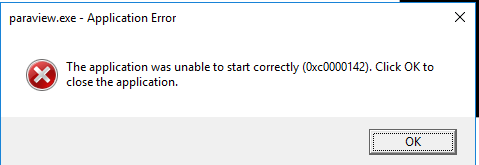
I have paraview 5.6.0 and mesa 21.0.2. I’ve followed your procedure but when I start paraview I get the error message:
The application was unable to start correctly (0cx0000142). Any idea what I’m doing wrong?
---
### Author:  [@mwestphal](https://discourse.paraview.org/u/mwestphal)
#### Post date: [April 22, 2021, 10:33am UTC](https://discourse.paraview.org/t/how-to-run-paraview-including-the-binary-release-using-mesa-on-windows/4321/6 "2021-04-22T10:33:11Z")
No idea at this point, please open your own topic.
---
### Author:  [@jaswantp](https://discourse.paraview.org/u/jaswantp)
#### Post date: [May 17, 2021, 9:20pm UTC](https://discourse.paraview.org/t/how-to-run-paraview-including-the-binary-release-using-mesa-on-windows/4321/7 "2021-05-17T21:20:24Z")
If someone is unlucky and found themselves struggling to debug or develop ParaView with VS2019 on a Windows 10 Azure VM/Remote Desktop like me, you’d probably come here. So, here’s an update for you (Relax, it just got better. Windows doesn’t have to be a pain always…)
The original repo link by @mwestphal is much convenient and better now. It provides scripts for per-app or system-wide deployment. I prefer system-wide deployment so that it’s centralized.
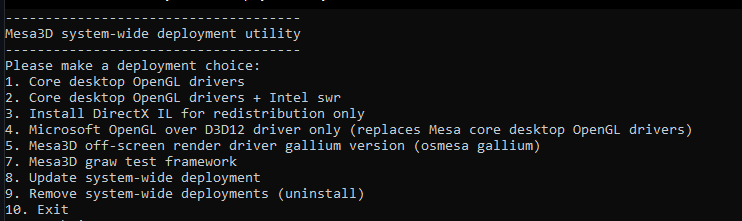
Select option 1 or 2 or 4 in the cmdlet and deploy. By default, it installs mesa 21.1.0. This supports up to a 4.6 context should you want that.
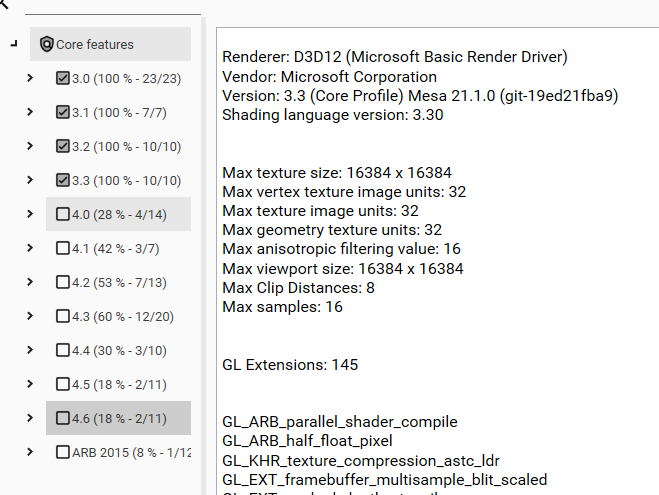
The 5.9 release binary for ParaView seems to pick up a 3.1 compat context.

---
### Author:  [@vbolea](https://discourse.paraview.org/u/vbolea)
#### Post date: [November 27, 2021, 12:24am UTC](https://discourse.paraview.org/t/how-to-run-paraview-including-the-binary-release-using-mesa-on-windows/4321/8 "2021-11-27T00:24:54Z")
For those who mesa-dist-win did not work as expected, you could also possibly grab the OpenGL3d.dll from [Mesa3D For Windows - Federico Dossena](https://fdossena.com/?p=mesa/index.frag) and follow the same instructions as the one given in the OP.
This has worked for me in Virtual Machines instances of Windows 10.
---
### Author:  [@qlhai](https://discourse.paraview.org/u/qlhai)
#### Post date: [July 25, 2023, 9:29am UTC](https://discourse.paraview.org/t/how-to-run-paraview-including-the-binary-release-using-mesa-on-windows/4321/9 "2023-07-25T09:29:13Z")
Hi @vbolea, I also met this problem, after using your solution it worked. Thanks!
---
### Author:  [@joint](https://discourse.paraview.org/u/joint)
#### Post date: [March 11, 2024, 6:55am UTC](https://discourse.paraview.org/t/how-to-run-paraview-including-the-binary-release-using-mesa-on-windows/4321/10 "2024-03-11T06:55:33Z")
Hello!
Should one copy pdb files from the latest development pack? What should one to in order to develop paraview if he faces such issues?
---
### Author:  [@mwestphal](https://discourse.paraview.org/u/mwestphal)
#### Post date: [March 11, 2024, 8:25am UTC](https://discourse.paraview.org/t/how-to-run-paraview-including-the-binary-release-using-mesa-on-windows/4321/11 "2024-03-11T08:25:04Z")
no need for .pdb files. Please open your own thread if you have issues.