# How to select the blocks by using python?
**URL:** https://discourse.paraview.org/t/how-to-select-the-blocks-by-using-python/10513
**Category:** ParaView Support
**Tags:** python
**Created:** [October 14, 2022, 3:35am UTC](https://discourse.paraview.org/t/how-to-select-the-blocks-by-using-python/10513 "2022-10-14T03:35:22Z")
**Posts on this page:** 3
**Page:** 1
### Author:  [@Echo](https://discourse.paraview.org/u/Echo)
#### Post date: [October 14, 2022, 3:35am UTC](https://discourse.paraview.org/t/how-to-select-the-blocks-by-using-python/10513/1 "2022-10-14T03:35:22Z")
HI all,
I am new to ParaView, and I want to konw how to select the concerned blocks by using `python`.
For example, selecting the blocks with names of ` 'block_1003'` and `'block_1010'` as the figure shows:
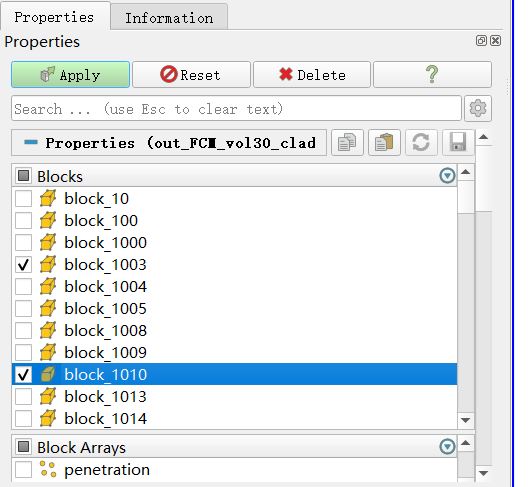
The file is in ExodusII format.
Thanks in advance.
---
### Author:  [@mwestphal](https://discourse.paraview.org/u/mwestphal)
#### Post date: [October 14, 2022, 3:38am UTC](https://discourse.paraview.org/t/how-to-select-the-blocks-by-using-python/10513/2 "2022-10-14T03:38:29Z")
Hi @Echo
The simplest way to findout how to script GUI action in python is to use the python trace with the Incremental option
- Tools → Start trace
- Check “Show Incremental”
- Perform GUI actions
- Watch your code write itself 🙂
---
### Author:  [@Echo](https://discourse.paraview.org/u/Echo)
#### Post date: [October 14, 2022, 3:50am UTC](https://discourse.paraview.org/t/how-to-select-the-blocks-by-using-python/10513/3 "2022-10-14T03:50:23Z")
@mwestphal Thanks a lot for your reply! It is really a great feature!