# How to set animation speed (not the string)
**URL:** https://discourse.paraview.org/t/how-to-set-animation-speed-not-the-string/14198
**Category:** ParaView Support
**Created:** [March 19, 2024, 10:31am UTC](https://discourse.paraview.org/t/how-to-set-animation-speed-not-the-string/14198 "2024-03-19T10:31:53Z")
**Posts on this page:** 8
**Page:** 1
### Author:  [@legno](https://discourse.paraview.org/u/legno)
#### Post date: [March 19, 2024, 10:31am UTC](https://discourse.paraview.org/t/how-to-set-animation-speed-not-the-string/14198/1 "2024-03-19T10:31:54Z")
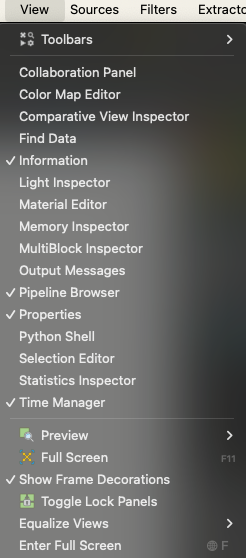
Hello, I am using Paraview 5.12.0 on OSX. I know how to change the frame rate of an animation. How may I change the stride of an animation. How may I change the speed at which the animation is played? Note that the solution provided [here](https://discourse.paraview.org/t/how-to-change-frame-rate/3623) does not work, because there is no ‘Animation view’ item in ‘View’ menu (see screenshot attached).
---
### Author:  [@mwestphal](https://discourse.paraview.org/u/mwestphal)
#### Post date: [March 19, 2024, 10:33am UTC](https://discourse.paraview.org/t/how-to-set-animation-speed-not-the-string/14198/2 "2024-03-19T10:33:03Z")
Use the TimeManager instead.
[https://www.kitware.com/a-new-time-manager-is-landing-in-paraview/](https://www.kitware.com/a-new-time-manager-is-landing-in-paraview/)
---
### Author:  [@legno](https://discourse.paraview.org/u/legno)
#### Post date: [March 19, 2024, 4:34pm UTC](https://discourse.paraview.org/t/how-to-set-animation-speed-not-the-string/14198/3 "2024-03-19T16:34:28Z")
There is no place to speficy frames per second in time manager.
---
### Author:  [@mwestphal](https://discourse.paraview.org/u/mwestphal)
#### Post date: [March 19, 2024, 4:36pm UTC](https://discourse.paraview.org/t/how-to-set-animation-speed-not-the-string/14198/4 "2024-03-19T16:36:15Z")
If you refer to RealTime mode, yes it was deprecated and removed in 5.12.0
You can specify the FPS when you export the animation.
---
### Author:  [@legno](https://discourse.paraview.org/u/legno)
#### Post date: [March 22, 2024, 5:23pm UTC](https://discourse.paraview.org/t/how-to-set-animation-speed-not-the-string/14198/5 "2024-03-22T17:23:40Z")
Is there any other way to increase the speed at which the animation is played in real time ?
---
### Author:  [@mwestphal](https://discourse.paraview.org/u/mwestphal)
#### Post date: [March 24, 2024, 5:28pm UTC](https://discourse.paraview.org/t/how-to-set-animation-speed-not-the-string/14198/6 "2024-03-24T17:28:49Z")
Can you be more precise in what you are trying to do ?
---
### Author:  [@Ace\_Goody](https://discourse.paraview.org/u/Ace_Goody)
#### Post date: [June 26, 2024, 10:00am UTC](https://discourse.paraview.org/t/how-to-set-animation-speed-not-the-string/14198/7 "2024-06-26T10:00:58Z")
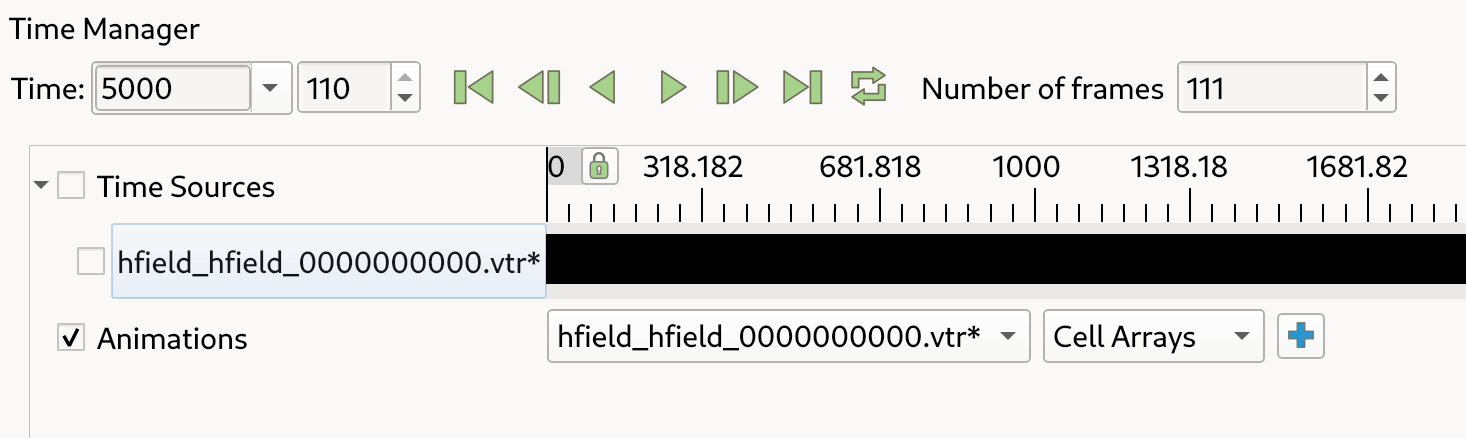
Open TimeManager and uncheck the Time sources box. You should find an option to set frames per second
---
### Author:  [@quique](https://discourse.paraview.org/u/quique)
#### Post date: [October 13, 2024, 9:09am UTC](https://discourse.paraview.org/t/how-to-set-animation-speed-not-the-string/14198/8 "2024-10-13T09:09:23Z")
This worked for me:
In the time manager I unchecked “Time Sources” and then the “Number of frames” setting popped up. Here it is possible to change the number of frames. It seems the frame rate is fixed, but in this way you can change the animations speed.