# How to show shell thickness from LS-DYNA file
**URL:** https://discourse.paraview.org/t/how-to-show-shell-thickness-from-ls-dyna-file/2201
**Category:** ParaView Support
**Created:** [July 11, 2019, 5:32pm UTC](https://discourse.paraview.org/t/how-to-show-shell-thickness-from-ls-dyna-file/2201 "2019-07-11T17:32:22Z")
**Posts on this page:** 3
**Page:** 1
### Author:  [@hsvalladares](https://discourse.paraview.org/u/hsvalladares)
#### Post date: [July 11, 2019, 5:32pm UTC](https://discourse.paraview.org/t/how-to-show-shell-thickness-from-ls-dyna-file/2201/1 "2019-07-11T17:32:22Z")
Hi,
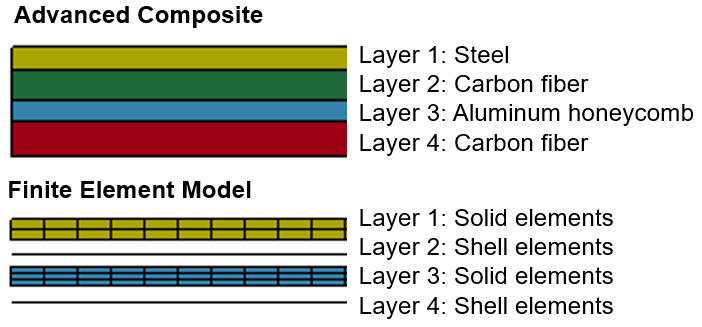
I am modeling a sandwich composite in LS-DYNA using shell and solid elements and I would like to know if there is any way to show the thickness of the shell elements in ParaView. Please see the attached figure.
Any help is appreciated,
Homero
---
### Author:  [@utkarsh.ayachit](https://discourse.paraview.org/u/utkarsh.ayachit)
#### Post date: [July 11, 2019, 5:33pm UTC](https://discourse.paraview.org/t/how-to-show-shell-thickness-from-ls-dyna-file/2201/2 "2019-07-11T17:33:55Z")
do you have a sample dataset? that may make this easier.
---
### Author:  [@hsvalladares](https://discourse.paraview.org/u/hsvalladares)
#### Post date: [July 11, 2019, 6:20pm UTC](https://discourse.paraview.org/t/how-to-show-shell-thickness-from-ls-dyna-file/2201/3 "2019-07-11T18:20:41Z")
Hi Utkarsh,
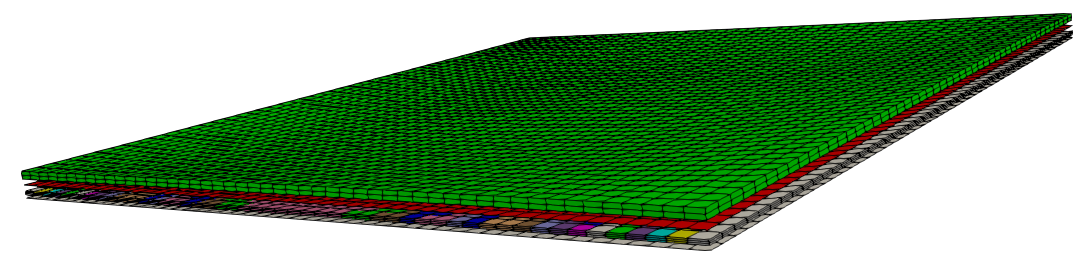
This is the model I want to show the thickness of the shell elements:
**ParaView**
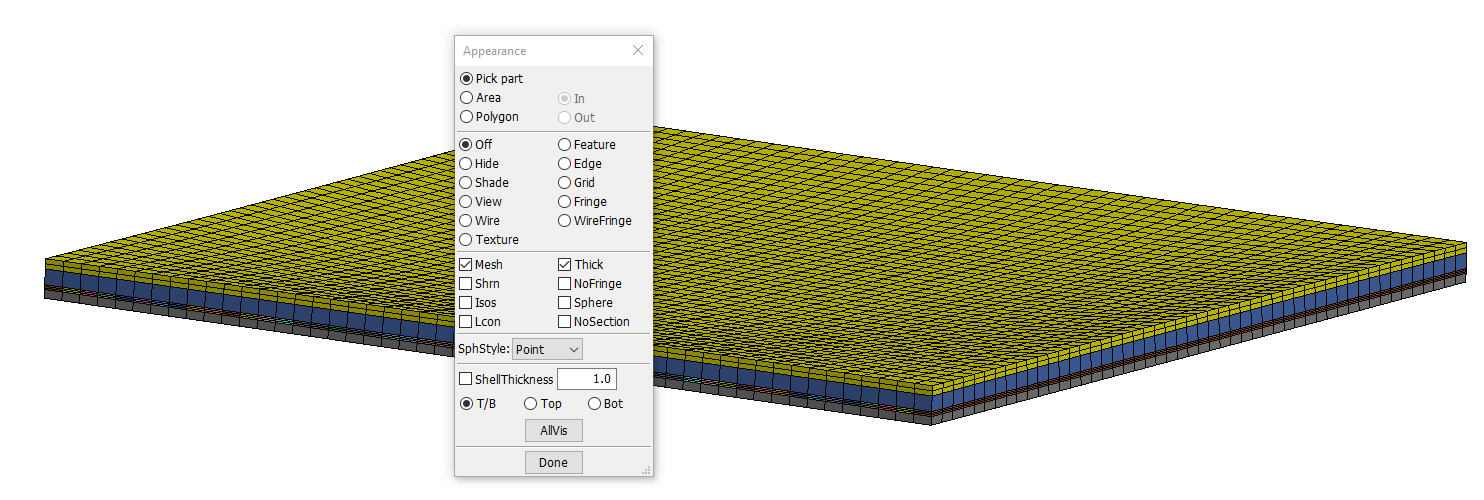
This is how I want to visualize the model (generated by **LS-PrePost** ):
This is the link to the files (too big to be added to the ParaView website).
[ composite\_model.zip](https://drive.google.com/file/d/19W2tu4zps8hYINF1m2Y5MF8F8irT6Pm3/view?usp=drive_web)
Also, how I can generate **isometric views** of the model (without rotating the model manually (with the mouse))? LS-PrePost has this option to generate default iso views.
I just discovered ParaView and I am really excited about its capabilities.
Thanks for your help,
Homero