# How to specify a file path within the Python shell
**URL:** https://discourse.paraview.org/t/how-to-specify-a-file-path-within-the-python-shell/3256
**Category:** ParaView Support
**Created:** [January 2, 2020, 3:47pm UTC](https://discourse.paraview.org/t/how-to-specify-a-file-path-within-the-python-shell/3256 "2020-01-02T15:47:23Z")
**Posts on this page:** 20
**Page:** 1
### Author:  [@Pat](https://discourse.paraview.org/u/Pat)
#### Post date: [January 2, 2020, 3:47pm UTC](https://discourse.paraview.org/t/how-to-specify-a-file-path-within-the-python-shell/3256/1 "2020-01-02T15:47:23Z")
Hello, I am trying to run a script in Paraview’s Python shell and I need the relative path of several files within my script. If I use Python’s os library I will get the execution path and I won’t know the absolute path beforehand.
i.e:
```python
import os
os.getcwd()
```
will provide me with this file path:
`C:\\Program Files\\ParaView 5.7.0-Windows-Python3.7-msvc2015-64bit`
---
### Author:  [@mwestphal](https://discourse.paraview.org/u/mwestphal)
#### Post date: [January 6, 2020, 10:37am UTC](https://discourse.paraview.org/t/how-to-specify-a-file-path-within-the-python-shell/3256/2 "2020-01-06T10:37:24Z")
If you have the absolute path, can’t you rebuild the relative path then ?
---
### Author:  [@Pat](https://discourse.paraview.org/u/Pat)
#### Post date: [January 6, 2020, 12:02pm UTC](https://discourse.paraview.org/t/how-to-specify-a-file-path-within-the-python-shell/3256/3 "2020-01-06T12:02:57Z")
Hi Mathieu, I will not know the absolute path beforehand. Hence why I was using Pythons OS library. Thank you for your response !
---
### Author:  [@mwestphal](https://discourse.paraview.org/u/mwestphal)
#### Post date: [January 6, 2020, 12:23pm UTC](https://discourse.paraview.org/t/how-to-specify-a-file-path-within-the-python-shell/3256/4 "2020-01-06T12:23:56Z")
If you use the last nightly of ParaView, you can use `_file_` to recover the path to your script file.
---
### Author:  [@Pat](https://discourse.paraview.org/u/Pat)
#### Post date: [January 6, 2020, 1:41pm UTC](https://discourse.paraview.org/t/how-to-specify-a-file-path-within-the-python-shell/3256/5 "2020-01-06T13:41:20Z")
Thank you Mathieu. When I install the nightly build from [here](https://www.paraview.org/download/) I get an error. When I run the latest nightly build I get an error saying “The code execution cannot proceed because VCOMP140.DLL was not found. Reinstalling the program may fix this problem”. I have tried reinstalling.
---
### Author:  [@mwestphal](https://discourse.paraview.org/u/mwestphal)
#### Post date: [January 6, 2020, 1:44pm UTC](https://discourse.paraview.org/t/how-to-specify-a-file-path-within-the-python-shell/3256/6 "2020-01-06T13:44:12Z")
Are you using Windows 10 ?
You may want to update your system.
---
### Author:  [@Pat](https://discourse.paraview.org/u/Pat)
#### Post date: [January 6, 2020, 1:49pm UTC](https://discourse.paraview.org/t/how-to-specify-a-file-path-within-the-python-shell/3256/7 "2020-01-06T13:49:29Z")
I am using Windows 10.
---
### Author:  [@mwestphal](https://discourse.paraview.org/u/mwestphal)
#### Post date: [January 7, 2020, 10:29am UTC](https://discourse.paraview.org/t/how-to-specify-a-file-path-within-the-python-shell/3256/8 "2020-01-07T10:29:25Z")
Is your system up to date ?
---
### Author:  [@Pat](https://discourse.paraview.org/u/Pat)
#### Post date: [January 7, 2020, 12:33pm UTC](https://discourse.paraview.org/t/how-to-specify-a-file-path-within-the-python-shell/3256/9 "2020-01-07T12:33:45Z")
I just checked and updated my system but I’m still getting the same error.
---
### Author:  [@mwestphal](https://discourse.paraview.org/u/mwestphal)
#### Post date: [January 7, 2020, 12:41pm UTC](https://discourse.paraview.org/t/how-to-specify-a-file-path-within-the-python-shell/3256/10 "2020-01-07T12:41:42Z")
See here for a fix :
https://windowsreport.com/fix-missing-vcomp140-dll/
@ben.boeckel : Should we recommend the VS redistributable installation to users ?
---
### Author:  [@Pat](https://discourse.paraview.org/u/Pat)
#### Post date: [January 7, 2020, 2:07pm UTC](https://discourse.paraview.org/t/how-to-specify-a-file-path-within-the-python-shell/3256/11 "2020-01-07T14:07:35Z")
I just fixed the issue with that same link you provided thank you!
Unfortunately I’m still getting an error when I try to recover the file path in my script.
```python
import os
dir = os.path.abspath( __file__ )
```
will give me this error in the python shell:
```auto
File "", line 1
SyntaxError: (unicode error) 'unicodeescape' codec can't decode bytes in
position 2-3: truncated \UXXXXXXXX escape
```
Thank you for your help.
---
### Author:  [@Pat](https://discourse.paraview.org/u/Pat)
#### Post date: [January 8, 2020, 3:33pm UTC](https://discourse.paraview.org/t/how-to-specify-a-file-path-within-the-python-shell/3256/12 "2020-01-08T15:33:30Z")
There are a few things that I have noticed.
1. After getting the nightly build to work I can now use the ` __file__ ` specifier in my program. I could not do that with the published 5.7.0 build. Here is a short program I am using to test this.
```python
import os
dir = os.path.dirname( __file__ )
print(dir)
```
If I place my script into the execution directory ( **which is not what I ultimately want** ) `C:\Program Files\ParaView 5.7.0-963-g032f608266-Windows-Python3.7-msvc2015-64bit` I get the following output.
**Nightly Output**
```python
C:\Program Files\ParaView 5.7.0-963-g032f608266-Windows-Python3.7-msvc2015-64bit
```
**v5.7.0 Output**
```python
Traceback (most recent call last):
File "", line 1, in
NameError: name ' __file__' is not defined
```
1. In the nightly build it limits me to having my script in the execution path which isn’t what I want. If I drop my script into some arbitrary directory `\my\home\directory` I get the error message I posted above.
```python
File "", line 1
SyntaxError: (unicode error) 'unicodeescape' codec can't decode bytes in
position 2-3: truncated \UXXXXXXXX escape
```
---
### Author:  [@mwestphal](https://discourse.paraview.org/u/mwestphal)
#### Post date: [January 8, 2020, 3:35pm UTC](https://discourse.paraview.org/t/how-to-specify-a-file-path-within-the-python-shell/3256/13 "2020-01-08T15:35:51Z")
The script in your home directory should work. Can you try a few others directories ?
---
### Author:  [@Pat](https://discourse.paraview.org/u/Pat)
#### Post date: [January 8, 2020, 3:43pm UTC](https://discourse.paraview.org/t/how-to-specify-a-file-path-within-the-python-shell/3256/14 "2020-01-08T15:43:46Z")
Hi Mathieu thank you for your quick response, I have tried a few directories and I still get the same error message.
---
### Author:  [@Pat](https://discourse.paraview.org/u/Pat)
#### Post date: [January 9, 2020, 12:02pm UTC](https://discourse.paraview.org/t/how-to-specify-a-file-path-within-the-python-shell/3256/15 "2020-01-09T12:02:01Z")
It is strange that if I place my script directly into the C drive i.e `C:\MySript.py` works but something like `C:\some\file\path\MySript.py` does not.
---
### Author:  [@ben.boeckel](https://discourse.paraview.org/u/ben.boeckel)
#### Post date: [January 14, 2020, 3:28pm UTC](https://discourse.paraview.org/t/how-to-specify-a-file-path-within-the-python-shell/3256/16 "2020-01-14T15:28:50Z")
> [@Pat](#):
>
> SyntaxError: (unicode error) ‘unicodeescape’ codec can’t decode bytes in position 2-3: truncated \UXXXXXXXX escape
This looks to be an issue because you have a path `C:\Users` which needs to be escaped for Python strings. `\Us` is not the beginning of a valid unicode escape sequence.
---
### Author:  [@Pat](https://discourse.paraview.org/u/Pat)
#### Post date: [January 14, 2020, 4:00pm UTC](https://discourse.paraview.org/t/how-to-specify-a-file-path-within-the-python-shell/3256/17 "2020-01-14T16:00:38Z")
This block of code should print out the correct file path in the nightly build as of 01-13-20.
```python
dir = os.path.dirname( __file__ )
print(dir)
```
For some strange reason certain directories break this functionality and I cant seem to figure out why. Here is an example of testing the above two lines of code in two different directories, lets just call this script Path.py. Any directory starting with a numerical value will also break the functionality that I am looking for which isn’t to much of a concern for me.
**File Location** : C:\Test\Test1\Test2\Test3\Path.py
- Output: C:\Test\Test1\Test2\Test3
- Result: This works
**File Location** : C:\Test\Test1\run\Test3\Path.py
- Output: C:\Test\Test1
un\Test3
- Result: This Breaks
Here is the output in the Python shell.
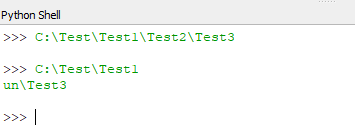
I don’t believe that it is an issue with the unicode escape sequence because I’m not physically specifying the file path. I could be wrong and misinterpreting your answer. Regardless thank you for your response.
---
### Author:  [@ben.boeckel](https://discourse.paraview.org/u/ben.boeckel)
#### Post date: [January 14, 2020, 8:18pm UTC](https://discourse.paraview.org/t/how-to-specify-a-file-path-within-the-python-shell/3256/18 "2020-01-14T20:18:11Z")
You can’t just type paths at a Python prompt (why this is working as is already confuses me). You need to make them strings with `'` or `"`. And then, `\` needs escaped (typed literally as `\\`) to show up. Python is replacing the `\r` in your `\run` bit with a carriage return here.
---
### Author:  [@Pat](https://discourse.paraview.org/u/Pat)
#### Post date: [January 15, 2020, 12:35pm UTC](https://discourse.paraview.org/t/how-to-specify-a-file-path-within-the-python-shell/3256/19 "2020-01-15T12:35:51Z")
Okay thank you I understand where the error itself is coming from now, but I still don’t understand why its happening because I’m not just typing paths at the Python shell. I know that if I were manually specifying the directory name it would be dir = ‘C:\Test\Test1\Test2\Test3\Path.py’ but are you saying that I can’t just do dir = os.path.dirname(\_\_ file \_\_ ) to recover my file path? That line of code has always worked for me? Thank you for helping me figure this out.
---
### Author:  [@ben.boeckel](https://discourse.paraview.org/u/ben.boeckel)
#### Post date: [January 15, 2020, 1:45pm UTC](https://discourse.paraview.org/t/how-to-specify-a-file-path-within-the-python-shell/3256/20 "2020-01-15T13:45:17Z")
` __file__ ` should be fine in a script, but does not work at the shell; there is no file being executed there. That variable is also not defined at a Python REPL prompt which is what the Python shell is. If you’re literally typing it in as a string, you need to follow the escaping rules for the `\` separators in your Windows path and double them up.
[Next page](https://discourse.paraview.org/t/how-to-specify-a-file-path-within-the-python-shell/3256.md?page=2)