# How to use PBR rendering ?
**URL:** https://discourse.paraview.org/t/how-to-use-pbr-rendering/14294
**Category:** ParaView Support
**Created:** [March 28, 2024, 4:14pm UTC](https://discourse.paraview.org/t/how-to-use-pbr-rendering/14294 "2024-03-28T16:14:11Z")
**Posts on this page:** 13
**Page:** 1
### Author:  [@OlivierM](https://discourse.paraview.org/u/OlivierM)
#### Post date: [March 28, 2024, 4:14pm UTC](https://discourse.paraview.org/t/how-to-use-pbr-rendering/14294/1 "2024-03-28T16:14:11Z")
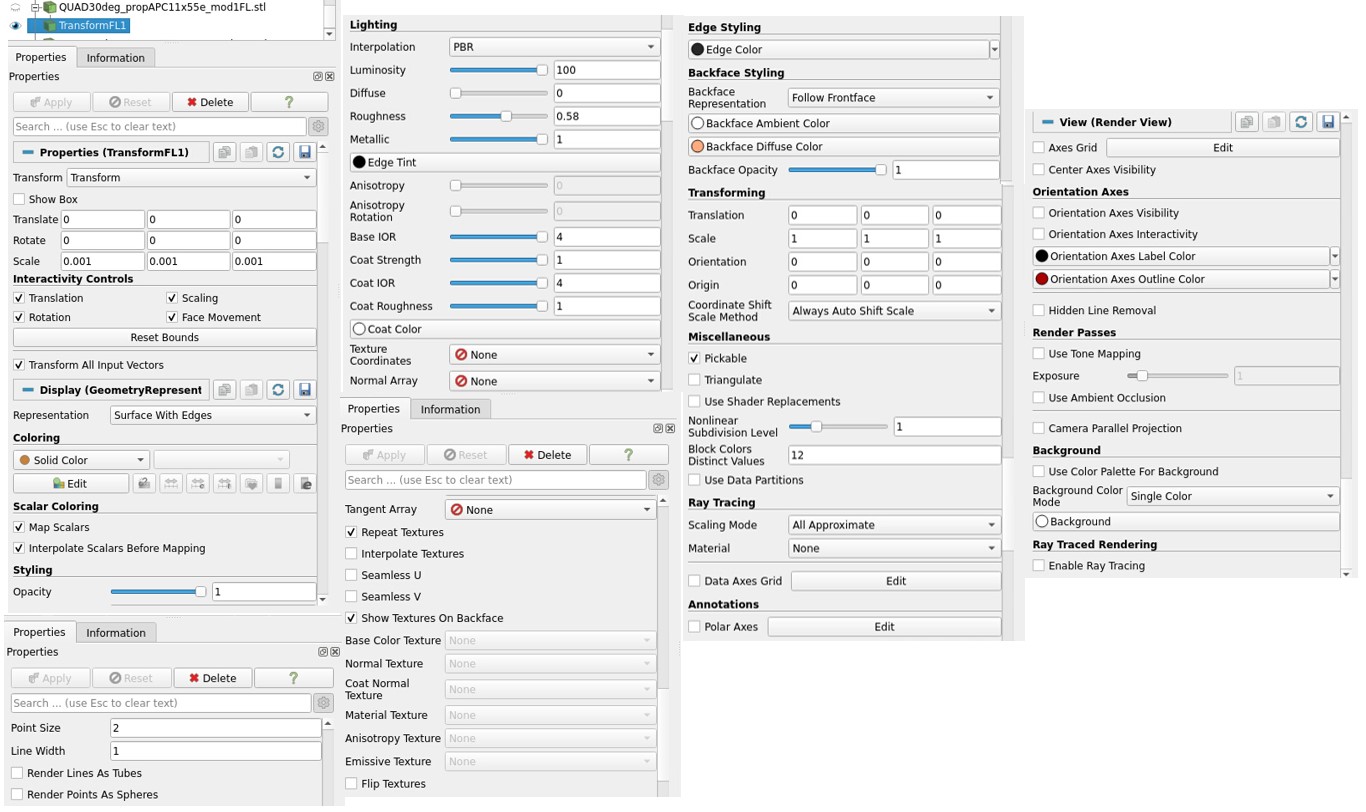
Hello, i saw your promising PBR but I can’t find the way to make it working !
What I am tested is a **stl surface** imported in Paraview 5.11.0 on which I try to make the surface looking metallic or carbon fiber or whatever. I have loaded the textures from here: [https://gitlab.kitware.com/paraview/materials](https://gitlab.kitware.com/paraview/materials).
I try to follow this: [https://www.kitware.com/physically-based-rendering-improvements-in-paraview/](https://www.kitware.com/physically-based-rendering-improvements-in-paraview/)
but Texture Coordinates remains to None, as Normal and Tangent Arrays.
What could be wrong here ?
Many thanks if you could help.
Oli
---
### Author:  [@mwestphal](https://discourse.paraview.org/u/mwestphal)
#### Post date: [March 29, 2024, 7:35am UTC](https://discourse.paraview.org/t/how-to-use-pbr-rendering/14294/2 "2024-03-29T07:35:44Z")
Please share data and screenshots
---
### Author:  [@OlivierM](https://discourse.paraview.org/u/OlivierM)
#### Post date: [March 29, 2024, 8:34am UTC](https://discourse.paraview.org/t/how-to-use-pbr-rendering/14294/3 "2024-03-29T08:34:23Z")
edited with the screenshot
---
### Author:  [@mwestphal](https://discourse.paraview.org/u/mwestphal)
#### Post date: [March 29, 2024, 8:36am UTC](https://discourse.paraview.org/t/how-to-use-pbr-rendering/14294/4 "2024-03-29T08:36:14Z")
> [@OlivierM](#):
>
> Texture Coordinates remains to None, as Normal and Tangent Arrays.
Well, do you have texture coordinates in the data ?
Please share data and **screenshots of the data**
---
### Author:  [@OlivierM](https://discourse.paraview.org/u/OlivierM)
#### Post date: [March 29, 2024, 8:39am UTC](https://discourse.paraview.org/t/how-to-use-pbr-rendering/14294/5 "2024-03-29T08:39:42Z")
What do you mean? How to check / where to check texture coordinates in the data ?
---
### Author:  [@mwestphal](https://discourse.paraview.org/u/mwestphal)
#### Post date: [March 29, 2024, 8:41am UTC](https://discourse.paraview.org/t/how-to-use-pbr-rendering/14294/6 "2024-03-29T08:41:43Z")
> [@mwestphal](#):
>
> Please share data and **screenshots of the data**
**Please share data and screenshots of the data**
---
### Author:  [@OlivierM](https://discourse.paraview.org/u/OlivierM)
#### Post date: [March 29, 2024, 8:44am UTC](https://discourse.paraview.org/t/how-to-use-pbr-rendering/14294/7 "2024-03-29T08:44:12Z")
please could you give an example of what you need.
I just don’t understand what you mean by data for an imported stl surface.
I also don’t know where to look for the data. Where should it be?
Sorry but I use your software quite a lot but I am not an expert at all.
---
### Author:  [@nicolas.vuaille](https://discourse.paraview.org/u/nicolas.vuaille)
#### Post date: [March 29, 2024, 9:01am UTC](https://discourse.paraview.org/t/how-to-use-pbr-rendering/14294/8 "2024-03-29T09:01:39Z")
When something looks wrong, the best way to help is to be able to _see_ the problem and to _reproduce_ it.
Then “screenshot” means an image that show the unexpected behavior, like the 3D scene that is actually rendered on your screen. And “data” means the file(s) you are loading so someone else can load it too and give it a try
---
### Author:  [@OlivierM](https://discourse.paraview.org/u/OlivierM)
#### Post date: [March 29, 2024, 9:15am UTC](https://discourse.paraview.org/t/how-to-use-pbr-rendering/14294/9 "2024-03-29T09:15:31Z")
> [@mwestphal](#):
>
> texture coordinates in the data
Thanks Nicolas. Sorry I can’t share the file for NDA reason.
But may be it was possible to look at my first screenshot and suggest me to add a filter like ‘TexturemaptoSphere’ to get the Texture Coordinates appearing in the Coloring Filter !
… was that so difficult from the support point of view?
---
### Author:  [@nicolas.vuaille](https://discourse.paraview.org/u/nicolas.vuaille)
#### Post date: [March 29, 2024, 9:36am UTC](https://discourse.paraview.org/t/how-to-use-pbr-rendering/14294/10 "2024-03-29T09:36:56Z")
> [@OlivierM](#):
>
> … was that so difficult from the support point of view?
This is not a paid support, this an open forum where people just try to freely help people like you.
---
### Author:  [@OlivierM](https://discourse.paraview.org/u/OlivierM)
#### Post date: [March 29, 2024, 9:39am UTC](https://discourse.paraview.org/t/how-to-use-pbr-rendering/14294/11 "2024-03-29T09:39:25Z")
No problem. That’s kind of you and Mathieu to have looked at my question.
The PBR is far from working well on my side but I’ll try to find my way.
Many thanks
---
### Author:  [@steve\_r](https://discourse.paraview.org/u/steve_r)
#### Post date: [April 3, 2024, 10:15am UTC](https://discourse.paraview.org/t/how-to-use-pbr-rendering/14294/12 "2024-04-03T10:15:59Z")
For PBR rendering, I’d suggest you turn on “ray tracing” (either OSPray or OptiX) and assign a material (select one of the materials in the **material** setting).
---
### Author:  [@mwestphal](https://discourse.paraview.org/u/mwestphal)
#### Post date: [April 3, 2024, 12:23pm UTC](https://discourse.paraview.org/t/how-to-use-pbr-rendering/14294/13 "2024-04-03T12:23:53Z")
I’m not sure what you mean, raytracing is not PBR. It is realistic, just not with PBR techniques.