# How to use Resample To Image in parallel?
**URL:** https://discourse.paraview.org/t/how-to-use-resample-to-image-in-parallel/9987
**Category:** ParaView Support
**Created:** [July 8, 2022, 3:10pm UTC](https://discourse.paraview.org/t/how-to-use-resample-to-image-in-parallel/9987 "2022-07-08T15:10:38Z")
**Posts on this page:** 3
**Page:** 1
### Author:  [@robertsawko](https://discourse.paraview.org/u/robertsawko)
#### Post date: [July 8, 2022, 3:10pm UTC](https://discourse.paraview.org/t/how-to-use-resample-to-image-in-parallel/9987/1 "2022-07-08T15:10:38Z")
Hello,
I’ve just noticed a curious behaviuor and after thinking about it I believe it is intended, but I wanted to verify it and ask how to deal with it.
I had a subset of unstructured mesh resampled to image for an external analysis. In serial the procedure worked fine, but when run in parallel I noticed there are additional points and replotting the file in an external toolkit was showing an offset.
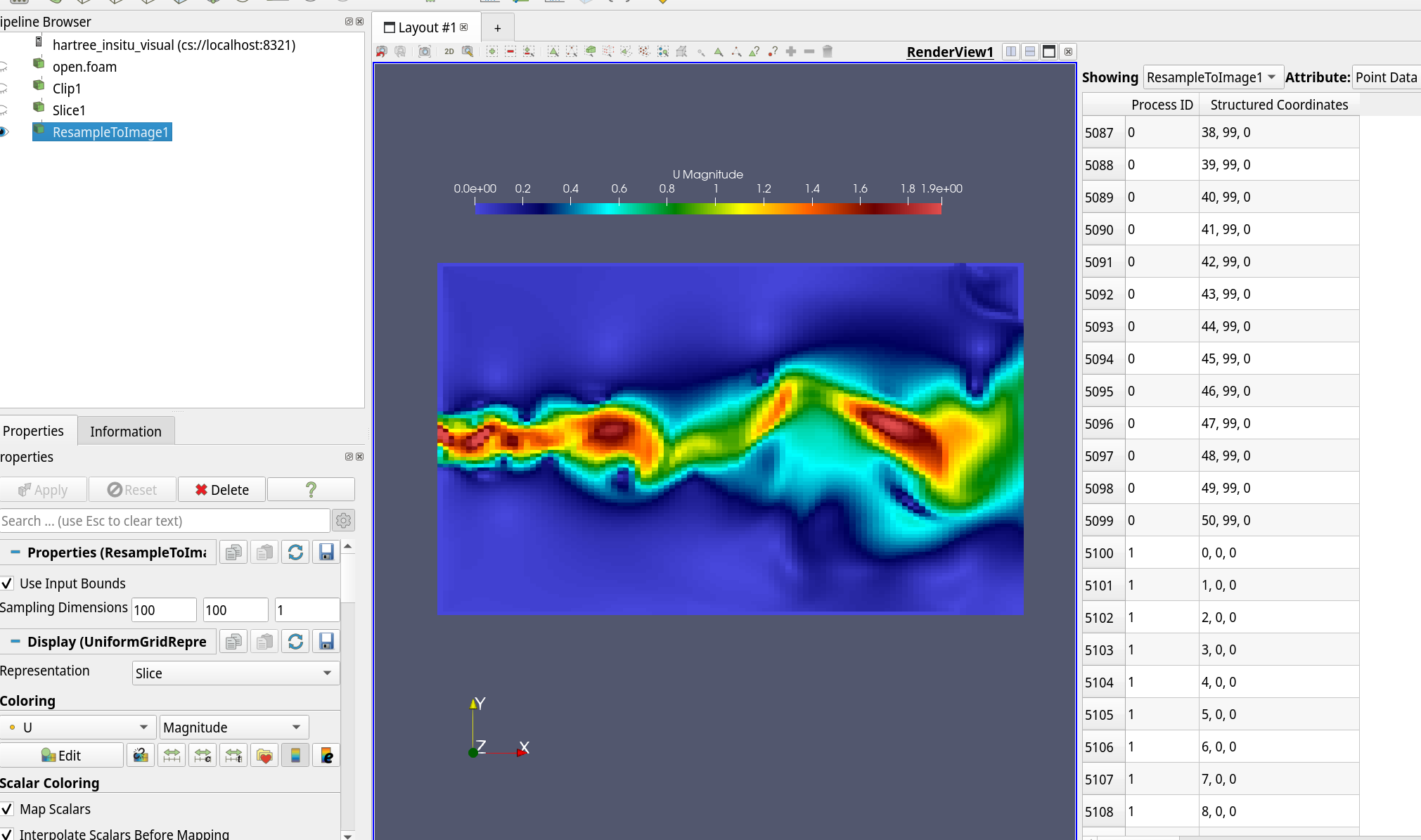
After investigating it more closely, I realised that the points originating from Resample to Image filter are broken up into different processors and the additional points are presumably the repetitions so e.g for 2 processes and 100x100 image the structured coordinate 50 is 0 in the next processor.
But if I use Save Data on the filter I lose Process ID and structured coordinate. My questions:
- Is it possible to recover the serial behaviour whilst working in parallel e.g. 100x100x1 should return 10k points rather than 11k?
- If not, how to reconstruct the image correctly when using Save Data?
I am ob obviously doing this for a large number of time step so need to automate. Would appreciate suggestions. Thanks.
---
### Author:  [@robertsawko](https://discourse.paraview.org/u/robertsawko)
#### Post date: [July 8, 2022, 3:25pm UTC](https://discourse.paraview.org/t/how-to-use-resample-to-image-in-parallel/9987/2 "2022-07-08T15:25:54Z")
Please let me clarify my question with an example. On 2 processors and 100x100 image this is the behaviour I am seeing:
- structured coordinate run from 0,50 on processor 0 and 0,49 on processor 1,
- they are arranged by processor i.e. all processor 0 points are first and then processor 1,
- within each processor they are assembled by i coordinate, so you have this:
```auto
#i, j, other variables...
0, 0 ...
1, 0
...
50, 0
0, 1
...
49, 50
50, 50
0, 0 #<- processor 1 starts here
1, 0
...
49, 49
```
I find this a bit surprising. Mainly the appearance of an additional 100 points. Will they appear for every inter processor boundary? Is there a resample image filter which would stitch the image?
I am attaching a screenshot of the client below
---
### Author:  [@mwestphal](https://discourse.paraview.org/u/mwestphal)
#### Post date: [July 11, 2022, 11:46am UTC](https://discourse.paraview.org/t/how-to-use-resample-to-image-in-parallel/9987/3 "2022-07-11T11:46:38Z")
> [@robertsawko](#):
>
> I find this a bit surprising. Mainly the appearance of an additional 100 points.
Sounds like ghost points. ghost points are indeed expected.