# how to use vtkJSONSceneExporter to export data to a json file and some .gz compressed files
**URL:** https://discourse.paraview.org/t/how-to-use-vtkjsonsceneexporter-to-export-data-to-a-json-file-and-some-gz-compressed-files/1673
**Category:** Development
**Created:** [April 16, 2019, 2:39am UTC](https://discourse.paraview.org/t/how-to-use-vtkjsonsceneexporter-to-export-data-to-a-json-file-and-some-gz-compressed-files/1673 "2019-04-16T02:39:11Z")
**Posts on this page:** 3
**Page:** 1
### Author:  [@jigetage](https://discourse.paraview.org/u/jigetage)
#### Post date: [April 16, 2019, 2:39am UTC](https://discourse.paraview.org/t/how-to-use-vtkjsonsceneexporter-to-export-data-to-a-json-file-and-some-gz-compressed-files/1673/1 "2019-04-16T02:39:11Z")
I used vtkJSONSceneExporter in vtk c++ library to export data. And the whole codes are below:
* * *
vtkSmartPointer exporter =
vtkSmartPointer::New();
exporter-\> **SetFileName** ("./Scenes");
exporter-\> **SetInput** (m\_renderWindow);
exporter-\> **SetActiveRenderer** (m\_renderer);
exporter-\> **Write** ();
* * *
But in the end, only a json file was generated in “./Scenes” directory, and no .gz compressed file was exported. The picture down below showed that.

And the json file contained no **scene** and **lookupTables** information, just like down below:
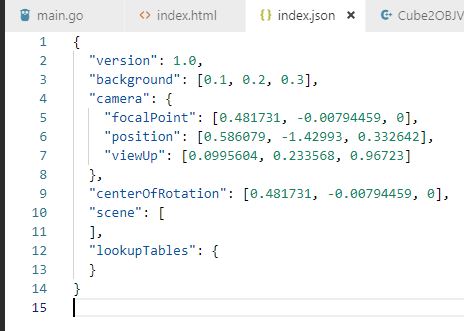
So, did I forget some key codes when exporting? Or, was there any additional steps when using vtkJSONSceneExporter?
Looking forward to your reply and any reply will be highly appreciated!!!
Thank you very much.
---
### Author:  [@jourdain](https://discourse.paraview.org/u/jourdain)
#### Post date: [April 16, 2019, 1:39pm UTC](https://discourse.paraview.org/t/how-to-use-vtkjsonsceneexporter-to-export-data-to-a-json-file-and-some-gz-compressed-files/1673/2 "2019-04-16T13:39:07Z")
If you don’t have anything in your renderer, you are indeed getting the right thing.
The c++ exporter is missing the last bundle/zip action which as been left to some python helper that is available [here](https://github.com/Kitware/VTK/blob/master/Web/Python/vtkmodules/web/vtkjs_helper.py).
That helper script also allow you to bundle the scene export along with the ParaViewGlance viewer.
That new exporter can be used inside ParaView/master where it has been integrated.
---
### Author:  [@Vixen](https://discourse.paraview.org/u/Vixen)
#### Post date: [February 13, 2024, 3:05am UTC](https://discourse.paraview.org/t/how-to-use-vtkjsonsceneexporter-to-export-data-to-a-json-file-and-some-gz-compressed-files/1673/3 "2024-02-13T03:05:46Z")
> [@jigetage](#):
>
> So, did I forget some key codes when exporting? Or, was there any additional steps when using vtkJSONSceneExporter?
I had a similar problem when dealing with vtkUnstructuredGrid. processing it into vtkPolyData (extract\_surface) solved the issue.