# I'm not seeing the loop closure parameter in the general parameters in lidarview
**URL:** https://discourse.paraview.org/t/im-not-seeing-the-loop-closure-parameter-in-the-general-parameters-in-lidarview/13502
**Category:** LidarView, Lidar, and SLAM
**Created:** [December 13, 2023, 6:31pm UTC](https://discourse.paraview.org/t/im-not-seeing-the-loop-closure-parameter-in-the-general-parameters-in-lidarview/13502 "2023-12-13T18:31:29Z")
**Posts on this page:** 20
**Page:** 1
### Author:  [@Shane\_Holmes](https://discourse.paraview.org/u/Shane_Holmes)
#### Post date: [December 13, 2023, 6:31pm UTC](https://discourse.paraview.org/t/im-not-seeing-the-loop-closure-parameter-in-the-general-parameters-in-lidarview/13502/1 "2023-12-13T18:31:29Z")
From this resource,
[https://gitlab.kitware.com/keu-computervision/slam/-/blob/master/paraview\_wrapping/Plugin/doc/How\_to\_SLAM\_with\_LidarView.md?ref\_type=heads#external-sensors-use](https://gitlab.kitware.com/keu-computervision/slam/-/blob/master/paraview_wrapping/Plugin/doc/How_to_SLAM_with_LidarView.md?ref_type=heads#external-sensors-use)
and this resource
[https://www.kitware.com/loop-closure-is-ready-to-use-in-lidarview/#:~:text=To%20use%20the%20loop%20closure,logged%20trajectory%20will%20be%20updated](https://www.kitware.com/loop-closure-is-ready-to-use-in-lidarview/#:~:text=To%20use%20the%20loop%20closure,logged%20trajectory%20will%20be%20updated).
it’s telling me that if I want to enable loop closure I need to enable the **Use pose graph** parameter in general parameters. but I don’t see that parameter anywhere in the settings,
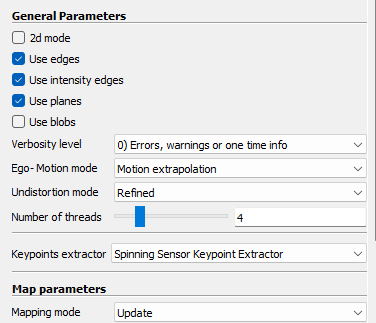
It should be right below the number of threads parameter and when I search for it using the settings search bar I still don’t get it. I’m using LidarView 4.3.0 windows AMD64, in the tutorials I’ve looked at it looks like it should be right there what am I doing wrong?
---
### Author:  [@Gatien\_Ferret](https://discourse.paraview.org/u/Gatien_Ferret)
#### Post date: [December 14, 2023, 9:54am UTC](https://discourse.paraview.org/t/im-not-seeing-the-loop-closure-parameter-in-the-general-parameters-in-lidarview/13502/2 "2023-12-14T09:54:26Z")
Hi @Shane_Holmes,
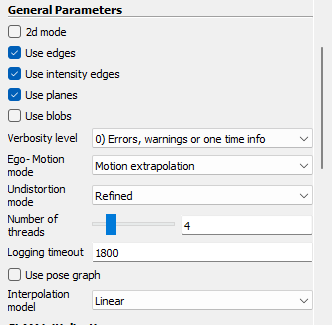
The loop closure fonctionality was introduced in SLAM version 2.0, which has been integrated in LidarView version 4.4.0, so it is not present in LidarView 4.3.0.
And you to view this option, make sure to toggle the advanced properties of the SLAM filter in LidarView. Here a screenshot from version 4.4.0.
For reference, here is the list of releases of SLAM :
[https://gitlab.kitware.com/keu-computervision/slam/-/releases](https://gitlab.kitware.com/keu-computervision/slam/-/releases)
And the list of releases of LidarView
[https://gitlab.kitware.com/LidarView/lidarview/-/releases](https://gitlab.kitware.com/LidarView/lidarview/-/releases)
Note: Version 2.1 of SLAM (which includes in particular pose graph with external poses) has not yet been integrated in a LidarView release, and LidarView would need to be rebuilt from source branch to access it ( I would advise master branch to get the latest developments)
---
### Author:  [@Shane\_Holmes](https://discourse.paraview.org/u/Shane_Holmes)
#### Post date: [December 14, 2023, 3:59pm UTC](https://discourse.paraview.org/t/im-not-seeing-the-loop-closure-parameter-in-the-general-parameters-in-lidarview/13502/3 "2023-12-14T15:59:50Z")
Hello, thanks for your advice from before, I got the new lidarview 4.4.0 I’ve enabled the advanced features, but I still don’t see the **use pose graph** in the general settings. You mentioned I need to toggle the advance properties of the SLAM filter, in lidar view but idk how to do that. Is that different than the advanced features parameter I toggled in help? If it isn’t then I’m stuck because I already did that and I still don’t see it. Or is there a different setting I need to toggle exclusively for the SLAM system, if so where is it? I didn’t see it when I was searching in the SLAM properties menu?
I’m still looking but It this time I still don’t see it.
Thank you for your responses, Shane
---
### Author:  [@Gatien\_Ferret](https://discourse.paraview.org/u/Gatien_Ferret)
#### Post date: [December 14, 2023, 4:05pm UTC](https://discourse.paraview.org/t/im-not-seeing-the-loop-closure-parameter-in-the-general-parameters-in-lidarview/13502/4 "2023-12-14T16:05:04Z")
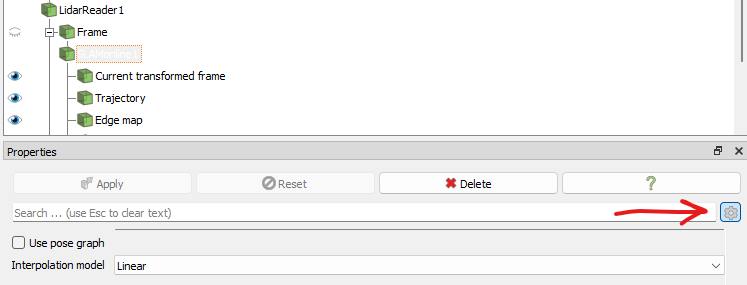
Apologies, my answer may have not been clear enough. The advanced properties of the SLAM filter ( as with any filter in ParaView / LidarView ) are visible by clicking on the cogwheel next to the search bar.
See below :
I hope this helps.
Gatien
---
### Author:  [@Shane\_Holmes](https://discourse.paraview.org/u/Shane_Holmes)
#### Post date: [December 14, 2023, 4:59pm UTC](https://discourse.paraview.org/t/im-not-seeing-the-loop-closure-parameter-in-the-general-parameters-in-lidarview/13502/5 "2023-12-14T16:59:37Z")
Ok I see it now, it was just a little unintuitive.
If I have any other questions I’ll ask
you’ve been very helpful
---
### Author:  [@Shane\_Holmes](https://discourse.paraview.org/u/Shane_Holmes)
#### Post date: [December 14, 2023, 7:06pm UTC](https://discourse.paraview.org/t/im-not-seeing-the-loop-closure-parameter-in-the-general-parameters-in-lidarview/13502/6 "2023-12-14T19:06:04Z")
Ok so I can see the settings and I’m trying to play around with them to get the loop closer to happen but it’s just not working?
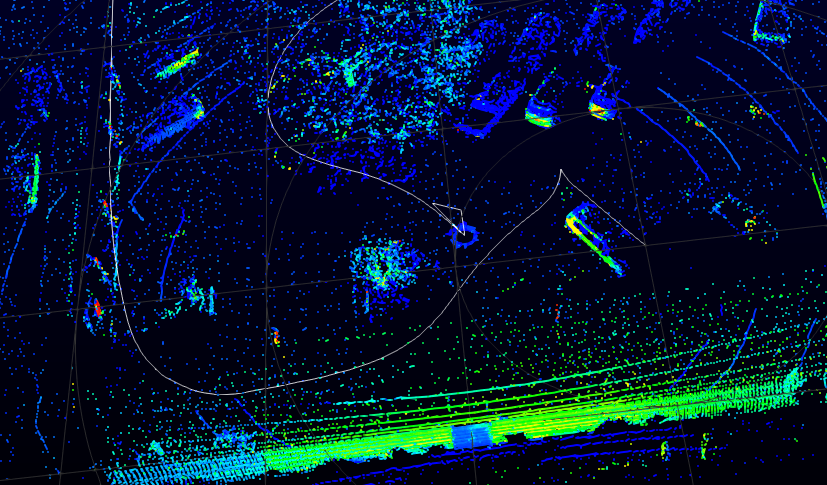
The start and the end of the trajectory should be in the same position. Now I will note while watching this happen that portions of the point field get deleted after a while, I’m guessing to conserve memory or something but I think this is having an effect where the first several frames are like deleted and thus the last few frames have nothing to reference to.
what’s your opinion and how can I fix this?
also through all the resources I’ve read they are not super detailed on what all the settings mean, take this resource
[https://www.kitware.com/lidar-slam-spotlight-on-kitwares-open-source-library/](https://www.kitware.com/lidar-slam-spotlight-on-kitwares-open-source-library/)
and this resource
[https://gitlab.kitware.com/keu-computervision/slam/-/blob/master/paraview\_wrapping/Plugin/doc/How\_to\_SLAM\_with\_LidarView.md?ref\_type=heads#using-loop-closure-in-lidarview](https://gitlab.kitware.com/keu-computervision/slam/-/blob/master/paraview_wrapping/Plugin/doc/How_to_SLAM_with_LidarView.md?ref_type=heads#using-loop-closure-in-lidarview)
Neither of them tell me what like **query map end range** mean or what **subsample revisited maps** mean?
---
### Author:  [@Julia\_Sanchez](https://discourse.paraview.org/u/Julia_Sanchez)
#### Post date: [December 15, 2023, 2:46pm UTC](https://discourse.paraview.org/t/im-not-seeing-the-loop-closure-parameter-in-the-general-parameters-in-lidarview/13502/7 "2023-12-15T14:46:45Z")
Hello,
it is hard to tell what is wrong without seeing any data nor knowing your exact issue.
**1) Version**
Documentation for slam 2.0 as you have in your current LidarView is [here](https://gitlab.kitware.com/keu-computervision/slam/-/blob/v2.0/paraview_wrapping/Plugin/doc/How_to_SLAM_with_LidarView.md?ref_type=tags).
However, I suggest you use the last LidarView version ([Windows](https://drive.google.com/file/d/1inufqJtAczAV_pEHOHKgUb9IGp3i7-X6/view?usp=drive_link), [Linux](https://drive.google.com/file/d/1RplxT06koi4g3XVspLpwdICe0i3k3nyW/view?usp=drive_link)) which corresponds to the documentation version you referred to in your previous message.
[A tutorial video](https://drive.google.com/file/d/15T0XnHXpYy7CFhZVd2x25fr3QQTLyTwN/view?usp=drive_link) is available for this new version.
**2) About the deleted points**
The map is limited in space and in time (check **Map parameters** : _Rolling grid dimension_ and _Decaying threshold_). This must be why you see points disappear. However, this is not directly linked with the loop closure behavior.
The trajectory is stored in the time window defined by _Logging timeout_ (one of the first parameters in the **Properties** panel). So, by default, points older than half an hour will be completely forgotten and the loop closure must happen during this time to be usable.
**3) Loop closure parameters**
If you see clearly the loop closure, I suggest you use the **manual** / **external** mode to specify approximately the indices of the frames that define the start and the end of the loop.
If the SLAM has drifted a lot since the start of the loop, you can check the box : **Add offset** in the loop closure **advanced settings** before optimizing the graph to help the registration perform well.
Note that if you need to have more information about the parameters of any ParaView filter, you can let your mouse on the parameter field in the UI and some extra doc will appear.
If you need more help, don’t hesitate to have a look at our [support contracts](https://www.kitware.eu/get-support).
I hope this helps.
---
### Author:  [@Shane\_Holmes](https://discourse.paraview.org/u/Shane_Holmes)
#### Post date: [December 15, 2023, 2:54pm UTC](https://discourse.paraview.org/t/im-not-seeing-the-loop-closure-parameter-in-the-general-parameters-in-lidarview/13502/8 "2023-12-15T14:54:11Z")
This is very helpful I’ll look at this and report back on what I found.
I cannot access the windows link for the newest lidarview version, the current version I have is 4.4.0 which I believe is the newest version?
Thank you especially for the new video I watched it and it looks like it’s much more descriptive than the other ones, I’ve seen. Is there a repository of new videos for other features as well. Like incorporating IMU and GNSS data?
---
### Author:  [@Shane\_Holmes](https://discourse.paraview.org/u/Shane_Holmes)
#### Post date: [December 15, 2023, 3:07pm UTC](https://discourse.paraview.org/t/im-not-seeing-the-loop-closure-parameter-in-the-general-parameters-in-lidarview/13502/9 "2023-12-15T15:07:42Z")
Here’s a link to the dataset that I’m using …
> **[Google Drive: Sign-in](https://accounts.google.com/v3/signin/identifier?continue=https%3A%2F%2Fdrive.google.com%2Ffile%2Fd%2F1HaYylzzXd8tjI7M2-bxUB--In-rZT-AF%2Fview%3Fusp%3Dsharing&followup=https%3A%2F%2Fdrive.google.com%2Ffile%2Fd%2F1HaYylzzXd8tjI7M2-bxUB--In-rZT-AF%2Fview%3Fusp%3Dsharing&ifkv=ASKXGp3Aalnj_ry8b4LHkyNB_vdFZmjQ8o6fCyKybNF1fU2nicNO9QCE0ntMF1W2B1RgXjM-ZGA75Q&osid=1&passive=1209600&service=wise&flowName=GlifWebSignIn&flowEntry=ServiceLogin&dsh=S-1157218326%3A1702652853901763&theme=glif)**
>
> Access Google Drive with a Google account (for personal use) or Google Workspace account (for business use).
let me know if you can see it.
---
### Author:  [@Julia\_Sanchez](https://discourse.paraview.org/u/Julia_Sanchez)
#### Post date: [December 15, 2023, 3:17pm UTC](https://discourse.paraview.org/t/im-not-seeing-the-loop-closure-parameter-in-the-general-parameters-in-lidarview/13502/10 "2023-12-15T15:17:12Z")
The last LidarView release is quite old now. New ones will come in few days. However, the last LidarView master with SLAM master is always available on [this page](https://gitlab.kitware.com/LidarView/lidarview-superbuild/-/pipelines) in the artifacts of the last pipeline (this is where I took the binaries I sent to you).
About the documentation, we don’t do free development meaning each feature we have included in the repository has been asked by a customer. If you need more documentation we would be very happy to be able to create it in the context of a contract.
---
### Author:  [@Shane\_Holmes](https://discourse.paraview.org/u/Shane_Holmes)
#### Post date: [December 15, 2023, 4:53pm UTC](https://discourse.paraview.org/t/im-not-seeing-the-loop-closure-parameter-in-the-general-parameters-in-lidarview/13502/11 "2023-12-15T16:53:25Z")
Ok so I’ve been playing around with the settings and following the tutorial but it’s just not working, the procedure I’m following is as follows
1. upload the pcap dataset that I have
2. apply the SLAM (online filter)
3. toggle **use pose graph**
4. set verbosity level to “**3) 2 + Sub-problems processing duration**”
5. set **rolling grid dimension** to 100
6. apply and then launch the SLAM operation.
Some thing’s to note is that I’m getting like a lot of inconsistancy with the trajectory when I repeat this process over and over again like the trajectory is just way off see picture below.
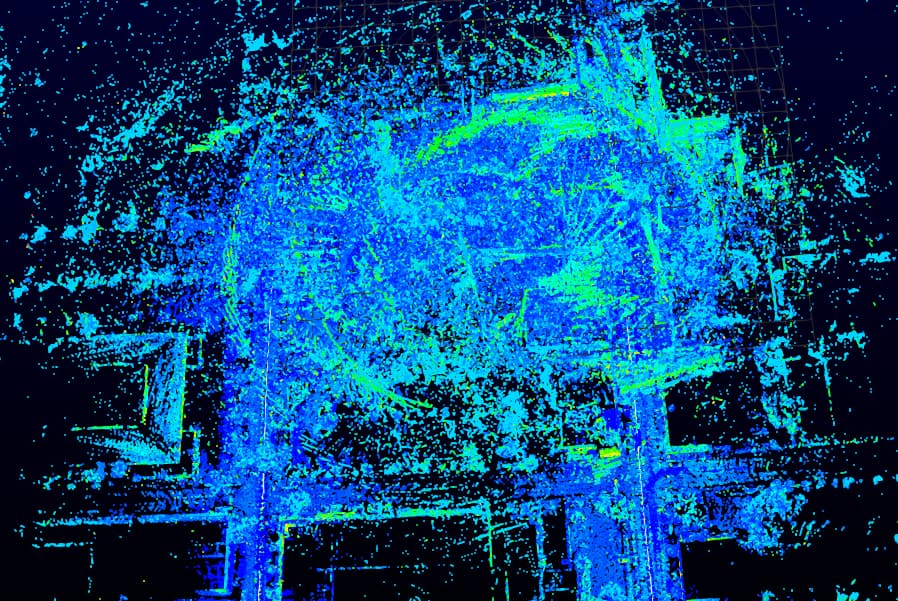
(Fig. 1)Above image of the completed SLAM scan
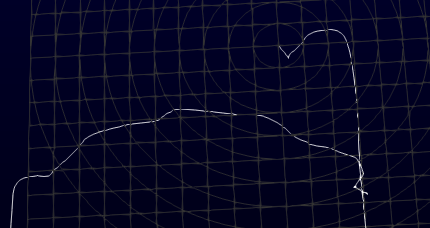
(Fig. 2)Isolated trajectory from the above image for clarity
You can make out the difference between the trajectory in the above image to the trajectory in the earlier image I submitted to the thread.
So I continue with the procedure
1. select the **tooltop selection** tool
2. select a point from one of the first frames to a point in one of the last frames, (That’s what I’m gathering I need to do from the video)
3. create a new csv file with the following content
> queryIdx,revisitedIdx
> 10526, 9303
1. toggle **loop closure contraint**
2. select **External** for the loop closure detector
3. load the csv file
4. click apply
5. then click **Optimize Graph**
When I do this I wait for a couple minutes, and this is what I get…
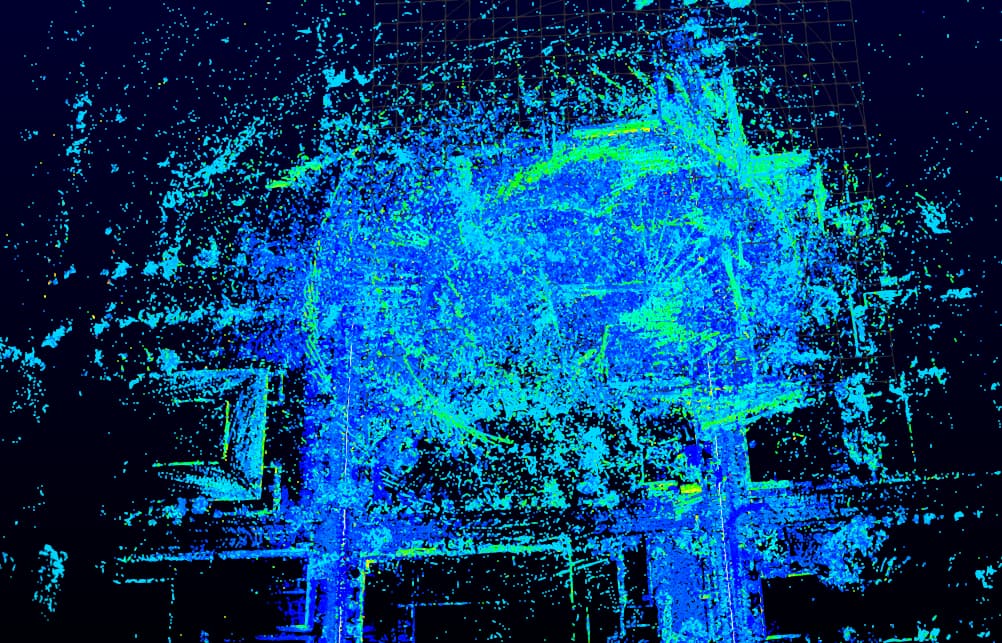
(Fig. 3)Result from optimizing the graph
There’s … no difference like it doesn’t seem to have done anything? Normally when I perform a process like for example adding a temporal transform applier filter the only indication I get that the software is processing is that the program freezes. But when I click Optimize graph there is no freeze there’s no log, there’s no indication that it did anything. I repeated the steps several times and everytime I did I sampled new point ID values and clicked the optimization button and nothing has happened. The only difference between these trials is like the SLAMed trajectory changes like you see in fig.2.
So I’m not sure what to do from here, because I’m not getting any kind of error or log. I’m going to try to find the dataset that they used in the video and see if I can repeat what they did and like work my way backwards.
Let me know what your thoughts are or if you need me to provide any more detail.
---
### Author:  [@Shane\_Holmes](https://discourse.paraview.org/u/Shane_Holmes)
#### Post date: [December 15, 2023, 5:03pm UTC](https://discourse.paraview.org/t/im-not-seeing-the-loop-closure-parameter-in-the-general-parameters-in-lidarview/13502/12 "2023-12-15T17:03:49Z")
Also I just shared the pcap file I didn’t realize you wouldn’t have automatic access
---
### Author:  [@Shane\_Holmes](https://discourse.paraview.org/u/Shane_Holmes)
#### Post date: [December 18, 2023, 7:35pm UTC](https://discourse.paraview.org/t/im-not-seeing-the-loop-closure-parameter-in-the-general-parameters-in-lidarview/13502/13 "2023-12-18T19:35:17Z")
I’ve tried several things now and I’m still not getting any changes, I’ve also noticed that the exploding seems to just be a random thing that happens sometimes, and happens more often if I increase the _rolling grid dimension_ to 100, I just kept trying different things and I’m just still not getting any results. I’ve contacted kitware to try and schedule a discussion with someone but I haven’t heard anything back them.
I also can’t find any datasets used in any of the videos as a reference.
could someone help me with this?
---
### Author:  [@Julia\_Sanchez](https://discourse.paraview.org/u/Julia_Sanchez)
#### Post date: [December 19, 2023, 9:44am UTC](https://discourse.paraview.org/t/im-not-seeing-the-loop-closure-parameter-in-the-general-parameters-in-lidarview/13502/14 "2023-12-19T09:44:10Z")
Hello, I sent you a private message in the chat. I guess you didn’t see it.
The loop closure (of any kind) can never solve a SLAM failure (regardless of the algorithm behind) as you seem to get. It can just reduce the drift correcting accumulated little errors.
Following the video and preventing the map doubling with the decay threshold, [this is the resulting map](https://drive.google.com/file/d/14G8b70jZ2RZHiYR8E2X8Z0Z6U11ntg76/view?usp=sharing) I get after loop closure. [This is the relative corrected trajectory](https://drive.google.com/file/d/1uHe-aBBhUcm0JfaJ_fW8a3XbTM2nPj3h/view?usp=sharing). I didn’t modify the default parameters.
Note that, in the shared pcap, there are about 5000 frames so the indices 10526 and 9303 you took do not exist. Don’t hesitate to launch LidarView from a terminal to get the logs from the library.
FYI, I have updated the link to LidarView to the new SLAM master with a minor fix (not related to your issue).
The data we used in the demo could be shared in a support/training context.
---
### Author:  [@Shane\_Holmes](https://discourse.paraview.org/u/Shane_Holmes)
#### Post date: [December 19, 2023, 2:49pm UTC](https://discourse.paraview.org/t/im-not-seeing-the-loop-closure-parameter-in-the-general-parameters-in-lidarview/13502/15 "2023-12-19T14:49:55Z")
This is great information I really appreciate your response and patience. I’m sorry I didn’t see your DM earlier I’ve just responded to it now. I did try to schedule a training session over email to kitware using this email, “[kitware@kitware.fr](mailto:kitware@kitware.fr)”, but I didn’t get a response. I’ll see if I can replicate your results on my end.
---
### Author:  [@Julia\_Sanchez](https://discourse.paraview.org/u/Julia_Sanchez)
#### Post date: [December 19, 2023, 4:22pm UTC](https://discourse.paraview.org/t/im-not-seeing-the-loop-closure-parameter-in-the-general-parameters-in-lidarview/13502/16 "2023-12-19T16:22:22Z")
Your request has been taken into account. Someone will reach you in a few hours.
---
### Author:  [@Maged\_Gouda](https://discourse.paraview.org/u/Maged_Gouda)
#### Post date: [July 27, 2024, 4:48am UTC](https://discourse.paraview.org/t/im-not-seeing-the-loop-closure-parameter-in-the-general-parameters-in-lidarview/13502/17 "2024-07-27T04:48:01Z")
Hi @Shane_Holmes,
I had the same problem of no action when we choose optimize graph. I am wondering what could be the problem.
---
### Author:  [@Maged\_Gouda](https://discourse.paraview.org/u/Maged_Gouda)
#### Post date: [July 27, 2024, 4:49am UTC](https://discourse.paraview.org/t/im-not-seeing-the-loop-closure-parameter-in-the-general-parameters-in-lidarview/13502/18 "2024-07-27T04:49:47Z")
@Julia_Sanchez I’ve emailed one of my .pcap files from a Hesai XT32.
---
### Author:  [@Maged\_Gouda](https://discourse.paraview.org/u/Maged_Gouda)
#### Post date: [July 31, 2024, 6:27pm UTC](https://discourse.paraview.org/t/im-not-seeing-the-loop-closure-parameter-in-the-general-parameters-in-lidarview/13502/20 "2024-07-31T18:27:33Z")
@Gatien_Ferret @Timothee_Couble I am wondering if you could help with this inquiry. Much appreciated. Also, we did some changes to external poses files but still having the issue of LiDARView not reading it. I will email the new one.
---
### Author:  [@Gatien\_Ferret](https://discourse.paraview.org/u/Gatien_Ferret)
#### Post date: [August 9, 2024, 12:39pm UTC](https://discourse.paraview.org/t/im-not-seeing-the-loop-closure-parameter-in-the-general-parameters-in-lidarview/13502/21 "2024-08-09T12:39:28Z")
More details have been given by mail specifically for this data, but for documentation purposes in case other readers encounter this. Main points to check are :
- Time synchronization between the points and the IMU data
- Frequency of the IMU data should be higher than LiDAR data for meaningful results
- Calibration matrix shall be provided ( Assuming identity is usually not correct)
- Whether the gravity acceleration is present in the IMU acceleration should be checked, and this information shall be entered in the Gravity property of the SLAM filter. Beware that some devices already remove that component, some normalize the gravity vector to 1 and some send it raw, so this may require a preprocess step of the data. If assuming Z upwards at first frame with non normalized gravity, the following shall be entered
