# Import \*.mhd file and then there is unnecessary visual gray data. how to disappear it?
**URL:** https://discourse.paraview.org/t/import-mhd-file-and-then-there-is-unnecessary-visual-gray-data-how-to-disappear-it/12191
**Category:** ParaView Support
**Created:** [May 31, 2023, 6:51am UTC](https://discourse.paraview.org/t/import-mhd-file-and-then-there-is-unnecessary-visual-gray-data-how-to-disappear-it/12191 "2023-05-31T06:51:29Z")
**Posts on this page:** 4
**Page:** 1
### Author:  [@yelnine](https://discourse.paraview.org/u/yelnine)
#### Post date: [May 31, 2023, 6:51am UTC](https://discourse.paraview.org/t/import-mhd-file-and-then-there-is-unnecessary-visual-gray-data-how-to-disappear-it/12191/1 "2023-05-31T06:51:30Z")
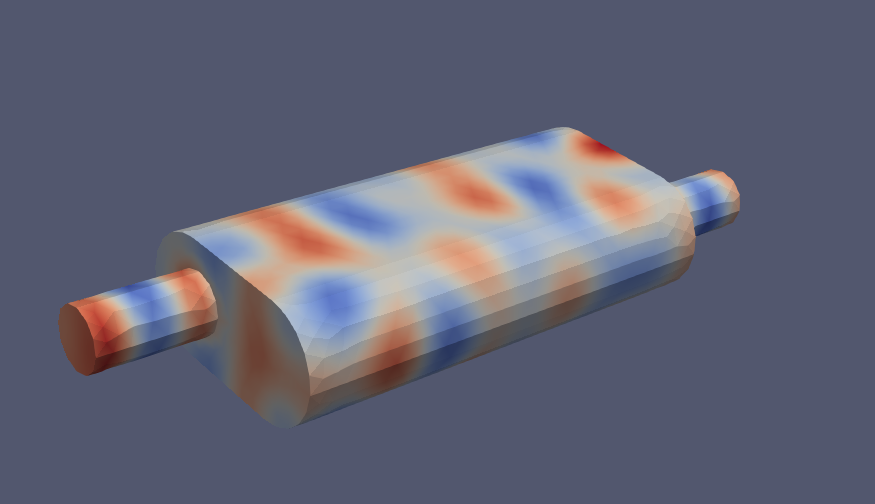
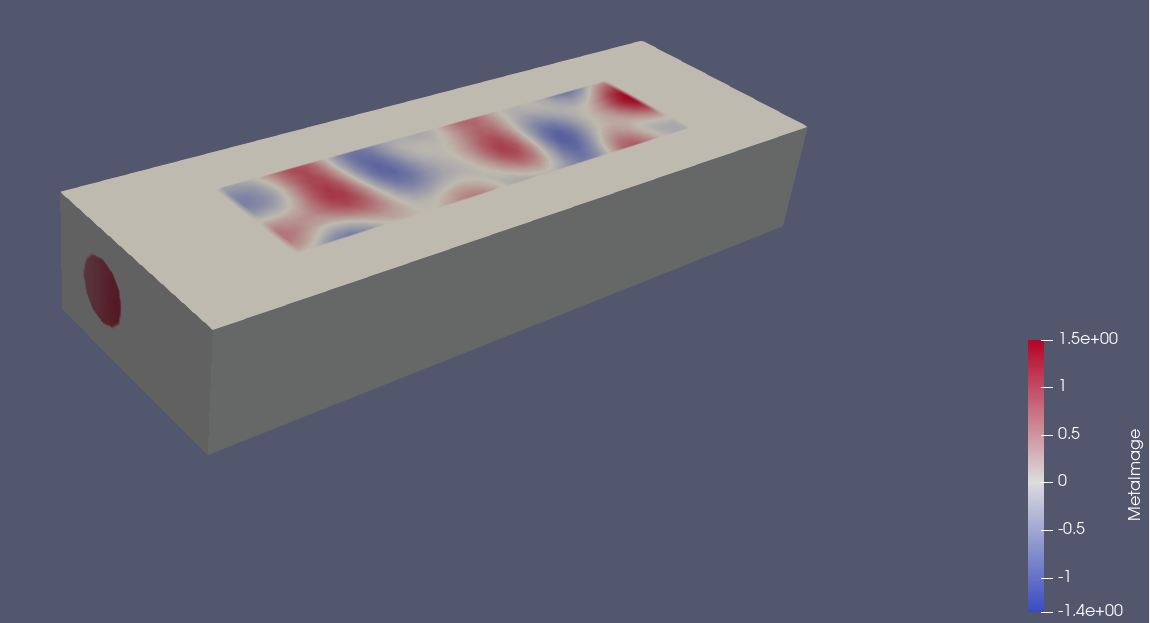
To convert the \*.vtu file to a \*.mhd file, I used the Calculator filter, the ResampleToImage filter, and the Save Data menu. When I load the converted \*.mhd file in Paraview, an unnecessary hexahedral shape (gray) appears. Is there any way to get rid of this gray shape?
[muffler2.z01](https://discourse.paraview.org/uploads/short-url/85cKOY61e0aTvGoke79XGyyhqPg.z01) (3 MB)
[muffler2.zip](https://discourse.paraview.org/uploads/short-url/i5xwy2srLgr3QuC14dV5vYjDlyc.zip) (2.1 MB)
---
### Author:  [@Kenichiro-Yoshimi](https://discourse.paraview.org/u/Kenichiro-Yoshimi)
#### Post date: [May 31, 2023, 7:42am UTC](https://discourse.paraview.org/t/import-mhd-file-and-then-there-is-unnecessary-visual-gray-data-how-to-disappear-it/12191/2 "2023-05-31T07:42:44Z")
Since the mhd file can only store one scalar data, it cannot store the variable _vtkValidPointMask_, which is output by the `ResampleToImage` filter to hide unwanted parts. Therefore, to output the _vtkValidPointMask_ as an image file as well, it must be saved in `Xdmf Data File (*.xmf)` or `VTK ImageData Files (*.vti)`.
---
### Author:  [@yelnine](https://discourse.paraview.org/u/yelnine)
#### Post date: [June 8, 2023, 12:50am UTC](https://discourse.paraview.org/t/import-mhd-file-and-then-there-is-unnecessary-visual-gray-data-how-to-disappear-it/12191/3 "2023-06-08T00:50:36Z")
Thanks for your reply.
Can you explain why a gray cube is created when loading mhd files? Does the gray hexahedron even have data?
---
### Author:  [@Kenichiro-Yoshimi](https://discourse.paraview.org/u/Kenichiro-Yoshimi)
#### Post date: [June 8, 2023, 1:23am UTC](https://discourse.paraview.org/t/import-mhd-file-and-then-there-is-unnecessary-visual-gray-data-how-to-disappear-it/12191/4 "2023-06-08T01:23:46Z")
The `ResampleToImage` filter samples data on 3D image data (voxel elements). When the result is saved to an mhd file, it is saved as 3-dimensional image data. Therefore, when the mhd file is loaded, a gray cube (3-dimensional image data) is displayed. The voxel elements of gray are set to a value of zero.