# Importing a CSV does not include all columns
**URL:** https://discourse.paraview.org/t/importing-a-csv-does-not-include-all-columns/13946
**Category:** ParaView Support
**Created:** [February 15, 2024, 3:50am UTC](https://discourse.paraview.org/t/importing-a-csv-does-not-include-all-columns/13946 "2024-02-15T03:50:05Z")
**Posts on this page:** 6
**Page:** 1
### Author:  [@KaylaTAL](https://discourse.paraview.org/u/KaylaTAL)
#### Post date: [February 15, 2024, 3:50am UTC](https://discourse.paraview.org/t/importing-a-csv-does-not-include-all-columns/13946/1 "2024-02-15T03:50:05Z")
I have [a .csv file](https://discourse.paraview.org/uploads/short-url/r0HTbrOVaCxmk18WonXK8yESJXU.csv) with three columns and 441 rows. It is completely numerical. This csv was generated by Kenneth Moreland in his excellent answer to [2D contour from .csv](https://discourse.paraview.org/t/2d-contour-from-csv/2913) as a test file.
When trying to import this into paraview, I only get two of the three columns, plus a column called “row ID”.
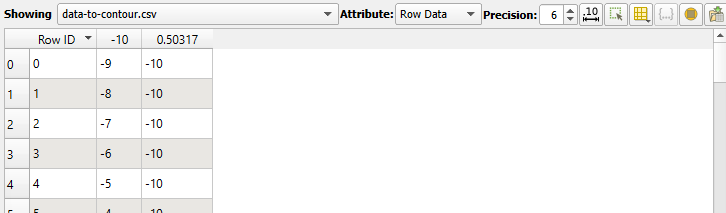
This seems very odd, as in the answer given on the previous page, the third column was needed to generate a colour map.
Any ideas on how to get all three columns? I am using the default CSV reader to open this.
---
### Author:  [@SKSoni](https://discourse.paraview.org/u/SKSoni)
#### Post date: [February 15, 2024, 5:34am UTC](https://discourse.paraview.org/t/importing-a-csv-does-not-include-all-columns/13946/2 "2024-02-15T05:34:11Z")
Add a heading to each column [e.g. X, Y, Z] and then import with CSV reader.
---
### Author:  [@KaylaTAL](https://discourse.paraview.org/u/KaylaTAL)
#### Post date: [February 19, 2024, 12:44am UTC](https://discourse.paraview.org/t/importing-a-csv-does-not-include-all-columns/13946/3 "2024-02-19T00:44:17Z")
Thank you, this fixed the issue!
---
### Author:  [@madmoonman](https://discourse.paraview.org/u/madmoonman)
#### Post date: [February 21, 2024, 3:02pm UTC](https://discourse.paraview.org/t/importing-a-csv-does-not-include-all-columns/13946/4 "2024-02-21T15:02:32Z")
Might just add as I had the same issue recently:
Make sure the last data line in the CSV file does not have a trailing whitespace. This also leads to Paraview not showing the last column.
---
### Author:  [@KaylaTAL](https://discourse.paraview.org/u/KaylaTAL)
#### Post date: [February 21, 2024, 11:28pm UTC](https://discourse.paraview.org/t/importing-a-csv-does-not-include-all-columns/13946/5 "2024-02-21T23:28:41Z")
This is an excellent tip, definitely something to watch out for.
I’ll also add that python is great for avoiding any potential issues with a weird csv file. Pandas makes filtering out things you don’t want - excess headers, comments, bad data, really easy.
For example, I use the following code for one particular file I get from another program which loves to add comments to my data, and uses -1 instead of NaN:
```auto
import numpy as np
import pandas as pd
df = pd.read_csv(r"C:\Users\User\yourdata.txt",
comment='#',delim_whitespace=True, header=None,
)
df.columns =['qx', 'qz', 'counts'] #these are the x, y, and z labels for my data, which is a 2D XRD scan if you're curious.
df['counts'] = df['counts'].mask(df.counts < 0) #change negative values to NaN
for series_name, series in df.items():
name = series_name
array = series.to_numpy()
output.RowData.append(array, name)
```
This is probably my favourite method so far, I don’t love the default CSV reader. But when I’m following a tutorial I think it’s best that I don’t do anything fancy haha.
---
### Author:  [@KaylaTAL](https://discourse.paraview.org/u/KaylaTAL)
#### Post date: [February 21, 2024, 11:34pm UTC](https://discourse.paraview.org/t/importing-a-csv-does-not-include-all-columns/13946/6 "2024-02-21T23:34:01Z")
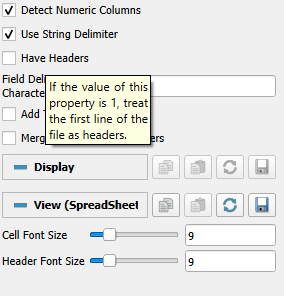
Also, if the data doesn’t have headers, it helps to make sure that this box is not ticked!! A semi-obvious solution - I assumed that this wouldn’t case issues and that the first line of data would become a header, but it seems that wasn’t the case.