# Inquiry on Precise Axis Rotation in Paraview
**URL:** https://discourse.paraview.org/t/inquiry-on-precise-axis-rotation-in-paraview/12538
**Category:** ParaView Support
**Created:** [July 19, 2023, 1:53am UTC](https://discourse.paraview.org/t/inquiry-on-precise-axis-rotation-in-paraview/12538 "2023-07-19T01:53:44Z")
**Posts on this page:** 3
**Page:** 1
### Author:  [@wei\_peng](https://discourse.paraview.org/u/wei_peng)
#### Post date: [July 19, 2023, 1:53am UTC](https://discourse.paraview.org/t/inquiry-on-precise-axis-rotation-in-paraview/12538/1 "2023-07-19T01:53:44Z")
Dear Paraview Forum members,
I hope this email finds you well. I am currently working on a project where I need to precisely rotate the coordinate axis in Paraview to achieve a well-defined view of a 3D box. I want to emphasize that my objective is to use a numerical method similar to Euler angles for setting the rotation angles rather than relying on the mouse to directly manipulate the axis, and I do not intend to use filters: transform to move or rotate the data points’ coordinates.
If anyone in the community has experience or knowledge on how to accomplish this task, I would be grateful for your insights and suggestions. Any example scripts or step-by-step instructions would be particularly helpful to me.
Thank you in advance for your time and assistance. I am looking forward to learning from the expertise of the Paraview community.
Best regards,
Peng
---
### Author:  [@wascott](https://discourse.paraview.org/u/wascott)
#### Post date: [July 19, 2023, 1:59am UTC](https://discourse.paraview.org/t/inquiry-on-precise-axis-rotation-in-paraview/12538/2 "2023-07-19T01:59:23Z")
Hi Peng,
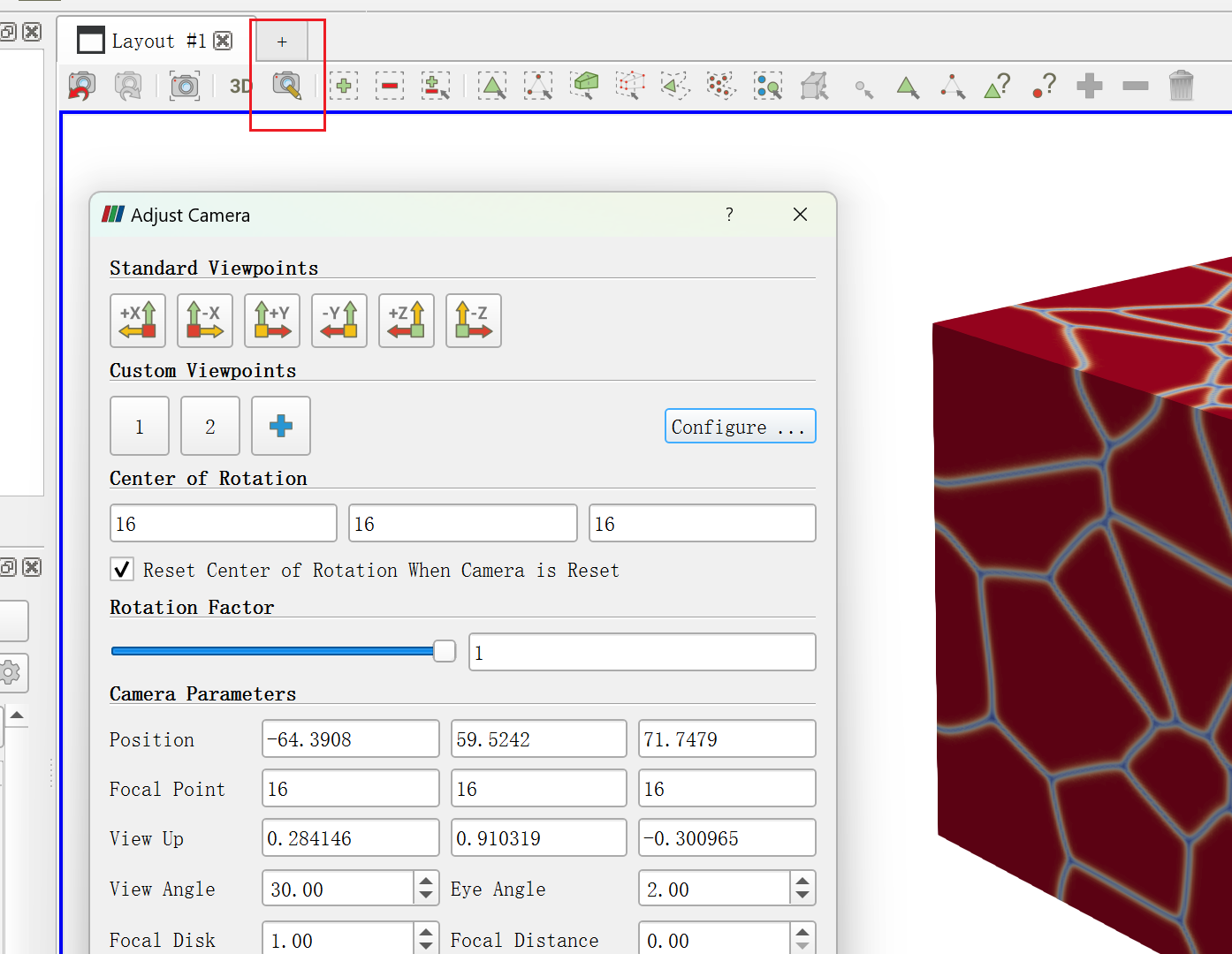
I think what you are looking for is the Adjust Camera dialog. This is found at the top of the viewport, left side. Icon looks like a camera with a brown tail going right and down. It is one icon right of the icon that says 3D/2D. Controls to rotate around axes are at the bottom.
Alan
---
### Author:  [@wei\_peng](https://discourse.paraview.org/u/wei_peng)
#### Post date: [July 19, 2023, 2:16am UTC](https://discourse.paraview.org/t/inquiry-on-precise-axis-rotation-in-paraview/12538/3 "2023-07-19T02:16:21Z")
Thank you so much for your response and helpful hints regarding the precise axis rotation in Paraview. Following your suggestions, I am pleased to inform you that I have successfully found the setting for achieving the desired view of a 3D box using numerical input methods similar to Euler angles.