# install problem - file association paraview 5.11 in windows 11
**URL:** https://discourse.paraview.org/t/install-problem-file-association-paraview-5-11-in-windows-11/11730
**Category:** ParaView Support
**Created:** [March 28, 2023, 9:31am UTC](https://discourse.paraview.org/t/install-problem-file-association-paraview-5-11-in-windows-11/11730 "2023-03-28T09:31:37Z")
**Posts on this page:** 9
**Page:** 1
### Author:  [@MarcDP](https://discourse.paraview.org/u/MarcDP)
#### Post date: [March 28, 2023, 9:31am UTC](https://discourse.paraview.org/t/install-problem-file-association-paraview-5-11-in-windows-11/11730/1 "2023-03-28T09:31:37Z")
Hello I am working on my personal computer and having trouble updating to the last version of paraview.
After downloading and installing, as usual in previous version, the msi package, when I update the executable associated with the vtk files - it seems that the file association fails.
All the vtk files icon turns to blank:
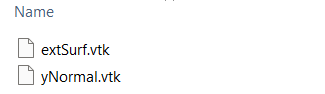
and when I click on these the following prompt is shown:
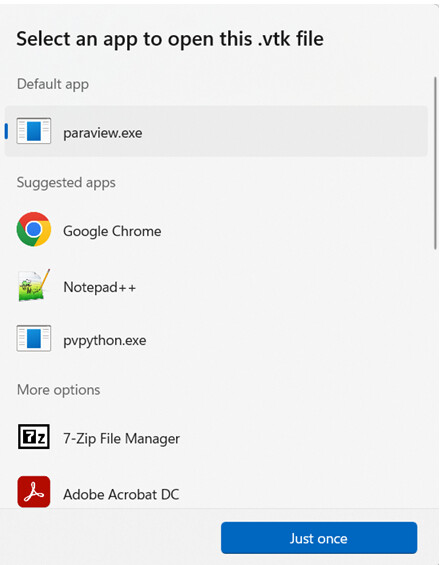
However if I click on paraview.exe, nothing happens.
It is not a huge problem, I can still use the older version just fine or I can open the 5.11 binary and manually open the file from inside the paraview, however It is a bit of a pain day to day.
I was wondering if I am the only one with this issue with win11
---
### Author:  [@MarcDP](https://discourse.paraview.org/u/MarcDP)
#### Post date: [April 4, 2023, 10:19am UTC](https://discourse.paraview.org/t/install-problem-file-association-paraview-5-11-in-windows-11/11730/2 "2023-04-04T10:19:25Z")
bump 😅
---
### Author:  [@ben.boeckel](https://discourse.paraview.org/u/ben.boeckel)
#### Post date: [April 23, 2023, 8:49pm UTC](https://discourse.paraview.org/t/install-problem-file-association-paraview-5-11-in-windows-11/11730/3 "2023-04-23T20:49:05Z")
It seems that this is something else that we lost in the exe → msi migration 😕 .
Cc: @wascott @cory.quammen
---
### Author:  [@wascott](https://discourse.paraview.org/u/wascott)
#### Post date: [April 25, 2023, 4:31pm UTC](https://discourse.paraview.org/t/install-problem-file-association-paraview-5-11-in-windows-11/11730/4 "2023-04-25T16:31:17Z")
We don’t use the msi version. We download the zip ball, and I then repackage it into a zip and also a exe package. Thanks for the heads up.
---
### Author:  [@MarcDP](https://discourse.paraview.org/u/MarcDP)
#### Post date: [April 26, 2023, 9:36am UTC](https://discourse.paraview.org/t/install-problem-file-association-paraview-5-11-in-windows-11/11730/5 "2023-04-26T09:36:51Z")
the same file association issue arise both with the installer and with the zip package
---
### Author:  [@ben.boeckel](https://discourse.paraview.org/u/ben.boeckel)
#### Post date: [April 26, 2023, 3:39pm UTC](https://discourse.paraview.org/t/install-problem-file-association-paraview-5-11-in-windows-11/11730/6 "2023-04-26T15:39:53Z")
Yeah, the `.zip` is never going to do file associations; it is just a directory containing ParaView.
---
### Author:  [@Yann](https://discourse.paraview.org/u/Yann)
#### Post date: [October 14, 2024, 3:24pm UTC](https://discourse.paraview.org/t/install-problem-file-association-paraview-5-11-in-windows-11/11730/7 "2024-10-14T15:24:18Z")
Hello all,
I’m reviving this thread because I have the same problem, pretty much every time I want to upgrade ParaView to a new version, on both windows 10 and 11, using msi.
After installing the new version, I update the file association in the settings as mentioned in the initial post, but it seems the new path is not saved and the file association still point to the old ParaView install. (or just fails if I uninstalled the older version)
Is there a workaround to solve this issue?
Thanks,
Yann
---
### Author:  [@Yann](https://discourse.paraview.org/u/Yann)
#### Post date: [October 16, 2024, 8:05am UTC](https://discourse.paraview.org/t/install-problem-file-association-paraview-5-11-in-windows-11/11730/8 "2024-10-16T08:05:40Z")
Alright, I found the culprit, and the solution.
1. Press **Win + R** , type `regedit`, and press Enter to open the **Registry Editor**.
2. Navigate to the following key: `HKEY_CLASSES_ROOT\Applications\paraview.exe\shell\open\command`
3. Update paraview path to the desired version.
This will make things way easier and more comfortable to upgrade to newer versions!
---
### Author:  [@mwestphal](https://discourse.paraview.org/u/mwestphal)
#### Post date: [October 21, 2024, 9:55am UTC](https://discourse.paraview.org/t/install-problem-file-association-paraview-5-11-in-windows-11/11730/9 "2024-10-21T09:55:59Z")
I’d expect this to be automatic. Worth opening an issue imo.
FYI @cory.quammen