# Installing paraview on Ubuntu
**URL:** https://discourse.paraview.org/t/installing-paraview-on-ubuntu/6201
**Category:** ParaView Support
**Created:** [January 11, 2021, 2:50pm UTC](https://discourse.paraview.org/t/installing-paraview-on-ubuntu/6201 "2021-01-11T14:50:37Z")
**Posts on this page:** 12
**Page:** 1
### Author:  [@Mileguir](https://discourse.paraview.org/u/Mileguir)
#### Post date: [January 11, 2021, 2:50pm UTC](https://discourse.paraview.org/t/installing-paraview-on-ubuntu/6201/1 "2021-01-11T14:50:37Z")
Hi,
I’m trying to install ParaView-5.9.0-RC3-MPI-Linux-Python3.8-64bit on ubuntu.
I installed a Xming server.
When I tried to activate paraview I received the following message,
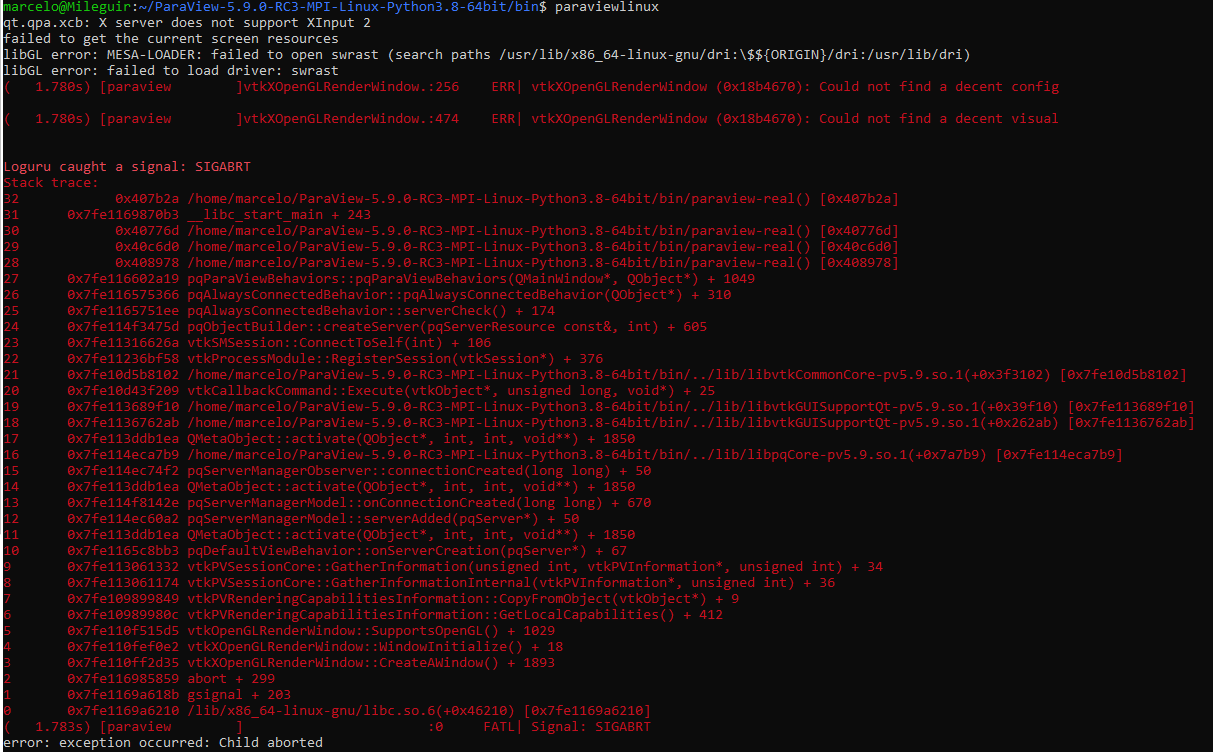
What am I doing wrong?
Your help is appriciated.
Thanks.
Marcelo
---
### Author:  [@mwestphal](https://discourse.paraview.org/u/mwestphal)
#### Post date: [January 11, 2021, 2:55pm UTC](https://discourse.paraview.org/t/installing-paraview-on-ubuntu/6201/2 "2021-01-11T14:55:27Z")
Your graphic driver is incorrect. Are you able to run glxgears or glxinfo ?
Xming is for windows, not ubuntu, I’m confused of your setup here.
---
### Author:  [@Mileguir](https://discourse.paraview.org/u/Mileguir)
#### Post date: [January 11, 2021, 2:57pm UTC](https://discourse.paraview.org/t/installing-paraview-on-ubuntu/6201/3 "2021-01-11T14:57:14Z")
To be honest I’m new with paraview and Ubunto as well… I’ll be happy if you could give me a hand…
Thanks
---
### Author:  [@mwestphal](https://discourse.paraview.org/u/mwestphal)
#### Post date: [January 11, 2021, 3:00pm UTC](https://discourse.paraview.org/t/installing-paraview-on-ubuntu/6201/4 "2021-01-11T15:00:27Z")
Are you using Ubuntu inside Microsoft Windows ?
---
### Author:  [@Mileguir](https://discourse.paraview.org/u/Mileguir)
#### Post date: [January 11, 2021, 3:01pm UTC](https://discourse.paraview.org/t/installing-paraview-on-ubuntu/6201/5 "2021-01-11T15:01:14Z")
Yes I am. Windows 10
---
### Author:  [@mwestphal](https://discourse.paraview.org/u/mwestphal)
#### Post date: [January 11, 2021, 3:05pm UTC](https://discourse.paraview.org/t/installing-paraview-on-ubuntu/6201/6 "2021-01-11T15:05:25Z")
Follow this:
> **[Hands-On with WSL: Running Graphical Apps -- Virtualization Review](https://virtualizationreview.com/articles/2018/01/30/hands-on-with-wsl-graphical-apps.aspx)**
>
> The fourth article of a five-part series on Microsoft's Windows Subsystem for Linux (WSL).
---
### Author:  [@Mileguir](https://discourse.paraview.org/u/Mileguir)
#### Post date: [January 11, 2021, 3:13pm UTC](https://discourse.paraview.org/t/installing-paraview-on-ubuntu/6201/7 "2021-01-11T15:13:31Z")
> [@mwestphal](#):
>
> glxgears
Hi,
I followed the instructions.
the xeyes program runs, but paraview don’t.
it gives me the same error message.
Thanks for your help…
---
### Author:  [@mwestphal](https://discourse.paraview.org/u/mwestphal)
#### Post date: [January 11, 2021, 3:20pm UTC](https://discourse.paraview.org/t/installing-paraview-on-ubuntu/6201/8 "2021-01-11T15:20:10Z")
> [@xming and paraview](https://discourse.paraview.org/t/xming-and-paraview/3168):
>
> Hello, when I type paraview on ubuntu, paraview do not open and I have the following message ‘’‘paraview and xming are not connected.’’’ Could you give me your advice,please? I appreciate your kind help.
Long story short, use ParaView for windows.
---
### Author:  [@Mileguir](https://discourse.paraview.org/u/Mileguir)
#### Post date: [January 11, 2021, 3:27pm UTC](https://discourse.paraview.org/t/installing-paraview-on-ubuntu/6201/9 "2021-01-11T15:27:48Z")
Thanks.
The problem is to browse from paraview for windows (that is working fine) the folder of the results obtained inmy home directory in Ubunto…
---
### Author:  [@mwestphal](https://discourse.paraview.org/u/mwestphal)
#### Post date: [January 11, 2021, 3:29pm UTC](https://discourse.paraview.org/t/installing-paraview-on-ubuntu/6201/10 "2021-01-11T15:29:18Z")
> **[OpenFOAM® Installation on Windows - Docker](https://www.openfoam.com/download/openfoam-installation-on-windows-docker)**
>
> OpenFOAM - Official home of The Open Source Computational Fluid Dynamics (CFD) Toolbox
> > How can I post process the results from OpenFOAM? I am unable to launch Paraview/ParaFoam from terminal?
> It is not possible to use ParaView within the container, you will need to [download ParaView](http://www.paraview.org/download) for Windows from the ParaView website, install it directly on Windows and use it outside of the Docker container. Create a file with the suffix ”.foam” e.g. type the command ”touch a.foam” in your case folder. Launch ParaView and browse the case folder. Open the file with suffix ”.foam” to start the post processing.
---
### Author:  [@Joachim\_P](https://discourse.paraview.org/u/Joachim_P)
#### Post date: [January 13, 2021, 2:52am UTC](https://discourse.paraview.org/t/installing-paraview-on-ubuntu/6201/11 "2021-01-13T02:52:52Z")
What about sharing the file system between both OS? You should be able to mount one of your Windows partition on Ubuntu, save the results on it and then read them back with PV on Windows.
---
### Author:  [@Iose](https://discourse.paraview.org/u/Iose)
#### Post date: [January 27, 2021, 10:05am UTC](https://discourse.paraview.org/t/installing-paraview-on-ubuntu/6201/12 "2021-01-27T10:05:53Z")
Hi Marcelo,
the sharing is easy; your Ubuntu WSL on Windows 10 will be stored at C:\Users$YOURUSERNAME\AppData\Local\Packages\CanonicalGroupLimited.Ubuntu20.04onWindows\_79rhkp1fndgsc\LocalState\rootfs
or something similar like this… Be aware I have version Ubuntu 20.04, but I don’t know which version you have…
If you would like to launch paraview directly from Ubuntu WSL the first step is launch xLaunch application on your windows and as second step launch paraview from your comand line…
But as Mathieu mentioned - the easiest way is using Paraview for Windows… It works very well…