# Interactive selection of cells based on ParaView generated parameters
**URL:** https://discourse.paraview.org/t/interactive-selection-of-cells-based-on-paraview-generated-parameters/13059
**Category:** ParaView Support
**Created:** [October 18, 2023, 1:02pm UTC](https://discourse.paraview.org/t/interactive-selection-of-cells-based-on-paraview-generated-parameters/13059 "2023-10-18T13:02:01Z")
**Posts on this page:** 4
**Page:** 1
### Author:  [@praneeth](https://discourse.paraview.org/u/praneeth)
#### Post date: [October 18, 2023, 1:02pm UTC](https://discourse.paraview.org/t/interactive-selection-of-cells-based-on-paraview-generated-parameters/13059/1 "2023-10-18T13:02:02Z")
Hi all,
I am still new to ParaView and this issue I have did not appear in previous threads so I thought to raise a new one.
A few days ago I asked a question about using ParaView GUI to identify faces of a given geometry and got suggested this beautiful solution by @Kenneth_Moreland: [Accessing points associated to a cell from the Programmable Filter or Python Shell - #5 by Kenneth\_Moreland](https://discourse.paraview.org/t/accessing-points-associated-to-a-cell-from-the-programmable-filter-or-python-shell/13004/5)
Based on the method of @Kenneth_Moreland, I was able to access individual faces by a property `RegionId`, which is created from the `Connectivity` filter.
I am now trying to select the individual faces based on this `RegionId`. I can already do this using the `Find Data` panel, as shown in the image below:
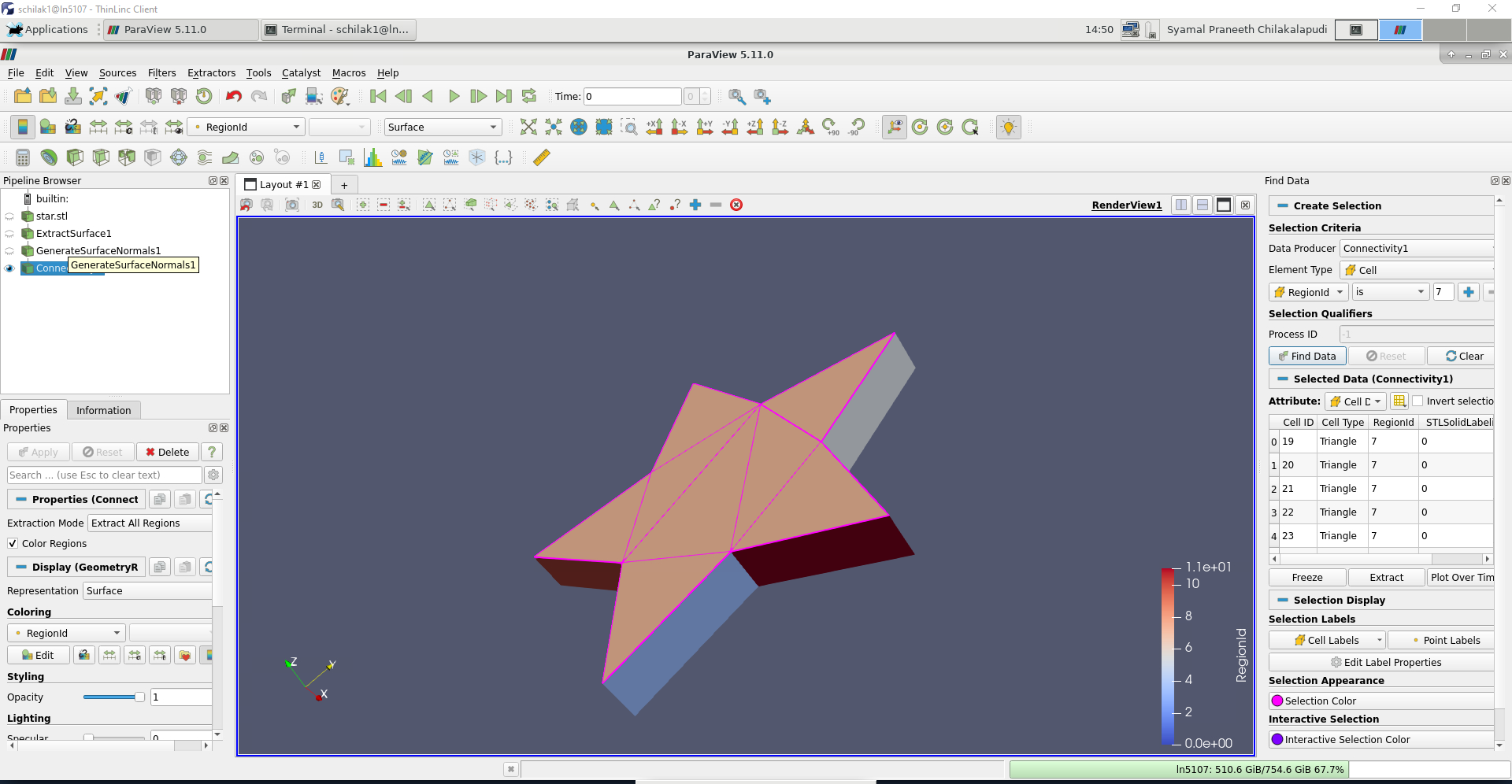
Using the `Extract` option in `Find Data` gives me the selected surface (All cells with RegionId=7).
Is it also possible to do the same selection of the surface (i.e., all cells with RegionId=7) via GUI? Perhaps there is an option within selecting within `Views` that is not obvious to a newbie like me? (Relevant docs page: [6. Selecting Data — ParaView Documentation 5.11.0 documentation](https://docs.paraview.org/en/latest/UsersGuide/selectingData.html#creating-selections-using-views)).
A relevant ParaView state file for the star geometry in the image above is attached to this post.
Many thanks in advance for your help and advice!
Praneeth
Attachment:
[star.pvsm](https://discourse.paraview.org/uploads/short-url/yS6DljZNvSgRQTeJNlV9NLHm863.pvsm) (532.3 KB)
---
### Author:  [@Kenneth\_Moreland](https://discourse.paraview.org/u/Kenneth_Moreland)
#### Post date: [October 18, 2023, 2:07pm UTC](https://discourse.paraview.org/t/interactive-selection-of-cells-based-on-paraview-generated-parameters/13059/2 "2023-10-18T14:07:43Z")
You cannot do it directly. But what you can do is convert the single mesh with `RegionID` into a partitioned structure that the ParaView GUI will understand.
There is no direct filter to do it, but it has been discussed before: [How to create a collection of blocks (multi block) based on connectivity](https://discourse.paraview.org/t/how-to-create-a-collection-of-blocks-multi-block-based-on-connectivity/9124). The instructions there are a bit out of date, so here is an update.
Create a `Programmable Filter`. Set the output data type to `vtkPartitionedDataSet`. Set the script to the following:
```py
import vtk
inp = self.GetInputDataObject(0, 0)
out = self.GetOutput()
outData = vtk.vtkPartitionedDataSet()
rangeID = inputs[0].CellData.GetArray('RegionId').GetRange()
outData.SetNumberOfPartitions(int(rangeID[1]) + 1)
for ic in range(int(rangeID[0]), int(rangeID[1]) + 1):
thresh = vtk.vtkThreshold()
thresh.SetInputData(inp)
thresh.SetInputArrayToProcess(0,0,0,
vtk.vtkDataObject.FIELD_ASSOCIATION_CELLS,'RegionId')
thresh.SetLowerThreshold(ic-0.5)
thresh.SetUpperThreshold(ic+0.5)
thresh.Update()
tooutData = thresh.GetOutputDataObject(0)
outData.SetPartition(ic, tooutData)
out.DeepCopy(outData)
```
This will run internally run the threshold filter on all region ids and then collect them into a `vtkPartitionedDataSet`.
Once you have a `vtkPartitionedDataSet`, you can use select block  (or just hit `b`) in the view and click on a face to select it.
[star-blocks.pvsm](https://discourse.paraview.org/uploads/short-url/1hfusyeMDs7ror8uXh3qR6HPsaH.pvsm) (670.2 KB)
---
### Author:  [@praneeth](https://discourse.paraview.org/u/praneeth)
#### Post date: [October 24, 2023, 9:52am UTC](https://discourse.paraview.org/t/interactive-selection-of-cells-based-on-paraview-generated-parameters/13059/3 "2023-10-24T09:52:20Z")
Hi @Kenneth_Moreland, I had the chance to try this solution out today, and it works really well!
I initially had some issues, I could not get a python package `pygments` to work on the `Programmable Filter`; and our ParaView installation is made through Spack (which has a separate python installation for ParaView) so it would not have been straightforward to fix. But when I reset the ParaView and tried running the `Programmable Filter`, I no longer had the issue.
For other readers of this thread, I also get this error when running the `Programmable Filter`:
> ( 174.785s) [paraview]vtkDemandDrivenPipeline:776 ERR| vtkCompositeDataPipeline (0xce96a00): Input for connection index 0 on input port index 0 for algorithm vtkExtractBlockUsingDataAssembly (0x130e4180) is of type vtkPartitionedDataSet, but a vtkPartitionedDataSetCollection is required.
> ( 174.786s) [paraview]vtkDataAssemblyUtilitie:815 ERR| GetSelectorForCompositeId is only supported on a data-assembly representation a hierarchy.
> ( 174.787s) [paraview]vtkDataAssemblyUtilitie:815 ERR| GetSelectorForCompositeId is only supported on a data-assembly representation a hierarchy.
> ( 194.500s) [paraview]vtkDataAssemblyUtilitie:815 ERR| GetSelectorForCompositeId is only supported on a data-assembly representation a hierarchy.
But this error had no effect on the selection of the “blocks”. After the programmable filter. I was able to use  and `Extract Selection` to get the faces that I wanted.
Thanks again for the quick and effective advice!
Praneeth
---
### Author:  [@mwestphal](https://discourse.paraview.org/u/mwestphal)
#### Post date: [October 24, 2023, 11:26am UTC](https://discourse.paraview.org/t/interactive-selection-of-cells-based-on-paraview-generated-parameters/13059/4 "2023-10-24T11:26:48Z")
Alternatively you can use the selection by point/cell data directly:
- Open your dataset
- Connectivity, Apply
- ColorBy regionId, cell or point
- Select by cell/point data: