# Interpolating 3D data (X, Y, Z, value)...and adding a time component.
**URL:** https://discourse.paraview.org/t/interpolating-3d-data-x-y-z-value-and-adding-a-time-component/7307
**Category:** ParaView Support
**Created:** [May 27, 2021, 10:58pm UTC](https://discourse.paraview.org/t/interpolating-3d-data-x-y-z-value-and-adding-a-time-component/7307 "2021-05-27T22:58:18Z")
**Posts on this page:** 14
**Page:** 1
### Author:  [@datathing](https://discourse.paraview.org/u/datathing)
#### Post date: [May 27, 2021, 10:58pm UTC](https://discourse.paraview.org/t/interpolating-3d-data-x-y-z-value-and-adding-a-time-component/7307/1 "2021-05-27T22:58:18Z")
Hi,
I’m interested in the possibility of interpolating a set of X/Y/Z/value data in 3D, and then working towards incorporating a time component to it so that animations can be generated. I tried to follow the information here ([link](https://discourse.paraview.org/t/3d-interpolation-method/1049/3)), but wasn’t able to get those filters to work for me…and the descriptions of them did not sound like the would do the right thing?
I have been able to (sort of) do the first part with the Gaussian Resampling filter but it’s not a very good 3D interpolation of the data and looks more like a discrete blob placed around each data point, and points in proximity to each other do not interact in the interpolation in the sort of way that you would expect form something like Kriging (for example).

- Are there any other more sophisticated ways to interpolate data in 3D within ParaView, e.g. Kriging? My data is likely to be very dense and pretty uniformly distributed so something simple may suffice.
- Would the best way to extend this work-flow to include the time dimension? I am aware of the capability of using VTK files for each time step and a pvd file to organize it all…but I cannot get an XML format file to work for points only ([question here](https://discourse.paraview.org/t/xml-format-for-a-file-that-only-contains-points/7308)). Also, it seems like it should be easier to just have a ‘time’ category in the data and somehow link that to the ‘time’ in ParaView so that when time advances in the animation it simply updates the data set to use only those from the current time step? Is something like this possible?
[Edit] I have discovered that I might be able to just use simple XYZval format in a text file if the naming convention is consistent. I can import these as a group:

…but I am struggling to figure out how I can assign these to different time steps other than 0,1,2,3,4…etc. The output times from my modelling are not guaranteed to be of uniform timestep length, so is there any way to associate these with actual times rather than 0,1,2,3,4 etc…?
Thanks!
---
### Author:  [@nurw](https://discourse.paraview.org/u/nurw)
#### Post date: [May 28, 2021, 4:22am UTC](https://discourse.paraview.org/t/interpolating-3d-data-x-y-z-value-and-adding-a-time-component/7307/2 "2021-05-28T04:22:55Z")
I have the same question here. I couldn’t get my “.vts” format to tell ParaView about the physical time value for my data which is really quite simple structured mesh. I looked into writing netCDF4 format or HDF5 format, but I’m wondering if anyone knows an easier workaround. Thanks!
---
### Author:  [@mwestphal](https://discourse.paraview.org/u/mwestphal)
#### Post date: [May 28, 2021, 10:09am UTC](https://discourse.paraview.org/t/interpolating-3d-data-x-y-z-value-and-adding-a-time-component/7307/3 "2021-05-28T10:09:38Z")
@datathing : GaussianResampling is the best you can get. There is no Kriging method implemented in ParaView yet. You can implement anything in a programmable filter though.
Uses a .series file to manage the time values.
---
### Author:  [@datathing](https://discourse.paraview.org/u/datathing)
#### Post date: [May 28, 2021, 4:55pm UTC](https://discourse.paraview.org/t/interpolating-3d-data-x-y-z-value-and-adding-a-time-component/7307/4 "2021-05-28T16:55:22Z")
Thanks! With help on another question ([link](https://discourse.paraview.org/t/xml-format-for-a-file-that-only-contains-points/7308/2)) I have this partially working. Using .vtp XML format files and a .pvd file with the content below:
```
```
However, the animation seems to have an unexpected behavior (to me at least) in that:
- The data set for time step 0 is _only_ visible at time = 0 and is then immediately superseded by the date for time step 1.
- The data set for time step 1 continues to be visible until time = 1 and is then immediately superseded by the date for time step 2.
This pattern continues for each following time step, so that in my example the one defined for time step 8 is actually visible for all time steps \> 4. E.g.

…rather than what I had expected:

Is this the intended behavior, and if yes, is there a way to change it? Logically with my data I want the image to update on the time step that corresponds with the time step that it was defined.
---
### Author:  [@nurw](https://discourse.paraview.org/u/nurw)
#### Post date: [May 28, 2021, 5:54pm UTC](https://discourse.paraview.org/t/interpolating-3d-data-x-y-z-value-and-adding-a-time-component/7307/5 "2021-05-28T17:54:25Z")
@mwestphal Thank you so much. I’ll look into that!
---
### Author:  [@mwestphal](https://discourse.paraview.org/u/mwestphal)
#### Post date: [May 31, 2021, 7:41am UTC](https://discourse.paraview.org/t/interpolating-3d-data-x-y-z-value-and-adding-a-time-component/7307/6 "2021-05-31T07:41:24Z")
please share your data
---
### Author:  [@datathing](https://discourse.paraview.org/u/datathing)
#### Post date: [May 31, 2021, 9:19pm UTC](https://discourse.paraview.org/t/interpolating-3d-data-x-y-z-value-and-adding-a-time-component/7307/7 "2021-05-31T21:19:16Z")
> [@datathing](#):
>
> `"pointTest_05`
[particle\_tracking\_pointTest.zip](https://discourse.paraview.org/uploads/short-url/xFTbxW3Jma9zHDHIp93HrOER0Dg.zip) (40.5 KB)
vtp, pvd and pvsm files are attached. The strange particle movement described above is visible when you play the animation using the ‘real time’ setting. Thanks!
---
### Author:  [@mwestphal](https://discourse.paraview.org/u/mwestphal)
#### Post date: [June 1, 2021, 8:39am UTC](https://discourse.paraview.org/t/interpolating-3d-data-x-y-z-value-and-adding-a-time-component/7307/8 "2021-06-01T08:39:26Z")
This is the expected behavior. It could be controlled with a settings though.
@nicolas.vuaille
---
### Author:  [@datathing](https://discourse.paraview.org/u/datathing)
#### Post date: [August 17, 2021, 12:00am UTC](https://discourse.paraview.org/t/interpolating-3d-data-x-y-z-value-and-adding-a-time-component/7307/9 "2021-08-17T00:00:45Z")
Just reviewing this again and wondered if you had any thoughts about work arounds? This type of time interpolation is really unintuitive and I’m a little perplexed as to why this would be the default option in scientific visualisation. Data is typically defined at a point in time at which it occurs, and I can’t think of a good reason why we would want to have that data rendered at a preceding time-step which could be offset by any amount of time. This was made quite obvious when I tried using the temporal interpolator with this simple example. The data at t=8 is displayed 4 time units before it actually happens and then the animation ceases at t=4, which is 4 time units before the last data point. This is really misleading for my purposes because this is long term temporal data that is simply not in sync with what is happening in the real world. i.e. there is a 4 year offset in my visualisation and my real world data.
I think I have to manually edit my data in a really unintuitive way and slide all my time stamps to the next observed data?
---
### Author:  [@mwestphal](https://discourse.paraview.org/u/mwestphal)
#### Post date: [August 17, 2021, 7:07am UTC](https://discourse.paraview.org/t/interpolating-3d-data-x-y-z-value-and-adding-a-time-component/7307/10 "2021-08-17T07:07:11Z")
@nicolas.vuaille : I think you merged a new temporal filter, right ?
---
### Author:  [@nicolas.vuaille](https://discourse.paraview.org/u/nicolas.vuaille)
#### Post date: [August 17, 2021, 8:12am UTC](https://discourse.paraview.org/t/interpolating-3d-data-x-y-z-value-and-adding-a-time-component/7307/11 "2021-08-17T08:12:41Z")
Hi,
Animation and temporal mode are a tricky thing in ParaView. The recommended mode is still `Snap to Time Step`. You can find some details in this (quite long) discussion:
> [@ParaView Time Refactoring](https://discourse.paraview.org/t/paraview-time-refactoring/5506/6):
>
> Seems to me that all this is stemming from the fact that you want to link world-time with time in ParaView. As @Kenneth_Moreland mentioned, ParaVIew is not a video application. It’s not meant for editing videos. Thus, an expectation that time in the application is same as what the user-perceives in real world is not reasonable. In fact, I’d argue that we get rid of real-time mode entirely. It was only added as a toy since it was technically possible. In hindsight, it should have never been there…
As a workaround in your case, you can use the `Temporal Snap To Timestep` filter, with `Snap Mode` to `Next Below or Equal`.
---
### Author:  [@datathing](https://discourse.paraview.org/u/datathing)
#### Post date: [August 17, 2021, 8:17pm UTC](https://discourse.paraview.org/t/interpolating-3d-data-x-y-z-value-and-adding-a-time-component/7307/12 "2021-08-17T20:17:03Z")
Thanks, I will try the Snap To Time Step. I read through the discussion and it was interesting, but it does sound like it is partly a case of my particular field of science (geoscience) not currently being a major user of the software in comparison to some of the engineering type applications being discussed there. I know that the clients that I present to are interested in seeing the results in sped-up real time such that what they see on the screen _exactly_ matches the time stamp that is displayed. It would be incredibly confusing for them to see a contaminant plume reaching their well-field earlier than expected, for example. It’s a little disheartening after all the time I have invested into ParaView (and more importantly the time I have taken up from all the helpful people on this Discourse) to see the negative opinions of the animation functions amongst the developers etc. To me, when I selected a software for the purpose of generating these animations, there was no reason to believe that ParaView isn’t really intended for this purpose.
FYI - over the next few years I suspect there will be an increased interest in this sort of capability, I know that other open source tools are being developed that will make the access to the VTK file conversion from our modeling software much more streamlined for the larger geoscience community, and along with that will come more questions about why the rendered imaged doesn’t match the time stamp of the input data.
Anyway, thanks again! I will try your suggestions.
---
### Author:  [@datathing](https://discourse.paraview.org/u/datathing)
#### Post date: [August 17, 2021, 8:27pm UTC](https://discourse.paraview.org/t/interpolating-3d-data-x-y-z-value-and-adding-a-time-component/7307/13 "2021-08-17T20:27:13Z")
@nicolas.vuaille the Snap to Time Step filter seems to partially work. It makes the animation align with the data (good!) but won’t display the last time step (not too bad, I can always append some dummy data to force it to display), but the main issue seems to be that I can’t apply a temporal interpolate filter to the results of the Snap To Time Step filter. I get the following error:
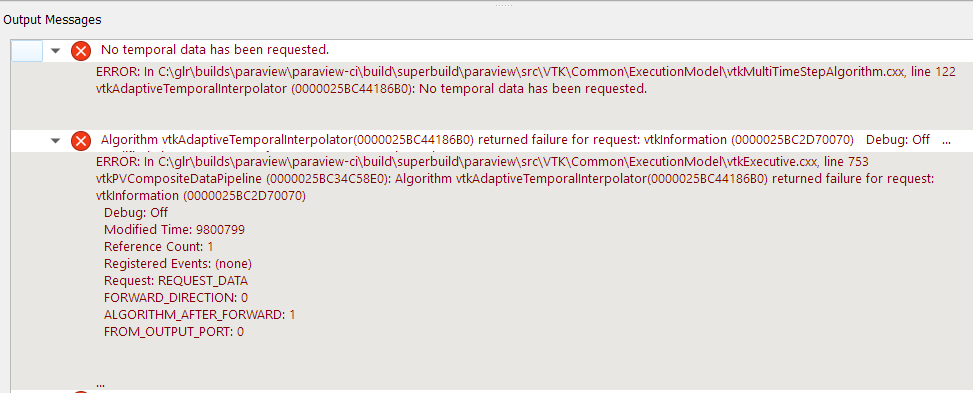
Any ideas? Again, thanks for your help, and thanks @mwestphal.
---
### Author:  [@nicolas.vuaille](https://discourse.paraview.org/u/nicolas.vuaille)
#### Post date: [August 18, 2021, 2:08pm UTC](https://discourse.paraview.org/t/interpolating-3d-data-x-y-z-value-and-adding-a-time-component/7307/14 "2021-08-18T14:08:26Z")
No idea for this, sorry … Did you try the Interpolate first and then Snap ?