# Issues Using Server GPU for Rendering with ParaView
**URL:** https://discourse.paraview.org/t/issues-using-server-gpu-for-rendering-with-paraview/15619
**Category:** ParaView Support
**Created:** [October 23, 2024, 5:37am UTC](https://discourse.paraview.org/t/issues-using-server-gpu-for-rendering-with-paraview/15619 "2024-10-23T05:37:12Z")
**Posts on this page:** 14
**Page:** 1
### Author:  [@Sh\_K](https://discourse.paraview.org/u/Sh_K)
#### Post date: [October 23, 2024, 5:37am UTC](https://discourse.paraview.org/t/issues-using-server-gpu-for-rendering-with-paraview/15619/1 "2024-10-23T05:37:12Z")
Hello,
I am experiencing issues when attempting to use the server’s GPU for rendering while utilizing ParaView’s server functionality.
**1. Goal:**
I am trying to use the server-side data and leverage the server’s GPU for rendering.
**2. Issue Summary:**
While rendering data on the local machine using server-side data works without any problems, I encounter errors when trying to use the server’s GPU for rendering.
**3. Current Setup:**
Upon connecting to the server, the nvidia-smi command shows that the task is recognized by the GPU, as shown below:
```auto
+-----------------------------------------------------------------------------+
| NVIDIA-SMI 525.60.13 Driver Version: 525.60.13 CUDA Version: 12.0 |
|-------------------------------+----------------------+----------------------|
| GPU Name Persistence-M| Bus-Id Disp.A | Volatile Uncorr. ECC |
| Fan Temp Perf Pwr:Usage/Cap| Memory-Usage | GPU-Util Compute M. |
| | | MIG M. |
|===============================+======================+======================|
| 0 NVIDIA GeForce ... On | 00000000:01:00.0 Off | N/A |
| 36% 35C P8 13W / 180W | 4MiB / 8192MiB | 0% Default |
| | | N/A |
+-------------------------------+----------------------+----------------------+
| 1 NVIDIA GeForce ... On | 00000000:02:00.0 Off | N/A |
| 36% 34C P8 8W / 180W | 2MiB / 8192MiB | 0% Default |
| | | N/A |
+-------------------------------+----------------------+----------------------+
| Processes: |
| GPU GI CI PID Type Process name GPU Memory |
| ID ID Usage |
|=============================================================================|
| 0 N/A N/A 4023 G ...-x86_64/bin/pvserver-real 1MiB |
+-----------------------------------------------------------------------------+
```
**4. Problem Description:**
I can load the file and see it in the **Pipeline Browser**. However, as soon as I attempt to **apply properties** or **make the object visible** , ParaView crashes on the local machine, and errors appear on the Linux server.
Here is the process I followed for the **Data Server** :
```auto
$ pvserver --server-port=11111
Waiting for client...
Connection URL: cs://user:11111
Accepting connection(s): user:11111
Client connected.
ConnectMtoN
-----------------------------------------------------
By loading the 'pvNVIDIAIndeX' plugin you have accepted the EULA shipped with it.
If that is not acceptable, please restart the application without loading
the 'pvNVIDIAIndeX' plugin.
-----------------------------------------------------
( 377.070s) [pvserver]vtkSocketCommunicator.c:774 ERR| vtkSocketCommunicator (0x1a61310): Could not receive tag. 41235
( 377.070s) [pvserver]vtkSocketCommunicator.c:774 ERR| vtkSocketCommunicator (0x1a61310): Could not receive tag. 41233
( 377.070s) [pvserver]vtkSocketCommunicator.c:774 ERR| vtkSocketCommunicator (0x1a61310): Could not receive tag. 1
( 377.071s) [pvserver]vtkTCPNetworkAccessMana:284 ERR| vtkTCPNetworkAccessManager (0x19720e0): Some error in socket processing.
```
And for the **Rendering Server** :
```auto
$ pvserver --server-port=11112
Waiting for client...
Connection URL: cs://user:11112
Accepting connection(s): user:11112
Client connected.
ConnectMtoN
-----------------------------------------------------
By loading the 'pvNVIDIAIndeX' plugin you have accepted the EULA shipped with it.
If that is not acceptable, please restart the application without loading
the 'pvNVIDIAIndeX' plugin.
-----------------------------------------------------
( 362.189s) [pvserver]vtkSocketCommunicator.c:839 ERR| vtkSocketCommunicator (0x903250): Tag mismatch: got 102290, expecting 41235.
( 362.202s) [pvserver]vtkSocketCommunicator.c:839 ERR| vtkSocketCommunicator (0x903250): Tag mismatch: got 102290, expecting 41233.
( 366.086s) [pvserver]vtkSocketCommunicator.c:774 ERR| vtkSocketCommunicator (0x903250): Could not receive tag. 1
( 366.087s) [pvserver]vtkTCPNetworkAccessMana:284 ERR| vtkTCPNetworkAccessManager (0x8140e0): Some error in socket processing.
```
**5. Cross-Platform Issue:**
I have tried this process on two different local machines (macOS and Windows 11), and the issue persists across both platforms.
**6. Environment Details:**
• **ParaView Version** : 5.13.1 (MPI version) on both Linux server and local machines.
• **Server Installation** : The Linux server uses the EGL version of ParaView.
Could you please assist in identifying the cause of these errors and provide guidance on how to resolve this issue?
Thank you.
---
### Author:  [@mwestphal](https://discourse.paraview.org/u/mwestphal)
#### Post date: [October 23, 2024, 10:02am UTC](https://discourse.paraview.org/t/issues-using-server-gpu-for-rendering-with-paraview/15619/2 "2024-10-23T10:02:44Z")
> [@Sh\_K](#):
>
> `By loading the 'pvNVIDIAIndeX' plugin`
Looks like you are loading the Index plugin, is that intended ?
---
### Author:  [@Sh\_K](https://discourse.paraview.org/u/Sh_K)
#### Post date: [October 23, 2024, 12:53pm UTC](https://discourse.paraview.org/t/issues-using-server-gpu-for-rendering-with-paraview/15619/3 "2024-10-23T12:53:34Z")
Thanks.
Yes. I want to fully utilize my gpu therefore i tried to use NVIDIAIndeX.
I followed the `3.4 NVIDIAIndeXsettings` of the `NVIDIA IndeX ParaView Plugin User’s Guide`. Is it correct approach to achieve my goal?
I have to render quite heavy files ( ~3GiB vtk file per timestep) therefore using server GPU and ram. It will be thankfull if you give any advice.
---
### Author:  [@mwestphal](https://discourse.paraview.org/u/mwestphal)
#### Post date: [October 23, 2024, 1:13pm UTC](https://discourse.paraview.org/t/issues-using-server-gpu-for-rendering-with-paraview/15619/4 "2024-10-23T13:13:32Z")
> [@Sh\_K](#):
>
> Yes. I want to fully utilize my gpu therefore i tried to use NVIDIAIndeX.
Well, this only makes sense if you want to do volume rendering.
In any case I tried using NVidia index with EGL pvserver and it worked fine.
Which version of libegl are you using on the server side ? Which OS are you using ?
---
### Author:  [@Sh\_K](https://discourse.paraview.org/u/Sh_K)
#### Post date: [October 23, 2024, 2:19pm UTC](https://discourse.paraview.org/t/issues-using-server-gpu-for-rendering-with-paraview/15619/5 "2024-10-23T14:19:48Z")
Thanks for additional support.
Before answering, i should inform you that problem has little bit solved with using
pvrenderserver and pvdataserver instead pvserver twice.(with port 11111 and 22221)
Now I can render my files in linux server with “client/data server/render server”, but following error occurs, therefore I can utilize my GPU.
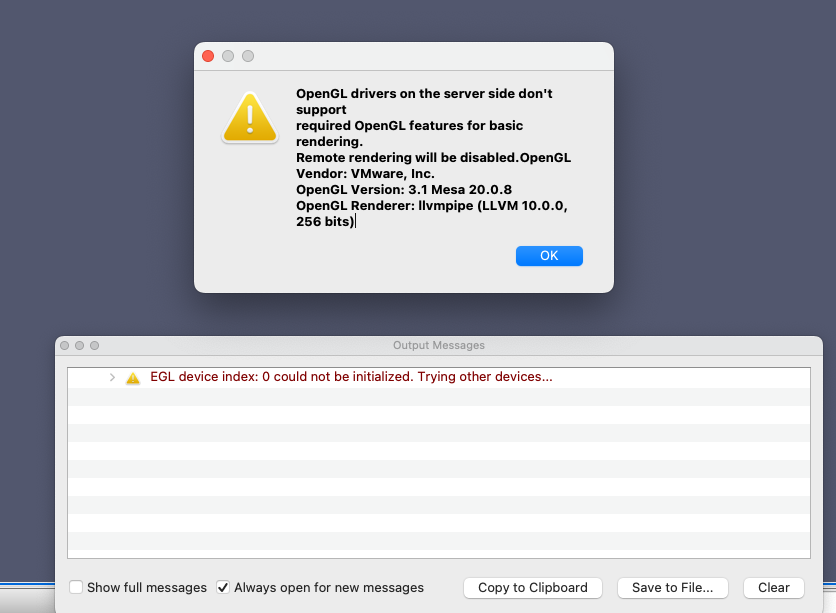
Anyhow,
`libegl version`
```auto
root@user:~# dpkg -l | grep libegl
ii libegl-mesa0:amd64 20.0.8-0ubuntu1~18.04.1 amd64 free implementation of the EGL API -- Mesa vendor library
ii libegl-mesa0:i386 20.0.8-0ubuntu1~18.04.1 i386 free implementation of the EGL API -- Mesa vendor library
ii libegl1:amd64 1.0.0-2ubuntu2.3 amd64 Vendor neutral GL dispatch library -- EGL support
ii libegl1:i386 1.0.0-2ubuntu2.3 i386 Vendor neutral GL dispatch library -- EGL support
ii libegl1-mesa:amd64 20.0.8-0ubuntu1~18.04.1 amd64 transitional dummy package
```
`OS`
```auto
root@user:~# lsb_release -a
No LSB modules are available.
Distributor ID: Ubuntu
Description: Ubuntu 18.04.6 LTS
Release: 18.04
Codename: bionic
```
---
### Author:  [@mwestphal](https://discourse.paraview.org/u/mwestphal)
#### Post date: [October 23, 2024, 2:21pm UTC](https://discourse.paraview.org/t/issues-using-server-gpu-for-rendering-with-paraview/15619/6 "2024-10-23T14:21:07Z")
> Remote Rendering will be disabled
You are not using your server GPU at all in that case.
---
### Author:  [@mwestphal](https://discourse.paraview.org/u/mwestphal)
#### Post date: [October 23, 2024, 2:22pm UTC](https://discourse.paraview.org/t/issues-using-server-gpu-for-rendering-with-paraview/15619/7 "2024-10-23T14:22:05Z")
> Ubuntu 18.04.6 LTS
> libegl1:amd64 1.0.0-2ubuntu2.3
This version of libegl is non fonctionnal, you need to update to Ubuntu 20 at least.
---
### Author:  [@Sh\_K](https://discourse.paraview.org/u/Sh_K)
#### Post date: [October 23, 2024, 2:37pm UTC](https://discourse.paraview.org/t/issues-using-server-gpu-for-rendering-with-paraview/15619/8 "2024-10-23T14:37:24Z")
So you mean there is no other way to use gpu with ubuntu 18?
Sorry but for me it’s weird that It works well with other Ubuntu18 server.
This is settings of my secondary server.
```auto
(base) root@user:~# dpkg -l | grep libegl
ii libegl-mesa0:amd64 20.0.8-0ubuntu1~18.04.1 amd64 free implementation of the EGL API -- Mesa vendor library
ii libegl-mesa0:i386 20.0.8-0ubuntu1~18.04.1 i386 free implementation of the EGL API -- Mesa vendor library
ii libegl1:amd64 1.0.0-2ubuntu2.3 amd64 Vendor neutral GL dispatch library -- EGL support
ii libegl1:i386 1.0.0-2ubuntu2.3 i386 Vendor neutral GL dispatch library -- EGL support
ii libegl1-mesa:amd64 20.0.8-0ubuntu1~18.04.1 amd64 transitional dummy package
(base) root@user:~# lsb_release -a
No LSB modules are available.
Distributor ID: Ubuntu
Description: Ubuntu 18.04.6 LTS
Release: 18.04
Codename: bionic
```
For example, in the same way with client/dataserver/renderserver, It seems that it utilize GPU well.
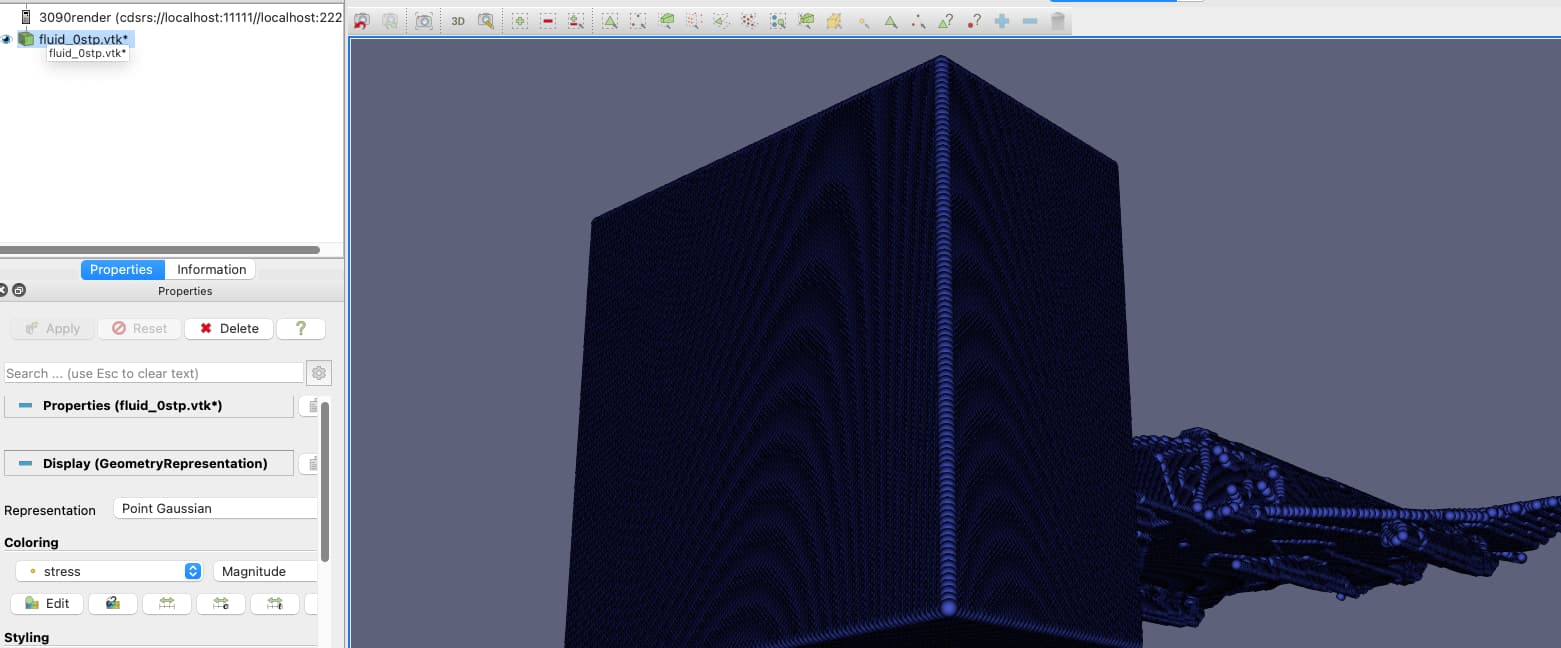
```auto
(base) root@user:~# nvidia-smi
Wed Oct 23 23:31:02 2024
+---------------------------------------------------------------------------------------+
| NVIDIA-SMI 530.30.02 Driver Version: 530.30.02 CUDA Version: 12.1 |
|-----------------------------------------+----------------------+----------------------+
| GPU Name Persistence-M| Bus-Id Disp.A | Volatile Uncorr. ECC |
| Fan Temp Perf Pwr:Usage/Cap| Memory-Usage | GPU-Util Compute M. |
| | | MIG M. |
|=========================================+======================+======================|
| 0 NVIDIA GeForce RTX 3090 On | 00000000:B4:00.0 Off | N/A |
| 49% 48C P2 188W / 350W| 510MiB / 24576MiB | 100% Default |
| | | N/A |
+-----------------------------------------+----------------------+----------------------+
| 1 NVIDIA GeForce RTX 3090 On | 00000000:B6:00.0 Off | N/A |
| 30% 25C P8 18W / 350W| 115MiB / 24576MiB | 0% Default |
| | | N/A |
+-----------------------------------------+----------------------+----------------------+
| 2 NVIDIA GeForce RTX 3090 On | 00000000:BB:00.0 Off | N/A |
| 30% 25C P8 19W / 350W| 3MiB / 24576MiB | 0% Default |
| | | N/A |
+-----------------------------------------+----------------------+----------------------+
| 3 NVIDIA GeForce RTX 3090 On | 00000000:BC:00.0 Off | N/A |
| 30% 25C P8 23W / 350W| 3MiB / 24576MiB | 0% Default |
| | | N/A |
+-----------------------------------------+----------------------+----------------------+
| 4 NVIDIA GeForce RTX 3090 On | 00000000:BE:00.0 Off | N/A |
| 48% 24C P8 17W / 350W| 3MiB / 24576MiB | 0% Default |
| | | N/A |
+-----------------------------------------+----------------------+----------------------+
| 5 NVIDIA GeForce RTX 3090 On | 00000000:C4:00.0 Off | N/A |
| 44% 52C P2 216W / 350W| 503MiB / 24576MiB | 100% Default |
| | | N/A |
+-----------------------------------------+----------------------+----------------------+
| 6 NVIDIA GeForce RTX 3090 On | 00000000:C6:00.0 Off | N/A |
| 30% 25C P8 15W / 350W| 3MiB / 24576MiB | 0% Default |
| | | N/A |
+-----------------------------------------+----------------------+----------------------+
| 7 NVIDIA GeForce RTX 3090 On | 00000000:CC:00.0 Off | N/A |
| 30% 25C P8 21W / 350W| 3MiB / 24576MiB | 0% Default |
| | | N/A |
+-----------------------------------------+----------------------+----------------------+
| 8 NVIDIA GeForce RTX 3090 On | 00000000:CD:00.0 Off | N/A |
| 50% 24C P8 18W / 350W| 3MiB / 24576MiB | 0% Default |
| | | N/A |
+-----------------------------------------+----------------------+----------------------+
+---------------------------------------------------------------------------------------+
| Processes: |
| GPU GI CI PID Type Process name GPU Memory |
| ID ID Usage |
|=======================================================================================|
| 0 N/A N/A 17740 C ./CFD_gpu 502MiB |
| 0 N/A N/A 18293 G ...3.10-x86_64/bin/pvrenderserver-real 4MiB |
| 1 N/A N/A 18293 G ...3.10-x86_64/bin/pvrenderserver-real 111MiB |
| 5 N/A N/A 17700 C ./CFD_gpu 500MiB |
+---------------------------------------------------------------------------------------+
```
with `pvrenderserver --display=1`.
If there anything I should know about linux openGL settings or something else, please let me know. Sorry that I am not very familiar with Linux 😊 …
Thank you.
---
### Author:  [@mwestphal](https://discourse.paraview.org/u/mwestphal)
#### Post date: [October 23, 2024, 2:41pm UTC](https://discourse.paraview.org/t/issues-using-server-gpu-for-rendering-with-paraview/15619/9 "2024-10-23T14:41:06Z")
> [@Sh\_K](#):
>
> For example, in the same way with client/dataserver/renderserver, It seems that it utilize GPU well.
To make sure:
Edit → Serttings → RenderView → Check ShowAnnotation
Remote Rendering should be true in the annotation.
---
### Author:  [@Sh\_K](https://discourse.paraview.org/u/Sh_K)
#### Post date: [October 23, 2024, 2:44pm UTC](https://discourse.paraview.org/t/issues-using-server-gpu-for-rendering-with-paraview/15619/10 "2024-10-23T14:44:29Z")
Thanks!
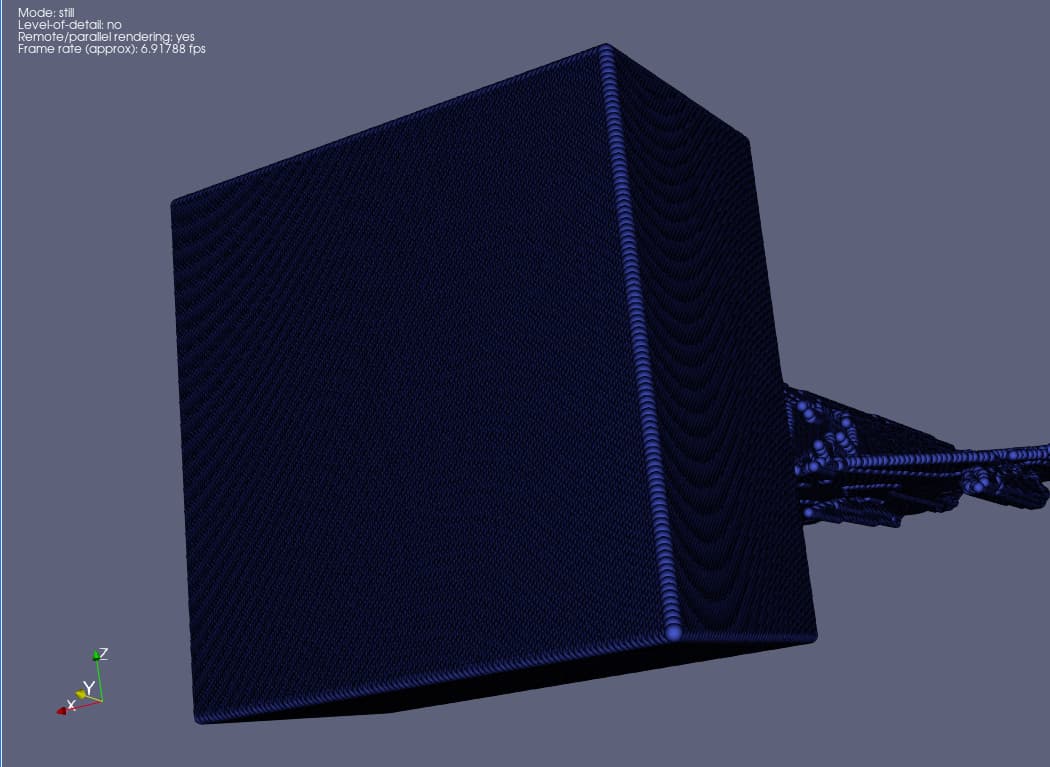
Now i’m sure that it works with remote server.
---
### Author:  [@Sh\_K](https://discourse.paraview.org/u/Sh_K)
#### Post date: [October 23, 2024, 2:50pm UTC](https://discourse.paraview.org/t/issues-using-server-gpu-for-rendering-with-paraview/15619/11 "2024-10-23T14:50:38Z")
Sorry but is there any other potential Issue that makes something wrong with my preliminary server??.
---
### Author:  [@mwestphal](https://discourse.paraview.org/u/mwestphal)
#### Post date: [October 23, 2024, 2:51pm UTC](https://discourse.paraview.org/t/issues-using-server-gpu-for-rendering-with-paraview/15619/12 "2024-10-23T14:51:54Z")
Im afraid I do not know.
---
### Author:  [@Francois\_Mazen](https://discourse.paraview.org/u/Francois_Mazen)
#### Post date: [October 23, 2024, 4:41pm UTC](https://discourse.paraview.org/t/issues-using-server-gpu-for-rendering-with-paraview/15619/13 "2024-10-23T16:41:40Z")
> [@Sh\_K](#):
>
> following error occurs, therefore I can utilize my GPU.
The error message indicates VMware vendoring. Are you using a virtual machine to run pvserver? If yes, I would check that your VM have access to the graphic drivers.
---
### Author:  [@Sh\_K](https://discourse.paraview.org/u/Sh_K)
#### Post date: [October 24, 2024, 1:32am UTC](https://discourse.paraview.org/t/issues-using-server-gpu-for-rendering-with-paraview/15619/14 "2024-10-24T01:32:32Z")
Thanks.
I’m afraid that it isn’t.
```auto
root@user:~# sudo dmidecode | grep -i vmware
root@user:~# lscpu | grep -i hypervisor
root@user:~# dmesg | grep -i vmware
root@user:~# ls /sys/class/dmi/id/product_name
/sys/class/dmi/id/product_name
```