# LateX typeset colorbar annotations
**URL:** https://discourse.paraview.org/t/latex-typeset-colorbar-annotations/4608
**Category:** ParaView Support
**Created:** [June 17, 2020, 4:55pm UTC](https://discourse.paraview.org/t/latex-typeset-colorbar-annotations/4608 "2020-06-17T16:55:06Z")
**Posts on this page:** 3
**Page:** 1
### Author:  [@dutta-alankar](https://discourse.paraview.org/u/dutta-alankar)
#### Post date: [June 17, 2020, 4:55pm UTC](https://discourse.paraview.org/t/latex-typeset-colorbar-annotations/4608/1 "2020-06-17T16:55:06Z")
Using format strings like %e or %g I can have “scientific notation”
What is the simplest way to format the number in LaTeX format, i.e. 1\times10^{9} (1\times10^{9} instead of 1.0e+09) automatically in places where numbers are displayed Paraview, for example in colorbar level annotations?
---
### Author:  [@cory.quammen](https://discourse.paraview.org/u/cory.quammen)
#### Post date: [June 17, 2020, 6:34pm UTC](https://discourse.paraview.org/t/latex-typeset-colorbar-annotations/4608/2 "2020-06-17T18:34:21Z")
You can embed latex expressions inside $$ like you would for inline equations in LaTeX.
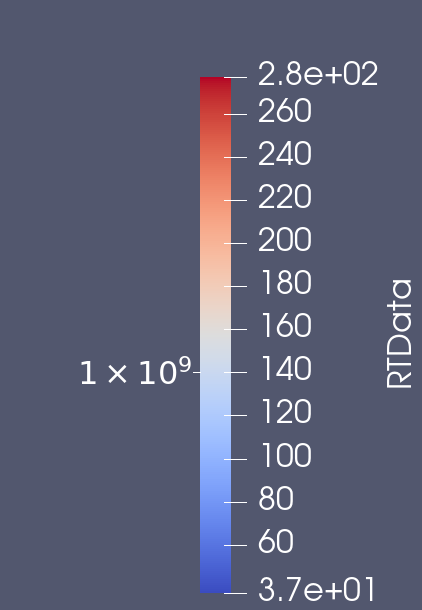
However, that applies only to custom annotations, not the automatically generated tick labels. There isn’t currently a way to use LaTeX expression formatting for the tick labels.
---
### Author:  [@dutta-alankar](https://discourse.paraview.org/u/dutta-alankar)
#### Post date: [June 17, 2020, 7:12pm UTC](https://discourse.paraview.org/t/latex-typeset-colorbar-annotations/4608/3 "2020-06-17T19:12:56Z")
I see. I was more interested in using this format in auto generated labels.
Something similar to this on the auto generated labels will also do the job for me
```auto
def latex_float(f):
float_str = "{0:.2g}".format(f)
if "e" in float_str:
base, exponent = float_str.split("e")
return r"${0} \times 10^{{{1}}}$".format(base, int(exponent))
else:
return float_str
```
Testing:
```auto
>>> latex_float(-1.5e-9)
'$-1.5 \\times 10^{-9}$'
>>> latex_float(1.e-9)
'$1 \\times 10^{-9}$'
>>> latex_float(1.e9)
'$1 \\times 10^{9}$'
>>> latex_float(1.e+09)
'$1 \\times 10^{9}$'
```