# Legend fonts get messed up saving screenshot using pvpython
**URL:** https://discourse.paraview.org/t/legend-fonts-get-messed-up-saving-screenshot-using-pvpython/3954
**Category:** ParaView Support
**Created:** [April 2, 2020, 8:57pm UTC](https://discourse.paraview.org/t/legend-fonts-get-messed-up-saving-screenshot-using-pvpython/3954 "2020-04-02T20:57:15Z")
**Posts on this page:** 16
**Page:** 1
### Author:  [@pdiercks](https://discourse.paraview.org/u/pdiercks)
#### Post date: [April 2, 2020, 8:57pm UTC](https://discourse.paraview.org/t/legend-fonts-get-messed-up-saving-screenshot-using-pvpython/3954/1 "2020-04-02T20:57:15Z")
Dear All,
I am using the latest paraview binary (version 5.8.0 with MPI and python 3) under Linux.
I have a simple python script (recorded via set trace) which loads a XDMF file, plots the data, adds a colorbar (setting font size to 12) and then saves a screenshot. If I run that script in the GUI I get the desired result.

However if I run the same script in a terminal via
```bash
pvpython trace.py
```
the font size is messed up:
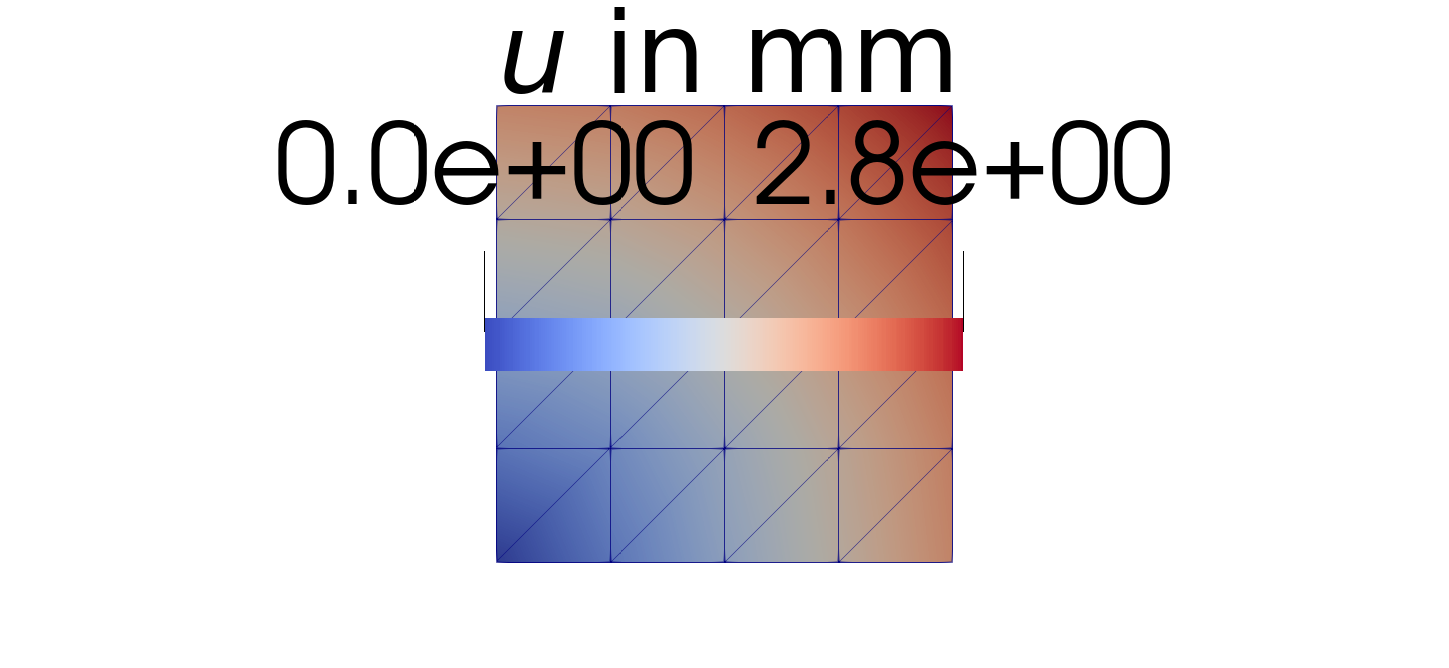
Can someone point out what I’m doing wrong?
Thanks,
Philipp
---
### Author:  [@danlipsa](https://discourse.paraview.org/u/danlipsa)
#### Post date: [April 2, 2020, 9:12pm UTC](https://discourse.paraview.org/t/legend-fonts-get-messed-up-saving-screenshot-using-pvpython/3954/2 "2020-04-02T21:12:00Z")
Make sure you set the view size to the same size as you image with something like:
view.ViewSize = [1024, 1024]
if your image is 1024 x 1204 pixels. I think there is something like this commented out in your script produced by the trace.
---
### Author:  [@pdiercks](https://discourse.paraview.org/u/pdiercks)
#### Post date: [April 3, 2020, 6:54am UTC](https://discourse.paraview.org/t/legend-fonts-get-messed-up-saving-screenshot-using-pvpython/3954/3 "2020-04-03T06:54:15Z")
Thank you for that quick response!
---
### Author:  [@pdiercks](https://discourse.paraview.org/u/pdiercks)
#### Post date: [April 3, 2020, 5:28pm UTC](https://discourse.paraview.org/t/legend-fonts-get-messed-up-saving-screenshot-using-pvpython/3954/4 "2020-04-03T17:28:03Z")
Hello Dan,
I am experiencing now some limitations regarding the image size. I now use the name of the resulting PNG and pixels as input arguments. E.g. with the view size you suggested:
```bash
pvpython script.py screenshot.png 1024 1024
```
For large sizes this happens:

Why is it 1920 x 1136 for `another.png`?
---
### Author:  [@danlipsa](https://discourse.paraview.org/u/danlipsa)
#### Post date: [April 3, 2020, 7:23pm UTC](https://discourse.paraview.org/t/legend-fonts-get-messed-up-saving-screenshot-using-pvpython/3954/5 "2020-04-03T19:23:04Z")
You should not go higher than your screen size.
---
### Author:  [@wascott](https://discourse.paraview.org/u/wascott)
#### Post date: [April 3, 2020, 7:27pm UTC](https://discourse.paraview.org/t/legend-fonts-get-messed-up-saving-screenshot-using-pvpython/3954/6 "2020-04-03T19:27:51Z")
@danlipsa That’s not true. You absolutely can go bigger than your screen size, I believe up to the size of your frame buffer. That’s the way you make good resoltuion images for powerwalls. If there IS an issue making big images, that is a bug and needs to get fixed.
---
### Author:  [@wascott](https://discourse.paraview.org/u/wascott)
#### Post date: [April 3, 2020, 8:04pm UTC](https://discourse.paraview.org/t/legend-fonts-get-messed-up-saving-screenshot-using-pvpython/3954/7 "2020-04-03T20:04:54Z")
The original question, about Color Legend font size changes between gui and batch is a bug. Written up here: [https://gitlab.kitware.com/paraview/paraview/-/issues/19831](https://gitlab.kitware.com/paraview/paraview/-/issues/19831). @pdiercks - Thanks for reporting. Alan
---
### Author:  [@wascott](https://discourse.paraview.org/u/wascott)
#### Post date: [April 3, 2020, 9:00pm UTC](https://discourse.paraview.org/t/legend-fonts-get-messed-up-saving-screenshot-using-pvpython/3954/8 "2020-04-03T21:00:47Z")
I played around with the second question, having to do with larger resolutions. I am on a very small viewport, about 700x300 (i.e., macbook, working remotely). I created .png’s that were 2345X1234 successfully, both with ParaView, and pvbatch from a script. Note that due to the file format for .png’s, what actually comes out in both cases is 2345X1232. I also did find one case where there was a 2 pixel wide difference, but don’t see that as an issue.
---
### Author:  [@pdiercks](https://discourse.paraview.org/u/pdiercks)
#### Post date: [April 4, 2020, 10:01am UTC](https://discourse.paraview.org/t/legend-fonts-get-messed-up-saving-screenshot-using-pvpython/3954/9 "2020-04-04T10:01:02Z")
@wascott thank you for your answers. Regarding larger resolutions It seems there is a difference between `pvpython` and `pvbatch`.

---
### Author:  [@danlipsa](https://discourse.paraview.org/u/danlipsa)
#### Post date: [April 6, 2020, 2:16pm UTC](https://discourse.paraview.org/t/legend-fonts-get-messed-up-saving-screenshot-using-pvpython/3954/10 "2020-04-06T14:16:13Z")
Alan,
You are right, you can save an image larger than the screen size. I was referring to setting the view size when rendering on-screen that does limit you to the size of the screen - which seems to be happening for pvpython.
But I don’t know why there is a difference between pvbatch and pvpython.
Philip, do you see a window created on the screen for rendering? For both pvpython and pvbatch?
---
### Author:  [@wascott](https://discourse.paraview.org/u/wascott)
#### Post date: [April 6, 2020, 3:22pm UTC](https://discourse.paraview.org/t/legend-fonts-get-messed-up-saving-screenshot-using-pvpython/3954/11 "2020-04-06T15:22:37Z")
They look the same to me. What I did:
- Linux, 5.8.0, builtin server.
- Create a trace
- Sources Fast Uniform Grid. Color by something. Solid.
- Save screenshot at 2345x1234
- Stop Trace.
- Save this screenshot
- Run trace with pvbatch. Save this screenshot
- Run trace with pvpython. Save this screenshot.
Using display on Linux, Info, I looked at picture resolution. Both were the same. (2345x1232).
Here is using Identify:
Dir$ identify deleteMeC-pvbatch.png
deleteMeC-pvbatch.png PNG 2345x1232 2345x1232+0+0 8-bit DirectClass 213KB 0.000u 0:00.000
Dir$ identify deleteMeC-pvpython.png
deleteMeC-pvpython.png PNG 2345x1232 2345x1232+0+0 8-bit DirectClass 213KB 0.000u 0:00.000
If this is still a bug, please provide very clear directions, along with a python script, how to replicate.
---
### Author:  [@pdiercks](https://discourse.paraview.org/u/pdiercks)
#### Post date: [April 6, 2020, 6:57pm UTC](https://discourse.paraview.org/t/legend-fonts-get-messed-up-saving-screenshot-using-pvpython/3954/12 "2020-04-06T18:57:52Z")
Hello @wascott,
I went through the your steps above and can confirm that there’s no difference between pvpython and pvbatch using the trace as above.
I think the problem was that I confused view size and PNG resolution.
When setting a specific view size like
```python
# uncomment following to set a specific view size
renderView1.ViewSize = [2345, 1234] # bigger than screen size
```
it seems that pvpython is limited to the screen size as @danlipsa suggests. (For pvpython a window is created but for pvbatch there is not).
#### Steps
- Start Trace
- Sources \> Data Objects \> Fast Uniform Grid
- Surface
- Color by Distance Squared
- Save screenshot at 2345 x 1234
- Stop Trace
- Edit `renderView1.ViewSize` as above
- Save the script as `trace.py`
- Run `pvpython trace.py`, save this screenshot
- Run `pvbatch trace.py`, save this screenshot
Thanks,
Philipp
---
### Author:  [@danlipsa](https://discourse.paraview.org/u/danlipsa)
#### Post date: [April 6, 2020, 8:11pm UTC](https://discourse.paraview.org/t/legend-fonts-get-messed-up-saving-screenshot-using-pvpython/3954/13 "2020-04-06T20:11:41Z")
Philip,
You’ll need to set the view size the same as the image size only for pvbatch. For pvpython you don’t need to do that - this will take care of the window bigger than the screen size problem.
I just tried that and it works fine.
---
### Author:  [@rcarneiro](https://discourse.paraview.org/u/rcarneiro)
#### Post date: [January 10, 2022, 3:41pm UTC](https://discourse.paraview.org/t/legend-fonts-get-messed-up-saving-screenshot-using-pvpython/3954/14 "2022-01-10T15:41:23Z")
Hello everyone,
I am using Paraview 5.8.1 and I am facing the same issue.
I am setting the ImageResolution parameter the same as the ViewSize parameter but when I run the script through pvbatch the size of the legend becomes larger than it should be?
Can somebody help?
Regards,
Rui
---
### Author:  [@wascott](https://discourse.paraview.org/u/wascott)
#### Post date: [January 11, 2022, 12:06am UTC](https://discourse.paraview.org/t/legend-fonts-get-messed-up-saving-screenshot-using-pvpython/3954/15 "2022-01-11T00:06:51Z")
Upgrade to ParaView 5.10.0? [https://gitlab.kitware.com/paraview/paraview/-/issues/19831](https://gitlab.kitware.com/paraview/paraview/-/issues/19831).
---
### Author:  [@rcarneiro](https://discourse.paraview.org/u/rcarneiro)
#### Post date: [January 11, 2022, 8:09am UTC](https://discourse.paraview.org/t/legend-fonts-get-messed-up-saving-screenshot-using-pvpython/3954/16 "2022-01-11T08:09:43Z")
Thank you for the suggestion. I have tried version 5.9.0 and it seems to work properly. I will also consider the most recent version.