# Loading tif stacks
**URL:** https://discourse.paraview.org/t/loading-tif-stacks/2903
**Category:** ParaView Support
**Created:** [November 4, 2019, 8:36pm UTC](https://discourse.paraview.org/t/loading-tif-stacks/2903 "2019-11-04T20:36:11Z")
**Posts on this page:** 11
**Page:** 1
### Author:  [@ep513140](https://discourse.paraview.org/u/ep513140)
#### Post date: [November 4, 2019, 8:36pm UTC](https://discourse.paraview.org/t/loading-tif-stacks/2903/1 "2019-11-04T20:36:11Z")
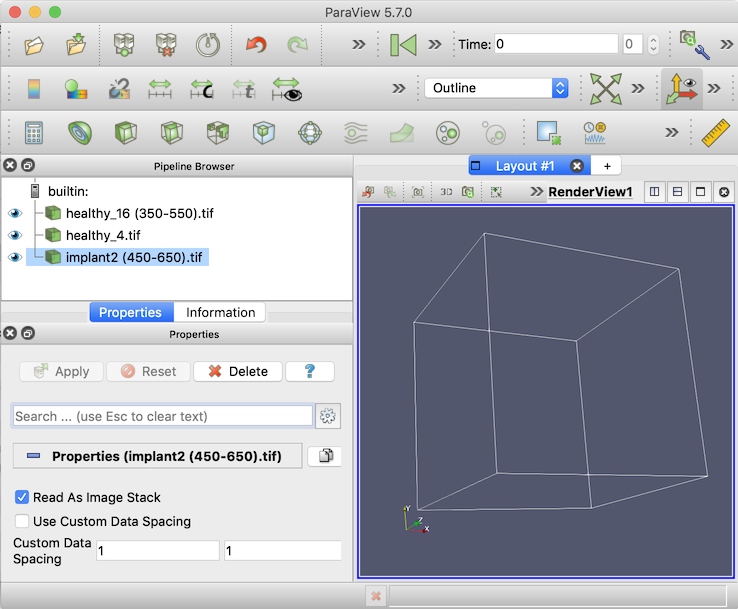
I am extremely new to Paraview. I am using the desktop app and I am trying to load three tif files. One of the tiff files loads, but the other two do not. In preview when I select Open Files and then select the files I want to load, I press “Ok” but the file Open Files window stays and nothing happens. However, for the working file, when I press “Ok”, the Open File pop-up goes away and my dataset is loaded. Is there a reason why this is happening?
---
### Author:  [@utkarsh.ayachit](https://discourse.paraview.org/u/utkarsh.ayachit)
#### Post date: [November 4, 2019, 8:40pm UTC](https://discourse.paraview.org/t/loading-tif-stacks/2903/2 "2019-11-04T20:40:07Z")
Which version of ParaView are you using? There was a bug in the multipage reading code which maybe what’s causing the reader to hang. The bug was fixed in the nightly versions, however it missed the 5.6 release cycle. So you may want to try with the nightly binaries, if possible.
---
### Author:  [@ep513140](https://discourse.paraview.org/u/ep513140)
#### Post date: [November 4, 2019, 8:41pm UTC](https://discourse.paraview.org/t/loading-tif-stacks/2903/3 "2019-11-04T20:41:09Z")
I am using the 5.6.0 version
---
### Author:  [@utkarsh.ayachit](https://discourse.paraview.org/u/utkarsh.ayachit)
#### Post date: [November 4, 2019, 8:44pm UTC](https://discourse.paraview.org/t/loading-tif-stacks/2903/4 "2019-11-04T20:44:14Z")
I’d recommend trying the nightly binaries. If that is still failing, feel free to share the data causing the issue and we can see what’s going on.
---
### Author:  [@ep513140](https://discourse.paraview.org/u/ep513140)
#### Post date: [November 4, 2019, 9:04pm UTC](https://discourse.paraview.org/t/loading-tif-stacks/2903/5 "2019-11-04T21:04:16Z")
I have added the files to the following folder as they were too late to upload:
[https://drive.google.com/drive/u/0/folders/17WDL-jljvLYlzN3ZfHW3YQ17fTv6RChf](https://drive.google.com/drive/u/0/folders/17WDL-jljvLYlzN3ZfHW3YQ17fTv6RChf)
any help would be greatly appreciated
---
### Author:  [@utkarsh.ayachit](https://discourse.paraview.org/u/utkarsh.ayachit)
#### Post date: [November 4, 2019, 9:24pm UTC](https://discourse.paraview.org/t/loading-tif-stacks/2903/6 "2019-11-04T21:24:02Z")
Looks like it’s the filename with `()` that’s causing the issues. I was able to load them by renaming the files to not have the `()` suffixes.
---
### Author:  [@ep513140](https://discourse.paraview.org/u/ep513140)
#### Post date: [November 5, 2019, 5:42pm UTC](https://discourse.paraview.org/t/loading-tif-stacks/2903/7 "2019-11-05T17:42:47Z")
This did not work for me, what I did was rename them as implant2.tif and healthy\_16.tif but they still were not able to load.
---
### Author:  [@utkarsh.ayachit](https://discourse.paraview.org/u/utkarsh.ayachit)
#### Post date: [November 5, 2019, 6:04pm UTC](https://discourse.paraview.org/t/loading-tif-stacks/2903/8 "2019-11-05T18:04:24Z")
which OS are you working on?
---
### Author:  [@ep513140](https://discourse.paraview.org/u/ep513140)
#### Post date: [November 5, 2019, 6:08pm UTC](https://discourse.paraview.org/t/loading-tif-stacks/2903/9 "2019-11-05T18:08:39Z")
I am using Mac OS
---
### Author:  [@ep513140](https://discourse.paraview.org/u/ep513140)
#### Post date: [November 11, 2019, 2:43am UTC](https://discourse.paraview.org/t/loading-tif-stacks/2903/10 "2019-11-11T02:43:34Z")
I hate to bring this up again, but I am still having trouble uploading these other two files. Did you only rename the files and they were able to upload? Thank you!
---
### Author:  [@utkarsh.ayachit](https://discourse.paraview.org/u/utkarsh.ayachit)
#### Post date: [November 11, 2019, 3:45pm UTC](https://discourse.paraview.org/t/loading-tif-stacks/2903/11 "2019-11-11T15:45:59Z")
I was mistaken, it’s not the `()` but a leading space in the names for some of the files that’s causing the issue. With ParaView 5.7.0 macOS binaries on a macOS Mojave machine, I was able to load all 3 files if I make sure none of the files have a leading space.