# Loading too many particles results in Server Disconnected
**URL:** https://discourse.paraview.org/t/loading-too-many-particles-results-in-server-disconnected/17064
**Category:** Development
**Tags:** python
**Created:** [August 11, 2025, 12:14pm UTC](https://discourse.paraview.org/t/loading-too-many-particles-results-in-server-disconnected/17064 "2025-08-11T12:14:28Z")
**Posts on this page:** 11
**Page:** 1
### Author:  [@enricsosa](https://discourse.paraview.org/u/enricsosa)
#### Post date: [August 11, 2025, 12:14pm UTC](https://discourse.paraview.org/t/loading-too-many-particles-results-in-server-disconnected/17064/1 "2025-08-11T12:14:28Z")
Hello,
To give some context to my problem, I am using a custom Python plugin that, in short, reads from a file, then transforms the data to numpy, and subsequently converts it to vtk format (vtkPoints) for visualization.
My plugin works, but only for relatively small sizes (I have tested it and it works for up to ~161 million particles, although I must say that it is quite slow).
I was trying to visualize a PointCloud of ~322 million particles, but shortly after loading, I get the error shown in the image (Server Disconnected!), with no further information.
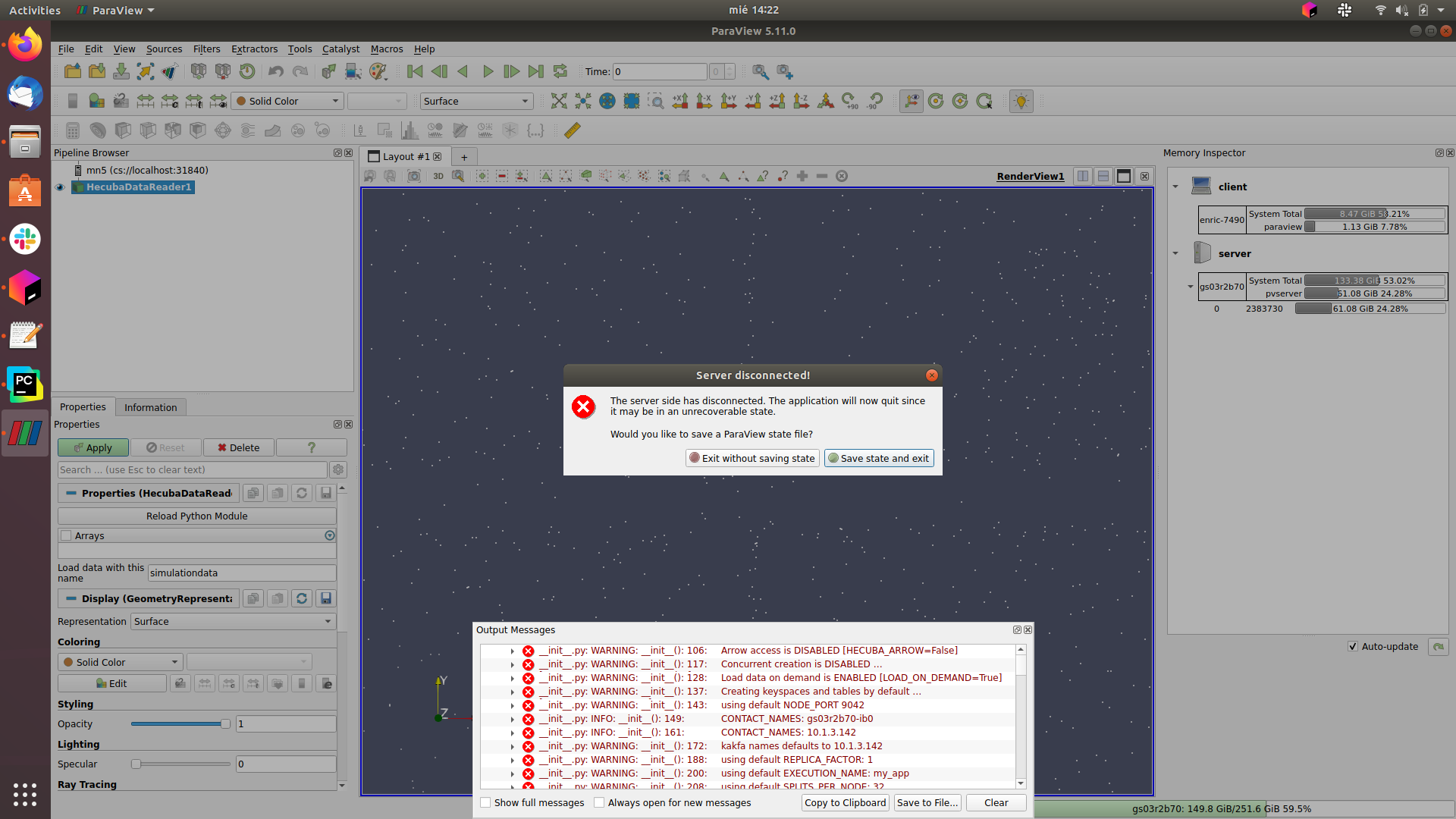
There are a lot of particles, and that is probably the reason considering that it works with smaller amounts, but I don’t know exactly what it is and how to fix it. I have included the Memory inspector for additional information.
I hope I was understood. For additional information that might be useful, I am using Paraview 5.11.0 in a linux client-server environment. I have no rights to install and configure ParaView on the server. If you need more information, please don’t hesitate to ask, such as the code, etc.
Best regards,
Thanks in advance
---
### Author:  [@Lucas\_Givord](https://discourse.paraview.org/u/Lucas_Givord)
#### Post date: [August 11, 2025, 2:45pm UTC](https://discourse.paraview.org/t/loading-too-many-particles-results-in-server-disconnected/17064/2 "2025-08-11T14:45:00Z")
Hello @enricsosa,
If the treatment on the server is too big, the server will be killed and the client will be notified by this pop up. To be sure this is the issue, do you have some log from the disconnected server itself?
Is it possible to share your paraview config (Help \> About \> “Copy to clipboard”) ?
---
### Author:  [@enricsosa](https://discourse.paraview.org/u/enricsosa)
#### Post date: [August 12, 2025, 6:46am UTC](https://discourse.paraview.org/t/loading-too-many-particles-results-in-server-disconnected/17064/3 "2025-08-12T06:46:33Z")
Hi @Lucas_Givord, thanks for your response.
How do I get the log from the disconnected server?
Here is my config:
> _ **Client Information** :_
> _Version: 5.11.0_
> _VTK Version: 9.2.20220823_
> _Qt Version: 5.15.2_
> _vtkIdType size: 64bits_
> _Embedded Python: On_
> _Python Library Path: /home/enricsosa/bsc/ParaView-5.11.0-MPI-Linux-Python3.9-x86\_64/lib/python3.9_
> _Python Library Version: 3.9.13 (main, Nov 14 2022, 18:41:25) [GCC 7.3.1 20180303 (Red Hat 7.3.1-5)]_
> _Python Numpy Support: Off_
> _Python Matplotlib Support: Off_
> _Python Testing: Off_
> _MPI Enabled: On_
> _ParaView Build ID: superbuild 296d2d1b237965dbf5059263bb6feac90417f250 (!1041)_
> _Disable Registry: Off_
> \*Test Directory: \*
> \*Data Directory: \*
> _SMP Backend: TBB_
> _SMP Max Number of Threads: 8_
> _OpenGL Vendor: Intel Open Source Technology Center_
> _OpenGL Version: 4.6 (Core Profile) Mesa 20.0.8_
> _OpenGL Renderer: Mesa DRI Intel(R) UHD Graphics 620 (KBL GT2)_
> _Accelerated filters overrides available: No_
> _ **Connection Information** :_
> _Remote Connection: Yes_
> _Separate Render Server: No_
> _Reverse Connection: No_
> _Number of Processes: 1_
> _Disable Remote Rendering: Off_
> _IceT: On_
> _Tile Display: Off_
> _vtkIdType size: 64bits_
> _SMP Backend: TBB_
> _SMP Max Number of Threads: 224_
> _Embedded Python: On_
> _Python Library Path: /apps/GPP/PARAVIEW/5.11.0/lib/python3.9_
> _Python Library Version: 3.9.13 (main, Nov 14 2022, 18:41:25) [GCC 7.3.1 20180303 (Red Hat 7.3.1-5)]_
> _Python Numpy Support: On_
> _Python Numpy Path: /gpfs/apps/MN5/GPP/PARAVIEW/5.11.0/lib/python3.9/site-packages/numpy_
> _Python Numpy Version: 1.21.1_
> _Python Matplotlib Support: On_
> _Python Matplotlib Path: /gpfs/apps/MN5/GPP/PARAVIEW/5.11.0/lib/python3.9/site-packages/matplotlib_
> _Python Matplotlib Version: 3.2.1_
> _OpenGL Vendor: Mesa/X.org_
> _OpenGL Version: 3.3 (Core Profile) Mesa 21.2.1_
> _OpenGL Renderer: llvmpipe (LLVM 7.0.0, 256 bits)_
> _Headless support: None_
> _Accelerated filters overrides available: No_
---
### Author:  [@mwestphal](https://discourse.paraview.org/u/mwestphal)
#### Post date: [August 25, 2025, 11:22am UTC](https://discourse.paraview.org/t/loading-too-many-particles-results-in-server-disconnected/17064/4 "2025-08-25T11:22:11Z")
> [@enricsosa](#):
>
> How do I get the log from the disconnected server?
How do you run the server ?
---
### Author:  [@enricsosa](https://discourse.paraview.org/u/enricsosa)
#### Post date: [August 25, 2025, 12:04pm UTC](https://discourse.paraview.org/t/loading-too-many-particles-results-in-server-disconnected/17064/5 "2025-08-25T12:04:15Z")
Hi,
Sorry, now I know where I have the server logs, this is the error message (I should have updated it):
```auto
numpy to vtk TIME: 49.910595178604126
^[[0m^[[1m^[[91m
Loguru caught a signal: SIGSEGV
^[[0m^[[0m^[[31mStack trace:
1 0x7fab86404129 [0x7fab86404129]
0 0x7fac88123df0 /lib64/libc.so.6(+0x54df0) [0x7fac88123df0]^[[0m
^[[0m^[[31m( 521.179s) [pvserver] :0 FATL| Signal: SIGSEGV^[[0m
error: exception occurred: Segmentation fault
srun: error: gs07r2b31: task 0: Exited with exit code 1
srun: Terminating StepId=25729908.6
```
These are the last lines of the log. The first line of these lines (_numpy to vtk TIME_[…]) is from a print of my _RequestData_ code from my custom source module. These are the last lines of code of my _RequestData_:
```
# set points
numPts = vtkpoints.GetNumberOfPoints()
ptIds = vtk.vtkIdList()
ptIds.SetNumberOfIds(numPts)
for a in range(numPts):
ptIds.SetId(a, a)
output.SetPoints(vtkpoints)
output.Allocate(1)
output.InsertNextCell(vtk.VTK_POLY_VERTEX, ptIds)
print("numpy to vtk TIME:", time.time() - vtk_time, flush=True) # TIME
return 1
```
Thanks in advance.
---
### Author:  [@mwestphal](https://discourse.paraview.org/u/mwestphal)
#### Post date: [August 25, 2025, 12:37pm UTC](https://discourse.paraview.org/t/loading-too-many-particles-results-in-server-disconnected/17064/6 "2025-08-25T12:37:46Z")
Does the crash occurs only when you use this custom source ?
---
### Author:  [@enricsosa](https://discourse.paraview.org/u/enricsosa)
#### Post date: [August 27, 2025, 9:55am UTC](https://discourse.paraview.org/t/loading-too-many-particles-results-in-server-disconnected/17064/7 "2025-08-27T09:55:47Z")
I tried using the _Point Source_ module with these parameters (which are similar to those I use) and it crashes:
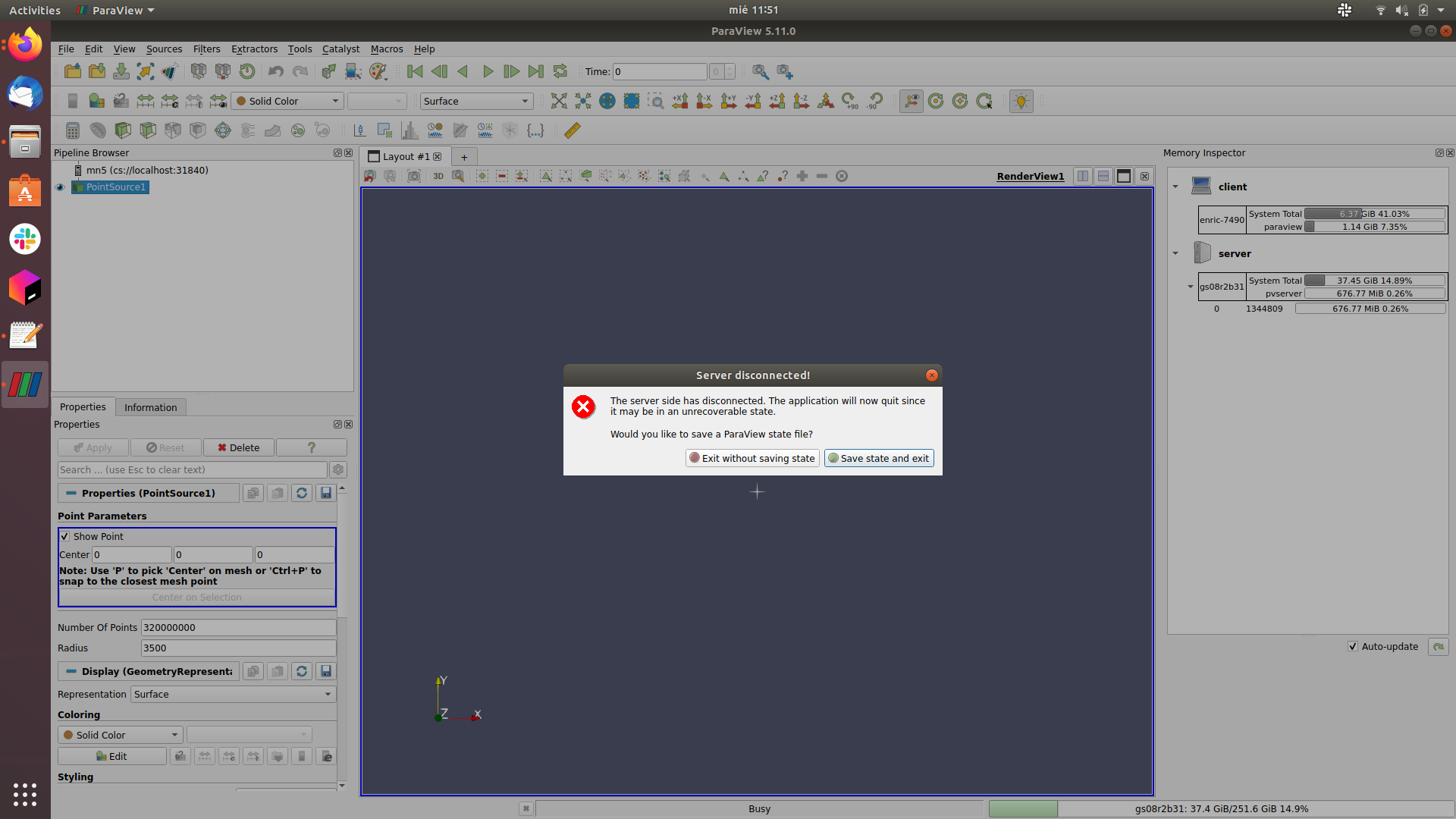
The complete server log:
> Waiting for client…
> Connection URL: cs://gs08r2b31:31840
> Accepting connection(s): gs08r2b31:31840
> Client connected.
> ^[[0m^[[1m^[[91m
> Loguru caught a signal: SIGSEGV
> ^[[0m^[[0m^[[31mStack trace:
> 1 0x7fbfc007d129 [0x7fbfc007d129]
> 0 0x7fc00acb8df0 /lib64/libc.so.6(+0x54df0) [0x7fc00acb8df0]^[[0m
> ^[[0m^[[31m( 98.205s) [pvserver] :0 FATL| Signal: SIGSEGV^[[0m
> error: exception occurred: Segmentation fault
> srun: error: gs08r2b31: task 0: Exited with exit code 1
> srun: Terminating StepId=26156300.7
To add additional information, this is the _pvserver_ command that I use to launch the server:
> srun pvserver --multi-clients --force-offscreen-rendering --server-port=$port \> ~/$log 2\>&1
---
### Author:  [@mwestphal](https://discourse.paraview.org/u/mwestphal)
#### Post date: [August 27, 2025, 10:48am UTC](https://discourse.paraview.org/t/loading-too-many-particles-results-in-server-disconnected/17064/8 "2025-08-27T10:48:23Z")
Can you monitor the memory on the server side while you do that ?
---
### Author:  [@enricsosa](https://discourse.paraview.org/u/enricsosa)
#### Post date: [August 27, 2025, 12:22pm UTC](https://discourse.paraview.org/t/loading-too-many-particles-results-in-server-disconnected/17064/9 "2025-08-27T12:22:34Z")
That is the htop command on the server side (speed up):
Also, the free command in another execution (also, speed up):
Does it seem good right?
---
### Author:  [@mwestphal](https://discourse.paraview.org/u/mwestphal)
#### Post date: [August 27, 2025, 1:08pm UTC](https://discourse.paraview.org/t/loading-too-many-particles-results-in-server-disconnected/17064/10 "2025-08-27T13:08:22Z")
Indeed, not a memory issue, we will need to try that on a large memory computer to check
---
### Author:  [@enricsosa](https://discourse.paraview.org/u/enricsosa)
#### Post date: [September 17, 2025, 7:59am UTC](https://discourse.paraview.org/t/loading-too-many-particles-results-in-server-disconnected/17064/11 "2025-09-17T07:59:32Z")
I have more information on the subject, but I’m still not entirely sure what the problem is exactly.
I’ve tried the _StreamingParticles_ plugin and its _RandomStreamingPoints_ source module. When I run it with lots of particles, I get the same error (Server Disconnected!), but this time it’s more explicit about it:
> `( 822.184s) [paraview] vtkOutputWindow.cxx:78 ERR| ERROR: In vtkTextureObject.cxx, line 1028 `
> `vtkTextureObject (0x18cb18b0): Attempt to use a texture buffer exceeding your hardware's limits. This can happen when trying to color by cell data with a large dataset. Hardware limit is 134217728 values while 249999993 was requested.`
I’ve looked into the problem and found a couple of threads about it: [Paraview texture buffer size (or driver) issue](https://discourse.paraview.org/t/paraview-texture-buffer-size-or-driver-issue/9575) and [Texture buffer size error](https://discourse.vtk.org/t/texture-buffer-size-error/8484), both threads answered by @cory.quammen . I’m using _ParaView 5.11.0_ (which 5.12 seems recommended), and also my _OpenGL Mesa_ versiones are 21.2.1 in my server side but 20.0.8 in my client side (which +21.1 seems recommended). However, even though this plugin needs to be loaded on both the server and client, mine in particular does not, so I don’t know if the Mesa version on my client side would have any influence.
Still, I don’t know if I’m in the correct path.