# Metrical unit in paraview
**URL:** https://discourse.paraview.org/t/metrical-unit-in-paraview/2339
**Category:** ParaView Support
**Created:** [August 1, 2019, 10:28am UTC](https://discourse.paraview.org/t/metrical-unit-in-paraview/2339 "2019-08-01T10:28:24Z")
**Posts on this page:** 3
**Page:** 1
### Author:  [@cfedon](https://discourse.paraview.org/u/cfedon)
#### Post date: [August 1, 2019, 10:28am UTC](https://discourse.paraview.org/t/metrical-unit-in-paraview/2339/1 "2019-08-01T10:28:25Z")
Hi all,
I am trying to upload two 3D .tiff images on paraview to make a visual comparison.
These images have a different number of voxels and a different voxel size, but eventually the dimension should be “equal” or, at least comparable, as follows:
Image1–\> 148 (number of voxel) x 0.5 mm (voxel size) = 74 mm
Image2–\> 267 (number of voxel) x 0.273 mm (voxel size) = 73 mm
However, what happen is that the second image (in yellow, which has higher number of voxel) is higher than the first (the blue one) [see attached file] 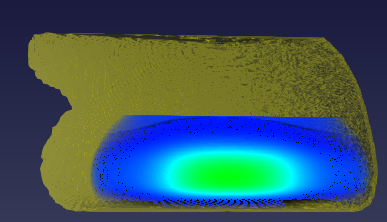 .
I know that Paraview doesn’t have unit, however there is any way to make this comparison?
I noticed that you can customize your data spacing when uploading the images, is it the only way to do that? Is there a better way to implement real dimension?
Many thanks for any help you will provide me!
---
### Author:  [@Kenneth\_Moreland](https://discourse.paraview.org/u/Kenneth_Moreland)
#### Post date: [August 1, 2019, 1:00pm UTC](https://discourse.paraview.org/t/metrical-unit-in-paraview/2339/2 "2019-08-01T13:00:35Z")
Like you said, ParaView does not directly support units. But you can adjust the size and location with the transform display properties. In the `Properties` panel, turn on the advanced properties (that gear icon near the upper right) and scroll down about halfway until you see a group of controls labeled `Transforming` as shown in this screen capture.
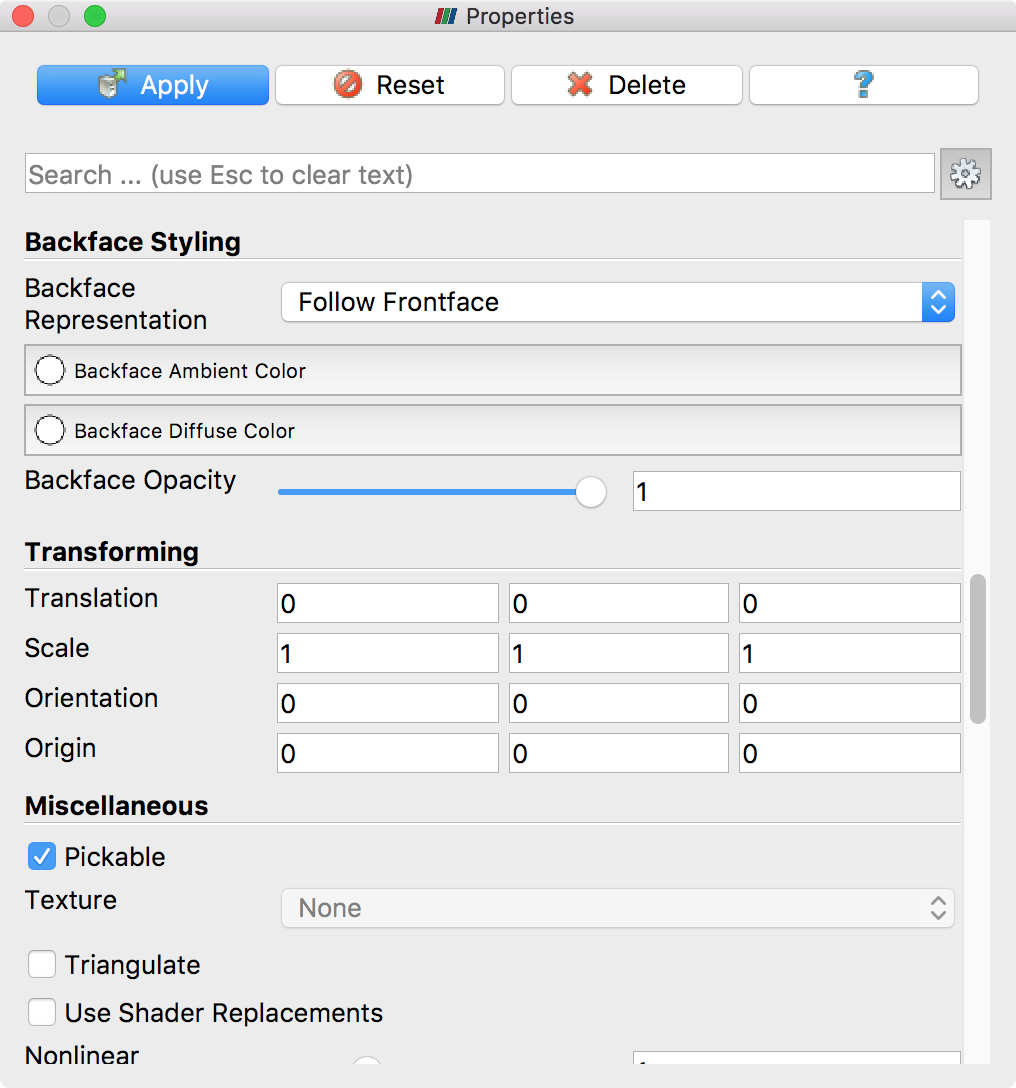
These controls let you adjust the size and position of the object in 3-space. You can use the `Scale` parameter to adjust the size of each image. I suggest setting the `Scale` to the voxel size of each respective image. So for your first image, set the `Scale` to 0.5, 0.5, 0.5 and for the second image set the `Scale` to 0.273, 0.273, 0.273.
If you need to move the images around to line them up, you can do so with the `Translation` parameters.
---
### Author:  [@cfedon](https://discourse.paraview.org/u/cfedon)
#### Post date: [August 1, 2019, 1:19pm UTC](https://discourse.paraview.org/t/metrical-unit-in-paraview/2339/3 "2019-08-01T13:19:22Z")
Many Thanks Kenneth!
Your suggestion helped and solved my issue!