# move axes
**URL:** https://discourse.paraview.org/t/move-axes/6884
**Category:** ParaView Support
**Tags:** vtk
**Created:** [April 6, 2021, 3:11pm UTC](https://discourse.paraview.org/t/move-axes/6884 "2021-04-06T15:11:54Z")
**Posts on this page:** 3
**Page:** 1
### Author:  [@aquanaut](https://discourse.paraview.org/u/aquanaut)
#### Post date: [April 6, 2021, 3:11pm UTC](https://discourse.paraview.org/t/move-axes/6884/1 "2021-04-06T15:11:54Z")

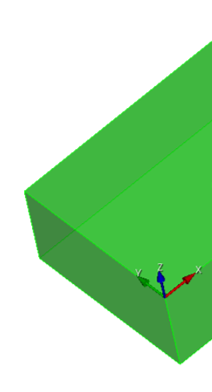
hi,can I move the axes to the positon like the following picture?
---
### Author:  [@mwestphal](https://discourse.paraview.org/u/mwestphal)
#### Post date: [April 6, 2021, 3:20pm UTC](https://discourse.paraview.org/t/move-axes/6884/2 "2021-04-06T15:20:31Z")
The defaults axes in ParaView are not in the scene but drawn on top.
You can add an axes source for that.
---
### Author:  [@cory.quammen](https://discourse.paraview.org/u/cory.quammen)
#### Post date: [April 6, 2021, 5:07pm UTC](https://discourse.paraview.org/t/move-axes/6884/3 "2021-04-06T17:07:51Z")
You can move ParaViews orientation axes by checking the **Orientation Axes Interactivity** checkbox in the properties panel under the View section. Note that if your 3D view is using the default perspective camera model, the axes may not line up with the corner of the cube because the orientation axes are rendered using an orthogonal camera model.