# multi-block VTK output
**URL:** https://discourse.paraview.org/t/multi-block-vtk-output/3957
**Category:** ParaView Support
**Tags:** vtk
**Created:** [April 3, 2020, 5:23am UTC](https://discourse.paraview.org/t/multi-block-vtk-output/3957 "2020-04-03T05:23:00Z")
**Posts on this page:** 10
**Page:** 1
### Author:  [@henry2004y](https://discourse.paraview.org/u/henry2004y)
#### Post date: [April 3, 2020, 5:23am UTC](https://discourse.paraview.org/t/multi-block-vtk-output/3957/1 "2020-04-03T05:23:00Z")
Hi,
I have a block based AMR code which outputs cell centered coordinates and values. I made some initial attempts to convert that into a multi-block output (\*.vtm),
However, the problem is that ParaView cannot figure out the connection between blocks, so there is a gap in between:
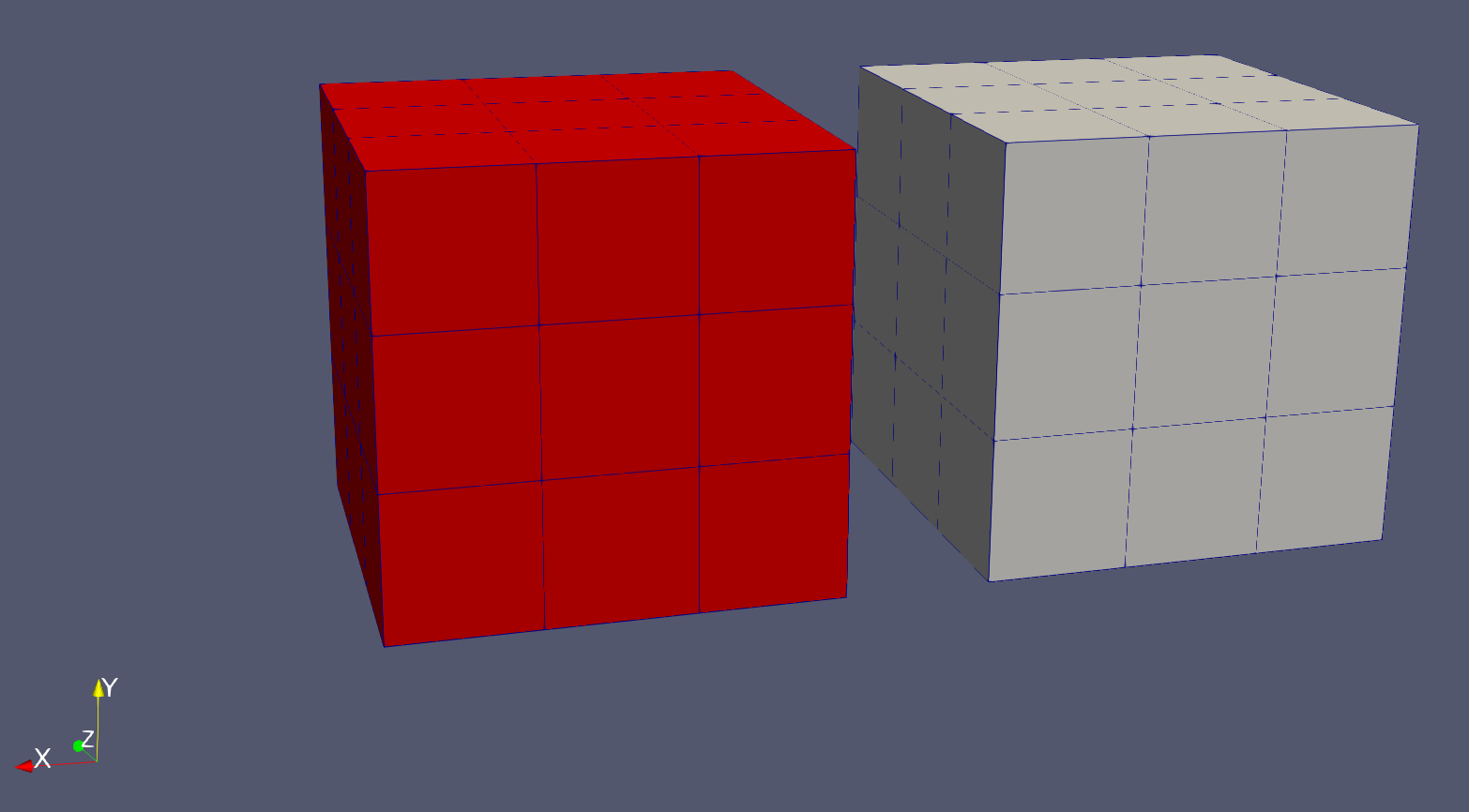
I am wondering what is a proper way to handle the data. Should I switch to the original node grid, or do some trick to let ParaView know the blocks are connected so that common filter can work?
[my\_vtm\_file\_1.vtr](https://discourse.paraview.org/uploads/short-url/nrfK6SJ3WHkPMfL48HrLNAYjZuF.vtr) (962 Bytes) [my\_vtm\_file\_2.vtr](https://discourse.paraview.org/uploads/short-url/bR9ETql7240Je4Q3JC6SfYB773A.vtr) (964 Bytes) [my\_vtm\_file.vtm](https://discourse.paraview.org/uploads/short-url/lMvxqavJ0doUPrbgKefoNSG60xM.vtm) (353 Bytes)
---
### Author:  [@Charles\_Gueunet](https://discourse.paraview.org/u/Charles_Gueunet)
#### Post date: [April 3, 2020, 2:24pm UTC](https://discourse.paraview.org/t/multi-block-vtk-output/3957/2 "2020-04-03T14:24:45Z")
Hello,
If you want common filters to work on your data set, you can use the [MergeBlock](https://kitware.github.io/paraview-docs/latest/python/paraview.simple.MergeBlocks.html) filter to append all blocks in a single data set.
Notice that this filter wont “glue” your blocks. Do you also need blocks to be merged in terms of neighborhood ?
---
### Author:  [@amarcozzi11](https://discourse.paraview.org/u/amarcozzi11)
#### Post date: [April 3, 2020, 2:41pm UTC](https://discourse.paraview.org/t/multi-block-vtk-output/3957/3 "2020-04-03T14:41:37Z")
Hello,
I was just about to make a post with a similar issue. I have a multiblock terrain representation that I’d like to run some contour and volume simulations over. However, like [henry2004y](https://discourse.paraview.org/u/henry2004y) when I import the plot3D .xyz files there’s a distinguishable gap between the blocks (see attached picture).
I’d like to find a way to eliminate those gaps to allow for smooth animations at the block boundaries.
I’m thinking this has something to do with ghosting variables, but I’d appreciate someone’s insight into the problem!

---
### Author:  [@henry2004y](https://discourse.paraview.org/u/henry2004y)
#### Post date: [April 3, 2020, 2:42pm UTC](https://discourse.paraview.org/t/multi-block-vtk-output/3957/4 "2020-04-03T14:42:01Z")
Yes. The blocks should be merged, but simply with the merge block filter, I can apply common filters, but the gaps are still there. And also using the merge block filter converts the structured grid to unstructured grid, which is what I want to avoid actually.
---
### Author:  [@mwestphal](https://discourse.paraview.org/u/mwestphal)
#### Post date: [April 6, 2020, 6:47am UTC](https://discourse.paraview.org/t/multi-block-vtk-output/3957/5 "2020-04-06T06:47:57Z")
> [@henry2004y](#):
>
> the problem is that ParaView cannot figure out the connection between blocks, so there is a gap in between:
Because there is no connection between the blocks.
Just make an actual connection and duplicate the point making the connection.
---
### Author:  [@henry2004y](https://discourse.paraview.org/u/henry2004y)
#### Post date: [April 6, 2020, 3:01pm UTC](https://discourse.paraview.org/t/multi-block-vtk-output/3957/6 "2020-04-06T15:01:22Z")
I see. But then if there are resolution changes between blocks (i.e. AMR), which means ghost cells are not overlapped, what will happen?
I found some pieces of information about AMR data structures in VTK, but I’m really not familiar with them…
---
### Author:  [@amarcozzi11](https://discourse.paraview.org/u/amarcozzi11)
#### Post date: [April 6, 2020, 7:42pm UTC](https://discourse.paraview.org/t/multi-block-vtk-output/3957/7 "2020-04-06T19:42:51Z")
Can you provide an example as to how to make a connection between the blocks? I tried the GroupDatasets filter followed by the Merge Blocks filter, but still cannot get Paraview to remove the space between blocks.
Thank you,
Anthony
---
### Author:  [@mwestphal](https://discourse.paraview.org/u/mwestphal)
#### Post date: [April 7, 2020, 3:30am UTC](https://discourse.paraview.org/t/multi-block-vtk-output/3957/8 "2020-04-07T03:30:29Z")
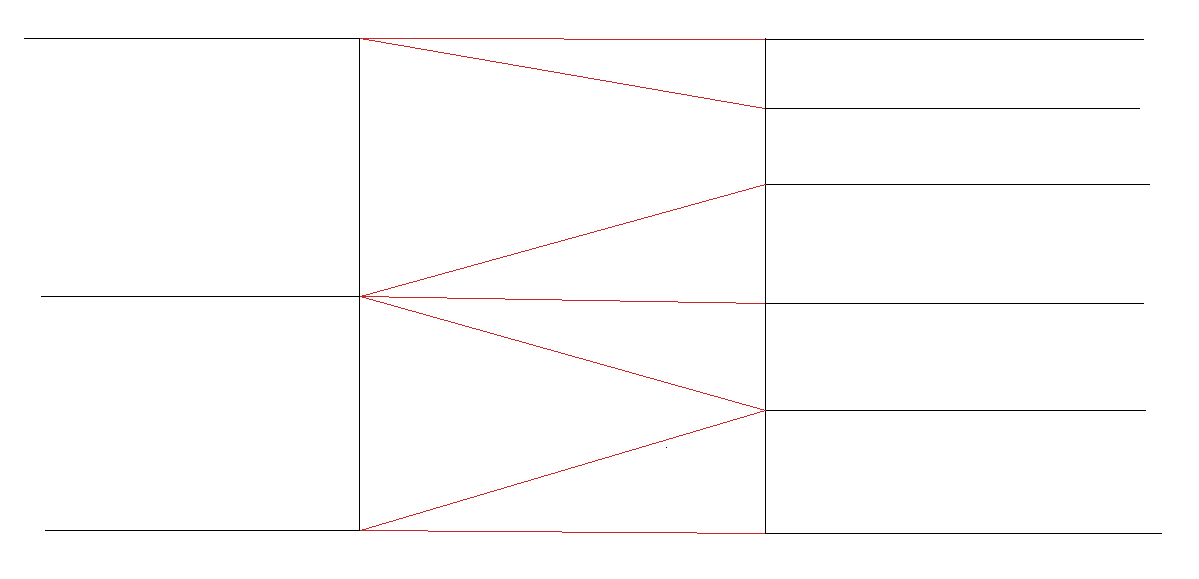
You either need to use a AMR datastructures like vtkUniformGridAMR or vtkHyperTreeGrid.
Or you need to create cells like this :
---
### Author:  [@henry2004y](https://discourse.paraview.org/u/henry2004y)
#### Post date: [April 11, 2020, 3:34pm UTC](https://discourse.paraview.org/t/multi-block-vtk-output/3957/9 "2020-04-11T15:34:31Z")
> [@mwestphal](#):
>
> vtkUniformGridAMR
Do you know where is this `vtkUniformGridAMR` format described? I found one in the auto-generated [https://vtk.org/doc/nightly/html/classvtkUniformGridAMR.html)](https://vtk.org/doc/nightly/html/classvtkUniformGridAMR.html), and the [C++ source code](https://gitlab.kitware.com/vtk/vtk/blob/master/Common/DataModel/vtkUniformGridAMR.cxx),
but I still have no clue how to generate this data structure myself.
---
### Author:  [@mwestphal](https://discourse.paraview.org/u/mwestphal)
#### Post date: [April 14, 2020, 3:30am UTC](https://discourse.paraview.org/t/multi-block-vtk-output/3957/10 "2020-04-14T03:30:49Z")
> **[Visualization & Analysis of AMR Datasets - Kitware Blog](https://blog.kitware.com/visualization-analysis-of-amr-datasets/)**
>
> Multiphysics simulations of complex phenomena exhibiting large length and time scales, such as astrophysics, have been greatly facilitated by the AMR approach. By discretizing the ... Read More
[https://www.paraview.org/ParaView/index.php/Multi-Resolution\_Rendering\_with\_Overlapping\_AMR](https://www.paraview.org/ParaView/index.php/Multi-Resolution_Rendering_with_Overlapping_AMR)
There is an AMRGaussianPulseSource in ParaView that you can use.