# Multiple time steps grouping
**URL:** https://discourse.paraview.org/t/multiple-time-steps-grouping/11222
**Category:** ParaView Support
**Created:** [January 20, 2023, 5:50pm UTC](https://discourse.paraview.org/t/multiple-time-steps-grouping/11222 "2023-01-20T17:50:52Z")
**Posts on this page:** 13
**Page:** 1
### Author:  [@alina6](https://discourse.paraview.org/u/alina6)
#### Post date: [January 20, 2023, 5:50pm UTC](https://discourse.paraview.org/t/multiple-time-steps-grouping/11222/1 "2023-01-20T17:50:52Z")
Hi all,
I am relatively new to paraview, I am sorry if it is a stupid question.
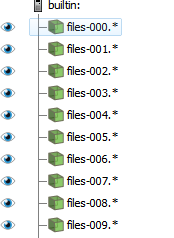
I have multiple vtu files from one transient simulation for time period of 10 sec in the steps of 0.1 seconds. When I am loading those multiple files to paraview they are grouped in datasets each 1 second period. When I am trying to play the simulation in paraview, it plays for the first second and then the picture freezes on last vtu file of the first second, while time continues to run. I have tried to use filters - “group datasets”, but while it is not freezing now, the files are played in some random order.
Please help!
Alina
---
### Author:  [@mwestphal](https://discourse.paraview.org/u/mwestphal)
#### Post date: [January 23, 2023, 7:40am UTC](https://discourse.paraview.org/t/multiple-time-steps-grouping/11222/2 "2023-01-23T07:40:39Z")
Hi @alina6
The simplest way to fix this is to change your numbering system.
instead of:
```auto
files-000.0.ext
files-000.1.ext
...
files-000.9.ext
files-001.0.ext
```
you may want to use:
```auto
files-0000.ext
files-0001.ext
...
files-0009.ext
files-0010.ext
```
If you want to keep the correct time values, then you may want to use a .series files like this:
[https://gitlab.kitware.com/paraview/paraview/blob/v5.5.0/Documentation/release/ParaView-5.5.0.md#json-based-new-meta-file-format-for-series-added](https://gitlab.kitware.com/paraview/paraview/blob/v5.5.0/Documentation/release/ParaView-5.5.0.md#json-based-new-meta-file-format-for-series-added)
Hth
---
### Author:  [@alina6](https://discourse.paraview.org/u/alina6)
#### Post date: [January 24, 2023, 10:03am UTC](https://discourse.paraview.org/t/multiple-time-steps-grouping/11222/3 "2023-01-24T10:03:03Z")
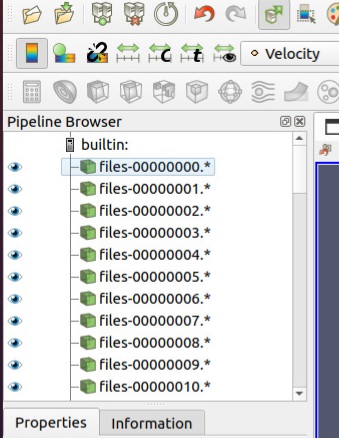
Thank you Mathieu for your reply. I’ve tried changing the numbering system, tried different configurations, but unfortunately it had not worked.
Regarding .series files, I will have to input manually series of about 100 vtu files (10 groups at least, 10 files each of 0.1 seconds)? May be there is another way?
Thank you in advance,
Alina
---
### Author:  [@mwestphal](https://discourse.paraview.org/u/mwestphal)
#### Post date: [January 24, 2023, 10:06am UTC](https://discourse.paraview.org/t/multiple-time-steps-grouping/11222/4 "2023-01-24T10:06:43Z")
> [@alina6](#):
>
> May be there is another way?
If you want to keep the correct time values, then you may want to use a .series files like this:
[https://gitlab.kitware.com/paraview/paraview/blob/v5.5.0/Documentation/release/ParaView-5.5.0.md#json-based-new-meta-file-format-for-series-added](https://gitlab.kitware.com/paraview/paraview/blob/v5.5.0/Documentation/release/ParaView-5.5.0.md#json-based-new-meta-file-format-for-series-added)
Hth
---
### Author:  [@alina6](https://discourse.paraview.org/u/alina6)
#### Post date: [January 26, 2023, 1:30pm UTC](https://discourse.paraview.org/t/multiple-time-steps-grouping/11222/5 "2023-01-26T13:30:35Z")
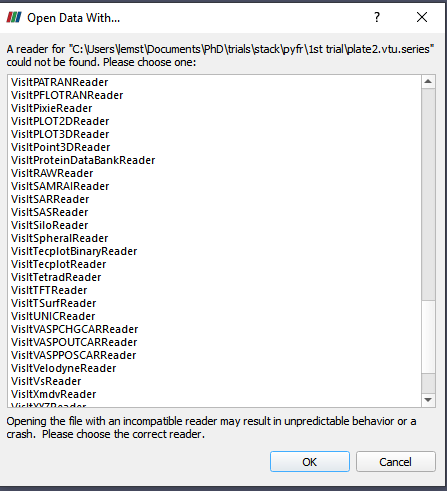
Hello Mathieu. What reader should I choose for opening .vtu.series I have created?
There is no vtkFileSeriesReader in the readers list.
Also, it is not quite clear to me, where can I find readers description, in order to add the `extension.series` extension to the extension list of the reader.
Thank you,
Alina
---
### Author:  [@mwestphal](https://discourse.paraview.org/u/mwestphal)
#### Post date: [January 26, 2023, 1:33pm UTC](https://discourse.paraview.org/t/multiple-time-steps-grouping/11222/6 "2023-01-26T13:33:47Z")
please share a few of your files, I will give you an example.
---
### Author:  [@alina6](https://discourse.paraview.org/u/alina6)
#### Post date: [January 26, 2023, 2:14pm UTC](https://discourse.paraview.org/t/multiple-time-steps-grouping/11222/7 "2023-01-26T14:14:45Z")
Please find them attached:
[F1.0.vtu](https://discourse.paraview.org/uploads/short-url/mresD9vw6d9wcMri2YbQNDNxtih.vtu) (407.4 KB)
[F2.0.vtu](https://discourse.paraview.org/uploads/short-url/kCjrKmnOc8Dm75iLhirRDQqWJ5G.vtu) (407.4 KB)
[F3.0.vtu](https://discourse.paraview.org/uploads/short-url/aEWjtrVBgX5tCdOmt91zGve1CLo.vtu) (407.4 KB)
[F4.0.vtu](https://discourse.paraview.org/uploads/short-url/up6RtIUnfLyQ5LxpMpBjrKzpfxE.vtu) (407.4 KB)
[plate2.vtu.series](https://discourse.paraview.org/uploads/short-url/kdmKblT7ivs7iyPqha8xv2thdct.series) (462 Bytes)
Thank you very much,
Alina
---
### Author:  [@mwestphal](https://discourse.paraview.org/u/mwestphal)
#### Post date: [January 26, 2023, 3:59pm UTC](https://discourse.paraview.org/t/multiple-time-steps-grouping/11222/8 "2023-01-26T15:59:55Z")
here is a corrected version
[plate2.vtu.series](https://discourse.paraview.org/uploads/short-url/rHxAvYUgcbnGCEHLgLW2zqotNxS.series) (228 Bytes)
---
### Author:  [@alina6](https://discourse.paraview.org/u/alina6)
#### Post date: [January 26, 2023, 5:19pm UTC](https://discourse.paraview.org/t/multiple-time-steps-grouping/11222/9 "2023-01-26T17:19:07Z")
Hallelujah! It is working!
I only now understand that the number of files opened in paraview should exactly match the number of files in series file.
Thank you very much for your help!
---
### Author:  [@javierdiaz](https://discourse.paraview.org/u/javierdiaz)
#### Post date: [October 10, 2023, 11:27am UTC](https://discourse.paraview.org/t/multiple-time-steps-grouping/11222/10 "2023-10-10T11:27:20Z")
Hello, I have a similar issue in which I can’t get to use the \*.series files properly.
I have a series of \*.vti files ordered like
vtk2\_00000000.vti
vtk2\_00000001.vti
…
vtk2\_00000033.vti
I would like to be able to map the index of the file to a real time value and for that I use a times.vti.series file (attached).
[times.vti.series](https://discourse.paraview.org/uploads/short-url/3rRqdKQh0uCeJ4jxxc0VP43HHMI.series) (1.9 KB)
However, when I load the \*.vti files I can’t get to see the actual “real time”, but only the index. The times.vti.series is in the same directory as the \*.vti files.
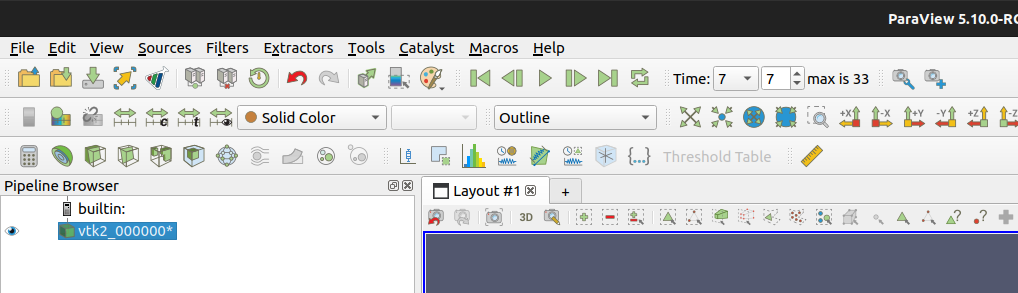
Similarly, if I load the times.vti.series, paraview does not seem to properly understand they refer to the same set, and instead appends more time steps, so that I have 68 time steps in paraview.
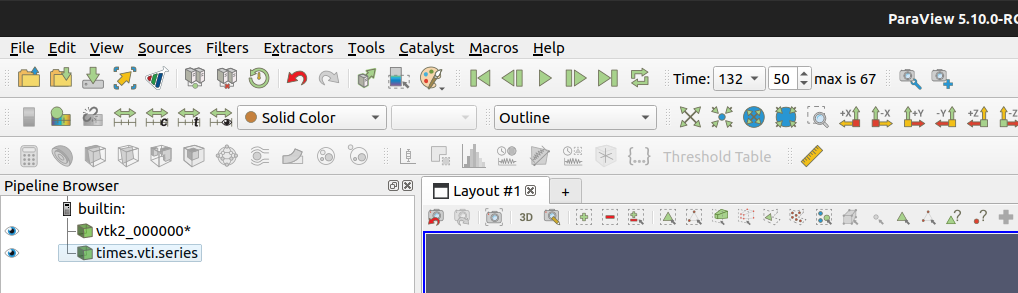
you can notice that paraview is understanding the mapping according to the times.vti.series file (time=132 as in the file), but is ‘doubling’ the number of steps so now I have 68 instead of 34.
Can you please provide any suggestions if I am having any error in the way how I deal with series files?
Thank you very much for your help
---
### Author:  [@mwestphal](https://discourse.paraview.org/u/mwestphal)
#### Post date: [October 10, 2023, 11:43am UTC](https://discourse.paraview.org/t/multiple-time-steps-grouping/11222/11 "2023-10-10T11:43:23Z")
open only the `.series` file
---
### Author:  [@javierdiaz](https://discourse.paraview.org/u/javierdiaz)
#### Post date: [October 10, 2023, 12:08pm UTC](https://discourse.paraview.org/t/multiple-time-steps-grouping/11222/12 "2023-10-10T12:08:04Z")
Thank you very much. I was thinking that the `.series` file was just a mapping to be added.
You fixed the issue.
---
### Author:  [@mwestphal](https://discourse.paraview.org/u/mwestphal)
#### Post date: [May 6, 2024, 12:24pm UTC](https://discourse.paraview.org/t/multiple-time-steps-grouping/11222/13 "2024-05-06T12:24:20Z")
A post was split to a new topic: [Show a serie of timesteps](https://discourse.paraview.org/t/show-a-serie-of-timesteps/14563)