# no text appears in the pop-up windows, when moving the cursor on filters
**URL:** https://discourse.paraview.org/t/no-text-appears-in-the-pop-up-windows-when-moving-the-cursor-on-filters/7223
**Category:** ParaView Support
**Created:** [May 13, 2021, 8:17am UTC](https://discourse.paraview.org/t/no-text-appears-in-the-pop-up-windows-when-moving-the-cursor-on-filters/7223 "2021-05-13T08:17:10Z")
**Posts on this page:** 14
**Page:** 1
### Author:  [@simonw](https://discourse.paraview.org/u/simonw)
#### Post date: [May 13, 2021, 8:17am UTC](https://discourse.paraview.org/t/no-text-appears-in-the-pop-up-windows-when-moving-the-cursor-on-filters/7223/1 "2021-05-13T08:17:10Z")
Dear all,
I am using paraview on a virtual macine (VM-ware). My problem is not a big issue, however it would be great if this problem could be fixed.
When I move my cursor on arbitrary filters (e.g. Clip, Rescale, Warp by Scalar,…) usually a small window pop-ups and shows some explanation what the correspondong filter actually does. In my case, the window pop-ups, but without the additional helping text, i.e. just an empty white window.
If necessary, I can attach a screenshot, but I guess my problem is well described.
Here some additional input about my current OpenGL settings:
OpenGL Vendor: VMware, Inc.
OpenGL Version: 2.1 Mesa 20.0.8
OpenGL Renderer: SVGA3D;build;RELEASE; LLVM;
I am not quite sure if this is actually a problem related to OpenGl/Missing drivers or if there is a simple setting inside paraview where I can activate the “helping texts”.
Any input would be greatly appreciated!
Best
Simon
---
### Author:  [@mwestphal](https://discourse.paraview.org/u/mwestphal)
#### Post date: [May 14, 2021, 8:24am UTC](https://discourse.paraview.org/t/no-text-appears-in-the-pop-up-windows-when-moving-the-cursor-on-filters/7223/2 "2021-05-14T08:24:21Z")
Not sure which window you are talking about. This information is displayed in the info status bar:

---
### Author:  [@simonw](https://discourse.paraview.org/u/simonw)
#### Post date: [May 14, 2021, 8:38am UTC](https://discourse.paraview.org/t/no-text-appears-in-the-pop-up-windows-when-moving-the-cursor-on-filters/7223/3 "2021-05-14T08:38:04Z")
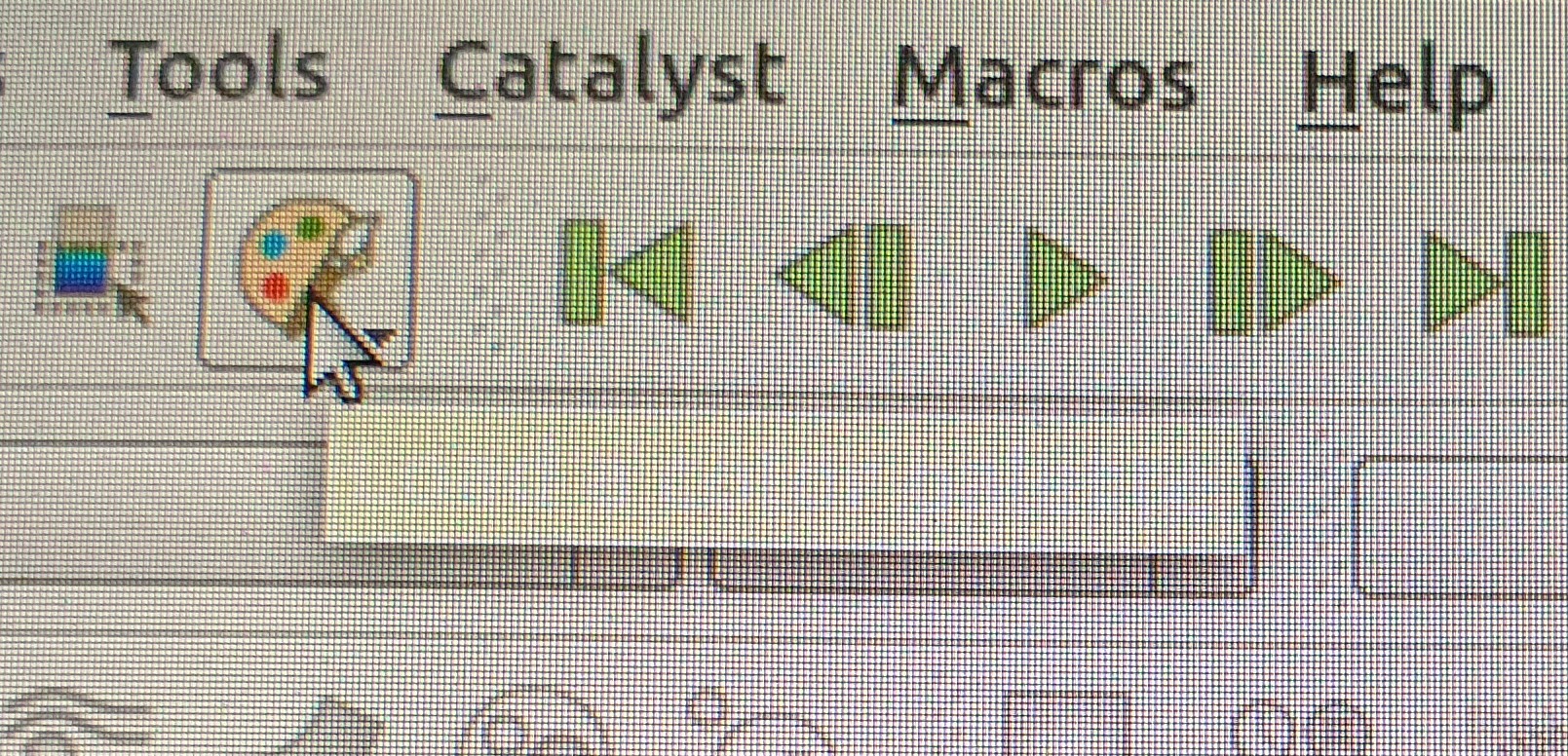
I attached a screenshot of what I am talking about. So for instance I move my cursor on the icon to change the background, then the little white rectangle pop-ups, but in my case it is not filled. (Usually the rectangle is filled with some text what the icon or filter does). I have this problem with all filters,…
Is it clear now what I mean?
-Simon
---
### Author:  [@mwestphal](https://discourse.paraview.org/u/mwestphal)
#### Post date: [May 14, 2021, 8:40am UTC](https://discourse.paraview.org/t/no-text-appears-in-the-pop-up-windows-when-moving-the-cursor-on-filters/7223/4 "2021-05-14T08:40:28Z")
Looks like a graphic driver / Qt bug. This would require deeper investigation in order to figure out what is going on.
---
### Author:  [@simonw](https://discourse.paraview.org/u/simonw)
#### Post date: [May 14, 2021, 8:48am UTC](https://discourse.paraview.org/t/no-text-appears-in-the-pop-up-windows-when-moving-the-cursor-on-filters/7223/5 "2021-05-14T08:48:12Z")
Can you give me some catchwords where the problem may comes from respectively in which files,… I can have a look to may fix my problem?
It would be very helpful to me, if the helping texts were available.
---
### Author:  [@mwestphal](https://discourse.paraview.org/u/mwestphal)
#### Post date: [May 14, 2021, 9:00am UTC](https://discourse.paraview.org/t/no-text-appears-in-the-pop-up-windows-when-moving-the-cursor-on-filters/7223/6 "2021-05-14T09:00:12Z")
“Qt tooltip do not appear” in google gives some insight.
What I’d do in your case would be building a simple qt app with tooltip to make sure this is a qt issue, not a ParaView one.
---
### Author:  [@simonw](https://discourse.paraview.org/u/simonw)
#### Post date: [May 14, 2021, 11:47am UTC](https://discourse.paraview.org/t/no-text-appears-in-the-pop-up-windows-when-moving-the-cursor-on-filters/7223/7 "2021-05-14T11:47:17Z")
Thank you, I will give it a try!
I have seen that I use QT version 4.8.7. I guess this could be the problem, since it is recommended to use a higher version.
Is there a way to install paraview via “sudo apt install paraview” with the current QT-version? I have installed a newer version of QT manually. However reinstalling paraview in the described way doesn´t recognize my new version of QT, i.e. there is still version 4.8.7
---
### Author:  [@mwestphal](https://discourse.paraview.org/u/mwestphal)
#### Post date: [May 14, 2021, 12:30pm UTC](https://discourse.paraview.org/t/no-text-appears-in-the-pop-up-windows-when-moving-the-cursor-on-filters/7223/8 "2021-05-14T12:30:51Z")
Just downlowd paraview from here:
[paraview.org/download](http://paraview.org/download)
---
### Author:  [@simonw](https://discourse.paraview.org/u/simonw)
#### Post date: [May 15, 2021, 7:12am UTC](https://discourse.paraview.org/t/no-text-appears-in-the-pop-up-windows-when-moving-the-cursor-on-filters/7223/9 "2021-05-15T07:12:37Z")
I tried to install paraview manually as you suggested, however cmake is reporting some error messages:

You have answered a similar question already in this forum where someone had the very same problem. After that error message I called cmake via:
cmake -DQt6\_DIR=\ …/paraview
Unfortunately the error message is not gone. I am not quite sure if my downloaded Qt, which I pass to cmake, is correct. Here is a screenshot of the folders I got after extracting Qt6:
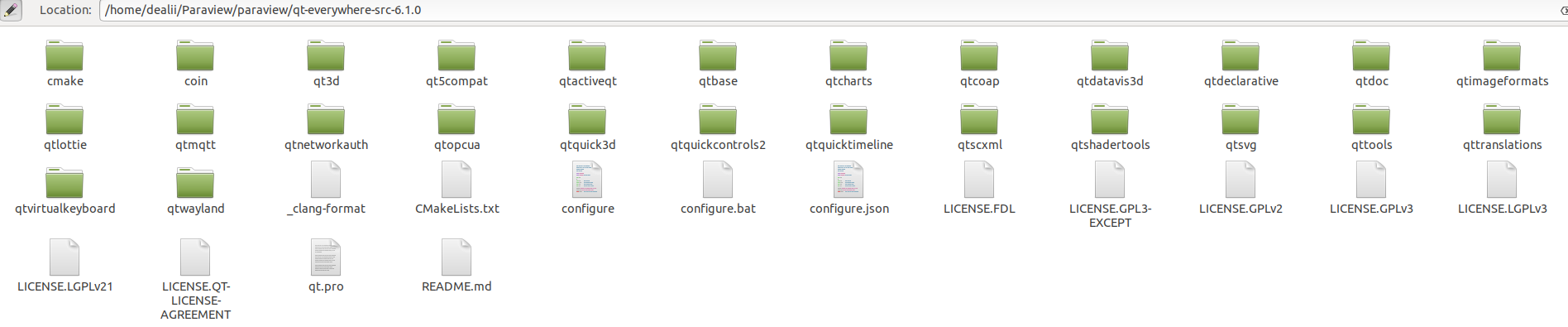
Inside this folder I passed the cmake folder to cmake via -DQt6\_DIR=… Is this correct?
By the way, the cmake error wants “Qt5 external dependency”, however I downloaded Qt6. Can this be a problem as well?
---
### Author:  [@mwestphal](https://discourse.paraview.org/u/mwestphal)
#### Post date: [May 15, 2021, 9:05am UTC](https://discourse.paraview.org/t/no-text-appears-in-the-pop-up-windows-when-moving-the-cursor-on-filters/7223/10 "2021-05-15T09:05:12Z")
Not sure why you think you need to compile ParaView yourself.
Just download and use it:
[paraview.org/download](http://paraview.org/download)
---
### Author:  [@simonw](https://discourse.paraview.org/u/simonw)
#### Post date: [May 17, 2021, 9:09am UTC](https://discourse.paraview.org/t/no-text-appears-in-the-pop-up-windows-when-moving-the-cursor-on-filters/7223/11 "2021-05-17T09:09:47Z")
I can open paraview now, but there is still a issue related to OpenGl:

I am running paraview on a virtual machine (vmware workstation player 16). On my host operating system, which is windows10, my graphic card model is “NVIDIA GeForce Rtx 2080”, OpenGL version 4.6.
Do you know if the workstation player of vmware supports a higher version of OpenGl than version 2.1? I know that within the pro-version there is a setting to support higher versions but I didn´t find a similar setting for the player-version.
-Simon
---
### Author:  [@mwestphal](https://discourse.paraview.org/u/mwestphal)
#### Post date: [May 17, 2021, 9:12am UTC](https://discourse.paraview.org/t/no-text-appears-in-the-pop-up-windows-when-moving-the-cursor-on-filters/7223/12 "2021-05-17T09:12:33Z")
Use mesa as described here:
> [@How to run ParaView (including the binary release) using Mesa on Windows](https://discourse.paraview.org/t/how-to-run-paraview-including-the-binary-release-using-mesa-on-windows/4321):
>
> Mesa is an alternative OpenGL implementation that let you run graphic application while not using your GPU driver. It can be very useful for a number of cases : GPU is unsupported by OS ([Old intel GPU](https://discourse.paraview.org/t/opengl-not-supported-in-windows-10-and-intel-hd-graphics-card-glew-could-not-be-intialized-missing-gl-version/2701)) GPU driver is incompatible with ParaView for some reasons ([Intel Driver current issue](https://gitlab.kitware.com/paraview/paraview/issues/19364)) The OpenGL version provided by the driver is not high enough ([VM](https://discourse.paraview.org/t/opengl-in-vmware-with-windows-guest/218/3), [Remote Desktop](https://gitlab.kitware.com/paraview/paraview/issues/19057)) ParaView has been shipped with Mesa on Linux and MacOS for a long time, but building it on Windows is not something we have b…
---
### Author:  [@simonw](https://discourse.paraview.org/u/simonw)
#### Post date: [May 17, 2021, 9:24am UTC](https://discourse.paraview.org/t/no-text-appears-in-the-pop-up-windows-when-moving-the-cursor-on-filters/7223/13 "2021-05-17T09:24:45Z")
I am running paraview on a linux distribution (ubuntu), i.e. my host is windows10 and my guest system is ubuntu and I run paraview in ubuntu.
Is there a similar approach as described in your article? In there only the implementation for windows10 is shown.
---
### Author:  [@mwestphal](https://discourse.paraview.org/u/mwestphal)
#### Post date: [May 17, 2021, 9:29am UTC](https://discourse.paraview.org/t/no-text-appears-in-the-pop-up-windows-when-moving-the-cursor-on-filters/7223/14 "2021-05-17T09:29:11Z")
Why not using ParaView outside of the VM, in Windows ?
In any case, yes and no, you can build mesa to do that but there is no mesa binary for your case.