# Only fraction of animation saved, no error message! Can anyone help? \[Not solved!\]
**URL:** https://discourse.paraview.org/t/only-fraction-of-animation-saved-no-error-message-can-anyone-help-not-solved/7278
**Category:** ParaView Support
**Created:** [May 22, 2021, 5:34pm UTC](https://discourse.paraview.org/t/only-fraction-of-animation-saved-no-error-message-can-anyone-help-not-solved/7278 "2021-05-22T17:34:52Z")
**Posts on this page:** 6
**Page:** 1
### Author:  [@Sarah](https://discourse.paraview.org/u/Sarah)
#### Post date: [May 22, 2021, 5:34pm UTC](https://discourse.paraview.org/t/only-fraction-of-animation-saved-no-error-message-can-anyone-help-not-solved/7278/1 "2021-05-22T17:34:52Z")
Hey guys,
I’ve recently added a quick solution to a time dependent PDE solution in ParaView and would like to create an animation with the files. I tried to do it via File/Save Animation. However after a certain while the export aborts without error alert or anything. Paraview is still open, everything is as configured before saving the animation. The video then is exported to that point which usually occurs after about 50 frames. What I’m trying to create is a 1min file at 30FPS but this particular problem occurs for all videos in all resolutions. Do you have any Ideas why that might occur or how to fix/work around it?
I’m using Windows 10 Pro Build 21382.co\_release.210511-1416 64 Bit and ParaView 5.9.0.
I’d really appreciate any help.
Sarah
---
### Author:  [@mwestphal](https://discourse.paraview.org/u/mwestphal)
#### Post date: [May 22, 2021, 6:02pm UTC](https://discourse.paraview.org/t/only-fraction-of-animation-saved-no-error-message-can-anyone-help-not-solved/7278/2 "2021-05-22T18:02:26Z")
Which animation settings are you using ?
---
### Author:  [@Sarah](https://discourse.paraview.org/u/Sarah)
#### Post date: [May 22, 2021, 6:10pm UTC](https://discourse.paraview.org/t/only-fraction-of-animation-saved-no-error-message-can-anyone-help-not-solved/7278/3 "2021-05-22T18:10:37Z")
It appears with all resolutions, all frame rates and the rest is as follows:
Coloring
Override Color Palette: No change
No transparent background
File Options
Format: Video For Windows (can’t be changed)
Quality: 2 (best quality, larger file) (doesn’t matter either I think)
---
### Author:  [@mwestphal](https://discourse.paraview.org/u/mwestphal)
#### Post date: [May 24, 2021, 8:30am UTC](https://discourse.paraview.org/t/only-fraction-of-animation-saved-no-error-message-can-anyone-help-not-solved/7278/4 "2021-05-24T08:30:10Z")
I’m talking about the “Animation View” dock widget settings.
---
### Author:  [@Sarah](https://discourse.paraview.org/u/Sarah)
#### Post date: [May 24, 2021, 11:21am UTC](https://discourse.paraview.org/t/only-fraction-of-animation-saved-no-error-message-can-anyone-help-not-solved/7278/5 "2021-05-24T11:21:42Z")
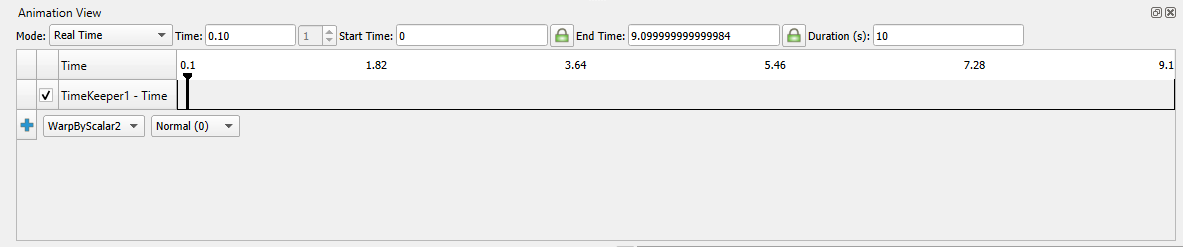
This you mean?
---
### Author:  [@mwestphal](https://discourse.paraview.org/u/mwestphal)
#### Post date: [May 24, 2021, 12:43pm UTC](https://discourse.paraview.org/t/only-fraction-of-animation-saved-no-error-message-can-anyone-help-not-solved/7278/6 "2021-05-24T12:43:10Z")
Yes. Please do not use RealTime for exports but instead Sequence or SnapToTimeSteps depending of your dataset being temporal or not.