# Opacity problem when overlapping several planes with transparency
**URL:** https://discourse.paraview.org/t/opacity-problem-when-overlapping-several-planes-with-transparency/16342
**Category:** ParaView Support
**Created:** [March 15, 2025, 6:23pm UTC](https://discourse.paraview.org/t/opacity-problem-when-overlapping-several-planes-with-transparency/16342 "2025-03-15T18:23:14Z")
**Posts on this page:** 5
**Page:** 1
### Author:  [@Captain\_Convergence](https://discourse.paraview.org/u/Captain_Convergence)
#### Post date: [March 15, 2025, 6:23pm UTC](https://discourse.paraview.org/t/opacity-problem-when-overlapping-several-planes-with-transparency/16342/1 "2025-03-15T18:23:14Z")
Dear support,
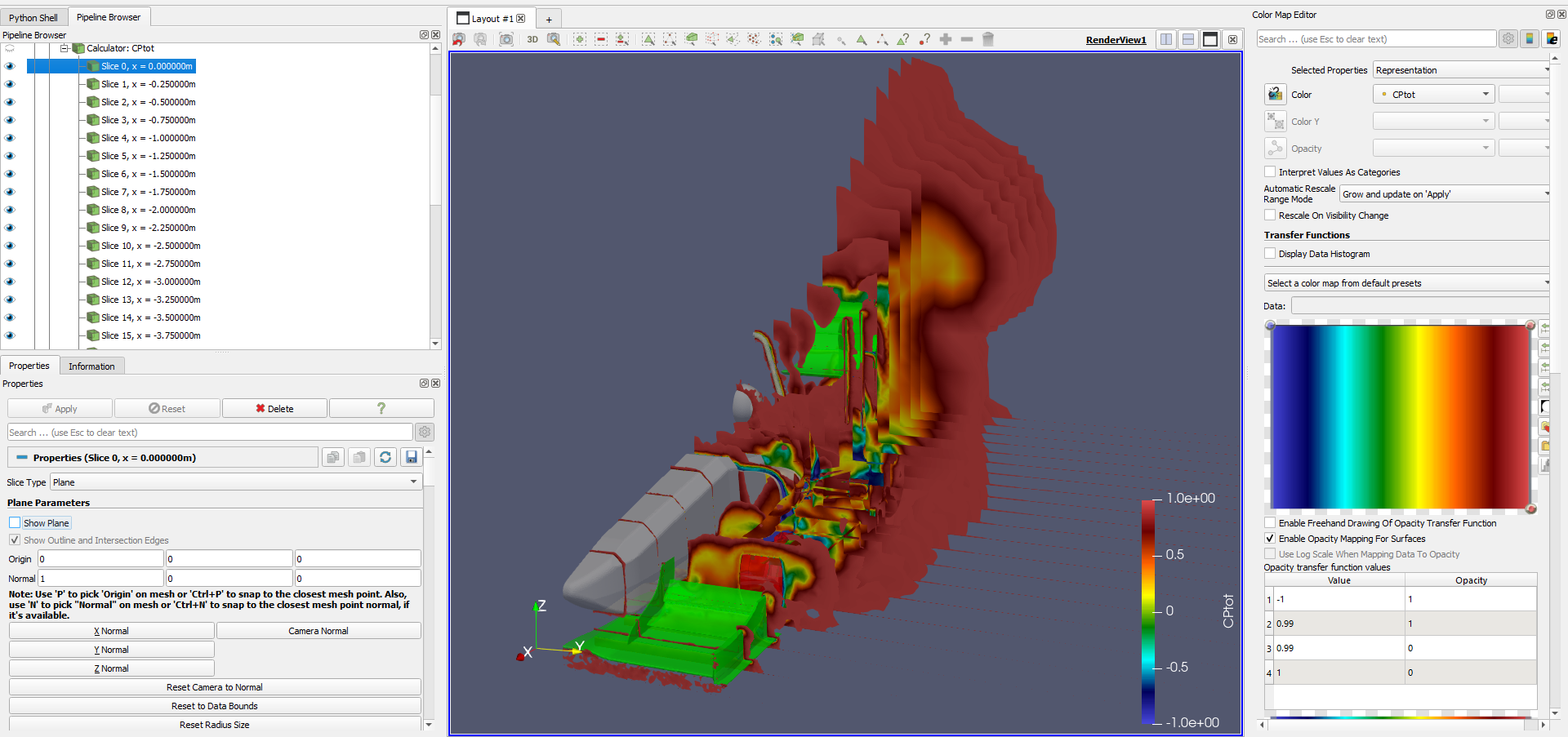
I am trying to display some planes where I used opacity mapping to cut the visible fields. As you can see in the image below there is a visualization problem when several planes overlap:
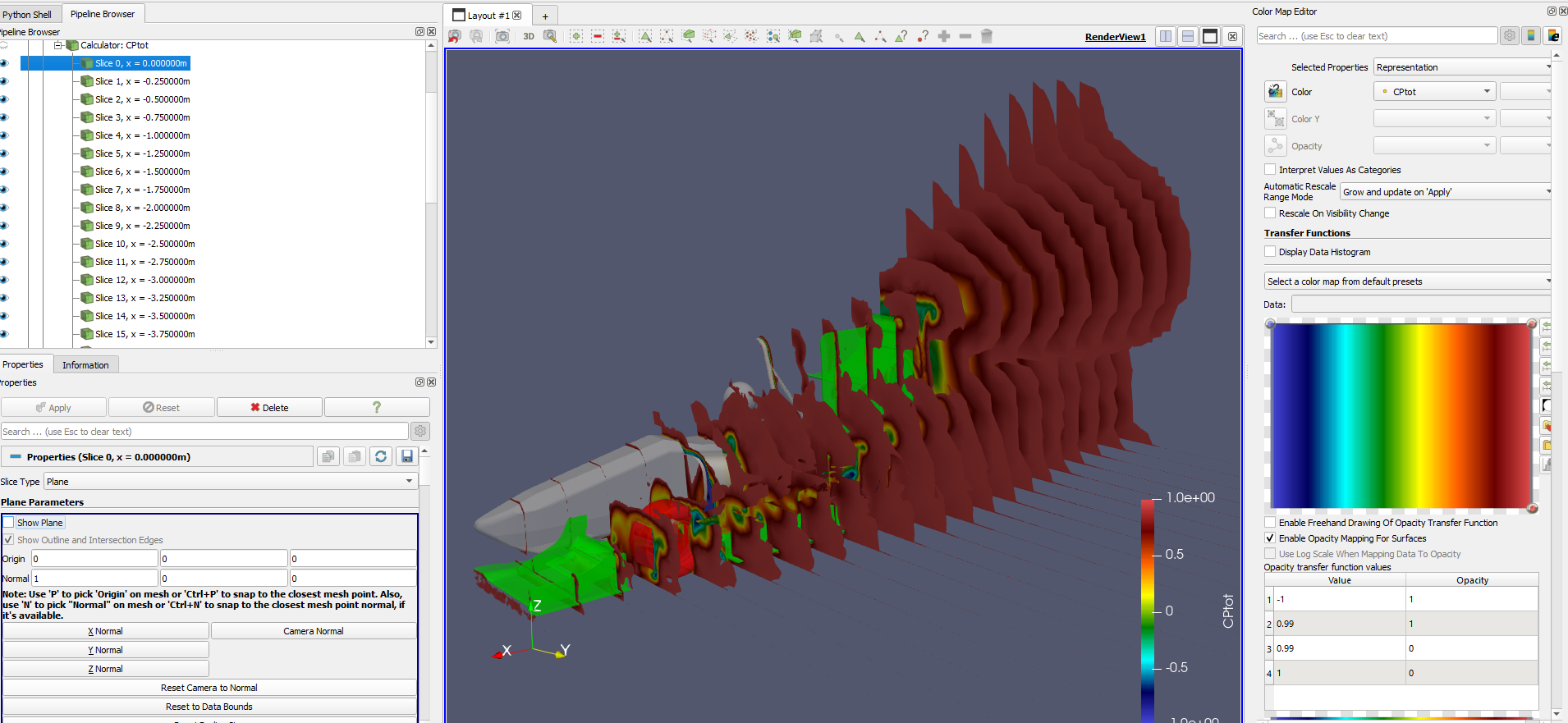
The problem doesn’t occur from the side:
Or when using the Ray Tracing option:
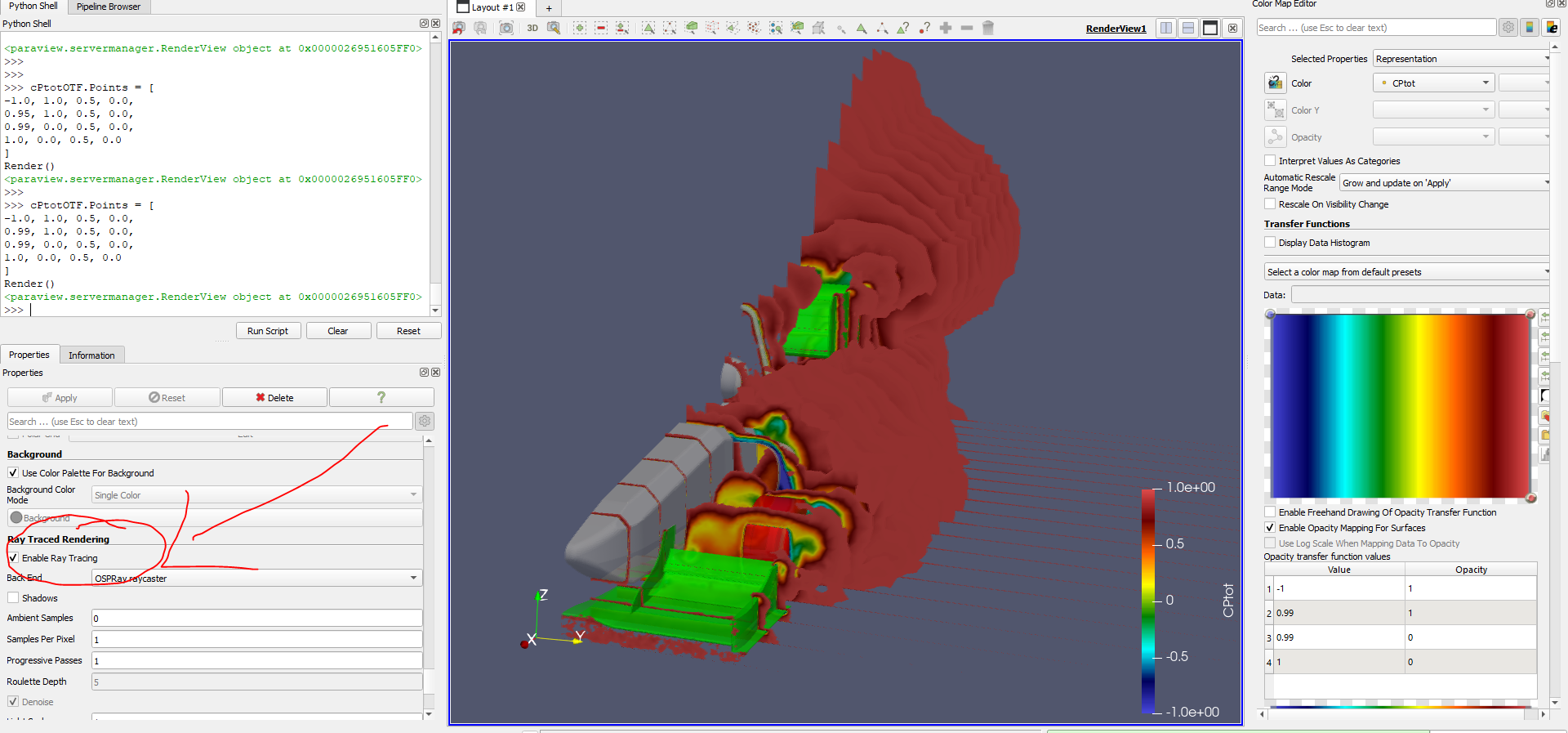
I would like not to use the Ray Tracing because the final goal is to run the scripts in a HPC wihtout GPUs. Is there any way to solve this opacity overlap problem with CPU rendering?
Thank you in advance for your time!
---
### Author:  [@dcthomp](https://discourse.paraview.org/u/dcthomp)
#### Post date: [March 15, 2025, 6:38pm UTC](https://discourse.paraview.org/t/opacity-problem-when-overlapping-several-planes-with-transparency/16342/2 "2025-03-15T18:38:15Z")
Have you tried increasing the _Maximum Number of Peels_ in the _Render View_ settings panel?
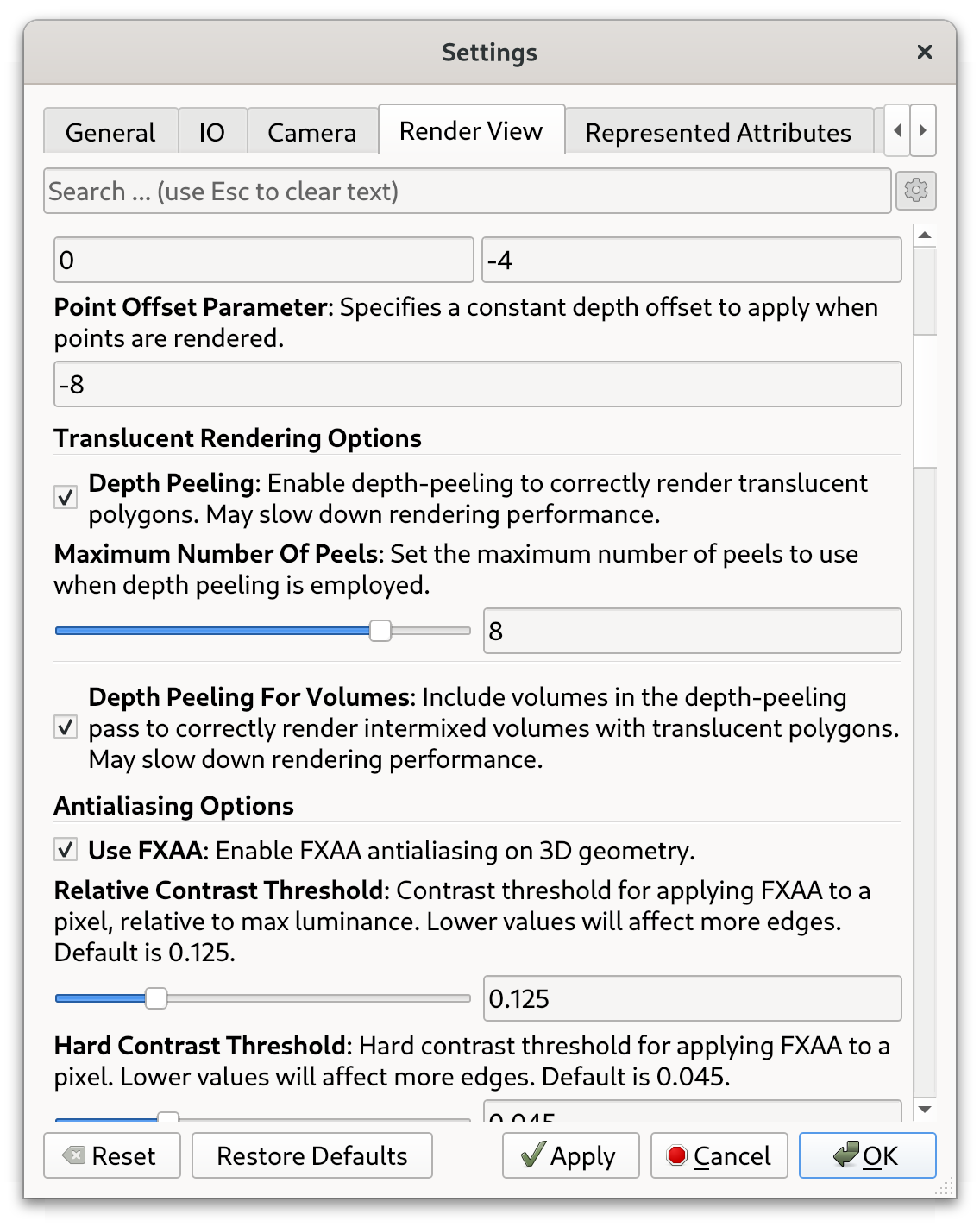
When many layers with transparency overlap and the slices are rendered out of order (relative to the camera), there may not be enough depth-peeling passes to produce a proper final image.
With the number of layers in your screenshot, I suspect that you may not be able to set the maximum number of layers high enough to render a head-on view. In that case, you might try using the _Threshold_ filter on each slice to remove cells would otherwise be completely transparent. This will cost a lot of memory but will produce proper images regardless of how many slices there are.
---
### Author:  [@Captain\_Convergence](https://discourse.paraview.org/u/Captain_Convergence)
#### Post date: [March 15, 2025, 10:07pm UTC](https://discourse.paraview.org/t/opacity-problem-when-overlapping-several-planes-with-transparency/16342/3 "2025-03-15T22:07:03Z")
I am not a big fan of using thresholds in this case because it cuts the cell so you might get serrated edges (even more than now!) but it is just a visual preference 🙂
It seems to work in this case!
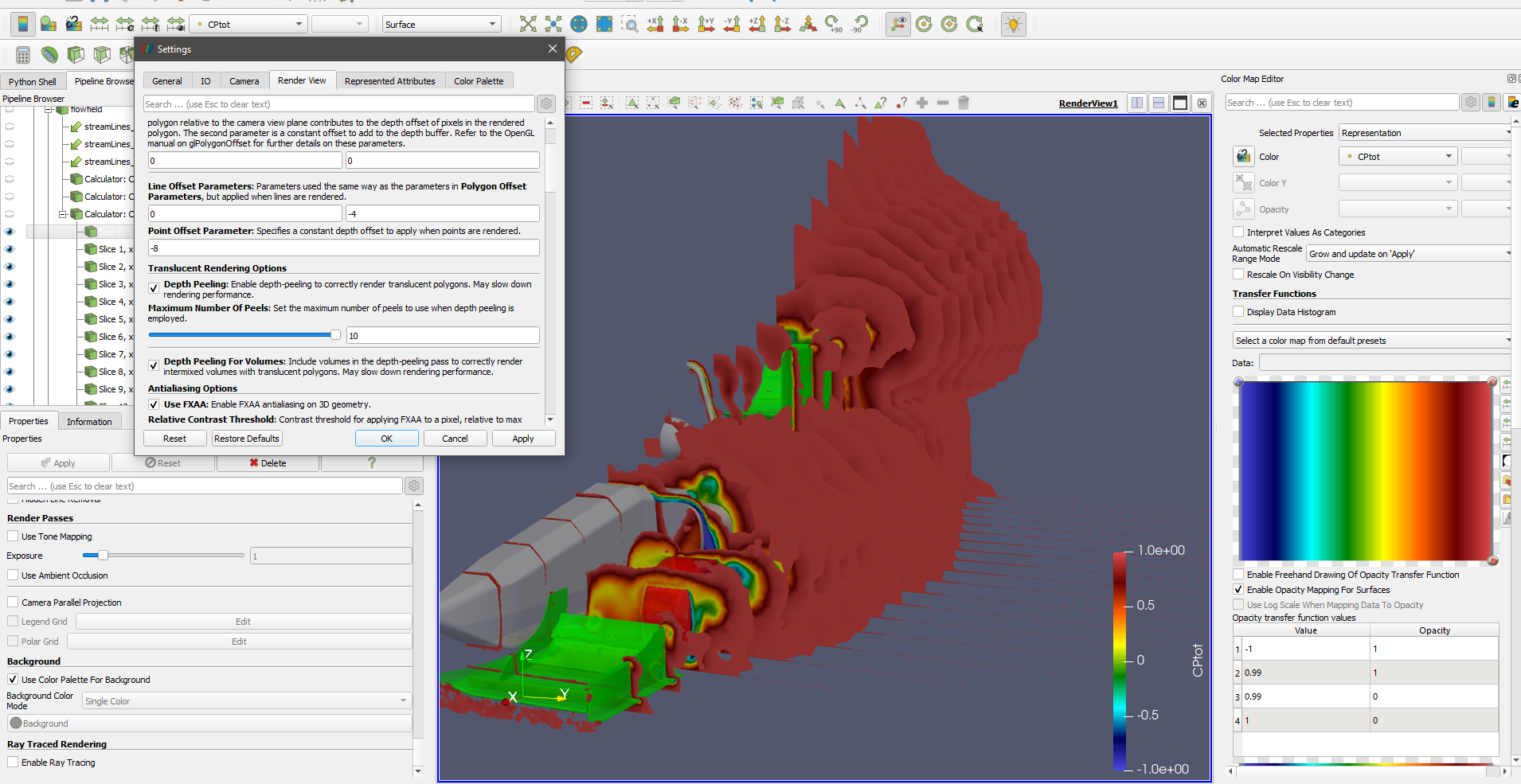
Is there any command to set the number of peels from the python terminal?
---
### Author:  [@dcthomp](https://discourse.paraview.org/u/dcthomp)
#### Post date: [March 15, 2025, 10:32pm UTC](https://discourse.paraview.org/t/opacity-problem-when-overlapping-several-planes-with-transparency/16342/4 "2025-03-15T22:32:30Z")
> [@Captain\_Convergence](#):
>
> I am not a big fan of using thresholds in this case because it cuts the cell so you might get serrated edges
I’m not sure what you mean. `Threshold` should never cut cells; either they are included in the output or not. `Clip` will cut input cells (assuming you have point scalars).
> [@Captain\_Convergence](#):
>
> Is there any command to set the number of peels from the python terminal?
```python
print('max peels was', GetSettingsProxy('RenderViewSettings').MaximumNumberOfPeels)
GetSettingsProxy('RenderViewSettings').MaximumNumberOfPeels = 20
print('max peels is, GetSettingsProxy('RenderViewSettings').MaximumNumberOfPeels)
```
---
### Author:  [@Captain\_Convergence](https://discourse.paraview.org/u/Captain_Convergence)
#### Post date: [March 16, 2025, 8:28am UTC](https://discourse.paraview.org/t/opacity-problem-when-overlapping-several-planes-with-transparency/16342/5 "2025-03-16T08:28:24Z")
> [@dcthomp](#):
>
> `GetSettingsProxy('RenderViewSettings').MaximumNumberOfPeels = 20`
Thanks a lot! It works for me 🙂