# Opacity/transparency of surface based on color map
**URL:** https://discourse.paraview.org/t/opacity-transparency-of-surface-based-on-color-map/17618
**Category:** ParaView Support
**Created:** [June 15, 2026, 3:24am UTC](https://discourse.paraview.org/t/opacity-transparency-of-surface-based-on-color-map/17618 "2026-06-15T03:24:38Z")
**Posts on this page:** 2
**Page:** 1
### Author:  [@PetrKryslUCSD](https://discourse.paraview.org/u/PetrKryslUCSD)
#### Post date: [June 15, 2026, 3:24am UTC](https://discourse.paraview.org/t/opacity-transparency-of-surface-based-on-color-map/17618/1 "2026-06-15T03:24:38Z")
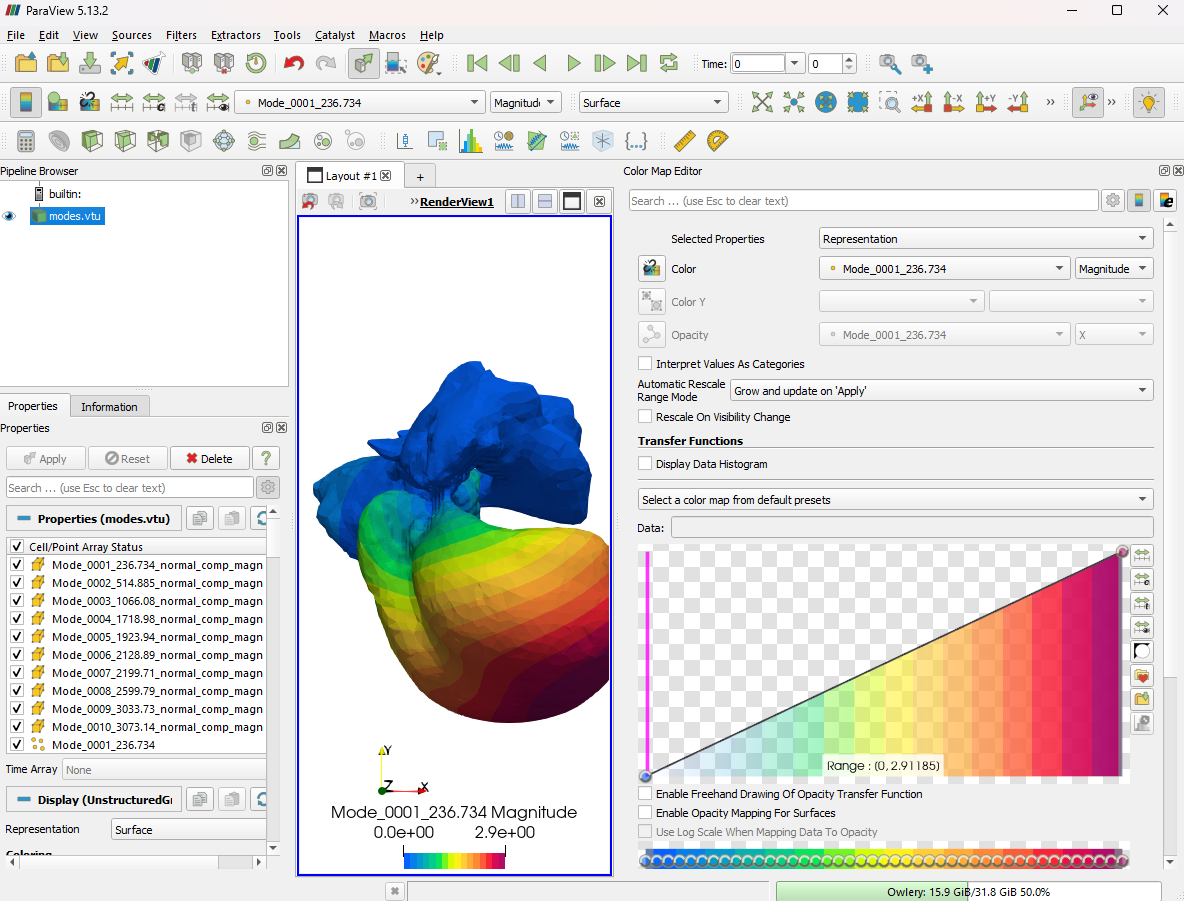
This used to work: I would map scalars to colors, and then the transfer function could be used to change the transparency of the colors. I can’t get it to work anymore (of course, it is possible that I misremember how to get it done)🙂
---
### Author:  [@Venke](https://discourse.paraview.org/u/Venke)
#### Post date: [June 15, 2026, 6:18am UTC](https://discourse.paraview.org/t/opacity-transparency-of-surface-based-on-color-map/17618/2 "2026-06-15T06:18:47Z")
I think all you need to do ist check the “Enable Opacity Mapping For Surface” box underneath the color triangle on the right of your screenshot.