# Open file dialog and multiple files with consecutive numbering
**URL:** https://discourse.paraview.org/t/open-file-dialog-and-multiple-files-with-consecutive-numbering/5107
**Category:** ParaView Support
**Created:** [August 14, 2020, 12:55pm UTC](https://discourse.paraview.org/t/open-file-dialog-and-multiple-files-with-consecutive-numbering/5107 "2020-08-14T12:55:16Z")
**Posts on this page:** 11
**Page:** 1
### Author:  [@nitawa](https://discourse.paraview.org/u/nitawa)
#### Post date: [August 14, 2020, 12:55pm UTC](https://discourse.paraview.org/t/open-file-dialog-and-multiple-files-with-consecutive-numbering/5107/1 "2020-08-14T12:55:16Z")
Dear experts,
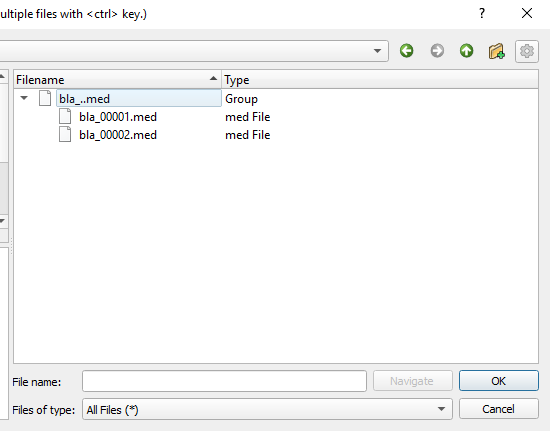
currently in the Paraview open file dialog box, if several files are present with extension file\_xxxx, with xxxx being a consecutive numbering, Paraview will group these files together in the Open file dialog.
Do you know whether there is an option in the Paraview configuration file settings, which allows the user to disable this behavior ?
Thanks for your valuable feedback.
---
### Author:  [@mwestphal](https://discourse.paraview.org/u/mwestphal)
#### Post date: [August 27, 2020, 1:16pm UTC](https://discourse.paraview.org/t/open-file-dialog-and-multiple-files-with-consecutive-numbering/5107/2 "2020-08-27T13:16:51Z")
This grouping is a “file series” and let you load multiple files as if they were multiple timesteps.
There is no settings to disable this behavior afaik, but it would make sense to have one imo.
Please feel free to open an issue on our [gitlab](https://gitlab.kitware.com/paraview/paraview/-/issues) and to [contribute](https://discourse.paraview.org/t/how-are-features-and-bug-fixes-incorporated-into-paraview/4735) to it if you are interested.
---
### Author:  [@nitawa](https://discourse.paraview.org/u/nitawa)
#### Post date: [September 3, 2020, 1:03pm UTC](https://discourse.paraview.org/t/open-file-dialog-and-multiple-files-with-consecutive-numbering/5107/3 "2020-09-03T13:03:27Z")
I raised this question, since there seems to be a bug here. Say I have two files at hand bla\_0\_00001.vtk and bla\_0\_001.vtk
In the Open file dialog box, I don’t see bla\_0\_001.vtk
I opened a bug report: [https://gitlab.kitware.com/paraview/paraview/-/issues/20181](https://gitlab.kitware.com/paraview/paraview/-/issues/20181)
---
### Author:  [@mwestphal](https://discourse.paraview.org/u/mwestphal)
#### Post date: [September 4, 2020, 8:02am UTC](https://discourse.paraview.org/t/open-file-dialog-and-multiple-files-with-consecutive-numbering/5107/4 "2020-09-04T08:02:11Z")
Already fixed here : [https://gitlab.kitware.com/paraview/paraview/-/merge\_requests/4339](https://gitlab.kitware.com/paraview/paraview/-/merge_requests/4339)
---
### Author:  [@OlivierM](https://discourse.paraview.org/u/OlivierM)
#### Post date: [September 12, 2022, 8:11am UTC](https://discourse.paraview.org/t/open-file-dialog-and-multiple-files-with-consecutive-numbering/5107/5 "2022-09-12T08:11:01Z")
Hello,
my issue is also about the grouping which occurs when trying to open a time serie of files.
The directory is made of subfolders named following a time sequence. Each of them include a single .vtp file, with an invariable name.
I would like to visualize the entire sequence of timesteps but unfortunately Paraview limits this by grouping the data. So intead of looking at the whole serie with an increment of 0.1, I can only see the serie from 0.1 to 1.0:
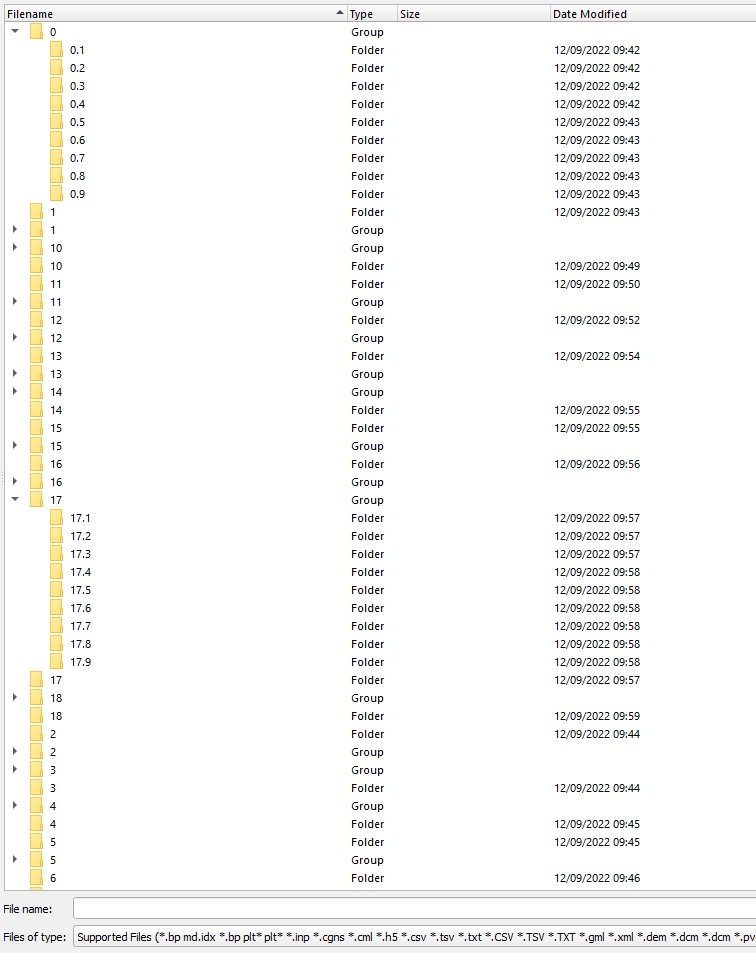
what would be the solution for this ?
thanks
---
### Author:  [@mwestphal](https://discourse.paraview.org/u/mwestphal)
#### Post date: [September 12, 2022, 12:15pm UTC](https://discourse.paraview.org/t/open-file-dialog-and-multiple-files-with-consecutive-numbering/5107/6 "2022-09-12T12:15:56Z")
ParaView does not support this kind of grouping and also does not support storing the timestep in the name.
You want to rename your folders like this:
```auto
folder.001
folder.002
...
```
---
### Author:  [@Kenneth\_Moreland](https://discourse.paraview.org/u/Kenneth_Moreland)
#### Post date: [September 12, 2022, 1:43pm UTC](https://discourse.paraview.org/t/open-file-dialog-and-multiple-files-with-consecutive-numbering/5107/7 "2022-09-12T13:43:23Z")
You can create a `.vtp.series` case file, which is a [JSON-formatted](https://gitlab.kitware.com/paraview/paraview/blob/v5.5.0/Documentation/release/ParaView-5.5.0.md#json-based-new-meta-file-format-for-series-added) text file that points to a list of files. You can point to files through a directory structure. It would probably look something like this:
```json
{
"file-series-version" : "1.0",
"files" : [
{ "name" : "0.1/file.vtp", "time" : 0.1 },
{ "name" : "0.2/file.vtp", "time" : 0.2 },
...
{ "name" : "18.8/file.vtp", "time" : 18.8 },
{ "name" : "18.9/file.vtp", "time" : 18.9 }
]
}
```
---
### Author:  [@OlivierM](https://discourse.paraview.org/u/OlivierM)
#### Post date: [September 12, 2022, 3:43pm UTC](https://discourse.paraview.org/t/open-file-dialog-and-multiple-files-with-consecutive-numbering/5107/8 "2022-09-12T15:43:36Z")
Thanks Mathieu,
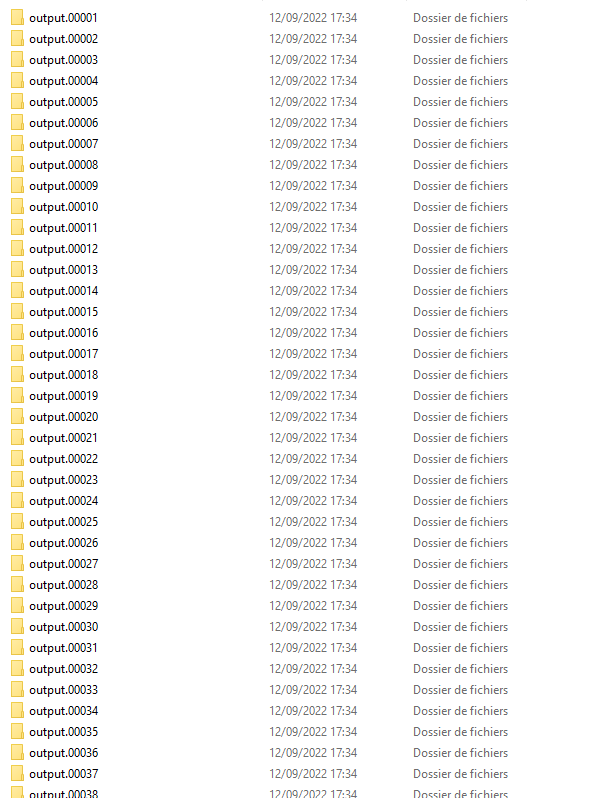
So I have renamed all the subfolders as you suggested (see image) but the serie is still limited to the original grouping when visualising in ParaView. Original data are OpenFOAM vtp surfaces. It seems impossible to read the whole serie in one go… 🙄
---
### Author:  [@Kenneth\_Moreland](https://discourse.paraview.org/u/Kenneth_Moreland)
#### Post date: [September 12, 2022, 8:33pm UTC](https://discourse.paraview.org/t/open-file-dialog-and-multiple-files-with-consecutive-numbering/5107/9 "2022-09-12T20:33:08Z")
I don’t know why ParaView is not grouping those directories, but I don’t know why it matters. You cannot load a bunch of `.vtp` files in grouped directories as a time series. You would have to put all the `.vtp` files in the same directory with indexed numbers so that the files themselves are grouped together.
Or, you can do what I said earlier and make a `.vtp.series` file. That is probably the easiest solution.
---
### Author:  [@OlivierM](https://discourse.paraview.org/u/OlivierM)
#### Post date: [September 13, 2022, 8:06am UTC](https://discourse.paraview.org/t/open-file-dialog-and-multiple-files-with-consecutive-numbering/5107/10 "2022-09-13T08:06:40Z")
Many thanks Kenneth,
I didn’t really understand your first suggestion about the `.vtp.series` file
But I followed your second idea, to put all the `.vtp` files in the same directory with indexed numbers, and that works fine for me.
---
### Author:  [@mnataraj](https://discourse.paraview.org/u/mnataraj)
#### Post date: [February 4, 2024, 11:55pm UTC](https://discourse.paraview.org/t/open-file-dialog-and-multiple-files-with-consecutive-numbering/5107/11 "2024-02-04T23:55:01Z")
Here is a sample bash script (courtesy ChatGPT) to write out the JSON file. In this the files are named plt02000 etc. Change that to your filename.
[write\_paraview\_series.sh](https://discourse.paraview.org/uploads/short-url/9ki4niWFSxIjSXjC3i6MdKtZwFH.sh) (1.2 KB)