# OPENGL not supported in WINDOWS 10 and Intel HD graphics card, GLEW could not be intialized missing GL version
**URL:** https://discourse.paraview.org/t/opengl-not-supported-in-windows-10-and-intel-hd-graphics-card-glew-could-not-be-intialized-missing-gl-version/2701
**Category:** ParaView Support
**Created:** [October 5, 2019, 11:43pm UTC](https://discourse.paraview.org/t/opengl-not-supported-in-windows-10-and-intel-hd-graphics-card-glew-could-not-be-intialized-missing-gl-version/2701 "2019-10-05T23:43:41Z")
**Posts on this page:** 15
**Page:** 1
### Author:  [@Sirius\_Fuenmayor](https://discourse.paraview.org/u/Sirius_Fuenmayor)
#### Post date: [October 5, 2019, 11:43pm UTC](https://discourse.paraview.org/t/opengl-not-supported-in-windows-10-and-intel-hd-graphics-card-glew-could-not-be-intialized-missing-gl-version/2701/1 "2019-10-05T23:43:41Z")
I can’t open Paraview on a Windows 10 64 bit machine. I get the error:
`GLEW could not be intialized missing GL version`
By doing some research on google I have found that the latest Intel drivers for Windows 10 for Intel HD 3000 graphics adapters do not support OpenGl which seem totally necessary for ParaView. In this YouTube video and the associated GitHub channel a solution is provided:
It consists of installing the Windows 10 Deployment Kit ([https://docs.microsoft.com/en-us/windows-hardware/get-started/adk-install](https://docs.microsoft.com/en-us/windows-hardware/get-started/adk-install)) and using the tool “Compatility Administrator” to patch the OpenGL DLLs of the affected program with the fix “Windows81RTMVersionLie”. But I do not know what are the related libraries in ParaView. I have tried with those with “GL” in their name but without success, and since there is a lot of DLLs and you can only select one by one I would appreciate if someone could point me to corrrect ones.
NOTE: There is also the option of installing Mesa drivers with MINGW but this did not work also.
---
### Author:  [@mwestphal](https://discourse.paraview.org/u/mwestphal)
#### Post date: [October 7, 2019, 2:51am UTC](https://discourse.paraview.org/t/opengl-not-supported-in-windows-10-and-intel-hd-graphics-card-glew-could-not-be-intialized-missing-gl-version/2701/2 "2019-10-07T02:51:26Z")
Intel HD 3000 is not supported on windows 10.
[https://forums.intel.com/s/question/0D50P0000490Gr7SAE/intel-hd-graphics-3000-windows-10?language=en\_US](https://forums.intel.com/s/question/0D50P0000490Gr7SAE/intel-hd-graphics-3000-windows-10?language=en_US)
I would recommend to either change your GPU or change to another OS that support your hardware. Ubuntu comes to mind.
To use mesa on windows, well you will need to be able to build mesa on windows and then build ParaView with this mesa. I do not recommend it.
---
### Author:  [@cbourcier](https://discourse.paraview.org/u/cbourcier)
#### Post date: [October 26, 2019, 1:21pm UTC](https://discourse.paraview.org/t/opengl-not-supported-in-windows-10-and-intel-hd-graphics-card-glew-could-not-be-intialized-missing-gl-version/2701/3 "2019-10-26T13:21:30Z")
Hi,
You can use mesa3d to provide a newer OpenGL version. This allows computers with Intel graphic chipset or old NVIDIA graphic cards to use applications requiring OpenGL 3.
This workaround works with Salome Platform (which includes Paraview), so it should work for Paraview too.
- Download Mesa3d for Windows:
[https://github.com/pal1000/mesa-dist-win/releases/](https://github.com/pal1000/mesa-dist-win/releases/)
- Extract it (either with double-click or right-click 7-zip)
- In the extraction folder of Mesa, go to x64, select and copy opengl32.dll
- In the extraction folder of Paraview, go to the bin folder and paste opengl32.dll
- Double-click on paraview.exe
Now Paraview should open without error.
Source: [https://www.salome-platform.org/forum/forum\_9/150542777#337431061](https://www.salome-platform.org/forum/forum_9/150542777#337431061)
Christophe
---
### Author:  [@mwestphal](https://discourse.paraview.org/u/mwestphal)
#### Post date: [October 28, 2019, 7:47am UTC](https://discourse.paraview.org/t/opengl-not-supported-in-windows-10-and-intel-hd-graphics-card-glew-could-not-be-intialized-missing-gl-version/2701/4 "2019-10-28T07:47:14Z")
Awesome @cbourcier !
@Sirius_Fuenmayor : Please let us know if this works for you.
---
### Author:  [@lucsanjo](https://discourse.paraview.org/u/lucsanjo)
#### Post date: [September 23, 2020, 12:56am UTC](https://discourse.paraview.org/t/opengl-not-supported-in-windows-10-and-intel-hd-graphics-card-glew-could-not-be-intialized-missing-gl-version/2701/5 "2020-09-23T00:56:04Z")
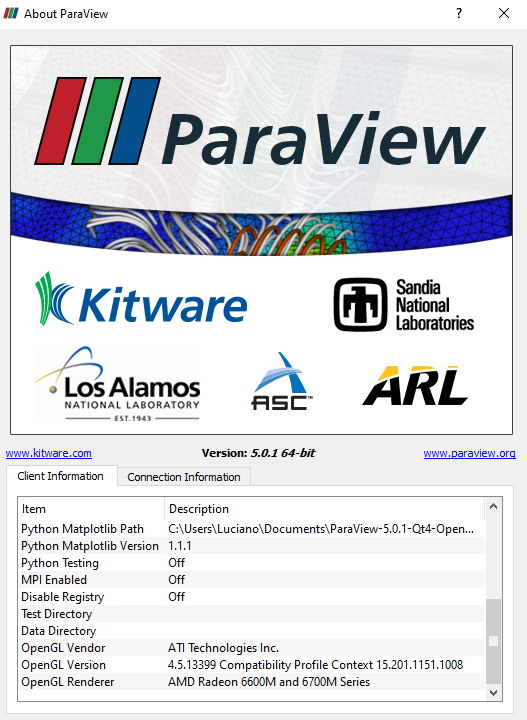
I know it´s an old topic, but I have same cpu (Intel HD 3000 + amd 6630m as gpu) and the solution proposed by @Sirius_Fuenmayor did not work for me. Intel HD 3000 is not supported on windows 10, but somehow I can run old versions of paraview on my notebok without any problems. Below is a version that still works:
---
### Author:  [@mwestphal](https://discourse.paraview.org/u/mwestphal)
#### Post date: [September 23, 2020, 6:53am UTC](https://discourse.paraview.org/t/opengl-not-supported-in-windows-10-and-intel-hd-graphics-card-glew-could-not-be-intialized-missing-gl-version/2701/6 "2020-09-23T06:53:38Z")
What do you mean that the solution does not work ? Provide errors or describe what is happening.
There is no other way to run a recent ParaView on your environment.
---
### Author:  [@lucsanjo](https://discourse.paraview.org/u/lucsanjo)
#### Post date: [September 23, 2020, 3:44pm UTC](https://discourse.paraview.org/t/opengl-not-supported-in-windows-10-and-intel-hd-graphics-card-glew-could-not-be-intialized-missing-gl-version/2701/7 "2020-09-23T15:44:36Z")
I meant Mesa3d drivers for windows did not work on my machine. Unfortunatelly this is what I get using or not using the procedures discribed by @cbourcier:
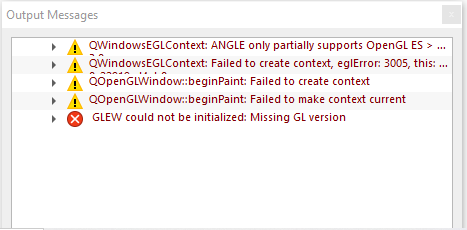
I can´t run recent versions of Paraview on my machine, but older versions (below 5.2.0) still working and when I go to help menu, it seams to be using my GPU drivers as in the picture bellow:
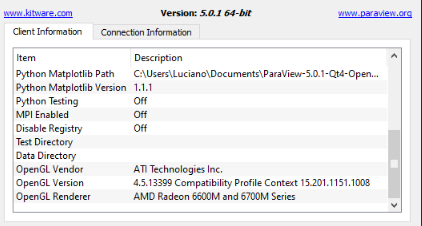
Newer versions (above 5.2.0) always crashes on my notebook. Nowadays I am running windows 10 64bits, my gpu is amd 6630m and cpu is i5-2410m wich relies on hd 3000 drivers.
---
### Author:  [@mwestphal](https://discourse.paraview.org/u/mwestphal)
#### Post date: [September 24, 2020, 12:27pm UTC](https://discourse.paraview.org/t/opengl-not-supported-in-windows-10-and-intel-hd-graphics-card-glew-could-not-be-intialized-missing-gl-version/2701/8 "2020-09-24T12:27:58Z")
For some reasons the mesa driver is not being picked up by ParaView. You will need to figure this one out as I can’t reproduce.
---
### Author:  [@cbourcier](https://discourse.paraview.org/u/cbourcier)
#### Post date: [September 24, 2020, 1:18pm UTC](https://discourse.paraview.org/t/opengl-not-supported-in-windows-10-and-intel-hd-graphics-card-glew-could-not-be-intialized-missing-gl-version/2701/9 "2020-09-24T13:18:05Z")
Hi @lucsanjo,
did you set the GL\_VERSION, like mentioned in [the step by step instructions](https://discourse.paraview.org/t/how-to-run-paraview-including-the-binary-release-using-mesa-on-windows/4321):
- copy `x64/OpenGL32.dll` and `x64/libglapi.dll` to `ParaView_Path/bin/`
- open a Windows terminal
- `cd ParaView_Path/bin/`
- `set MESA_GL_VERSION_OVERRIDE=4.5`
- `paraview.exe`
Christophe
---
### Author:  [@lucsanjo](https://discourse.paraview.org/u/lucsanjo)
#### Post date: [September 24, 2020, 1:48pm UTC](https://discourse.paraview.org/t/opengl-not-supported-in-windows-10-and-intel-hd-graphics-card-glew-could-not-be-intialized-missing-gl-version/2701/10 "2020-09-24T13:48:23Z")
Hi @cbourcier, thanks for your help!
Yes I did. I’ve tried mesa3d-20.0.6-release-msvc and mesa3d-20.1.8-release-msvc, but I got same erros with both.
---
### Author:  [@cbourcier](https://discourse.paraview.org/u/cbourcier)
#### Post date: [September 24, 2020, 7:52pm UTC](https://discourse.paraview.org/t/opengl-not-supported-in-windows-10-and-intel-hd-graphics-card-glew-could-not-be-intialized-missing-gl-version/2701/11 "2020-09-24T19:52:06Z")
Well, it should work with the mesa driver. I have just tried again with 20.1.8-release-msvc and Paraview 5.8.1.
Did you try to force the use of Intel chipset for Paraview instead of the Radeon card?
Christophe
---
### Author:  [@lucsanjo](https://discourse.paraview.org/u/lucsanjo)
#### Post date: [October 23, 2020, 8:53pm UTC](https://discourse.paraview.org/t/opengl-not-supported-in-windows-10-and-intel-hd-graphics-card-glew-could-not-be-intialized-missing-gl-version/2701/12 "2020-10-23T20:53:52Z")
Hi @cbourcier!
Yes I tried to force and unfortunatly it dit not work also.
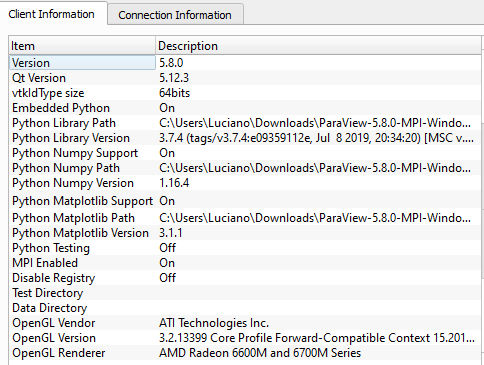
@mwestphal I found a way to make any versions of Paraview to work in Windows 10 using my machine.
I notice that my problem was happening because Qt was set to use Angle instead of native Opengl provided by hardware ([https://code.jsoftware.com/wiki/Modern\_OpenGL](https://code.jsoftware.com/wiki/Modern_OpenGL)). So the only thing I had to do was to set the variable QT\_OPENGL=desktop and it worked.
---
### Author:  [@chaitu208](https://discourse.paraview.org/u/chaitu208)
#### Post date: [October 13, 2021, 6:38am UTC](https://discourse.paraview.org/t/opengl-not-supported-in-windows-10-and-intel-hd-graphics-card-glew-could-not-be-intialized-missing-gl-version/2701/13 "2021-10-13T06:38:37Z")
Hi…
I am also facing same issue. Can you please mention the procedure to rectify that issue? Thanks in advance.
---
### Author:  [@Hasan\_12345](https://discourse.paraview.org/u/Hasan_12345)
#### Post date: [November 3, 2022, 4:39pm UTC](https://discourse.paraview.org/t/opengl-not-supported-in-windows-10-and-intel-hd-graphics-card-glew-could-not-be-intialized-missing-gl-version/2701/14 "2022-11-03T16:39:32Z")
> [@cbourcier](#):
>
> set MESA\_GL\_VERSION\_OVERRIDE=
where is the MESA\_GL\_VERSION\_OVERRIDE=4.5
is there a config file?
this not working for me sofar!!!
---
### Author:  [@mwestphal](https://discourse.paraview.org/u/mwestphal)
#### Post date: [November 7, 2022, 8:30am UTC](https://discourse.paraview.org/t/opengl-not-supported-in-windows-10-and-intel-hd-graphics-card-glew-could-not-be-intialized-missing-gl-version/2701/15 "2022-11-07T08:30:42Z")
This is en environnement variable, to set in a terminal before running ParaView from the same terminal.