# OpenGL problem in running paraview
**URL:** https://discourse.paraview.org/t/opengl-problem-in-running-paraview/9438
**Category:** ParaView Support
**Tags:** opengl, vtk
**Created:** [April 15, 2022, 1:47pm UTC](https://discourse.paraview.org/t/opengl-problem-in-running-paraview/9438 "2022-04-15T13:47:50Z")
**Posts on this page:** 6
**Page:** 1
### Author:  [@Zhuangz\_Zhang](https://discourse.paraview.org/u/Zhuangz_Zhang)
#### Post date: [April 15, 2022, 1:47pm UTC](https://discourse.paraview.org/t/opengl-problem-in-running-paraview/9438/1 "2022-04-15T13:47:50Z")
Hello everyone,
Recently, I tried installed paraview into my personal account in a server. I have downloaded the binary file in [Download | ParaView](https://www.paraview.org/download/), and the “ParaView-5.8.1-MPI-Linux-Python2.7-64bit” was downloaded.
I firstly run the paraview in the “paraview\_pack/bin” directory, and some error happened, but it was tackled by adding “paraview\_pack/lib” into the .bashrc file as “LD\_LIBRARY\_PATH”.
then run paraview again, another error come that:
`( 6.714s) [paraview]vtkOpenGLRenderWindow.c:578 ERR| vtkXOpenGLRenderWindow (0xeeda90): Unable to find a valid OpenGL 3.2 or later implementation. Please update your video card driver to the latest version. If you are using Mesa please make sure you have version 11.2 or later and make sure your driver in Mesa supports OpenGL 3.2 such as llvmpipe or openswr. If you are on windows and using Microsoft remote desktop note that it only supports OpenGL 3.2 with nvidia quadro cards. You can use other remoting software such as nomachine to avoid this issue.`
I always login the server via mobaXterm, and the server is equipped with centos7.9. I am wondering how to deal with this problem? looking forward for any reply, thanks in advance.
---
### Author:  [@ben.boeckel](https://discourse.paraview.org/u/ben.boeckel)
#### Post date: [May 16, 2022, 12:34am UTC](https://discourse.paraview.org/t/opengl-problem-in-running-paraview/9438/2 "2022-05-16T00:34:23Z")
It seems that your X provider doesn’t offer a suitable OpenGL implementation. Does passing `--mesa` work?
Also I highly suggest not changing `LD_LIBRARY_PATH` in `.bashrc` as it may confuse many other tools to inject ParaView’s copy of libraries into them (including things like `libz.so`).
---
### Author:  [@sandyITS](https://discourse.paraview.org/u/sandyITS)
#### Post date: [August 4, 2023, 3:33pm UTC](https://discourse.paraview.org/t/opengl-problem-in-running-paraview/9438/3 "2023-08-04T15:33:56Z")
I have Paraview 5.8.0 installed on my laptop Asus ROG Flow X13, AMD Ryzen 9 proc with RTX3050 GPU, ram 16 GB, and Windows 11. After installation, The Paraview window opened with a small, empty popup window titled “Output Messages”. Then the app suddenly closed without any error warnings. How to solve the issue? I’ve tried the newer version of Paraview 5.11.1, installed a later version of phyton, and activated OpenGL for paraview in NVidia Control Panel…the issue remained the same. Please anyone can help me with that?
---
### Author:  [@Bee](https://discourse.paraview.org/u/Bee)
#### Post date: [January 2, 2025, 7:44pm UTC](https://discourse.paraview.org/t/opengl-problem-in-running-paraview/9438/4 "2025-01-02T19:44:27Z")
Just came upon the same problem as OP - using mobaXterm and trying to launch ParaView via the paraFoam command when the same error message pops up:
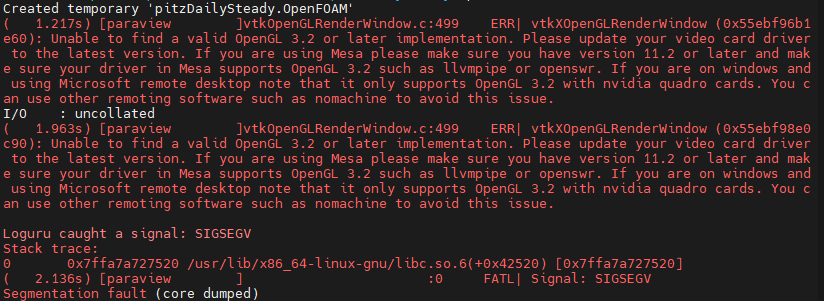
I tried passing `-- mesa` like you suggested, but it is telling me `--: command not found`.
Any suggestions on this? I feel like I’ve circumvented this OpenGL issue before but cannot remember what I did (different computer and a long time ago) - if I figure it out I will post.
@Zhuangz_Zhang did you ever get this sorted?
_EDIT: Using WSL-Ubuntu-22.04, ParaView 5.10.0-RC1, and OpenFOAM v12 (from .org)_
_Second EDIT: Tried running paraFoam in a regular Ubuntu terminal and it works fine. Looks like this is specific to my mobaXterm environment?_
---
### Author:  [@mwestphal](https://discourse.paraview.org/u/mwestphal)
#### Post date: [January 3, 2025, 9:19am UTC](https://discourse.paraview.org/t/opengl-problem-in-running-paraview/9438/5 "2025-01-03T09:19:04Z")
> [@Bee](#):
>
> Tried running paraFoam in a regular Ubuntu terminal and it works fine. Looks like this is specific to my mobaXterm environment?
Use ParaView from [https://www.paraview.org/download/](https://www.paraview.org/download/) instead.
---
### Author:  [@ben.boeckel](https://discourse.paraview.org/u/ben.boeckel)
#### Post date: [February 26, 2025, 4:13pm UTC](https://discourse.paraview.org/t/opengl-problem-in-running-paraview/9438/6 "2025-02-26T16:13:35Z")
> [@Bee](#):
>
> I tried passing `-- mesa`
It is `--mesa` (no space). It seems that line wrapping can break the line between the dashes and the name 😕 .