# OptiX does not show up
**URL:** https://discourse.paraview.org/t/optix-does-not-show-up/3679
**Category:** ParaView Support
**Created:** [February 27, 2020, 6:11am UTC](https://discourse.paraview.org/t/optix-does-not-show-up/3679 "2020-02-27T06:11:20Z")
**Posts on this page:** 7
**Page:** 1
### Author:  [@XIYUAN\_BAO](https://discourse.paraview.org/u/XIYUAN_BAO)
#### Post date: [February 27, 2020, 6:11am UTC](https://discourse.paraview.org/t/optix-does-not-show-up/3679/1 "2020-02-27T06:11:20Z")
Hi there,
I am using ParaView-5.8.0-MPI-Linux-Python3.7-64bit binary release on CentOS 7 with
`./mpiexec ./paraview`. The machine has one RTX 2080Ti, Driver 440.44, CUDA 10.2:
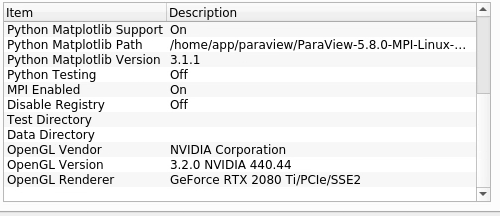
But when I enable ray tracing OptiX backend is not available.
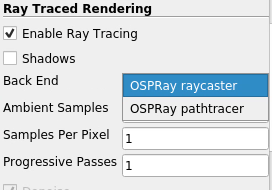
Did I miss any steps? Or should I build from source? Thanks!
---
### Author:  [@mwestphal](https://discourse.paraview.org/u/mwestphal)
#### Post date: [February 27, 2020, 7:59am UTC](https://discourse.paraview.org/t/optix-does-not-show-up/3679/2 "2020-02-27T07:59:47Z")
`./mpiexec ./paraview.`
There is no reason to run paraview with mpiexec. But it is unrelated to your issue.
Do you see the RTX detected in the terminal. Something like :
```
$ ./bin/paraview
VisRTX 0.1.6, using devices:
0: GeForce GTX 1050 Ti (Total: 4.2 GB, Available: 4.1 GB)
```
---
### Author:  [@XIYUAN\_BAO](https://discourse.paraview.org/u/XIYUAN_BAO)
#### Post date: [February 27, 2020, 7:00pm UTC](https://discourse.paraview.org/t/optix-does-not-show-up/3679/3 "2020-02-27T19:00:26Z")
Thank you for your reply.
I am using binary release and mpiexec in the system is not compatible with that.
When I run paraview, no info pops up:
```auto
$ ./mpiexec ./paraview
$
```
---
### Author:  [@cory.quammen](https://discourse.paraview.org/u/cory.quammen)
#### Post date: [February 27, 2020, 8:37pm UTC](https://discourse.paraview.org/t/optix-does-not-show-up/3679/4 "2020-02-27T20:37:39Z")
Just run
```bash
$ ./paraview
```
Running
```bash
$ ./mpiexec ./paraview
```
is not necessary. `mpiexec` might be needed _if_ you want to run `pvserver`, the ParaView server component, in parallel. But it is definitely **not** needed for `paraview`.
---
### Author:  [@XIYUAN\_BAO](https://discourse.paraview.org/u/XIYUAN_BAO)
#### Post date: [February 27, 2020, 10:08pm UTC](https://discourse.paraview.org/t/optix-does-not-show-up/3679/5 "2020-02-27T22:08:01Z")
The problem is I cannot execute paraview mpi binary directly:
```auto
$./paraview
Abort(2140047) on node 0 (rank 0 in comm 0): Fatal error in PMPI_Init: Other MPI error, error stack:
MPIR_Init_thread(703)........:
MPID_Init(958)...............:
MPIDI_OFI_mpi_init_hook(1334):
MPIDU_bc_table_create(444)...:
```
```auto
$ mpiexec --version
pbs_version = 19.1.3
$ mpirun --version
mpirun (Open MPI) 3.1.3
```
---
### Author:  [@Dave\_DeMarle](https://discourse.paraview.org/u/Dave_DeMarle)
#### Post date: [February 29, 2020, 6:31pm UTC](https://discourse.paraview.org/t/optix-does-not-show-up/3679/6 "2020-02-29T18:31:27Z")
Note - you can download non MPI binaries too, but I agree with Mathieu that use of MPI shouldn’t be related.
You shouldn’t have to build from source either, but it would be a way to diagnose. Then you can step through the GPU detection code path [here](https://gitlab.kitware.com/vtk/vtk/blob/master/Rendering/RayTracing/RTWrapper/VisRTX/VisRTXBackend.cxx#L27) and [here](https://github.com/NVIDIA/VisRTX/blob/master/src/VisRTX.h.in#L947) to see whether a library is not being found or whether the wrong GPU is being detected.
One quick thing to do is to use system settings to force use of the discrete graphics card. That could be the problem I suppose if the integrated GPU is being queried rather than the discrete one.
Finally, perhaps @tbiedert has other suggestions about what might be wrong.
---
### Author:  [@XIYUAN\_BAO](https://discourse.paraview.org/u/XIYUAN_BAO)
#### Post date: [March 8, 2020, 7:36am UTC](https://discourse.paraview.org/t/optix-does-not-show-up/3679/7 "2020-03-08T07:36:51Z")
I tried to compile from scratch but encountered too many problems. Then I tried to install Optix 7.0 but it still didn’t work. Finally I installed Optix 6.0 and export its lib to LD\_LIBRARIY\_PATH and now optix shows up in paraview! Thank you guys!