# OptiX Ray Tracing
**URL:** https://discourse.paraview.org/t/optix-ray-tracing/2198
**Category:** ParaView Support
**Created:** [July 11, 2019, 12:30pm UTC](https://discourse.paraview.org/t/optix-ray-tracing/2198 "2019-07-11T12:30:49Z")
**Posts on this page:** 17
**Page:** 1
### Author:  [@pcrepier](https://discourse.paraview.org/u/pcrepier)
#### Post date: [July 11, 2019, 12:30pm UTC](https://discourse.paraview.org/t/optix-ray-tracing/2198/1 "2019-07-11T12:30:49Z")
Hello community,
I was looking forward to the 5.7 release when I read that it would support the new NVidia RTX card, so with the first RC of 5.7, I downloaded it, when tried to setup a scene to try it, with an RTX 2080 in my workstation.
I now see that I can choose the OptiX backend when ray tracing is on, but how can I check whether it actually works ? my CPU shows usage peaks around 100% when I change the view, which was typical when using OSpray, but I was expecting a lot more GPU load when choosing OptiX.
Or was my intuition just wrong ?
So, is there a possibility to know whether the RTX cores are actually used ?
Also I can still choose the OptiX backend, even on my laptop, which does not have a RTX card, so is this expected ?
Thanks.
---
### Author:  [@Dave\_DeMarle](https://discourse.paraview.org/u/Dave_DeMarle)
#### Post date: [July 11, 2019, 1:12pm UTC](https://discourse.paraview.org/t/optix-ray-tracing/2198/2 "2019-07-11T13:12:32Z")
It is a bug that the dialog shows OptiX when it is not available. With our RC1 and nightly binaries, only the Linux packages actually have OptiX included. In other situations the behavior right now is to silently use OSPRay in those situations.
Before the RC cycle is through OptiX should be included in the Windows binaries and the OptiX choice should be disabled on Mac.
---
### Author:  [@Dave\_DeMarle](https://discourse.paraview.org/u/Dave_DeMarle)
#### Post date: [July 11, 2019, 1:16pm UTC](https://discourse.paraview.org/t/optix-ray-tracing/2198/3 "2019-07-11T13:16:08Z")
Tracking the issue here: [https://gitlab.kitware.com/paraview/paraview/issues/19180](https://gitlab.kitware.com/paraview/paraview/issues/19180)
---
### Author:  [@pcrepier](https://discourse.paraview.org/u/pcrepier)
#### Post date: [July 11, 2019, 1:28pm UTC](https://discourse.paraview.org/t/optix-ray-tracing/2198/4 "2019-07-11T13:28:18Z")
Thanks for the quick reply.
So does that mean that my gpu is not used and paraview falls silently back to ospray ? (I have a windows workstation)
---
### Author:  [@mwestphal](https://discourse.paraview.org/u/mwestphal)
#### Post date: [July 11, 2019, 2:06pm UTC](https://discourse.paraview.org/t/optix-ray-tracing/2198/5 "2019-07-11T14:06:11Z")
It looks like it is not working with linux package either.
It works great on my build 5.7.0-RC1 and outputs
```
VisRTX 0.1.6, using devices:
0: GeForce RTX 2080 Ti (Total: 11.5 GB, Available: 10.9 GB)
```
While the downloaded release does not output anything and fallback to ospray.
(On ArchLinux with GeForce RTX 2080 Ti)
---
### Author:  [@Dave\_DeMarle](https://discourse.paraview.org/u/Dave_DeMarle)
#### Post date: [July 11, 2019, 8:20pm UTC](https://discourse.paraview.org/t/optix-ray-tracing/2198/6 "2019-07-11T20:20:51Z")
Yes.
---
### Author:  [@pcrepier](https://discourse.paraview.org/u/pcrepier)
#### Post date: [August 28, 2019, 1:21pm UTC](https://discourse.paraview.org/t/optix-ray-tracing/2198/7 "2019-08-28T13:21:40Z")
Hi everyone,
I see that RC2 is ready for download, I tried it on my windows pc with no RTX card, OptiX is not not available. I expect the option to be enabled on a setup with a RTX card, but I want to make sure it is enabled, otherwise, I’ll have to wait for the next RC where it is enabled.
Thanks in advance
---
### Author:  [@cory.quammen](https://discourse.paraview.org/u/cory.quammen)
#### Post date: [August 28, 2019, 1:29pm UTC](https://discourse.paraview.org/t/optix-ray-tracing/2198/8 "2019-08-28T13:29:41Z")
> [@pcrepier](#):
>
> I want to make sure it is enabled, otherwise, I’ll have to wait for the next RC where it is enabled.
It should be available in RC2. It would be great if you could test it out and report any problems you encounter to help us see if any fixes are needed for RC3.
---
### Author:  [@pcrepier](https://discourse.paraview.org/u/pcrepier)
#### Post date: [August 30, 2019, 1:35pm UTC](https://discourse.paraview.org/t/optix-ray-tracing/2198/9 "2019-08-30T13:35:28Z")
I gave it a try, but the result was under expectations.
Paraview gives the option to choose OptiX as backend, but when turning it on, the rendering is quite different from what I get with ospray pathtracer.
My goal is to render a free-surface flow with a ship, the ship as a fixed color that I made using a material, the water is made in the same way but with different properties. I can see my ship, but the free-surface is basically not renderer as pathtracer renders it … So I do not know what to think, is it my “water” material that gives the expected result with pathtracer that does not work with OptiX, or is it something with OptiX that I do not understand ?
Thanks in advance
---
### Author:  [@pcrepier](https://discourse.paraview.org/u/pcrepier)
#### Post date: [September 2, 2019, 3:06pm UTC](https://discourse.paraview.org/t/optix-ray-tracing/2198/10 "2019-09-02T15:06:18Z")
Hi Everyone,
I have now easier access to the workstation.
Windows 10, RTX 2080 card, driver version 430.86 (not the latest), paraview 5.7.0-RC2.
I use a few custom materials that seem to work well with ospray:
```json
"water" : {
"type": "Glass",
"doubles" : {
"attenuationColor" : [1.0, 1.0, 1.0],
"attenuationDistance" : [1.0],
"eta" : [1.33]
}
},
"WaterLightBlue": {
"type": "Principled",
"doubles" : {
"thin" : [1.0],
"ior" : [1.33],
"transmissionColor" : [0.22, 0.34, 0.47],
"transmission" : [1.0],
"thickness" : [1.0],
"specular" : [1.0],
"opacity" : [0.6],
"diffuse" : [1.0],
"backlight" : [0.0],
"roughness" : [0.1]
}
},
"WaterDarkBlue": {
"type": "Principled",
"doubles" : {
"thin" : [1.0],
"ior" : [1.33],
"transmissionColor" : [0.22, 0.34, 0.47],
"transmission" : [1.0],
"thickness" : [1.0],
"specular" : [1.0],
"opacity" : [0.85],
"diffuse" : [1.0],
"backlight" : [0.0],
"roughness" : [0.1]
}
},
"YellowShip": {
"type": "Principled",
"doubles" : {
"baseColor" : [1.0, 1.0, 0.0],
"specular" : [0.5],
"opacity" : [1.0],
"diffuse" : [0.5],
"roughness" : [0.5]
}
}
```
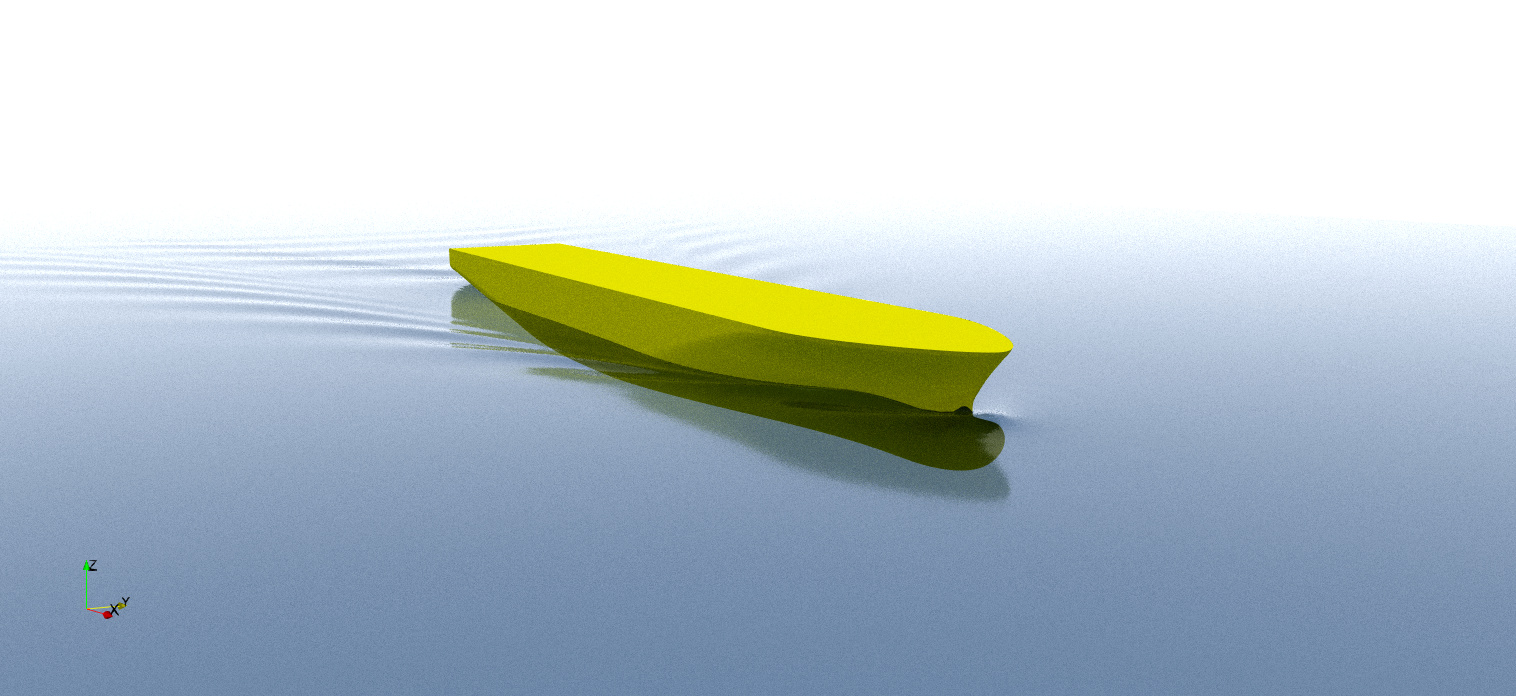
My goal is to render a Ship with the free-surface. (YellowShip for the ship material, WaterDarkBlue for the free-surface)
With OSpray:
With OptiX
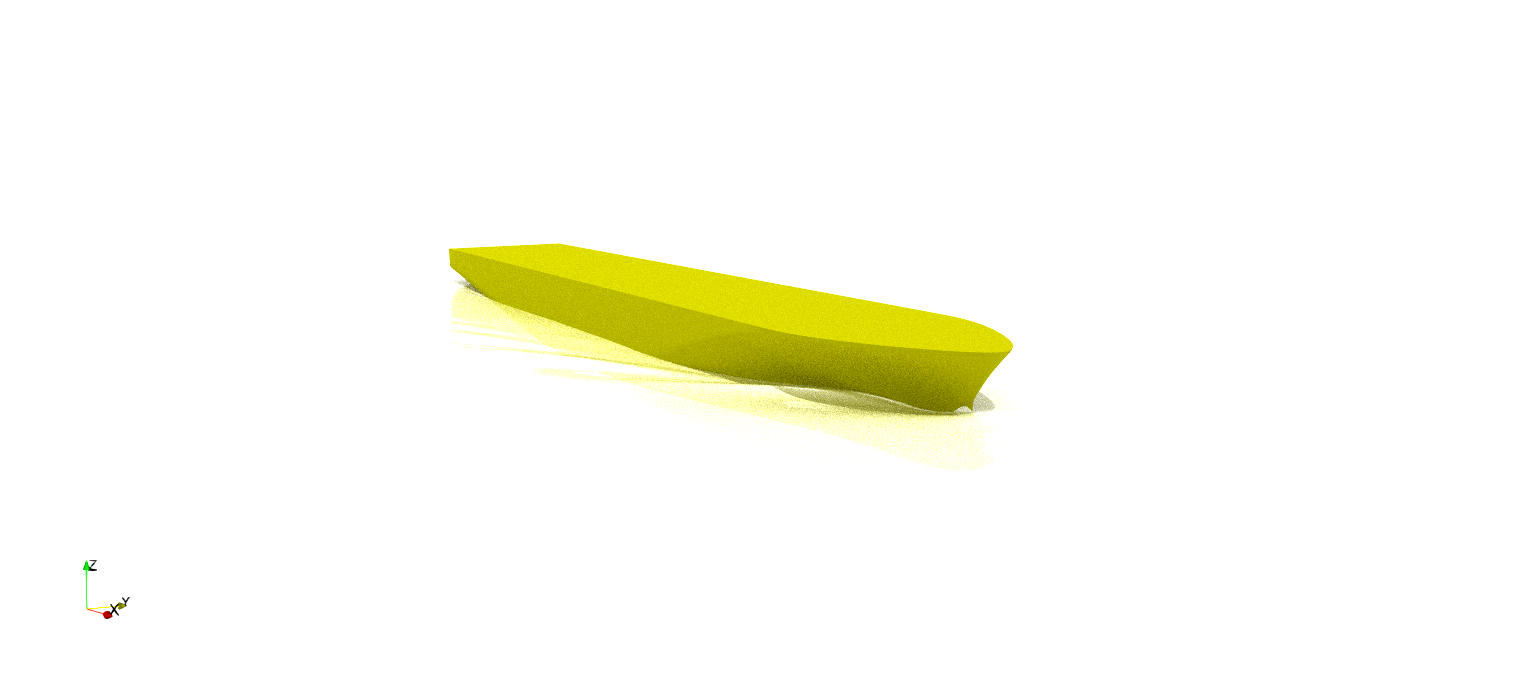
There seem to be something not working properly with the materials!
Another attempt: (YellowShip for the ship, WaterDarkBlue for a box which surrounds the whole domain, and “water” for the free-surface)
OSpray:

OptiX:
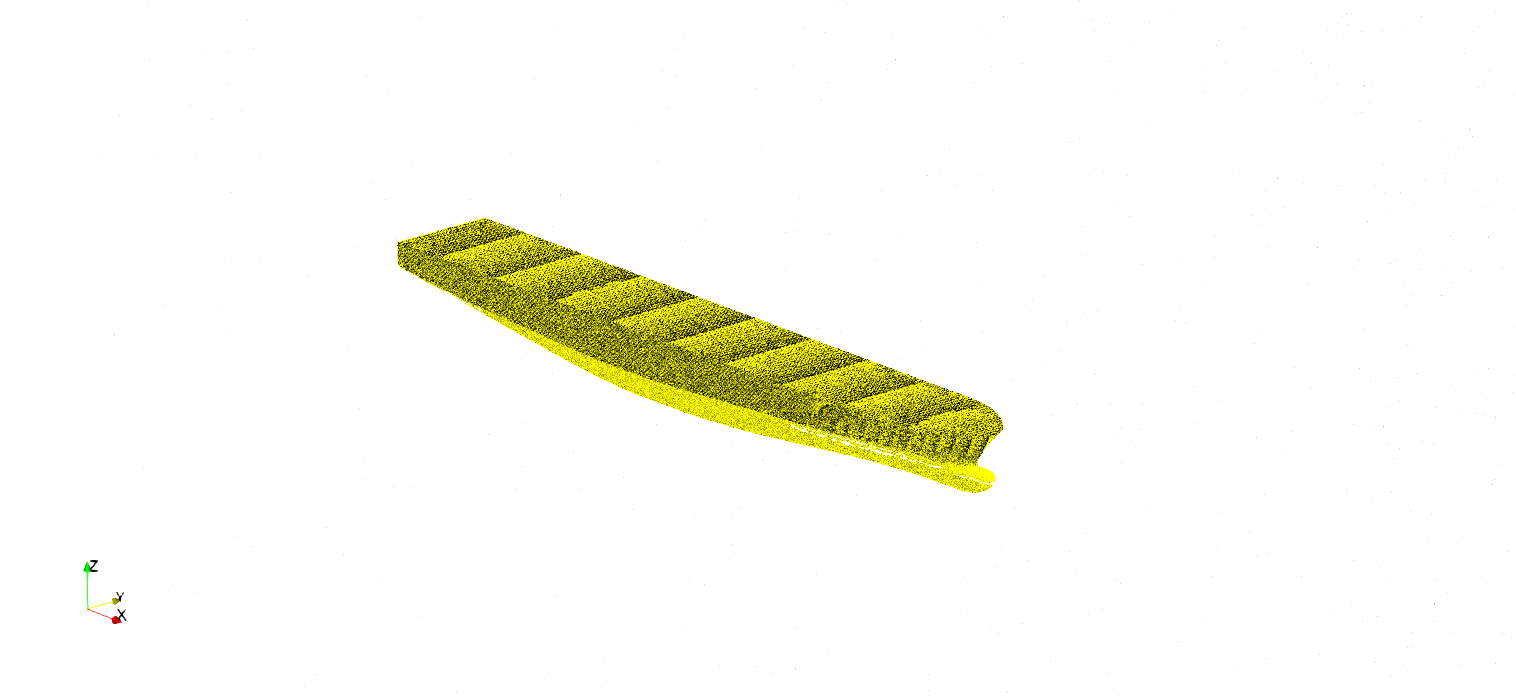
I also tried without using materials, but that does not seems very successful either.
So, does anybody has a clue of what’s going on ?
One thing I do see is the CPU usage reduction, and quicker time to image when using OptiX, but the result isn’t really up to my expectations…
---
### Author:  [@Dave\_DeMarle](https://discourse.paraview.org/u/Dave_DeMarle)
#### Post date: [September 2, 2019, 7:45pm UTC](https://discourse.paraview.org/t/optix-ray-tracing/2198/11 "2019-09-02T19:45:55Z")
That is a bug in the material handling somewhere down in the path from ParaView down to OptiX. I’ll discuss with Tim Biedert and try and take a close look. Thanks for the report. Feel free to report an issue tracker with a small reproducer case.
---
### Author:  [@pcrepier](https://discourse.paraview.org/u/pcrepier)
#### Post date: [September 3, 2019, 6:53am UTC](https://discourse.paraview.org/t/optix-ray-tracing/2198/12 "2019-09-03T06:53:42Z")
Issue reported here: [https://gitlab.kitware.com/paraview/paraview/issues/19296](https://gitlab.kitware.com/paraview/paraview/issues/19296)
---
### Author:  [@jfavre](https://discourse.paraview.org/u/jfavre)
#### Post date: [September 3, 2019, 10:33am UTC](https://discourse.paraview.org/t/optix-ray-tracing/2198/13 "2019-09-03T10:33:47Z")
Perhaps OptiX is more sensitive to flipped normals. I have noticed that your free surface does not have a consistent ordering of surface primitives (some of them pointing up, some of them pointing in the opposite direction). My first suggestion is to clean up the surface to insure consistent ordering. And try both path-tracers again.
my 2 cents.
---
### Author:  [@tbiedert](https://discourse.paraview.org/u/tbiedert)
#### Post date: [September 3, 2019, 12:48pm UTC](https://discourse.paraview.org/t/optix-ray-tracing/2198/14 "2019-09-03T12:48:47Z")
Thanks, Jean! That’s exactly what’s happening here. And there is a separate issue where one material parameter is not forwarded correctly. I’m currently preparing a patch for VTK, and will provide the details in the issue tracker.
Regarding the normals: They are inconsistent and facing downwards. Since normals are used for determining whether a volumetric material is entered or exited, this leads to unexpected results. When hitting the surface, the ray basically thinks that it’s leaving the water.
When the normals are oriented correctly, it will push the water material on its internal stack of active volumetric materials and will apply volumetric attenuation and proper IOR handling for every subsequent bounce; until it leaves the volumetric material again and pops it from the stack.
If you don’t consider normals for determining entering/exiting, you will run into other corner cases where volumes will fail (e.g. when the camera starts inside a volume).
I will look into making this more robust.
Thanks for raising this issue!
Tim
---
### Author:  [@tbiedert](https://discourse.paraview.org/u/tbiedert)
#### Post date: [September 3, 2019, 1:08pm UTC](https://discourse.paraview.org/t/optix-ray-tracing/2198/15 "2019-09-03T13:08:58Z")
Material bug fix: [https://gitlab.kitware.com/paraview/paraview/issues/19296#note\_620419](https://gitlab.kitware.com/paraview/paraview/issues/19296#note_620419)
---
### Author:  [@pcrepier](https://discourse.paraview.org/u/pcrepier)
#### Post date: [September 3, 2019, 1:49pm UTC](https://discourse.paraview.org/t/optix-ray-tracing/2198/16 "2019-09-03T13:49:58Z")
That was very quick! Thanks for that.
I now also see the normals issue, the “Clean” filter solves this issue.
The underlying issue is that the contouring algorithm does not car about normals consistency …
Would it be possible to know when the fix comes in the nightly build ? Then I could try again!
---
### Author:  [@Dave\_DeMarle](https://discourse.paraview.org/u/Dave_DeMarle)
#### Post date: [September 3, 2019, 4:56pm UTC](https://discourse.paraview.org/t/optix-ray-tracing/2198/17 "2019-09-03T16:56:17Z")
It will be in the nightly binaries in a couple of days. Once ParaView’s VTK branch is bumped that is.