# OSPRay scaling points
**URL:** https://discourse.paraview.org/t/ospray-scaling-points/992
**Category:** ParaView Support
**Created:** [December 2, 2018, 8:50pm UTC](https://discourse.paraview.org/t/ospray-scaling-points/992 "2018-12-02T20:50:10Z")
**Posts on this page:** 17
**Page:** 1
### Author:  [@Randy\_Heiland](https://discourse.paraview.org/u/Randy_Heiland)
#### Post date: [December 2, 2018, 8:50pm UTC](https://discourse.paraview.org/t/ospray-scaling-points/992/1 "2018-12-02T20:50:10Z")
PV 5.6.0
I’m trying to use OSPRay to render points as spheres (not 3D glyphs), scale them with a given scalar field, and then apply an additional, single value scale factor to that. It’s this last bit I cannot seem to do.
The “point size” under Styling seems to have no effect. Toggling “Render points as spheres” seem to have no effect. And OSPRay Scale Function I don’t understand, but it too seems to have no effect.
I can try to provide a simple example if necessary.
thanks, Randy
---
### Author:  [@Michael](https://discourse.paraview.org/u/Michael)
#### Post date: [December 3, 2018, 9:23am UTC](https://discourse.paraview.org/t/ospray-scaling-points/992/2 "2018-12-03T09:23:27Z")
Hi Randy,
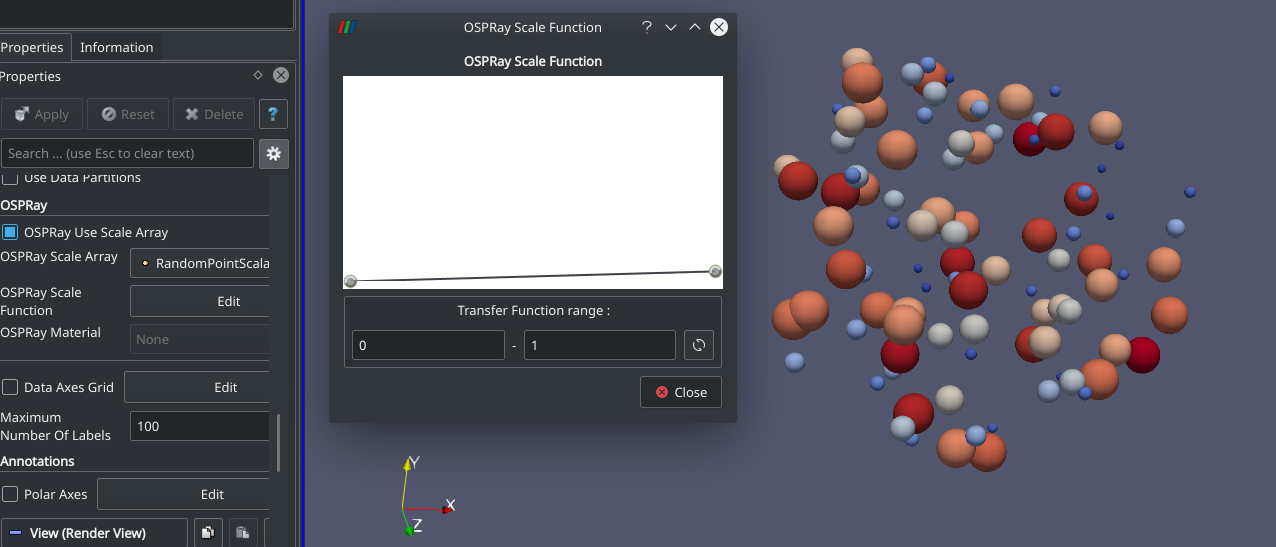
Are you using the OSPRay Scale Function (advanced properties)?
---
### Author:  [@Randy\_Heiland](https://discourse.paraview.org/u/Randy_Heiland)
#### Post date: [December 3, 2018, 12:49pm UTC](https://discourse.paraview.org/t/ospray-scaling-points/992/3 "2018-12-03T12:49:04Z")
I did open that and played with it, yes. But I did not see how it would let me apply an additional, fixed scaling factor to all my spheres. What’s the trick?
---
### Author:  [@Michael](https://discourse.paraview.org/u/Michael)
#### Post date: [December 3, 2018, 1:37pm UTC](https://discourse.paraview.org/t/ospray-scaling-points/992/4 "2018-12-03T13:37:45Z")
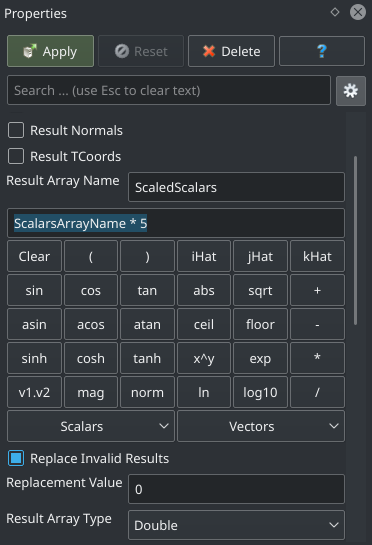
You can use the calculator filter for that.
If you want to scale up with a factor of 5, use the formula `ScalarsArrayName * 5`
---
### Author:  [@Randy\_Heiland](https://discourse.paraview.org/u/Randy_Heiland)
#### Post date: [December 3, 2018, 2:15pm UTC](https://discourse.paraview.org/t/ospray-scaling-points/992/5 "2018-12-03T14:15:29Z")
Sorry to be dense, but exactly where do I enter that formula in the GUI (for 5.6.0)? Also, do you know if there are docs for the 5.6.0 GUI? I’m finding the wiki a bit confusing. Thanks!
---
### Author:  [@Michael](https://discourse.paraview.org/u/Michael)
#### Post date: [December 3, 2018, 2:22pm UTC](https://discourse.paraview.org/t/ospray-scaling-points/992/6 "2018-12-03T14:22:21Z")
- Select the filter called `Calculator` (Filters menu / Data Analytics / Calculator)
- Enter the formula in properties panel (of course, replace the name of the array by yours):
Concerning the docs, you can find it for ParaView 5.5.2 here: [https://www.paraview.org/paraview-guide/](https://www.paraview.org/paraview-guide/)
As far as I know, the guide for 5.6.0 in not out yet. @cory.quammen
---
### Author:  [@cory.quammen](https://discourse.paraview.org/u/cory.quammen)
#### Post date: [December 3, 2018, 2:31pm UTC](https://discourse.paraview.org/t/ospray-scaling-points/992/7 "2018-12-03T14:31:38Z")
The updates for the ParaView Guide are just about finished for 5.6. Most of the guide for 5.5.2 is still valid for 5.6, so it is still a good reference.
I also highly recommend the [ParaView Tutorial](https://www.paraview.org/Wiki/The_ParaView_Tutorial) for getting a good hands-on understanding of ParaView.
---
### Author:  [@Randy\_Heiland](https://discourse.paraview.org/u/Randy_Heiland)
#### Post date: [December 4, 2018, 2:05am UTC](https://discourse.paraview.org/t/ospray-scaling-points/992/8 "2018-12-04T02:05:52Z")
Thanks. I confess I haven’t attempted your suggestion yet. But I did do some screen captures to try to describe what I’m seeing:
[https://docs.google.com/document/d/1HDJavoD6ZSx8\_khVJo\_2If5A4UTmPZXlpGz9Mev5bgM/edit](https://docs.google.com/document/d/1HDJavoD6ZSx8_khVJo_2If5A4UTmPZXlpGz9Mev5bgM/edit)
Briefly: Using 3D glyphs (spheres; no OSPRay), scaled by an array, work as one would expect. Toggle on OSPRay rendering, everything disappears. Switching to Points (from 3D glyphs), they appear, but very tiny and all the same size. Applying an OSPRay scale array (same as before) has no effect.
I would find it odd that I’d need to mess with a formula to get proper scaling.
---
### Author:  [@Michael](https://discourse.paraview.org/u/Michael)
#### Post date: [December 4, 2018, 9:59am UTC](https://discourse.paraview.org/t/ospray-scaling-points/992/9 "2018-12-04T09:59:47Z")
Hi Randy,
Thanks for the details.
There is a bug in the OSPRay Scale Function widget, the scalars range is not automatically set.
If you set manually your range (20-50), it works as intended.

@mwestphal
---
### Author:  [@Randy\_Heiland](https://discourse.paraview.org/u/Randy_Heiland)
#### Post date: [December 4, 2018, 1:49pm UTC](https://discourse.paraview.org/t/ospray-scaling-points/992/10 "2018-12-04T13:49:03Z")
I must still be missing something because when I set my range 20-50, I see no change (screenshot on google doc). Do I still need to mess with the formula in the prop panel or something else?
---
### Author:  [@Michael](https://discourse.paraview.org/u/Michael)
#### Post date: [December 4, 2018, 1:51pm UTC](https://discourse.paraview.org/t/ospray-scaling-points/992/11 "2018-12-04T13:51:39Z")
Can you share your data?
---
### Author:  [@Randy\_Heiland](https://discourse.paraview.org/u/Randy_Heiland)
#### Post date: [December 4, 2018, 2:28pm UTC](https://discourse.paraview.org/t/ospray-scaling-points/992/12 "2018-12-04T14:28:22Z")
Sure: [https://github.com/rheiland/paraview\_play](https://github.com/rheiland/paraview_play)
the pv560\*.pvsm state file uses the \*.mat file. Set an env var PHYSICELL\_DATA to point to a directory with the .mat file.
Caveat: this uses a custom reader for our data which requires scipy being installed in your Python env as explained here:
[http://www.mathcancer.org/blog/paraview-for-physicell-part-1/](http://www.mathcancer.org/blog/paraview-for-physicell-part-1/)
One could probably create a much simpler data file & pipeline for this particular test 🙂
---
### Author:  [@Michael](https://discourse.paraview.org/u/Michael)
#### Post date: [December 4, 2018, 4:14pm UTC](https://discourse.paraview.org/t/ospray-scaling-points/992/13 "2018-12-04T16:14:51Z")
Can you save your data to a `vtp` or `vtu` file (depending if you have a polydata or a unstructured grid) using the `Save Data...` menu in ParaView and share it with me?
It would be a lot easier for me to open it.
---
### Author:  [@Randy\_Heiland](https://discourse.paraview.org/u/Randy_Heiland)
#### Post date: [December 4, 2018, 4:30pm UTC](https://discourse.paraview.org/t/ospray-scaling-points/992/14 "2018-12-04T16:30:35Z")
I blindly created a .vtp and put on the repo.
---
### Author:  [@Michael](https://discourse.paraview.org/u/Michael)
#### Post date: [December 4, 2018, 4:47pm UTC](https://discourse.paraview.org/t/ospray-scaling-points/992/15 "2018-12-04T16:47:43Z")
It seems that there is no way to apply a custom factor on top of the scale function with OSPRay at the moment…
You can use a transform filter to scale down your dataset but it is a poor workaround.
Find attach a state file with this workaround: [state.pvsm](https://discourse.paraview.org/uploads/default/original/1X/beb346a3e84b3942c7ac16175ad8d7288c670dab.pvsm) (250.1 KB)
---
### Author:  [@Randy\_Heiland](https://discourse.paraview.org/u/Randy_Heiland)
#### Post date: [December 4, 2018, 4:54pm UTC](https://discourse.paraview.org/t/ospray-scaling-points/992/16 "2018-12-04T16:54:52Z")
But to be clear, for OSPRay rendered data, it doesn’t properly use the “OSPRay Use Scale Array”. Correct? Applying any additional scale factor/function on top of that is another issue. I think I’ll wait for a fix to the former before I share further with our users. But thanks for being so responsive!
---
### Author:  [@Michael](https://discourse.paraview.org/u/Michael)
#### Post date: [December 4, 2018, 4:58pm UTC](https://discourse.paraview.org/t/ospray-scaling-points/992/17 "2018-12-04T16:58:40Z")
It is using the OSPRay Use Scale Array but it is mapping your current range [20;50] to a custom function inside [0;1] range, meaning that the maximum size of the sphere you can achieve is 1.