# Outline rendered as if it were cutting through another object
**URL:** https://discourse.paraview.org/t/outline-rendered-as-if-it-were-cutting-through-another-object/2479
**Category:** Development
**Created:** [August 28, 2019, 11:03am UTC](https://discourse.paraview.org/t/outline-rendered-as-if-it-were-cutting-through-another-object/2479 "2019-08-28T11:03:36Z")
**Posts on this page:** 2
**Page:** 1
### Author:  [@bastian](https://discourse.paraview.org/u/bastian)
#### Post date: [August 28, 2019, 11:03am UTC](https://discourse.paraview.org/t/outline-rendered-as-if-it-were-cutting-through-another-object/2479/1 "2019-08-28T11:03:36Z")
Dear developers,
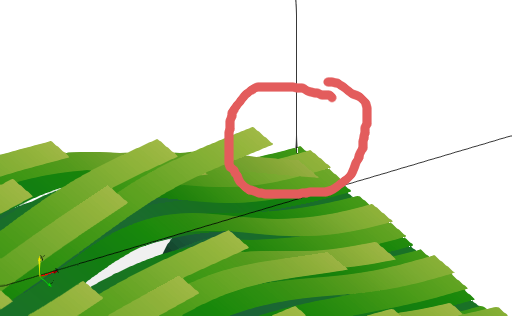
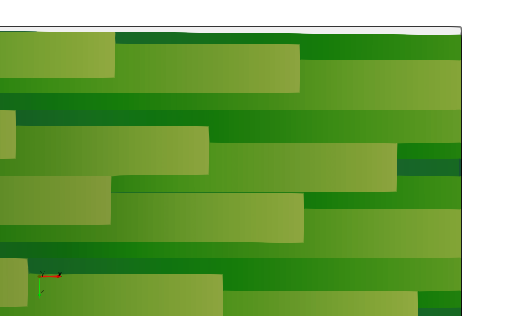
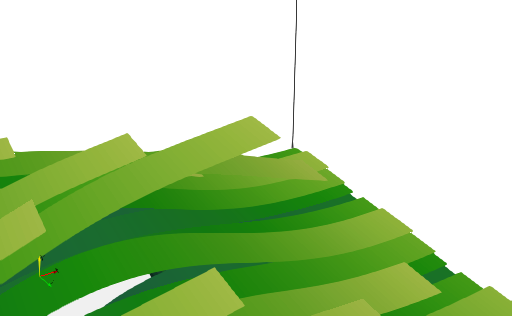
I sometimes get wrong representations of outlines such as shown below.
Here, the box outlines do not actually run through any of those green things, but renderings sometimes give the impression that one would (red “circle”).
vtk files, state and script to reproduce the images below: [test.zip](https://discourse.paraview.org/uploads/short-url/hLBCF9rg8TIH11opkJHPGTCZy4I.zip) (720.6 KB)
ParaView 5.7.0-RC2
---
### Author:  [@mwestphal](https://discourse.paraview.org/u/mwestphal)
#### Post date: [August 28, 2019, 11:27am UTC](https://discourse.paraview.org/t/outline-rendered-as-if-it-were-cutting-through-another-object/2479/2 "2019-08-28T11:27:47Z")
This appears because of “Camera Parralel Projection” (which is automatically set to on when you use the 2D mode)
You can either disable “Camera Parralel Projection” or use 3D mode as a work around, if that’s possible for you.
In any case, this is a bug.