# Output contour of a certain area
**URL:** https://discourse.paraview.org/t/output-contour-of-a-certain-area/9183
**Category:** Development
**Created:** [March 15, 2022, 12:52pm UTC](https://discourse.paraview.org/t/output-contour-of-a-certain-area/9183 "2022-03-15T12:52:26Z")
**Posts on this page:** 8
**Page:** 1
### Author:  [@xq520](https://discourse.paraview.org/u/xq520)
#### Post date: [March 15, 2022, 12:52pm UTC](https://discourse.paraview.org/t/output-contour-of-a-certain-area/9183/1 "2022-03-15T12:52:26Z")
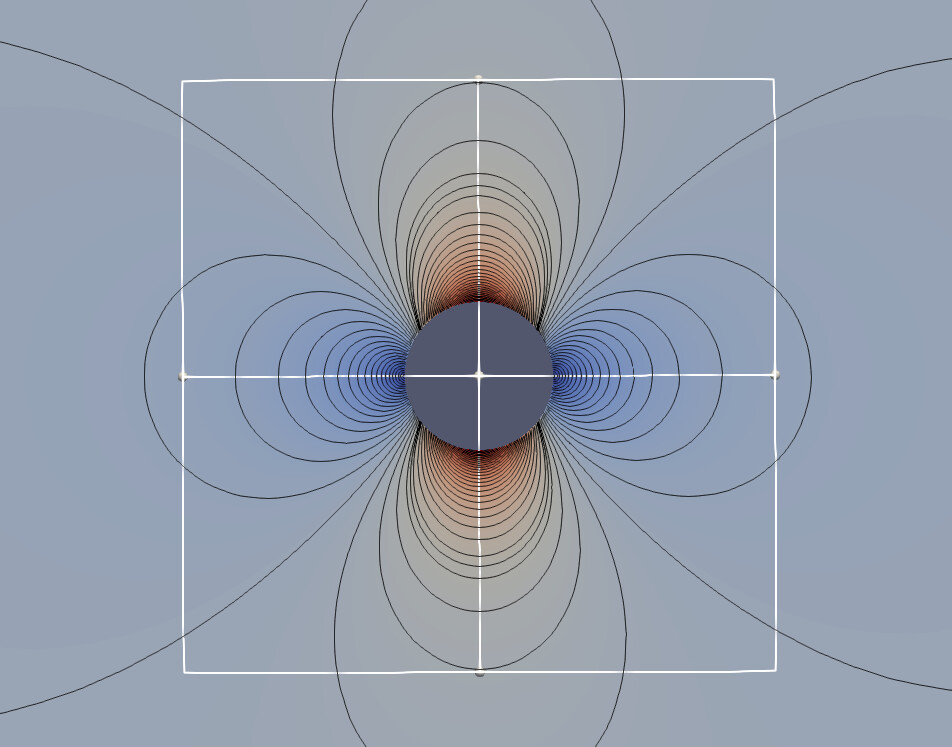
Hello, I want to output contour in a certain region, such as (-1,1)_(-1,1), and the whole region is (-10,10)_(-10,10). How can I get this? Thanks a lot.
Best regards
---
### Author:  [@Kenneth\_Moreland](https://discourse.paraview.org/u/Kenneth_Moreland)
#### Post date: [March 15, 2022, 1:07pm UTC](https://discourse.paraview.org/t/output-contour-of-a-certain-area/9183/2 "2022-03-15T13:07:01Z")
You can use the `Clip` filter to get the portion of data within a region of space. Just change the `Clip Type` from `Plane` to `Box`.
I suggest doing the `Contour` first and then applying the `Clip`. The reverse order will work, too, but it will probably be less efficient.
---
### Author:  [@xq520](https://discourse.paraview.org/u/xq520)
#### Post date: [March 15, 2022, 1:22pm UTC](https://discourse.paraview.org/t/output-contour-of-a-certain-area/9183/3 "2022-03-15T13:22:14Z")
Thanks for your replay.
But I can’t export the image which in the **clip** box. I don’t to export data, but I want output the contour image in the **clip** box.
---
### Author:  [@xq520](https://discourse.paraview.org/u/xq520)
#### Post date: [March 15, 2022, 1:40pm UTC](https://discourse.paraview.org/t/output-contour-of-a-certain-area/9183/4 "2022-03-15T13:40:48Z")
And could you tell me how to get the pressure coefficient over the cylinder surface for some details?
Best regards
---
### Author:  [@Kenneth\_Moreland](https://discourse.paraview.org/u/Kenneth_Moreland)
#### Post date: [March 15, 2022, 1:43pm UTC](https://discourse.paraview.org/t/output-contour-of-a-certain-area/9183/5 "2022-03-15T13:43:49Z")
If you want to save image rather than data, then use `File` →  `Save Screenshot`.
Unfortunately, you cannot specify a region of space to specifically write out as an image. You will have to position the camera to view the space you want to write out as an image. Using `Clip` can help place the camera in the right place.
---
### Author:  [@Kenneth\_Moreland](https://discourse.paraview.org/u/Kenneth_Moreland)
#### Post date: [March 15, 2022, 1:47pm UTC](https://discourse.paraview.org/t/output-contour-of-a-certain-area/9183/6 "2022-03-15T13:47:26Z")
The “pressure coefficient” part sounds like a completely different question. Could you start a new topic on discourse for that?
When you do, please provide more information. What cylinder? What is your data? What fields in your data can be used to compute the pressure coefficient?
---
### Author:  [@xq520](https://discourse.paraview.org/u/xq520)
#### Post date: [March 15, 2022, 1:56pm UTC](https://discourse.paraview.org/t/output-contour-of-a-certain-area/9183/7 "2022-03-15T13:56:18Z")
Thanks a lot for your help. Okey, I have started a new topic.
Thanks again.
---
### Author:  [@wascott](https://discourse.paraview.org/u/wascott)
#### Post date: [March 15, 2022, 4:32pm UTC](https://discourse.paraview.org/t/output-contour-of-a-certain-area/9183/8 "2022-03-15T16:32:02Z")
One way to get the “save screenshot” for just the area you are looking for is to use system tools. For instance, on a Mac it’s the command key + shift + 4. On Windows I always use the snipping tool. Linux has their flavor of tool, I forget the name. Or, as Ken says, just zoom into the data you are looking for.