# Parallel and Material
**URL:** https://discourse.paraview.org/t/parallel-and-material/3094
**Category:** ParaView Support
**Created:** [December 2, 2019, 10:52am UTC](https://discourse.paraview.org/t/parallel-and-material/3094 "2019-12-02T10:52:20Z")
**Posts on this page:** 10
**Page:** 1
### Author:  [@gilcu2](https://discourse.paraview.org/u/gilcu2)
#### Post date: [December 2, 2019, 10:52am UTC](https://discourse.paraview.org/t/parallel-and-material/3094/1 "2019-12-02T10:52:20Z")
I have created a pvtp file with references to several vtp files to process in parallel.
I want to set a different material to each model from a different vtp file but when load from the pvtp I can only select a material for all. How can I do?
Thanks
---
### Author:  [@mwestphal](https://discourse.paraview.org/u/mwestphal)
#### Post date: [December 2, 2019, 10:57am UTC](https://discourse.paraview.org/t/parallel-and-material/3094/2 "2019-12-02T10:57:06Z")
Sorry, your question is not clear.
What do you mean by material ?
Can you share a screenshot of what you see and what is not right ?
---
### Author:  [@gilcu2](https://discourse.paraview.org/u/gilcu2)
#### Post date: [December 2, 2019, 10:58am UTC](https://discourse.paraview.org/t/parallel-and-material/3094/3 "2019-12-02T10:58:39Z")
Sorry, the ospray material, in the raytracing section
---
### Author:  [@mwestphal](https://discourse.paraview.org/u/mwestphal)
#### Post date: [December 2, 2019, 12:03pm UTC](https://discourse.paraview.org/t/parallel-and-material/3094/4 "2019-12-02T12:03:12Z")
The material is not linked to the parallelism of the file.
To have multiple materials, you need to have a multiblock dataset, have a field data with different values on each leafs of the multiblock, use the “ValueIndexed” material and specify the materials in the Categorical color map.
Let me know if you want an example.
---
### Author:  [@gilcu2](https://discourse.paraview.org/u/gilcu2)
#### Post date: [December 2, 2019, 12:30pm UTC](https://discourse.paraview.org/t/parallel-and-material/3094/5 "2019-12-02T12:30:33Z")
Give me an example please
---
### Author:  [@mwestphal](https://discourse.paraview.org/u/mwestphal)
#### Post date: [December 2, 2019, 12:41pm UTC](https://discourse.paraview.org/t/parallel-and-material/3094/6 "2019-12-02T12:41:34Z")
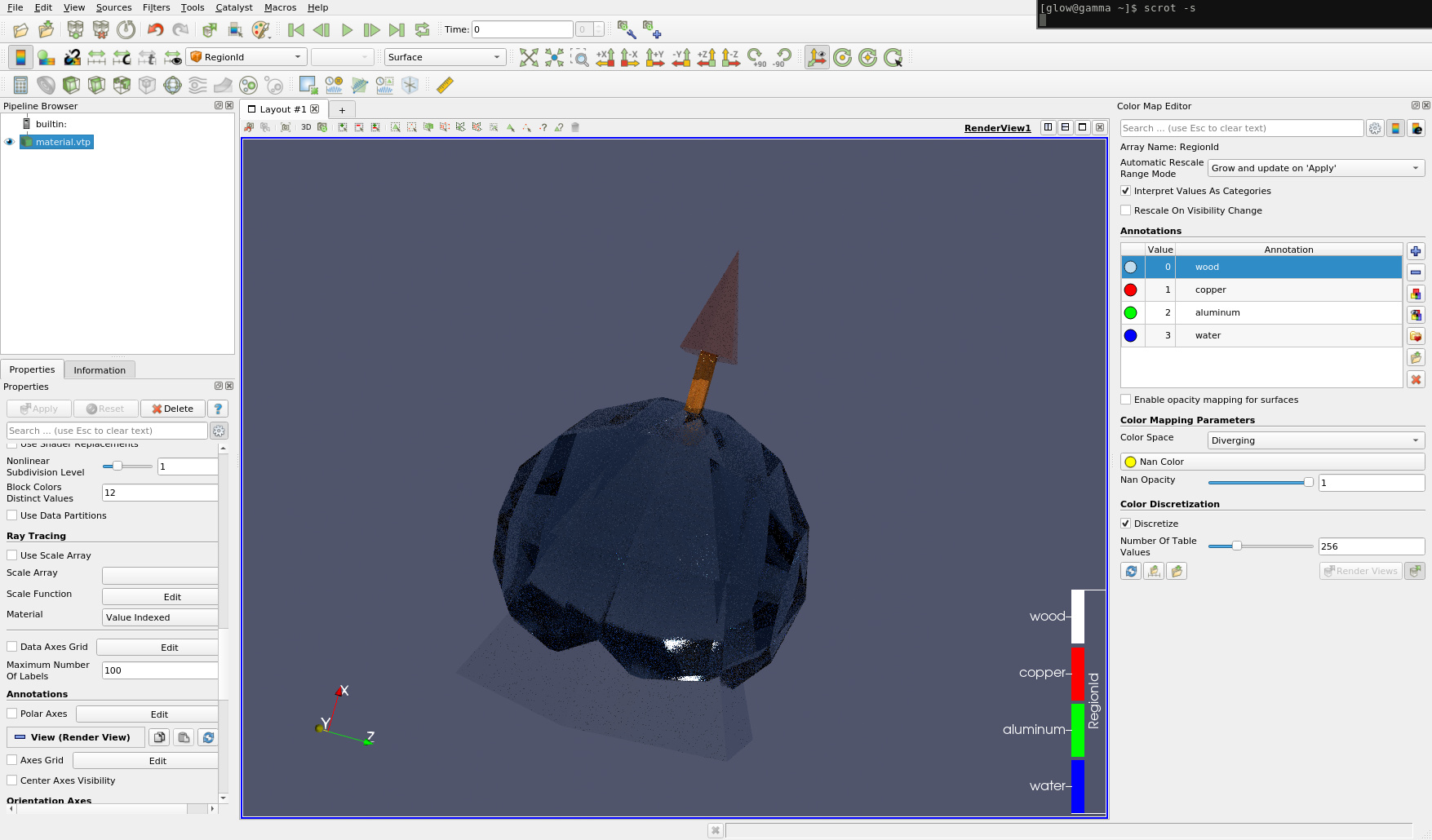
- Download and open this file : [material.vtp](https://discourse.paraview.org/uploads/short-url/dKcKqFEjbWmydiwmue3QQLlbMur.vtp) (8.9 KB)
- Color by cell array RegionId
- Enable Ray Tracing
- Select OSPray Pathtracer
- Choose raytracing material : Value Indexed
- View -\> ColorMapEditor
- Check : Interpret Values as categories
- in the annotation, write the following
- replace 0 by wood
- replace 1 by copper
- replace 2 by aluminum
- replace 3 by water
---
### Author:  [@gilcu2](https://discourse.paraview.org/u/gilcu2)
#### Post date: [December 2, 2019, 12:57pm UTC](https://discourse.paraview.org/t/parallel-and-material/3094/7 "2019-12-02T12:57:46Z")
Hi, thanks. I get something different.
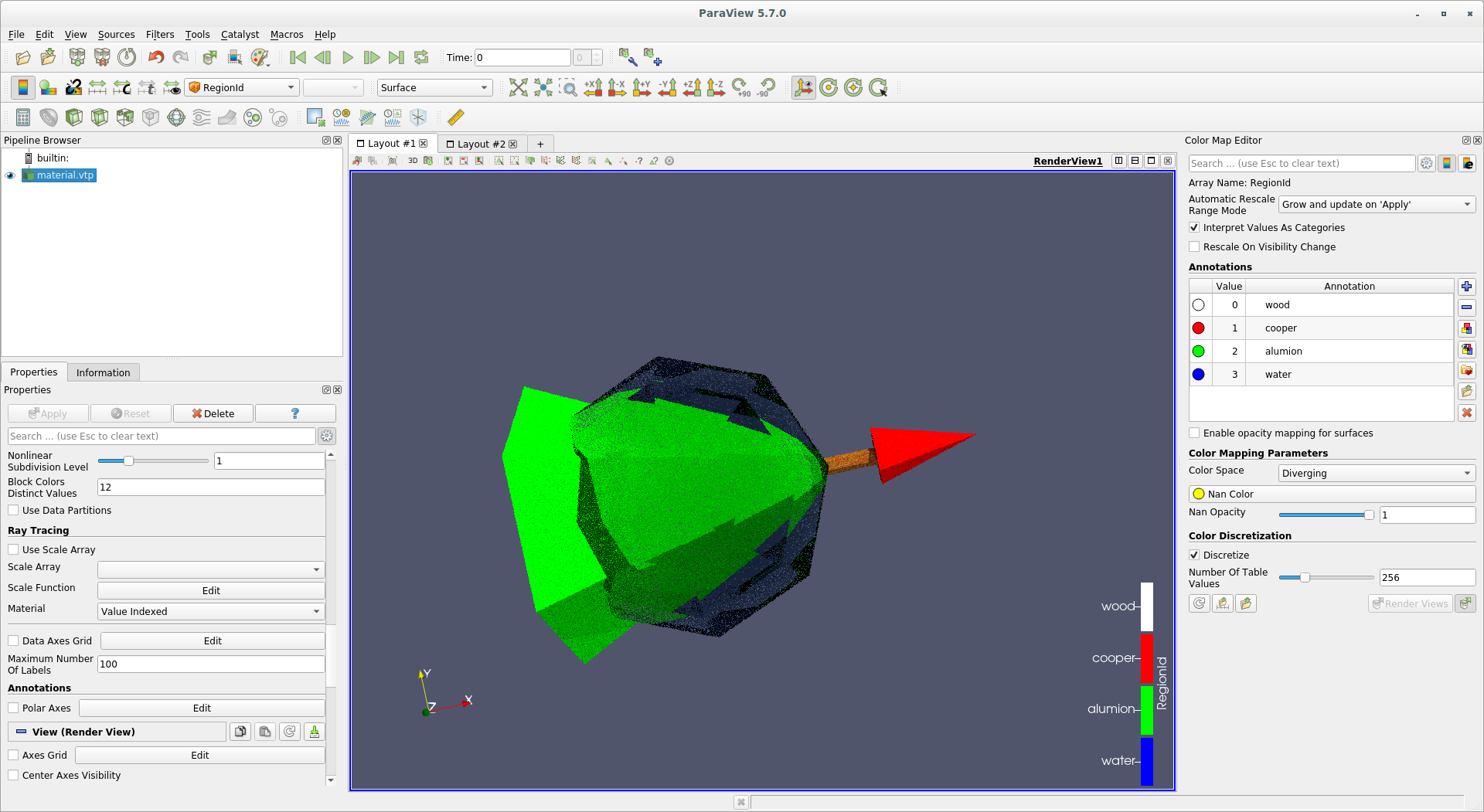
Can you guess why? I am using 5.7.0 binary download from your web.
---
### Author:  [@gilcu2](https://discourse.paraview.org/u/gilcu2)
#### Post date: [December 2, 2019, 1:02pm UTC](https://discourse.paraview.org/t/parallel-and-material/3094/8 "2019-12-02T13:02:36Z")
Sorry, it is working. Mistakes in the names.
Thanks a lot
---
### Author:  [@tjordan](https://discourse.paraview.org/u/tjordan)
#### Post date: [December 13, 2019, 3:27pm UTC](https://discourse.paraview.org/t/parallel-and-material/3094/9 "2019-12-13T15:27:24Z")
I was trying to follow your example. I am running the binary version of ParaView-5.7.0-MPI-Linux-Python3.7-64bit on centos. I can follow your example step by step but I have no option on the Properties pane for “Choose raytracing material : Value Indexed”. On my properties pane beneath Use Scale Array are no options entries for Scale Array, Scale Function or Material. Do you have any idea why?
---
### Author:  [@gilcu2](https://discourse.paraview.org/u/gilcu2)
#### Post date: [December 14, 2019, 7:50am UTC](https://discourse.paraview.org/t/parallel-and-material/3094/10 "2019-12-14T07:50:02Z")
Hello, you need to toggle on Advanced properties of properties panel. Then the panel shows a section named Ray Tracing, inside it a combo named Material where you select Value Indexed, it is the last option.
Thanks