# Paraview 5.6 Environment Setup for Windows
**URL:** https://discourse.paraview.org/t/paraview-5-6-environment-setup-for-windows/1112
**Category:** ParaView Support
**Created:** [January 7, 2019, 2:59pm UTC](https://discourse.paraview.org/t/paraview-5-6-environment-setup-for-windows/1112 "2019-01-07T14:59:21Z")
**Posts on this page:** 3
**Page:** 1
### Author:  [@yamartinezgomez](https://discourse.paraview.org/u/yamartinezgomez)
#### Post date: [January 7, 2019, 2:59pm UTC](https://discourse.paraview.org/t/paraview-5-6-environment-setup-for-windows/1112/1 "2019-01-07T14:59:21Z")
Hello,
I am a new user of Paraview and have a task to set-up Paraview environment for Windows 10. My version of Paraview is 5.6 but instructions that i have seen online for this task is for Paraview 4.2, which refers to the following file paths:
C:\ParaView-v4.2.0-build\lib
C:\ParaView-v4.2.0-build\lib\site-packages
C:\ParaView-v4.2.0-build\bin
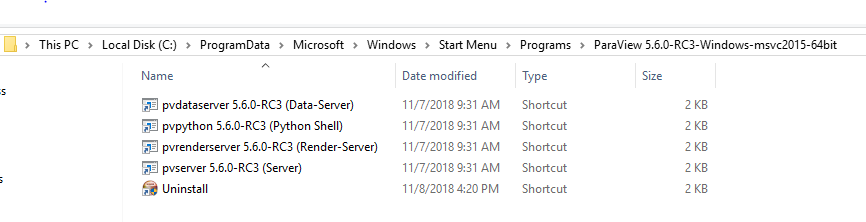
My Paraview installation does not have these folders (please see attached screen shot of my installation path). Kindly advise. Thanks!
Yvon.
---
### Author:  [@mwestphal](https://discourse.paraview.org/u/mwestphal)
#### Post date: [January 7, 2019, 3:02pm UTC](https://discourse.paraview.org/t/paraview-5-6-environment-setup-for-windows/1112/2 "2019-01-07T15:02:39Z")
Please download the last version of ParaView release and install it.
[https://www.paraview.org/paraview-downloads/download.php?submit=Download&version=v5.6&type=binary&os=Windows&downloadFile=ParaView-5.6.0-Windows-msvc2015-64bit.exe](https://www.paraview.org/paraview-downloads/download.php?submit=Download&version=v5.6&type=binary&os=Windows&downloadFile=ParaView-5.6.0-Windows-msvc2015-64bit.exe)
You should then be able to run ParaView from the Start Menu.
You may also want to remove older version of ParaView that you already installed.
---
### Author:  [@yamartinezgomez](https://discourse.paraview.org/u/yamartinezgomez)
#### Post date: [January 7, 2019, 3:18pm UTC](https://discourse.paraview.org/t/paraview-5-6-environment-setup-for-windows/1112/3 "2019-01-07T15:18:23Z")
Thanks for the swift response. Sorry for not being clear enough. I am able to run ParaView from Start Menu but my goal ultimately is to be able to start up the ParaView Service Manager, from a Python IDLE such as Spyder (Anaconda). I have read online that this requires adding some ParaView installation paths to my PYTHONPATH. Thanks!