# ParaView 5.8 Features Free Webinar
**URL:** https://discourse.paraview.org/t/paraview-5-8-features-free-webinar/3656
**Category:** Announcements
**Created:** [February 25, 2020, 11:02am UTC](https://discourse.paraview.org/t/paraview-5-8-features-free-webinar/3656 "2020-02-25T11:02:27Z")
**Posts on this page:** 17
**Page:** 1
### Author:  [@mwestphal](https://discourse.paraview.org/u/mwestphal)
#### Post date: [February 25, 2020, 11:02am UTC](https://discourse.paraview.org/t/paraview-5-8-features-free-webinar/3656/1 "2020-02-25T11:02:27Z")
Are you ready to join Kitware’s ParaView free Webinar ?
These first two sessions will happen in March and be focused on ParaView 5.8 new features.
During these 1 hour sessions, you will not only be able to follow our explanations and hands-on demonstrations of the new features, but you will also be able to interact with the presenter via the chat and different interaction methods in order to ask questions or precisions.
On March 3, 10am GMT+1, We will focus on the new Interface Improvements of ParaView in general, with specifics such as the recent graphic overhaul, interactive data histogram and data exploration using range handles.
Please join us at : [link removed, no recording sadly]
[Click to add to your calendar](https://calendar.google.com/event?action=TEMPLATE&tmeid=MHQxNzZpdTRjOG8yNzBiZWlvb3RsaWYyYWgga2l0d2FyZS5jb21fbTZzdjg0bnNlNDd1bDFpbjBxZHNuOWE4NzRAZw&tmsrc=kitware.com_m6sv84nse47ul1in0qdsn9a874%40group.calendar.google.com)
On march 10, 10am GMT+1, We will focus on the new rendering techniques in ParaView, with specifics such as Physically Based Rendering, Raytracing, and advanced GPU based rendering techniques.
Please rewatch it at : [https://youtu.be/Xg6Y7Qui8gc](https://youtu.be/Xg6Y7Qui8gc)
[Click to add to your calendar](https://calendar.google.com/event?action=TEMPLATE&tmeid=MjAyOGswa2dlOG4wczc0cDFqYTJrbGNnaWkga2l0d2FyZS5jb21fbTZzdjg0bnNlNDd1bDFpbjBxZHNuOWE4NzRAZw&tmsrc=kitware.com_m6sv84nse47ul1in0qdsn9a874%40group.calendar.google.com)
Next Planned Webinars :
- ParaView Initiation
---
### Author:  [@mwestphal](https://discourse.paraview.org/u/mwestphal)
#### Post date: [March 3, 2020, 9:15am UTC](https://discourse.paraview.org/t/paraview-5-8-features-free-webinar/3656/2 "2020-03-03T09:15:23Z")
We are experiencing issues with jitsi.
---
### Author:  [@XavierStuvw](https://discourse.paraview.org/u/XavierStuvw)
#### Post date: [March 3, 2020, 10:13am UTC](https://discourse.paraview.org/t/paraview-5-8-features-free-webinar/3656/3 "2020-03-03T10:13:54Z")
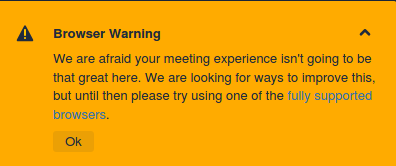
If I may add to it, Jitsi is also quite restrictive as for the choice of browsers. I use Firefox, which is not something has been invented yesterday.
And Google Meet is a bit of waiting…

---
### Author:  [@mwestphal](https://discourse.paraview.org/u/mwestphal)
#### Post date: [March 3, 2020, 10:47am UTC](https://discourse.paraview.org/t/paraview-5-8-features-free-webinar/3656/4 "2020-03-03T10:47:39Z")
Thanks for your feedback.
We will probably switch to another platform next week, we will keep you posted.
---
### Author:  [@mwestphal](https://discourse.paraview.org/u/mwestphal)
#### Post date: [March 4, 2020, 8:01am UTC](https://discourse.paraview.org/t/paraview-5-8-features-free-webinar/3656/5 "2020-03-04T08:01:55Z")
Thanks for all that have been here and sorry for the technical diffculties.
The webinar was not recorded this time, but will be next time.
We will keep you posted for the link for next week asap !
---
### Author:  [@mwestphal](https://discourse.paraview.org/u/mwestphal)
#### Post date: [March 9, 2020, 9:19am UTC](https://discourse.paraview.org/t/paraview-5-8-features-free-webinar/3656/6 "2020-03-09T09:19:57Z")
The second webinar is tomorrow !
This time we will use youtube live to stream the webinar, which should fix our technical issues and allow us to share a recording of the webinar afterwards.
---
### Author:  [@mwestphal](https://discourse.paraview.org/u/mwestphal)
#### Post date: [March 10, 2020, 9:59am UTC](https://discourse.paraview.org/t/paraview-5-8-features-free-webinar/3656/7 "2020-03-10T09:59:21Z")
These webinar session are over ! Thanks to all that participated in it.
The second session was recorded and can be found here : [https://youtu.be/Xg6Y7Qui8gc](https://youtu.be/Xg6Y7Qui8gc)
If you have any questions or comments, please comment here.
---
### Author:  [@Yann](https://discourse.paraview.org/u/Yann)
#### Post date: [March 10, 2020, 10:17am UTC](https://discourse.paraview.org/t/paraview-5-8-features-free-webinar/3656/8 "2020-03-10T10:17:58Z")
Thanks for this very interesting webinar. It’s a great way to follow the latest developments and features in ParaView. 👍
Following this morning webinar about rendering techniques, I had questions relatively to textures : how to manage textures on unstructured grid (OpenFOAM / Ensight multiblock datasets) or polygonal mesh (STL/OBJ files) ?
I am very new to rendering techniques, I’ve played around with OSPray and a bit of PBR and from what I understand with those datasets textures are mapped on each faces of the mesh, which kind of ruin the texture effect.
Is there a way to manage that in ParaView? Or should I just use other input formats ?
Thanks,
Yann
---
### Author:  [@Michael](https://discourse.paraview.org/u/Michael)
#### Post date: [March 10, 2020, 10:36am UTC](https://discourse.paraview.org/t/paraview-5-8-features-free-webinar/3656/9 "2020-03-10T10:36:39Z")
Hello Yann and thank you for the feedback!
In order to map texture on your dataset, you need texture coordinates.
Here is a great explanation on how the these coordinates works: [https://stackoverflow.com/a/5532670/2609654](https://stackoverflow.com/a/5532670/2609654)
If you do not have these coordinates, you can compute them using `Texture Map to Cylinder`, `Texture Map to Plane`, `Texture Map to Sphere`.
Please note that these are very naive ways to map texture coordinates to your object so you might want to rely on external tools for this (Blender for example).
Moreover, for the normal mapping texture, you will also need to have normals and tangents on your dataset. These are easily computed using `Generate Surface Normals` and `Generate Surface Tangents` filters.
Cheers,
Michael
---
### Author:  [@Yann](https://discourse.paraview.org/u/Yann)
#### Post date: [March 11, 2020, 2:13pm UTC](https://discourse.paraview.org/t/paraview-5-8-features-free-webinar/3656/10 "2020-03-11T14:13:14Z")
Thanks Michael for your quick feedback, I think I get a better idea about how textures work.
I already used filters such as `Texture Map to Plane` and I would probably need to have a look to Blender (and learn how to use it!) if I want to work with a bit more complex geometries.
Thanks,
Yann
---
### Author:  [@Vincent\_Rivola](https://discourse.paraview.org/u/Vincent_Rivola)
#### Post date: [March 31, 2020, 9:28am UTC](https://discourse.paraview.org/t/paraview-5-8-features-free-webinar/3656/11 "2020-03-31T09:28:58Z")
Good webinar, thanks.
Do you plan to include the “Luminous” Ospray material anytime soon in the ospray path tracer part?
---
### Author:  [@Michael](https://discourse.paraview.org/u/Michael)
#### Post date: [April 2, 2020, 6:01am UTC](https://discourse.paraview.org/t/paraview-5-8-features-free-webinar/3656/12 "2020-04-02T06:01:04Z")
Hi Vincent,
The Luminous material is already integrated in ParaView.
Check under lighting property goup, there is a property called “Luminosity”. When the value is not 0, the material used is “Luminous”.
Cheers,
Michael
---
### Author:  [@Vincent\_Rivola](https://discourse.paraview.org/u/Vincent_Rivola)
#### Post date: [April 3, 2020, 12:37pm UTC](https://discourse.paraview.org/t/paraview-5-8-features-free-webinar/3656/13 "2020-04-03T12:37:15Z")
Hi Michael,
That’s when you use the PBR interpolation but is that the case when you try to load up a luminous material from a JSON file with the OSPRAY path tracer activated?
---
### Author:  [@Michael](https://discourse.paraview.org/u/Michael)
#### Post date: [April 3, 2020, 1:02pm UTC](https://discourse.paraview.org/t/paraview-5-8-features-free-webinar/3656/14 "2020-04-03T13:02:35Z")
I’m not sure to understand, Luminous material is not related to PBR.
Here is a “Luminous” material (sphere) with a “Principled” material (box), without using any JSON file:
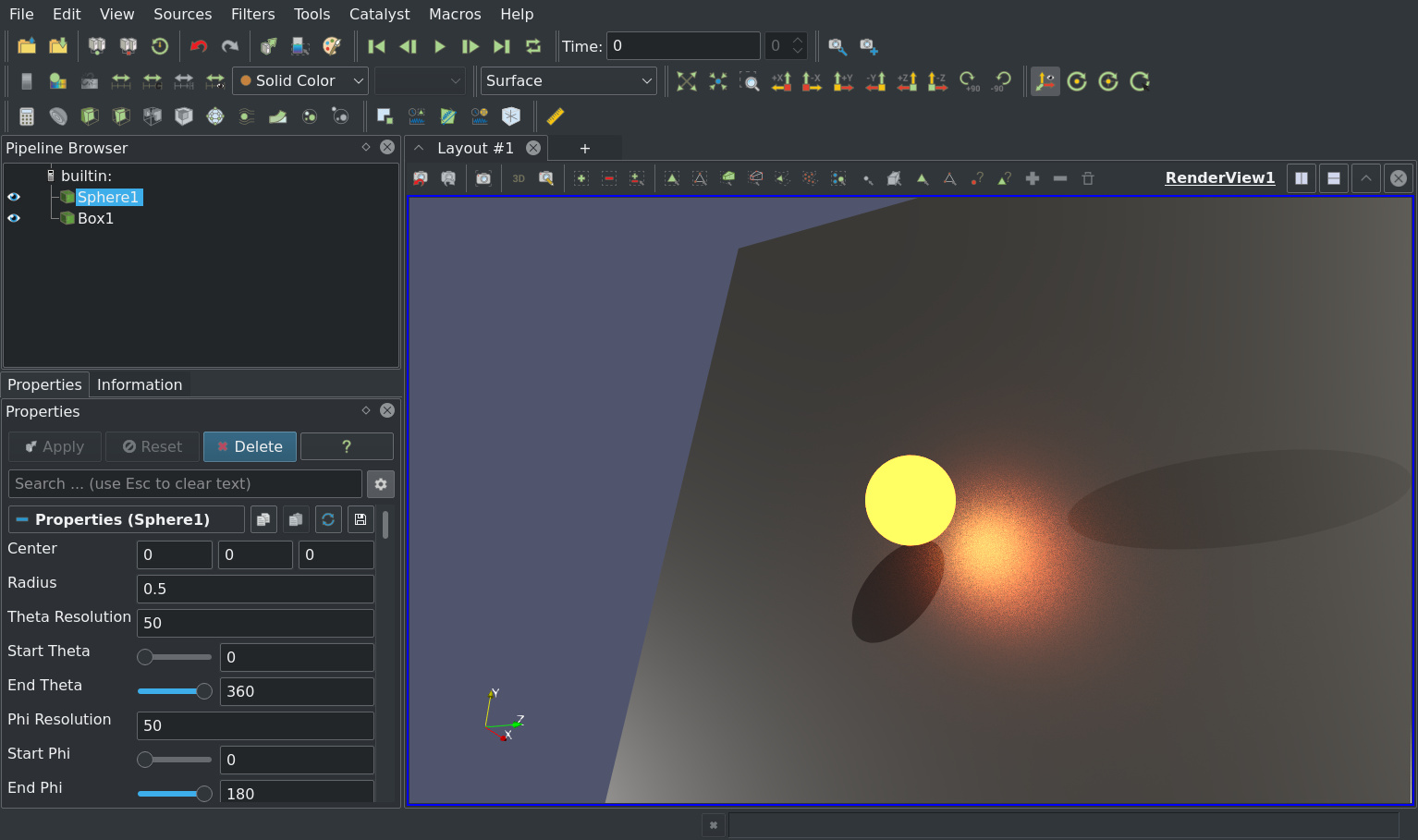
Here is the state file : [luminous.pvsm](https://discourse.paraview.org/uploads/short-url/kplTSTZ5o4LIYYAwjiIFlE7AFiw.pvsm) (244.5 KB)
---
### Author:  [@Vincent\_Rivola](https://discourse.paraview.org/u/Vincent_Rivola)
#### Post date: [April 3, 2020, 2:03pm UTC](https://discourse.paraview.org/t/paraview-5-8-features-free-webinar/3656/15 "2020-04-03T14:03:58Z")
Hmm, I was not clear enough, sorry for that. I was talking about the following material:
[https://www.ospray.org/documentation.html#luminous](https://www.ospray.org/documentation.html#luminous)
When we have a geometry with multiple parts that we map to materials loaded from a json file via a lookup table we cannot use the parameter that you just showed I believe. It will apply to the full geometry.
That’s why I was talking about the specific material “luminous” described in the Ospray documentation and we can apply on a part of the geometry if needed.
---
### Author:  [@Dave\_DeMarle](https://discourse.paraview.org/u/Dave_DeMarle)
#### Post date: [April 5, 2020, 3:58am UTC](https://discourse.paraview.org/t/paraview-5-8-features-free-webinar/3656/16 "2020-04-05T03:58:53Z")
ParaView master let’s you define luminous materials for ospray pathtracer via the Json file and thus the lookup table. That feature missed 5.8 but will appear in 5.9.
As Michael indicates, the luminosity setting also maps to ospray luminous material type, but as you describe it applies at the actor level, and is not mappable to individual blocks or cells.
---
### Author:  [@Vincent\_Rivola](https://discourse.paraview.org/u/Vincent_Rivola)
#### Post date: [April 6, 2020, 11:09am UTC](https://discourse.paraview.org/t/paraview-5-8-features-free-webinar/3656/17 "2020-04-06T11:09:17Z")
That’s good news Dave, thanks for your reply, that answers my question.
I’ll wait for the next release.