# ParaView 5.9.0 Release Candidate 2 available for download
**URL:** https://discourse.paraview.org/t/paraview-5-9-0-release-candidate-2-available-for-download/5970
**Category:** Announcements
**Created:** [December 3, 2020, 2:47pm UTC](https://discourse.paraview.org/t/paraview-5-9-0-release-candidate-2-available-for-download/5970 "2020-12-03T14:47:13Z")
**Posts on this page:** 6
**Page:** 1
### Author:  [@cory.quammen](https://discourse.paraview.org/u/cory.quammen)
#### Post date: [December 3, 2020, 2:47pm UTC](https://discourse.paraview.org/t/paraview-5-9-0-release-candidate-2-available-for-download/5970/1 "2020-12-03T14:47:14Z")
The ParaView team is happy to announce that ParaView 5.9.0-RC2 (Release Candidate 2) is available for download at
[https://www.paraview.org/download/](https://www.paraview.org/download/)
In addition, ParaView’s git repository and superbuild repository have been tagged with `v5.9.0-RC2` .
Release notes are available [here](https://gitlab.kitware.com/paraview/paraview/-/blob/master/Documentation/release/ParaView-5.9.0.md).
Binaries for macOS are signed and notarized with this release candidate.
Please let us know if you find any problems.
Thanks!
The ParaView team
---
### Author:  [@ebreard](https://discourse.paraview.org/u/ebreard)
#### Post date: [December 6, 2020, 9:31am UTC](https://discourse.paraview.org/t/paraview-5-9-0-release-candidate-2-available-for-download/5970/2 "2020-12-06T09:31:39Z")
Hi,
I tried to open it (5.9 RC2) with Windows 10, I get a black screen over the entire ParaView window. Tried the RC1, and get a black screen over the visualization panel. I have an Intel HD 520, with driver up to date apparently.
Any suggestion?
Cheers,
Eric
---
### Author:  [@Joachim\_P](https://discourse.paraview.org/u/Joachim_P)
#### Post date: [December 6, 2020, 11:18am UTC](https://discourse.paraview.org/t/paraview-5-9-0-release-candidate-2-available-for-download/5970/3 "2020-12-06T11:18:29Z")
Eric,
Do you have the same issue with version 5.8? What version of the Intel driver did you install?
J.
---
### Author:  [@ebreard](https://discourse.paraview.org/u/ebreard)
#### Post date: [December 7, 2020, 12:05am UTC](https://discourse.paraview.org/t/paraview-5-9-0-release-candidate-2-available-for-download/5970/4 "2020-12-07T00:05:25Z")
Hi,
I ran a big windows 10 update that was needed and ParaView 5.9 RC2 opened nicely :).
All good then.
Cheers,
Eric
---
### Author:  [@randomwangran](https://discourse.paraview.org/u/randomwangran)
#### Post date: [December 7, 2020, 5:02pm UTC](https://discourse.paraview.org/t/paraview-5-9-0-release-candidate-2-available-for-download/5970/5 "2020-12-07T17:02:03Z")
Super super cool.
Does anyone by chance know how the fire data is calculated in [the released picture](https://gitlab.kitware.com/paraview/paraview/-/blob/master/Documentation/release/img/5.9.0/volume-rendering-multiblock-imagedata.png)?
---
### Author:  [@ebreard](https://discourse.paraview.org/u/ebreard)
#### Post date: [December 8, 2020, 1:37am UTC](https://discourse.paraview.org/t/paraview-5-9-0-release-candidate-2-available-for-download/5970/6 "2020-12-08T01:37:58Z")
The 5.9 version was installed on our cluster. However I get an error when ticking the “enable ray tracing”
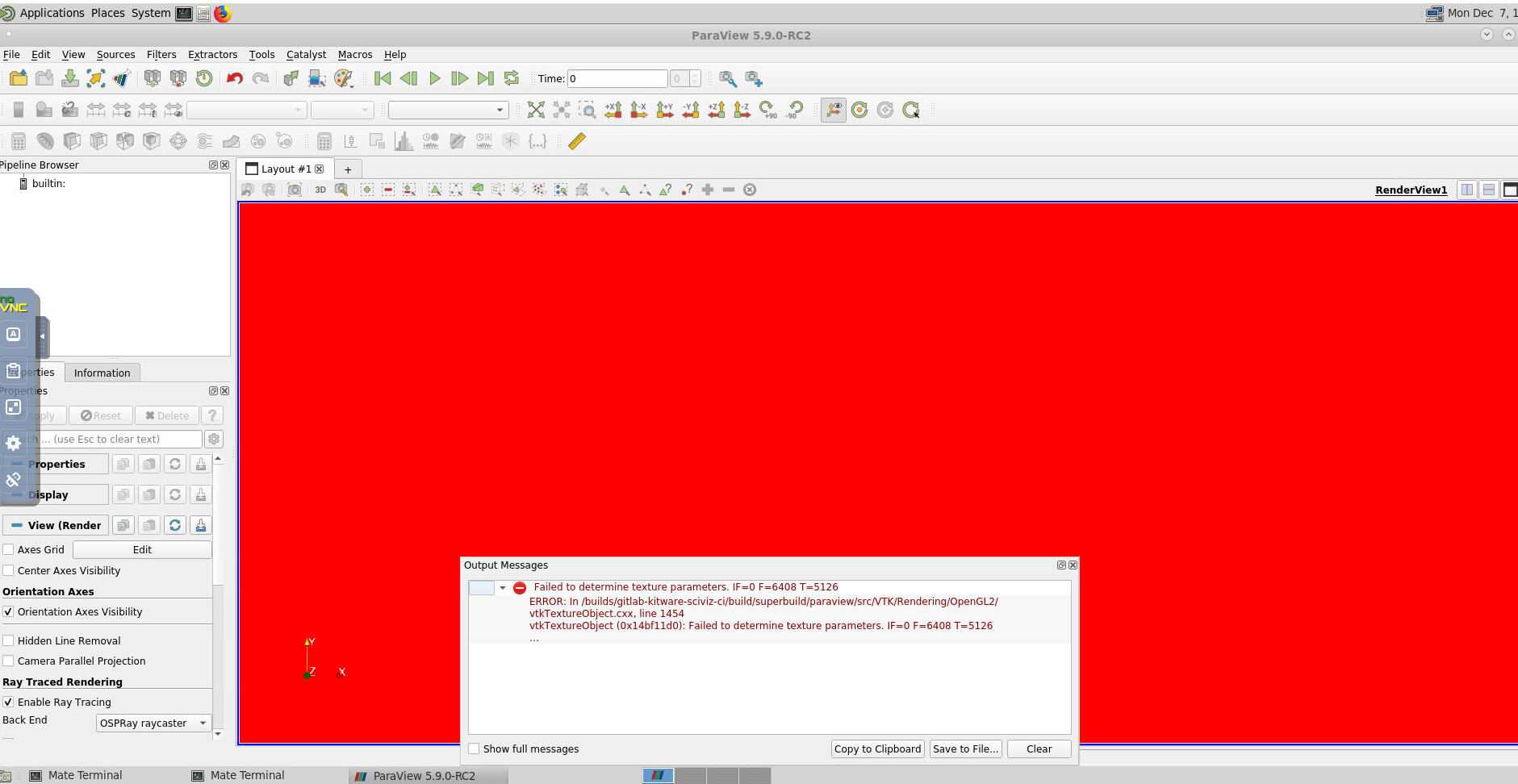
note that when the module is loaded, I open paraview as follows:
env MESA\_GL\_VERSION\_OVERRIDE=3.2 paraview &
If I do open it as “paraview &” only, there is a OpenGL error and nothing can be visualized.
ps: I can use successfully OSpray with ParaView 5.7 that we have installed on our cluster.
What do you suggest us to do to make the 5.9 version work?