# paraview animation
**URL:** https://discourse.paraview.org/t/paraview-animation/1170
**Category:** ParaView Support
**Created:** [January 24, 2019, 9:38am UTC](https://discourse.paraview.org/t/paraview-animation/1170 "2019-01-24T09:38:39Z")
**Posts on this page:** 7
**Page:** 1
### Author:  [@drudox00](https://discourse.paraview.org/u/drudox00)
#### Post date: [January 24, 2019, 9:38am UTC](https://discourse.paraview.org/t/paraview-animation/1170/1 "2019-01-24T09:38:39Z")
Dear all, I have to make an animation of polymer rheology (deformation due to hydro dynamic interaction)
In order to doing this, I exported from the CFD (in House) code the polymer chain’s beads coordinate written in VTK fortmat (POLYDATA) using Filter like glyph (for the beads) and tube (for the connection) I get a nice pictures of polymer in certain position.
I’m exporting this coodinate each time step of total 10 time step (just to try make a small animation), the file are named in a way that paraview recognized as time sequence (the end part of the filename is the time step) ,
But now I have problem related to the fact that the chain moves with the turbulent flow
so I cannot have a fixed area in which each time step i see the polymer change configurations! But this is what I need , there is some way to set the camera fixed with the chain and not with spatial coordinate ?
thanks in advance
---
### Author:  [@mwestphal](https://discourse.paraview.org/u/mwestphal)
#### Post date: [January 24, 2019, 10:11am UTC](https://discourse.paraview.org/t/paraview-animation/1170/2 "2019-01-24T10:11:46Z")
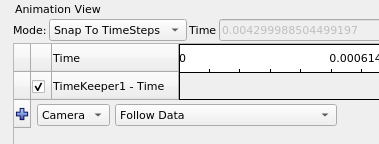
Use the “Folow Data” camera animation feature :
- Open ParaView and your temporal dataset
- View -\> Animation View
- Select `Camera` in the combo box, then `Folow Data` in the other combo box.
- Click on the blue “plus”
- Play animation
---
### Author:  [@drudox00](https://discourse.paraview.org/u/drudox00)
#### Post date: [January 24, 2019, 10:42am UTC](https://discourse.paraview.org/t/paraview-animation/1170/3 "2019-01-24T10:42:53Z")
thank you very much !!
---
### Author:  [@Arghavanizad](https://discourse.paraview.org/u/Arghavanizad)
#### Post date: [July 6, 2020, 1:50pm UTC](https://discourse.paraview.org/t/paraview-animation/1170/4 "2020-07-06T13:50:58Z")
Hi everyone,
how to make animation in paraview. when I use save animation then I get a bounch of png files, and there is no animation. Is there any special setting?
kind regards,
Arghavn
---
### Author:  [@bastian](https://discourse.paraview.org/u/bastian)
#### Post date: [July 7, 2020, 7:50am UTC](https://discourse.paraview.org/t/paraview-animation/1170/5 "2020-07-07T07:50:21Z")
It is possible to export to a video file, but I actually do prefer to produce pngs and then convert these into a video file since this enables a better quality than using the built-in video encoder (at least in PV 5.7).
Plus it gives you a lot more flexibility.
ffmpeg is your friend, e.g.:
```auto
ffmpeg -r 25 -start_number 0 -i "%04d.png" -c:v libx264 -profile:v high -level:v 4.0 -vf "format=rgb24" -pix_fmt yuv420p -y -an video.mp4
```
---
### Author:  [@mwestphal](https://discourse.paraview.org/u/mwestphal)
#### Post date: [July 7, 2020, 3:22pm UTC](https://discourse.paraview.org/t/paraview-animation/1170/6 "2020-07-07T15:22:47Z")
@Arghavanizad : Or just select the .avi format. If you have other question, please open your own topic.
---
### Author:  [@mwestphal](https://discourse.paraview.org/u/mwestphal)
#### Post date: [July 7, 2020, 3:22pm UTC](https://discourse.paraview.org/t/paraview-animation/1170/7 "2020-07-07T15:22:51Z")