# ParaView automatically zooms in
**URL:** https://discourse.paraview.org/t/paraview-automatically-zooms-in/3211
**Category:** ParaView Support
**Created:** [December 19, 2019, 9:59am UTC](https://discourse.paraview.org/t/paraview-automatically-zooms-in/3211 "2019-12-19T09:59:20Z")
**Posts on this page:** 15
**Page:** 1
### Author:  [@LearningCFD](https://discourse.paraview.org/u/LearningCFD)
#### Post date: [December 19, 2019, 9:59am UTC](https://discourse.paraview.org/t/paraview-automatically-zooms-in/3211/1 "2019-12-19T09:59:20Z")
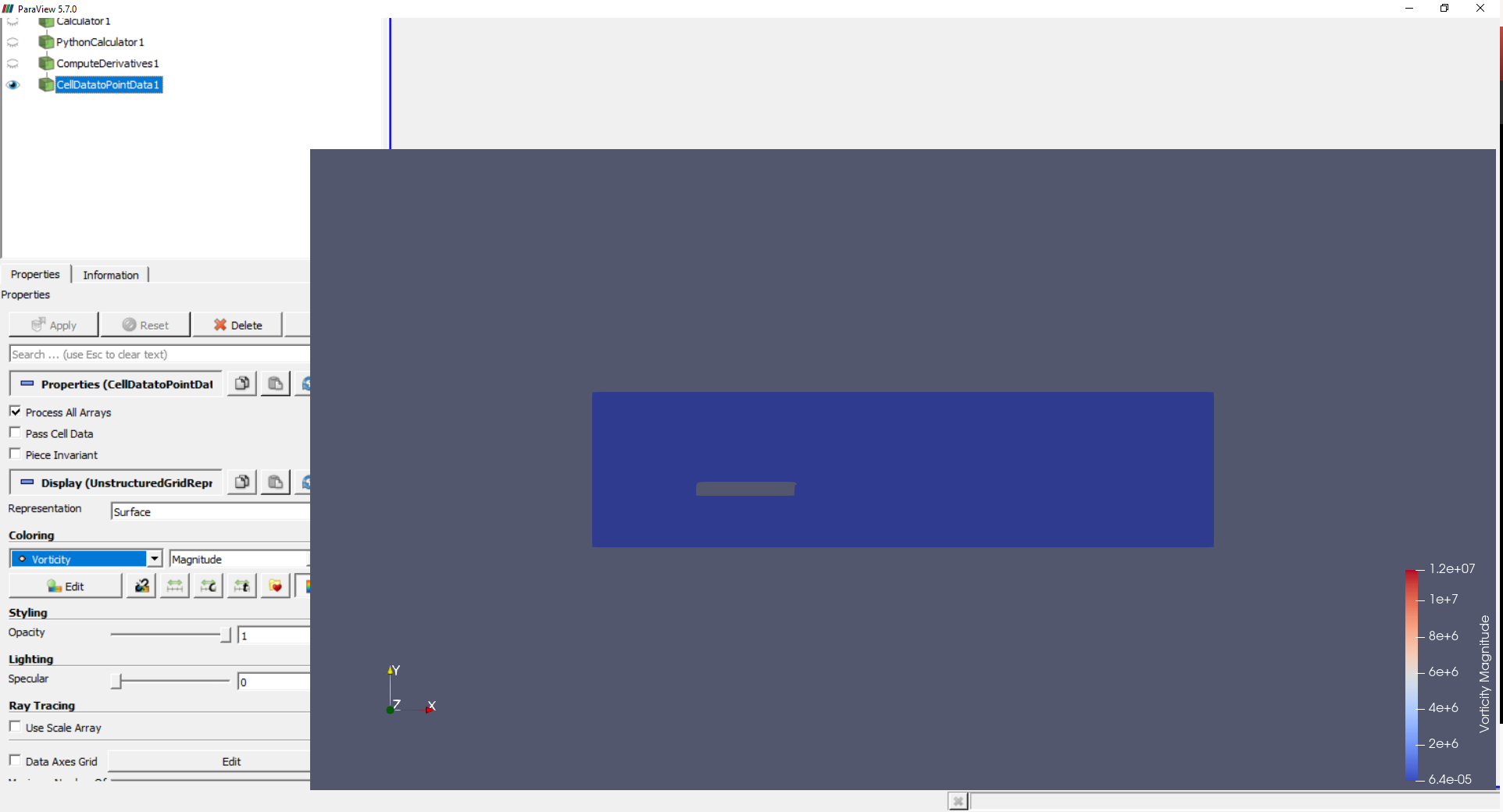
Hello everyone. I am in dire need of help. While working on my case (Windows 10, ParaView
5.7.0) my screen suddenly zoomed in (as shown in the attached picture). It happens only if I change the colouring from anything that was set as default - I can still freely use streamlines, StreamLIC plugin, etc… But I need to show vorticity as surface colours, and this prevents me from doing it. Does anyone know how to fix this issue? I have tried reinstalling ParaView, but it did not help.
Thank you in advance for all responses.
---
### Author:  [@mwestphal](https://discourse.paraview.org/u/mwestphal)
#### Post date: [December 19, 2019, 10:05am UTC](https://discourse.paraview.org/t/paraview-automatically-zooms-in/3211/2 "2019-12-19T10:05:55Z")
Caused by a bug in intel driver. Downgrade your driver :
[https://gitlab.kitware.com/paraview/paraview/issues/19364](https://gitlab.kitware.com/paraview/paraview/issues/19364)
---
### Author:  [@cory.quammen](https://discourse.paraview.org/u/cory.quammen)
#### Post date: [December 19, 2019, 2:31pm UTC](https://discourse.paraview.org/t/paraview-automatically-zooms-in/3211/3 "2019-12-19T14:31:59Z")
As a workaround, I believe you can also make sure the _Color Map Editor_ panel is closed to prevent this from happening to the main render window. If you don’t see the _Color Map Editor_, you can close it through the View -\> Color Map Editor menu item.
---
### Author:  [@LearningCFD](https://discourse.paraview.org/u/LearningCFD)
#### Post date: [December 19, 2019, 3:15pm UTC](https://discourse.paraview.org/t/paraview-automatically-zooms-in/3211/4 "2019-12-19T15:15:23Z")
I just found another workaround. Instead of using my Intel GPU, which is set to default, I can use my second Nvidia GPU. That solves the issue. But thank you for your replies, now I will be more aware of what went wrong.
---
### Author:  [@cory.quammen](https://discourse.paraview.org/u/cory.quammen)
#### Post date: [December 19, 2019, 3:16pm UTC](https://discourse.paraview.org/t/paraview-automatically-zooms-in/3211/5 "2019-12-19T15:16:30Z")
Using the NVIDIA GPU is the best solution all around 🙂
---
### Author:  [@LearningCFD](https://discourse.paraview.org/u/LearningCFD)
#### Post date: [December 20, 2019, 12:01pm UTC](https://discourse.paraview.org/t/paraview-automatically-zooms-in/3211/6 "2019-12-20T12:01:14Z")
And my victory was shortlived. Suddenly I experience the same issue on my Nvidia GPU as well. It may be due to the issue I was running it on my laptop battery while saving power, but I wanted to keep it as a possibility here so maybe someone knows another cause apart from Intel drivers.
And @cory.quammen the render window does not have this problem. Only the rest of the GUI .
---
### Author:  [@mwestphal](https://discourse.paraview.org/u/mwestphal)
#### Post date: [December 20, 2019, 12:29pm UTC](https://discourse.paraview.org/t/paraview-automatically-zooms-in/3211/7 "2019-12-20T12:29:38Z")
tbh I doubt that. Can you access the Help -\> About menu and share it here ?
---
### Author:  [@LearningCFD](https://discourse.paraview.org/u/LearningCFD)
#### Post date: [December 20, 2019, 1:40pm UTC](https://discourse.paraview.org/t/paraview-automatically-zooms-in/3211/8 "2019-12-20T13:40:49Z")
I will do it as soon asn I come back home. Currently I am on a train.
---
### Author:  [@LearningCFD](https://discourse.paraview.org/u/LearningCFD)
#### Post date: [December 20, 2019, 4:34pm UTC](https://discourse.paraview.org/t/paraview-automatically-zooms-in/3211/9 "2019-12-20T16:34:56Z")
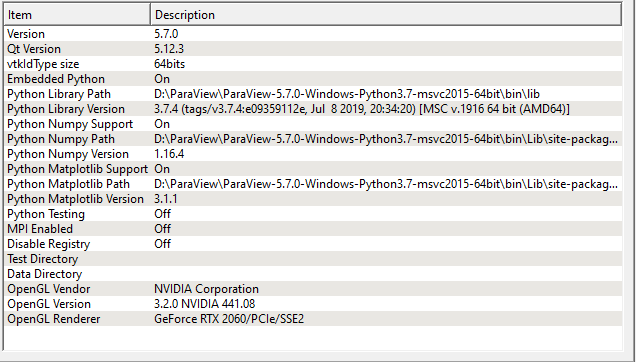
Here you have the details of my Help-\> About. Also. I figured out the technique to make it all work. I open any .dat file on my Nvidia GPU. Then, I import my .vtk file (SU2 7.0.0 gives the results in .vtk format, I need to check how to swap it to .dat in the new version) and delete the previous .dat file. Now I can freely edit my .vtk file. Who knew?
---
### Author:  [@w.perry](https://discourse.paraview.org/u/w.perry)
#### Post date: [January 17, 2020, 4:44pm UTC](https://discourse.paraview.org/t/paraview-automatically-zooms-in/3211/10 "2020-01-17T16:44:44Z")
I had this problem on my laptop using intel UHD 620 integrated graphics for display rendering. Today (1/17/2020) I updated the driver and the resizing issue seems to be resolved.
The driver version I updated to is 26.20.100.7584
---
### Author:  [@LearningCFD](https://discourse.paraview.org/u/LearningCFD)
#### Post date: [January 17, 2020, 7:03pm UTC](https://discourse.paraview.org/t/paraview-automatically-zooms-in/3211/11 "2020-01-17T19:03:23Z")
I omitted that, I just use Nvidia graphics and open .dat file before anything. As long as it works I will stick to this.
---
### Author:  [@mwestphal](https://discourse.paraview.org/u/mwestphal)
#### Post date: [January 21, 2020, 4:56am UTC](https://discourse.paraview.org/t/paraview-automatically-zooms-in/3211/12 "2020-01-21T04:56:06Z")
@cory.quammen : We need to try the update asap.
---
### Author:  [@fdi438](https://discourse.paraview.org/u/fdi438)
#### Post date: [January 21, 2020, 10:28am UTC](https://discourse.paraview.org/t/paraview-automatically-zooms-in/3211/13 "2020-01-21T10:28:47Z")
On 26.20.100.7261 / Intel UHD 620 (the latest driver version offered by Lenovo for this system) the UI still breaks.
---
### Author:  [@w.perry](https://discourse.paraview.org/u/w.perry)
#### Post date: [January 21, 2020, 2:28pm UTC](https://discourse.paraview.org/t/paraview-automatically-zooms-in/3211/14 "2020-01-21T14:28:50Z")
I also have a Lenovo laptop, but I went to Intel’s website to update this graphics driver. Version 26.20.100.7584 is dated as released on 11/26/2019.
---
### Author:  [@fdi438](https://discourse.paraview.org/u/fdi438)
#### Post date: [January 22, 2020, 7:40am UTC](https://discourse.paraview.org/t/paraview-automatically-zooms-in/3211/15 "2020-01-22T07:40:51Z")
The driver installer downloaded from Intel refused to install (said something about not being suitable for this ThinkPad). However, going to the device manager and updating the driver by right-clicking and letting it automatically update did the trick.
Now I’m on 26.20.100.7528 and Paraview is working again.