# Paraview Crashes Immediately when opened
**URL:** https://discourse.paraview.org/t/paraview-crashes-immediately-when-opened/6278
**Category:** ParaView Support
**Created:** [January 22, 2021, 10:10am UTC](https://discourse.paraview.org/t/paraview-crashes-immediately-when-opened/6278 "2021-01-22T10:10:37Z")
**Posts on this page:** 17
**Page:** 1
### Author:  [@lindsi](https://discourse.paraview.org/u/lindsi)
#### Post date: [January 22, 2021, 10:10am UTC](https://discourse.paraview.org/t/paraview-crashes-immediately-when-opened/6278/1 "2021-01-22T10:10:37Z")
I have downloaded the executable of paraview a few times, both 5.8 and the release candidate 5.9 and the program seems to open fine, but it crashes immediately when I pushed the ‘open file’ button. Have I missed a requirement when downloading?
I have 5.8 installed on a different computer and it works fine, but my IT department installed it, which is why I’m wondering if I have missed something.
I cannot try an older version, because I am working with very large tables and those versions have problems handling the data and crash themselves.
---
### Author:  [@mwestphal](https://discourse.paraview.org/u/mwestphal)
#### Post date: [January 22, 2021, 10:14am UTC](https://discourse.paraview.org/t/paraview-crashes-immediately-when-opened/6278/2 "2021-01-22T10:14:00Z")
Looks like a strange Qt issue.
Are you able to share the content of Help -\> About dialog ?
---
### Author:  [@mwestphal](https://discourse.paraview.org/u/mwestphal)
#### Post date: [January 22, 2021, 10:29am UTC](https://discourse.paraview.org/t/paraview-crashes-immediately-when-opened/6278/4 "2021-01-22T10:29:04Z")
Please use the copy to clipboard button in the About dialog and paste the result here.
---
### Author:  [@lindsi](https://discourse.paraview.org/u/lindsi)
#### Post date: [January 22, 2021, 10:30am UTC](https://discourse.paraview.org/t/paraview-crashes-immediately-when-opened/6278/5 "2021-01-22T10:30:31Z")
Client Information:
Version: 5.9.0-RC1
VTK Version:
Qt Version: 5.15.1
vtkIdType size: 64bits
Embedded Python: On
Python Library Path: C:\Program Files\ParaView 5.9.0-RC1-Windows-Python3.8-msvc2017-64bit\bin\lib
Python Library Version: 3.8.6 (tags/v3.8.6:db45529, Sep 23 2020, 15:52:53) [MSC v.1927 64 bit (AMD64)]
Python Numpy Support: On
Python Numpy Path: C:\Program Files\ParaView 5.9.0-RC1-Windows-Python3.8-msvc2017-64bit\bin\Lib\site-packages\numpy
Python Numpy Version: 1.19.2
Python Matplotlib Support: On
Python Matplotlib Path: C:\Program Files\ParaView 5.9.0-RC1-Windows-Python3.8-msvc2017-64bit\bin\Lib\site-packages\matplotlib
Python Matplotlib Version: 3.2.1
Python Testing: Off
MPI Enabled: Off
Disable Registry: Off
Test Directory:
Data Directory:
OpenGL Vendor: Intel
OpenGL Version: 3.2.0 - Build 10.18.10.3574
OpenGL Renderer: Intel® HD Graphics 4600
Connection Information:
Remote Connection: No
---
### Author:  [@mwestphal](https://discourse.paraview.org/u/mwestphal)
#### Post date: [January 22, 2021, 10:33am UTC](https://discourse.paraview.org/t/paraview-crashes-immediately-when-opened/6278/6 "2021-01-22T10:33:21Z")
This may be related to this issue:
> [@I am using ParaView 5.8.0 on Windows 10, and my GUI is completely broken, with missing icons! What is happening?](https://discourse.paraview.org/t/i-am-using-paraview-5-8-0-on-windows-10-and-my-gui-is-completely-broken-with-missing-icons-what-is-happening/4509):
>
> This is due to the "Intel Driver Bug., You can find all info about it here: [https://gitlab.kitware.com/paraview/paraview/-/issues/19364](https://gitlab.kitware.com/paraview/paraview/-/issues/19364) Possible solutions are: Upgrade to ParaView 5.8.1 or more recent Use another GPU (eg: NVIDIA instead of Intel) Downgrade your Intel driver to the version before 26.20.100.6708 Upgrade your Intel driver to the version after 26.20.100.7528 Use mesa instead : [How to run ParaView (including the binary release) using Mesa on Windows](https://discourse.paraview.org/t/how-to-run-paraview-including-the-binary-release-using-mesa-on-windows/4321/2) Downgrade to ParaView…
Can you try the fixes there ?
---
### Author:  [@lindsi](https://discourse.paraview.org/u/lindsi)
#### Post date: [January 22, 2021, 11:22am UTC](https://discourse.paraview.org/t/paraview-crashes-immediately-when-opened/6278/7 "2021-01-22T11:22:38Z")
Yes, I also found this post. I tried most of the fixes:
Possible solutions are:
- Upgrade to ParaView 5.8.1 or more recent
– have tried this and more recent
- Use another GPU (eg: NVIDIA instead of Intel)
– tried right clicking and running with NVIDIA
- Downgrade your Intel driver to the version before 26.20.100.6708
– My Intel driver version is 10.18.10.357, which seems appropriate, and in any case I am unable to roll back the driver (the option is unaccessible)
- Upgrade your Intel driver to the version after 26.20.100.7528
–I’ve tried updating my driver and it says it is up to date
- Use mesa instead : [How to run ParaView (including the binary release) using Mesa on Windows](https://discourse.paraview.org/t/how-to-run-paraview-including-the-binary-release-using-mesa-on-windows/4321/2)
– I’ve followed the steps and ran it using Mesa on Windows and am experiencing the cam problem
- Downgrade to ParaView 5.6.2
– not an option
---
### Author:  [@mwestphal](https://discourse.paraview.org/u/mwestphal)
#### Post date: [January 22, 2021, 11:27am UTC](https://discourse.paraview.org/t/paraview-crashes-immediately-when-opened/6278/8 "2021-01-22T11:27:59Z")
> [@lindsi](#):
>
> tried right clicking and running with NVIDIA
So you experience the same issue with NVIDIA ?
---
### Author:  [@lindsi](https://discourse.paraview.org/u/lindsi)
#### Post date: [January 22, 2021, 11:37am UTC](https://discourse.paraview.org/t/paraview-crashes-immediately-when-opened/6278/9 "2021-01-22T11:37:18Z")
yes
---
### Author:  [@mwestphal](https://discourse.paraview.org/u/mwestphal)
#### Post date: [January 22, 2021, 11:41am UTC](https://discourse.paraview.org/t/paraview-crashes-immediately-when-opened/6278/10 "2021-01-22T11:41:23Z")
Not the first report of this @cory.quammen
> [@ParaView crashes when trying to open file](https://discourse.paraview.org/t/paraview-crashes-when-trying-to-open-file/2089/6):
>
> Unless you can share your whole file, It is quite hard to help. Did the file in my message crash as well ?
[https://www.paraview.org/pipermail/paraview/2017-March/039648.html](https://www.paraview.org/pipermail/paraview/2017-March/039648.html)
[https://public.kitware.com/pipermail/paraview/2017-March/039781.html](https://public.kitware.com/pipermail/paraview/2017-March/039781.html)
Probably caused by a special disk on your system that paraview tries to read. Can you check that ?
---
### Author:  [@cory.quammen](https://discourse.paraview.org/u/cory.quammen)
#### Post date: [January 22, 2021, 2:06pm UTC](https://discourse.paraview.org/t/paraview-crashes-immediately-when-opened/6278/11 "2021-01-22T14:06:54Z")
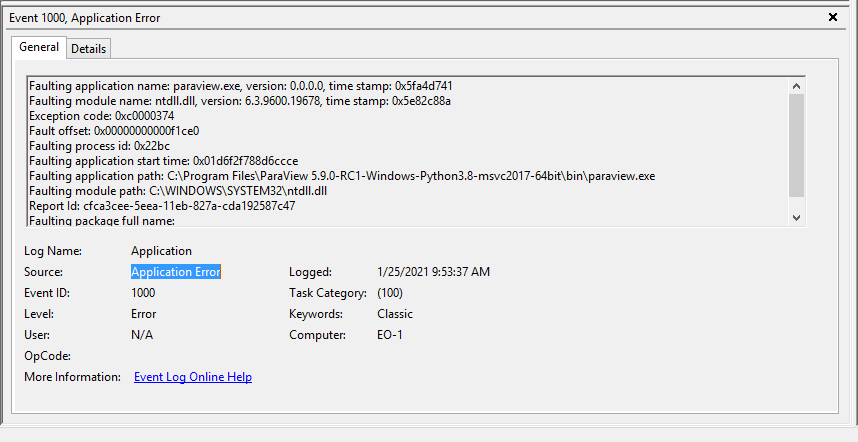
If you open the Window Event Viewer, is there any information provided about the crash?
---
### Author:  [@wascott](https://discourse.paraview.org/u/wascott)
#### Post date: [January 22, 2021, 7:07pm UTC](https://discourse.paraview.org/t/paraview-crashes-immediately-when-opened/6278/12 "2021-01-22T19:07:20Z")
Very likely, this is caused by something weird in your configuration files. You can move them to the side, and try ParaView again. If this fixes the issue, please zip them up and give them to one of the Kitware team.
You can find their location on the paraview wiki, but from memory they are going to be something like Users/yourName/Roaming/ParaView.
---
### Author:  [@wascott](https://discourse.paraview.org/u/wascott)
#### Post date: [January 22, 2021, 7:09pm UTC](https://discourse.paraview.org/t/paraview-crashes-immediately-when-opened/6278/13 "2021-01-22T19:09:03Z")
By the way, if you can open Edit/ Reset to Default Settings, that will do the same thing.
---
### Author:  [@lindsi](https://discourse.paraview.org/u/lindsi)
#### Post date: [January 25, 2021, 8:51am UTC](https://discourse.paraview.org/t/paraview-crashes-immediately-when-opened/6278/14 "2021-01-25T08:51:47Z")
Thanks Walter, I tried both this and moving the configuration files, and unfortunately neither has worked.
---
### Author:  [@lindsi](https://discourse.paraview.org/u/lindsi)
#### Post date: [January 25, 2021, 8:56am UTC](https://discourse.paraview.org/t/paraview-crashes-immediately-when-opened/6278/15 "2021-01-25T08:56:56Z")
Hi Cory,
Is this what you were thinking of? I don’t see anything here that is enlightening, but maybe your trained eye have more luck.
---
### Author:  [@lindsi](https://discourse.paraview.org/u/lindsi)
#### Post date: [January 25, 2021, 9:21am UTC](https://discourse.paraview.org/t/paraview-crashes-immediately-when-opened/6278/16 "2021-01-25T09:21:34Z")
This seemed to do it, thanks @mwestphal – the suggestion in the linked conversation that it could be Dell Backup and Recovery. It seems to be allowing me to open a file now. Thanks for the help with this!
---
### Author:  [@Kenneth\_Moreland](https://discourse.paraview.org/u/Kenneth_Moreland)
#### Post date: [January 25, 2021, 3:27pm UTC](https://discourse.paraview.org/t/paraview-crashes-immediately-when-opened/6278/17 "2021-01-25T15:27:17Z")
Although there is a workaround, this sounds like something that can be fixed in ParaView (if one of the ParaView developers can replicate the problem). I raised a bug here:
[https://gitlab.kitware.com/paraview/paraview/-/issues/20447](https://gitlab.kitware.com/paraview/paraview/-/issues/20447)
---
### Author:  [@cory.quammen](https://discourse.paraview.org/u/cory.quammen)
#### Post date: [January 25, 2021, 3:36pm UTC](https://discourse.paraview.org/t/paraview-crashes-immediately-when-opened/6278/18 "2021-01-25T15:36:25Z")
@lindsi thanks. I don’t see anything informative there either. Is there anything more useful in the “Details” tab?