# Paraview desktop application is a blank white window on startup - Win10 64bit
**URL:** https://discourse.paraview.org/t/paraview-desktop-application-is-a-blank-white-window-on-startup-win10-64bit/10491
**Category:** ParaView Support
**Created:** [October 12, 2022, 9:46am UTC](https://discourse.paraview.org/t/paraview-desktop-application-is-a-blank-white-window-on-startup-win10-64bit/10491 "2022-10-12T09:46:16Z")
**Posts on this page:** 9
**Page:** 1
### Author:  [@strud](https://discourse.paraview.org/u/strud)
#### Post date: [October 12, 2022, 9:46am UTC](https://discourse.paraview.org/t/paraview-desktop-application-is-a-blank-white-window-on-startup-win10-64bit/10491/1 "2022-10-12T09:46:16Z")
Hi All, just starting my Paraview journey.
I have downloaded the 5.10.1 version for windows and run the installer without issue.
I have installed on D drive.
Upon execution, I am presented with the Welcome to Paraview splash screen, which I click the close button on. The main application window then just sits there empty and nothing happens.
I have let this run for some time, but nothing happens and task manager shows no real CPU activity.
I assume I have missed some configuration or have a driver problem?
Any suggestions would be most apprecitated.
Strud
---
### Author:  [@mwestphal](https://discourse.paraview.org/u/mwestphal)
#### Post date: [October 12, 2022, 10:16am UTC](https://discourse.paraview.org/t/paraview-desktop-application-is-a-blank-white-window-on-startup-win10-64bit/10491/2 "2022-10-12T10:16:50Z")
Hi @strud ,
Which GPU are you using ?
Please take a look at this:
> [@I am using ParaView 5.8.0 on Windows 10, and my GUI is completely broken, with missing icons! What is happening?](https://discourse.paraview.org/t/i-am-using-paraview-5-8-0-on-windows-10-and-my-gui-is-completely-broken-with-missing-icons-what-is-happening/4509):
>
> This is due to the "Intel Driver Bug., You can find all info about it here: [https://gitlab.kitware.com/paraview/paraview/-/issues/19364](https://gitlab.kitware.com/paraview/paraview/-/issues/19364) Possible solutions are: Upgrade to ParaView 5.8.1 or more recent Use another GPU (eg: NVIDIA instead of Intel) Downgrade your Intel driver to the version before 26.20.100.6708 Upgrade your Intel driver to the version after 26.20.100.7528 Use mesa instead : [How to run ParaView (including the binary release) using Mesa on Windows](https://discourse.paraview.org/t/how-to-run-paraview-including-the-binary-release-using-mesa-on-windows/4321/2) Downgrade to ParaView…
This may be a different issue, but you never know.
---
### Author:  [@strud](https://discourse.paraview.org/u/strud)
#### Post date: [October 12, 2022, 10:35am UTC](https://discourse.paraview.org/t/paraview-desktop-application-is-a-blank-white-window-on-startup-win10-64bit/10491/3 "2022-10-12T10:35:37Z")
I have the Intel HD Graphics 3000
Driver version 9.17.10.4459
Apparenlty Intel tells me this is the latest available driver…
---
### Author:  [@mwestphal](https://discourse.paraview.org/u/mwestphal)
#### Post date: [October 13, 2022, 3:21am UTC](https://discourse.paraview.org/t/paraview-desktop-application-is-a-blank-white-window-on-startup-win10-64bit/10491/4 "2022-10-13T03:21:02Z")
Wildly out of date (4years), looks like an intel issue: [https://community.intel.com/t5/Graphics/Intel-HD-Graphics-Driver-Out-of-Date/td-p/582817](https://community.intel.com/t5/Graphics/Intel-HD-Graphics-Driver-Out-of-Date/td-p/582817)
We cant really help here, you wont be able to run ParaView on such old hardware with out of date driver.
---
### Author:  [@todoooo](https://discourse.paraview.org/u/todoooo)
#### Post date: [October 13, 2022, 6:19am UTC](https://discourse.paraview.org/t/paraview-desktop-application-is-a-blank-white-window-on-startup-win10-64bit/10491/5 "2022-10-13T06:19:40Z")
I have a much older HP laptop than that with an Intel HD Graphics card. Paraview works fine with my local build on Windows 10.
---
### Author:  [@mwestphal](https://discourse.paraview.org/u/mwestphal)
#### Post date: [October 13, 2022, 6:30am UTC](https://discourse.paraview.org/t/paraview-desktop-application-is-a-blank-white-window-on-startup-win10-64bit/10491/6 "2022-10-13T06:30:22Z")
With updated drivers, sure.
---
### Author:  [@cerver](https://discourse.paraview.org/u/cerver)
#### Post date: [July 14, 2023, 11:25am UTC](https://discourse.paraview.org/t/paraview-desktop-application-is-a-blank-white-window-on-startup-win10-64bit/10491/7 "2023-07-14T11:25:19Z")
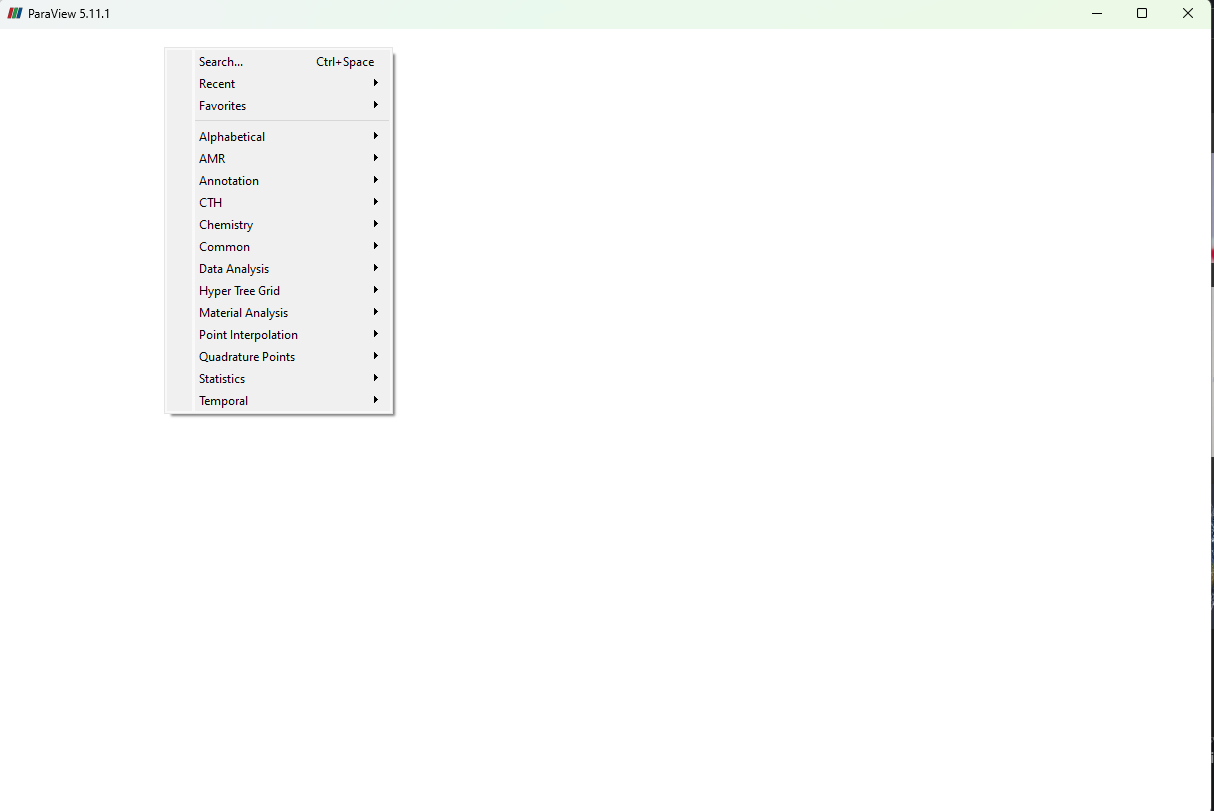
i have been having the same issue. i can see the top menu but nothing in the screen.
i have the latest Nvidia drivers and I have (2) Ada A6000 gpu’s.
---
### Author:  [@mwestphal](https://discourse.paraview.org/u/mwestphal)
#### Post date: [July 24, 2023, 9:19am UTC](https://discourse.paraview.org/t/paraview-desktop-application-is-a-blank-white-window-on-startup-win10-64bit/10491/8 "2023-07-24T09:19:29Z")
> [@cerver](#):
>
> i have the latest Nvidia drivers and I have (2) Ada A6000 gpu’s.
Looks like a different issue, related to your A6000 cards.
---
### Author:  [@xpijuan](https://discourse.paraview.org/u/xpijuan)
#### Post date: [November 11, 2023, 6:05pm UTC](https://discourse.paraview.org/t/paraview-desktop-application-is-a-blank-white-window-on-startup-win10-64bit/10491/9 "2023-11-11T18:05:17Z")
Same card and driver, got it working with version 5.11.2
I used the Windows mesa installer 23.3.0.rc3, perappdeploy.cmd and that solved the problem.
Don’t put in the application name, it didn’t work with it the first time. After re-running without it bingo!