# Paraview GUI view malfunction?
**URL:** https://discourse.paraview.org/t/paraview-gui-view-malfunction/15875
**Category:** ParaView Support
**Created:** [December 17, 2024, 2:22pm UTC](https://discourse.paraview.org/t/paraview-gui-view-malfunction/15875 "2024-12-17T14:22:10Z")
**Posts on this page:** 14
**Page:** 1
### Author:  [@thymomo178](https://discourse.paraview.org/u/thymomo178)
#### Post date: [December 17, 2024, 2:22pm UTC](https://discourse.paraview.org/t/paraview-gui-view-malfunction/15875/1 "2024-12-17T14:22:10Z")
Hi,
I’ve been using the same version of paraview on the same computer for 2 years, and it was working just fine this morning and then in the evening the GUI just started glitching.
Specifically I just want to plot over line for the classic cavity flow case, however the line chart view won’t show properly (i checked and it seems to happen to other views as well).
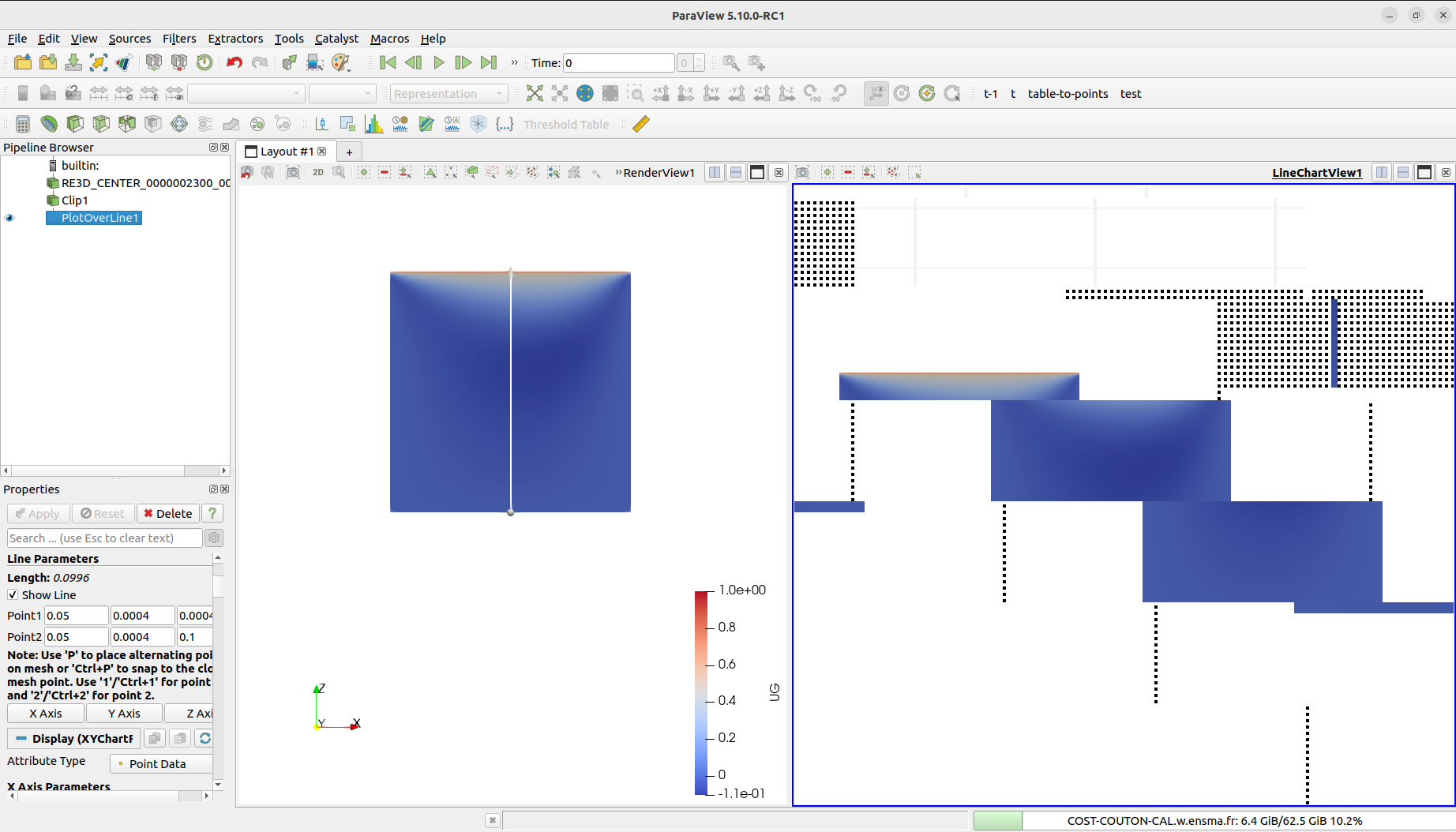
I have restarted the computer, install the latest version 5.13, didn’t work, so I reinstall the version i was using which is 5.10, didn’t work either. So now I start wondering if it was because of my computer malfunctioning?
---
### Author:  [@mwestphal](https://discourse.paraview.org/u/mwestphal)
#### Post date: [December 17, 2024, 3:12pm UTC](https://discourse.paraview.org/t/paraview-gui-view-malfunction/15875/2 "2024-12-17T15:12:12Z")
Which OS are you using ?
Which graphic driver are you using ?
Which GPU are you using ?
Do you see the same error between 5.10 et 5.13 ?
---
### Author:  [@thymomo178](https://discourse.paraview.org/u/thymomo178)
#### Post date: [January 30, 2025, 9:48am UTC](https://discourse.paraview.org/t/paraview-gui-view-malfunction/15875/3 "2025-01-30T09:48:34Z")
Hi,
Sorry, I’m not very good with IT and i don’t have full access to the computer as it belongs to my company, but I’ll try my best to answer your questions:
OS : Ubuntu 22.04.2 LTS
Graphics: NV137
GPU: NVIDIA QUADRO P400
And yes, same error between 5.10 and 5.13, but I have never had this problem before on the same computer.
Thank you.
---
### Author:  [@mwestphal](https://discourse.paraview.org/u/mwestphal)
#### Post date: [January 30, 2025, 9:53am UTC](https://discourse.paraview.org/t/paraview-gui-view-malfunction/15875/4 "2025-01-30T09:53:10Z")
This looks like a driver malfunction, please share the content of Help → About dialog.
---
### Author:  [@thymomo178](https://discourse.paraview.org/u/thymomo178)
#### Post date: [January 30, 2025, 10:01am UTC](https://discourse.paraview.org/t/paraview-gui-view-malfunction/15875/5 "2025-01-30T10:01:33Z")
Here it is:
Client Information:
Version: 5.10.0-RC1
VTK Version:
Qt Version: 5.15.2
vtkIdType size: 64bits
Embedded Python: On
Python Library Path: /usr/lib/python3.10
Python Library Version: 3.10.12 (main, Jan 17 2025, 14:35:34) [GCC 11.4.0]
Python Numpy Support: On
Python Numpy Path: /usr/lib/python3/dist-packages/numpy
Python Numpy Version: 1.21.5
Python Matplotlib Support: On
Python Matplotlib Path: /usr/lib/python3/dist-packages/matplotlib
Python Matplotlib Version: 3.5.1
Python Testing: Off
MPI Enabled: On
Disable Registry: Off
Test Directory:
Data Directory:
SMP Backend: Sequential
SMP Max Number of Threads: 1
OpenGL Vendor: Mesa
OpenGL Version: 4.3 (Core Profile) Mesa 23.2.1-1ubuntu3.1~22.04.2
OpenGL Renderer: NV137
Connection Information:
Remote Connection: No
---
### Author:  [@mwestphal](https://discourse.paraview.org/u/mwestphal)
#### Post date: [January 30, 2025, 11:57am UTC](https://discourse.paraview.org/t/paraview-gui-view-malfunction/15875/6 "2025-01-30T11:57:57Z")
> [@thymomo178](#):
>
> OpenGL Vendor: Mesa
> OpenGL Version: 4.3 (Core Profile) Mesa 23.2.1-1ubuntu3.1~22.04.2
> OpenGL Renderer: NV137
You are currently not using your GPU vendor driver.
What is the output of `glxinfo` ?
---
### Author:  [@thymomo178](https://discourse.paraview.org/u/thymomo178)
#### Post date: [January 30, 2025, 12:02pm UTC](https://discourse.paraview.org/t/paraview-gui-view-malfunction/15875/7 "2025-01-30T12:02:46Z")
[glxinfo.txt](https://discourse.paraview.org/uploads/short-url/m16iV2QPekwqJ6Q7FZhEl8qHsBi.txt) (75.3 KB)
---
### Author:  [@mwestphal](https://discourse.paraview.org/u/mwestphal)
#### Post date: [January 30, 2025, 12:07pm UTC](https://discourse.paraview.org/t/paraview-gui-view-malfunction/15875/8 "2025-01-30T12:07:47Z")
> OpenGL vendor string: Mesa
You are not using your GPU, you need to fix that.
---
### Author:  [@thymomo178](https://discourse.paraview.org/u/thymomo178)
#### Post date: [January 30, 2025, 12:08pm UTC](https://discourse.paraview.org/t/paraview-gui-view-malfunction/15875/9 "2025-01-30T12:08:41Z")
I’m sorry but how do I use it?
---
### Author:  [@mwestphal](https://discourse.paraview.org/u/mwestphal)
#### Post date: [January 30, 2025, 12:11pm UTC](https://discourse.paraview.org/t/paraview-gui-view-malfunction/15875/10 "2025-01-30T12:11:12Z")
I’m afraid this is not a ParaView question, but you may want to follow a guide like this one:
> **[How to install important drivers on Ubuntu](https://www.fosslinux.com/134496/how-to-install-important-drivers-on-ubuntu.htm)**
>
> Installing drivers in Ubuntu is crucial for optimal hardware performance. This guide covers the process of identifying and installing necessary drivers, including graphics, Wi-Fi, and other hardware components. Learn to use Ubuntu's built-in tools...
---
### Author:  [@thymomo178](https://discourse.paraview.org/u/thymomo178)
#### Post date: [January 30, 2025, 12:16pm UTC](https://discourse.paraview.org/t/paraview-gui-view-malfunction/15875/11 "2025-01-30T12:16:15Z")
thank you very much!
---
### Author:  [@salt](https://discourse.paraview.org/u/salt)
#### Post date: [April 28, 2026, 8:29am UTC](https://discourse.paraview.org/t/paraview-gui-view-malfunction/15875/12 "2026-04-28T08:29:31Z")
Hi, I have encountered a similar problem.
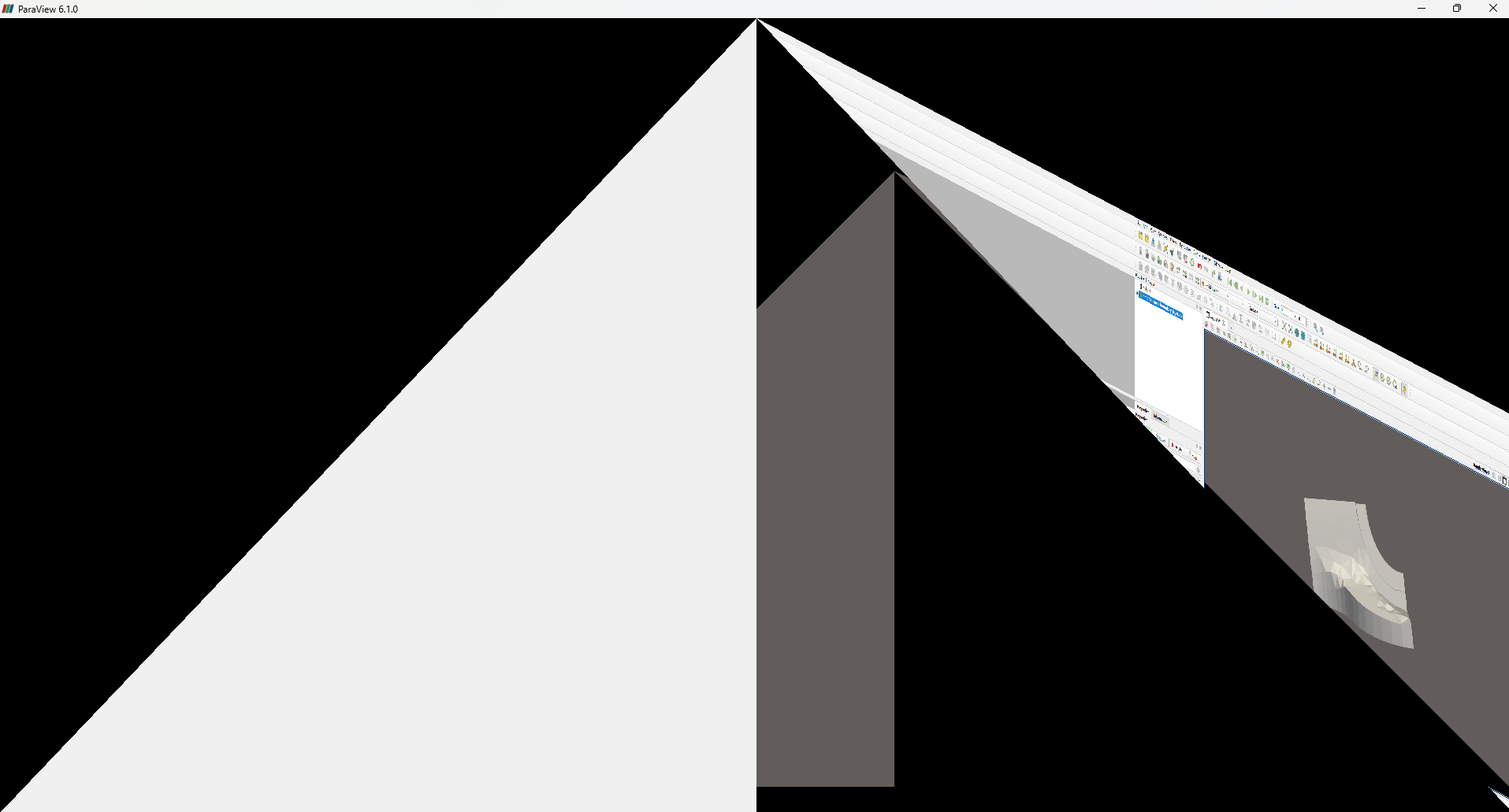
After I update my graphic driver, the main GUI cant render in right way(picture above).
here is my info:
```bash
Client Information:
Version: 6.1.0
VTK Version: 9.6.1
Qt Version: 6.9.0
vtkIdType size: 64bits
Embedded Python: On
Python Library Path: C:\LBZ\m_apps\Paraview\v6.1.0\bin\Lib
Python Library Version: 3.12.7 (tags/v3.12.7:0b05ead, Oct 1 2024, 03:06:41) [MSC v.1941 64 bit (AMD64)]
Python Numpy Support: On
Python Numpy Path: C:\LBZ\m_apps\Paraview\v6.1.0\bin\lib\site-packages\numpy
Python Numpy Version: 1.26.4
Python Matplotlib Support: On
Python Matplotlib Path: C:\LBZ\m_apps\Paraview\v6.1.0\bin\lib\site-packages\matplotlib
Python Matplotlib Version: 3.7.2
Python Testing: Off
MPI Enabled: Off
ParaView Build ID: superbuild af9bb3207d40b64f97c64a9c319d483ff3b17d03 (!1332)
Disable Registry: Off
Test Directory:
Data Directory:
SMP Backend: TBB
SMP Max Number of Threads: 16
OpenGL Vendor: NVIDIA Corporation
OpenGL Version: 3.2.0 NVIDIA 595.97
OpenGL Renderer: NVIDIA RTX A5000/PCIe/SSE2
Accelerated filters overrides available: No
Connection Information:
Remote Connection: No
```
---
### Author:  [@cory.quammen](https://discourse.paraview.org/u/cory.quammen)
#### Post date: [April 28, 2026, 10:39am UTC](https://discourse.paraview.org/t/paraview-gui-view-malfunction/15875/13 "2026-04-28T10:39:43Z")
Please see the discussion about this particular driver here: [ParaView not working with NVIDIA driver 595](https://discourse.paraview.org/t/paraview-not-working-with-nvidia-driver-595/17474). NVIDIA says they have fixed it in their driver release expected today (April 28).
---
### Author:  [@salt](https://discourse.paraview.org/u/salt)
#### Post date: [April 29, 2026, 1:33pm UTC](https://discourse.paraview.org/t/paraview-gui-view-malfunction/15875/14 "2026-04-29T13:33:25Z")
thank you! it fixed well!