# Paraview is Rendering in Only 1/4 of View
**URL:** https://discourse.paraview.org/t/paraview-is-rendering-in-only-1-4-of-view/6586
**Category:** ParaView Support
**Created:** [March 2, 2021, 7:05pm UTC](https://discourse.paraview.org/t/paraview-is-rendering-in-only-1-4-of-view/6586 "2021-03-02T19:05:01Z")
**Posts on this page:** 5
**Page:** 1
### Author:  [@gmcauley](https://discourse.paraview.org/u/gmcauley)
#### Post date: [March 2, 2021, 7:05pm UTC](https://discourse.paraview.org/t/paraview-is-rendering-in-only-1-4-of-view/6586/1 "2021-03-02T19:05:01Z")
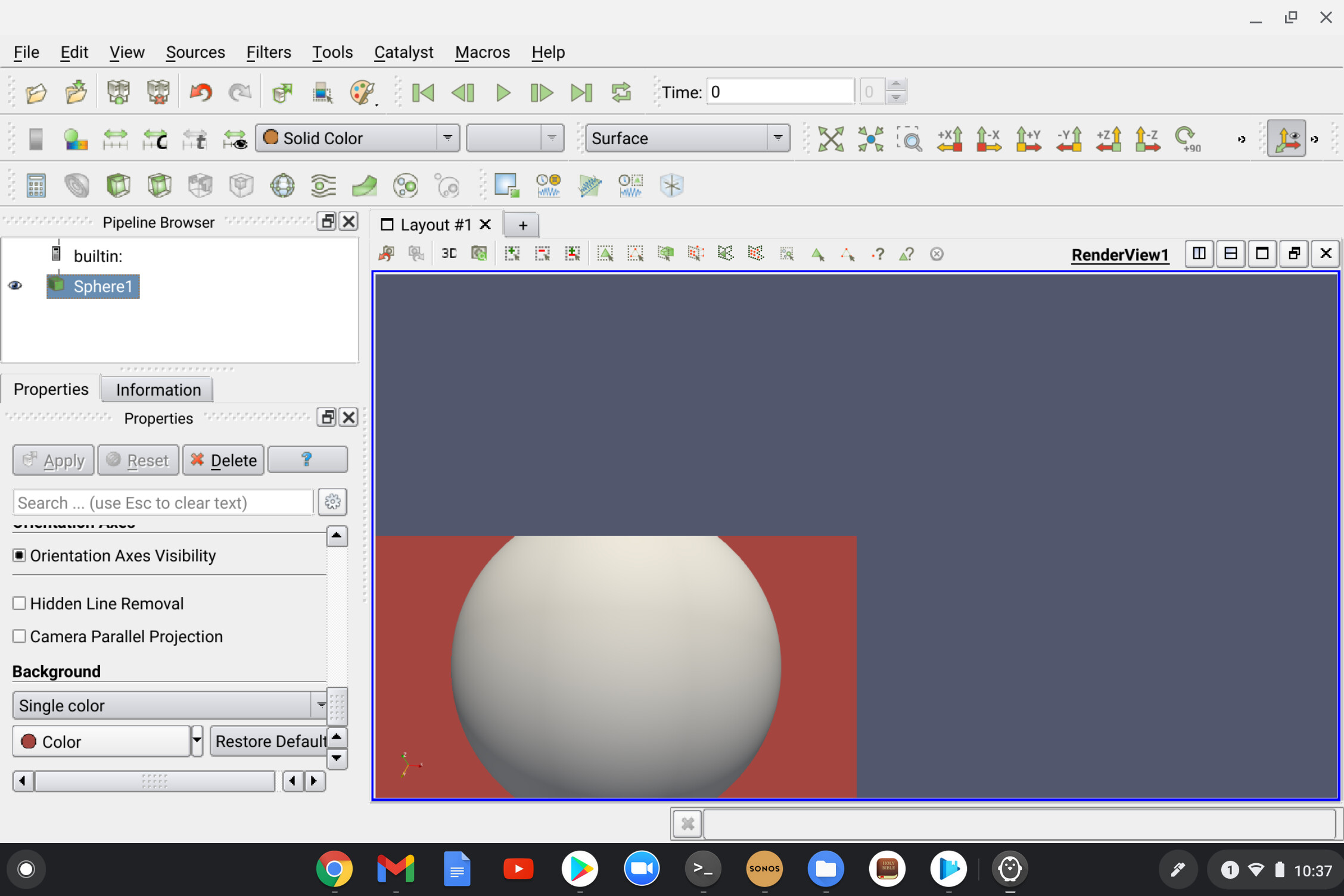
I am running Paraview on my Chromebook in a Linux container which is running Debian 10.
When I add a source (so far have tried sphere, cylinder and box), it gets rendered in the bottom left corner of the RenderView. When I change the background color, only that portion of the RenderView gets the color (see attached image).
Any thoughts or suggestions on what the issue might be?
---
### Author:  [@mwestphal](https://discourse.paraview.org/u/mwestphal)
#### Post date: [March 3, 2021, 8:26am UTC](https://discourse.paraview.org/t/paraview-is-rendering-in-only-1-4-of-view/6586/2 "2021-03-03T08:26:02Z")
That’s a new one, tbf that is also the first time I see ParaView in a Chromebook.
What happens if you detach the view or try fullscreen ?
This looks like a viewport issue.
---
### Author:  [@gmcauley](https://discourse.paraview.org/u/gmcauley)
#### Post date: [March 3, 2021, 10:10pm UTC](https://discourse.paraview.org/t/paraview-is-rendering-in-only-1-4-of-view/6586/3 "2021-03-03T22:10:25Z")
Thank you @mwestphal for your reply.
Yes, I might be the first to run Paraview in a Chromebook 🙃
In any case, in full screen I am seeing something similar except that the background color covers the whole RenderView (see attached image). Interestingly, upon exit of full screen, the background only covers the bottom left quarter again (as in the image of my original post).

---
### Author:  [@mwestphal](https://discourse.paraview.org/u/mwestphal)
#### Post date: [March 4, 2021, 8:14am UTC](https://discourse.paraview.org/t/paraview-is-rendering-in-only-1-4-of-view/6586/4 "2021-03-04T08:14:54Z")
You may want to try with pvpython instead of ParaView, that will let you know if the issue is with VTK or Qt.
In any case, I have no resolution to suggest except trying any other different graphical setup you may think of.
---
### Author:  [@aron.helser](https://discourse.paraview.org/u/aron.helser)
#### Post date: [March 4, 2021, 12:54pm UTC](https://discourse.paraview.org/t/paraview-is-rendering-in-only-1-4-of-view/6586/5 "2021-03-04T12:54:35Z")
This reminds me of some of the problems we saw early on with high-DPI displays. It seems like ParaView may be getting conflicting information about the display resolution. If you can find any settings related to high-DPI for either the container or for ParaView itself, it might help.