# Paraview not connecting with remote server
**URL:** https://discourse.paraview.org/t/paraview-not-connecting-with-remote-server/8842
**Category:** ParaView Support
**Created:** [January 26, 2022, 6:26am UTC](https://discourse.paraview.org/t/paraview-not-connecting-with-remote-server/8842 "2022-01-26T06:26:38Z")
**Posts on this page:** 20
**Page:** 1
### Author:  [@Bushra](https://discourse.paraview.org/u/Bushra)
#### Post date: [January 26, 2022, 6:26am UTC](https://discourse.paraview.org/t/paraview-not-connecting-with-remote-server/8842/1 "2022-01-26T06:26:38Z")
Hi!
I am trying to use pvserver to do post processing without the need of GUI for remote server. When I run pvserver in remote sever, it gives no error and says that it is connecting:
```auto
Waiting for client...
Connection URL: cs://v100b:11111
Accepting connection(s): v100b:11111
```
Then I add server name and default port number 11111 in connect option on my local paraview client and connect it as shown in the guide. However after connection, paraview client gets stuck for 60 seconds and then gives “force quit” message. I don’t know why it is not connecting to remote server paraview. Please guide.
Thanks!
---
### Author:  [@pavel](https://discourse.paraview.org/u/pavel)
#### Post date: [January 26, 2022, 7:27am UTC](https://discourse.paraview.org/t/paraview-not-connecting-with-remote-server/8842/2 "2022-01-26T07:27:42Z")
Hi Bushra,
You wrote about pvserver ‘…and says that it is connecting’, but there is no phrase ‘Client connected’ in your example of output. It is just a message about waiting a connection with a client.
If you can not see the message ‘Client connected’, you could try reverse connection (with -rc argument).
Edited: Do you have the same versions of ParaView on the client and on the server?
Best Regards,
Pavel
---
### Author:  [@Bushra](https://discourse.paraview.org/u/Bushra)
#### Post date: [January 26, 2022, 7:53am UTC](https://discourse.paraview.org/t/paraview-not-connecting-with-remote-server/8842/3 "2022-01-26T07:53:55Z")
Thanks for replying
I have 5.9.0 on local machine and 5.9.1 on remote server.
When I configure server in local paraview and run pvserver -rc on remote server, it gives me the following error:
```auto
( 0.290s) [pvserver] vtkSocket.cxx:447 ERR| vtkClientSocket (0x1dbdee0): Socket error in call to connect. Connection refused.
( 0.291s) [pvserver] vtkClientSocket.cxx:51 ERR| vtkClientSocket (0x1dbdee0): Failed to connect to server v100b:11111
( 0.291s) [pvserver]vtkTCPNetworkAccessMana:396 WARN| vtkTCPNetworkAccessManager (0x1c500b0): Connect failed. Retrying for 59.9993 more seconds.
```
---
### Author:  [@pavel](https://discourse.paraview.org/u/pavel)
#### Post date: [January 26, 2022, 7:56am UTC](https://discourse.paraview.org/t/paraview-not-connecting-with-remote-server/8842/4 "2022-01-26T07:56:49Z")
I think the problem is in different versions of PV on the client and on the server (at least this is the requirement from PV documentation to have the same versions of PV). Could you please install 5.9.1 on your local machine?
If this solution does not work, here is an example of establishing reverse connection (-rc) working in my case.
1. On the server side before connection:

1. On the client before connection:
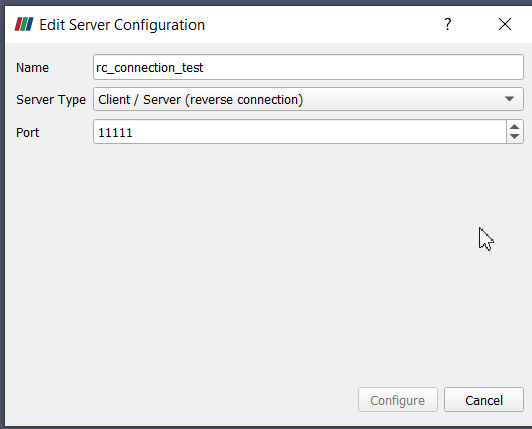
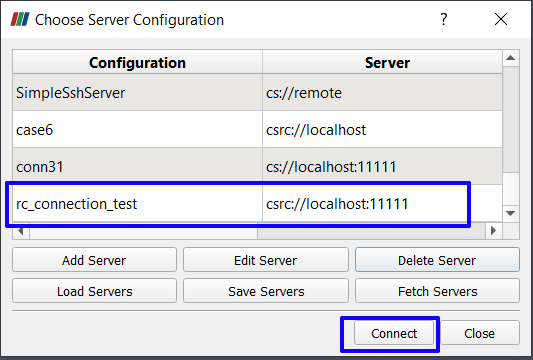
1. On the server side after establishing the connection:

1. On the client after connection:

---
### Author:  [@mwestphal](https://discourse.paraview.org/u/mwestphal)
#### Post date: [January 26, 2022, 8:27am UTC](https://discourse.paraview.org/t/paraview-not-connecting-with-remote-server/8842/5 "2022-01-26T08:27:42Z")
> [@pavel](#):
>
> I think the problem is in different versions of PV on the client and on the server
While this is true, OP must have another issue on top of that.
@Bushra : Do not use -rc unless you need it. What errors are you getting when connecting to your pvserver normally ?
---
### Author:  [@Bushra](https://discourse.paraview.org/u/Bushra)
#### Post date: [January 26, 2022, 9:52am UTC](https://discourse.paraview.org/t/paraview-not-connecting-with-remote-server/8842/6 "2022-01-26T09:52:14Z")
Hi!
I don’t get any particular error… just that I don’t get client connected message and my paraview client gets stuck after which it asks me to force quit
---
### Author:  [@mwestphal](https://discourse.paraview.org/u/mwestphal)
#### Post date: [January 26, 2022, 9:53am UTC](https://discourse.paraview.org/t/paraview-not-connecting-with-remote-server/8842/7 "2022-01-26T09:53:44Z")
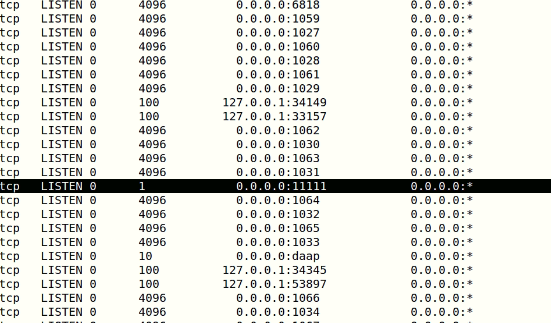
Is the 11111 port opened on your remote server ?
---
### Author:  [@pavel](https://discourse.paraview.org/u/pavel)
#### Post date: [January 26, 2022, 9:54am UTC](https://discourse.paraview.org/t/paraview-not-connecting-with-remote-server/8842/8 "2022-01-26T09:54:32Z")
Did you try it with the same versions of PV on the client and on the server?
---
### Author:  [@Bushra](https://discourse.paraview.org/u/Bushra)
#### Post date: [January 26, 2022, 10:16am UTC](https://discourse.paraview.org/t/paraview-not-connecting-with-remote-server/8842/9 "2022-01-26T10:16:22Z")
I installed same version but I’m still getting the same errors. Paraview stuck on simple pvserver command and on executing
`pvserver -rc --client-host= --server-port=11111`
I get the this repetitive error on server side:
```auto
( 0.762s) [pvserver] vtkSocket.cxx:447 ERR| vtkClientSocket (0x24cffa0): Socket error in call to connect. Connection refused.
( 0.762s) [pvserver] vtkClientSocket.cxx:51 ERR| vtkClientSocket (0x24cffa0): Failed to connect to server 10.10.56.157:11111
( 0.763s) [pvserver]vtkTCPNetworkAccessMana:396 WARN| vtkTCPNetworkAccessManager (0x23620b0): Connect failed. Retrying for 59.9985 more seconds.
```
---
### Author:  [@pavel](https://discourse.paraview.org/u/pavel)
#### Post date: [January 26, 2022, 10:22am UTC](https://discourse.paraview.org/t/paraview-not-connecting-with-remote-server/8842/10 "2022-01-26T10:22:29Z")
Do you have a ssh connection between these machines?
---
### Author:  [@Bushra](https://discourse.paraview.org/u/Bushra)
#### Post date: [January 26, 2022, 10:23am UTC](https://discourse.paraview.org/t/paraview-not-connecting-with-remote-server/8842/11 "2022-01-26T10:23:52Z")
yes it is
---
### Author:  [@Bushra](https://discourse.paraview.org/u/Bushra)
#### Post date: [January 26, 2022, 10:24am UTC](https://discourse.paraview.org/t/paraview-not-connecting-with-remote-server/8842/12 "2022-01-26T10:24:49Z")
yes I have ssh connection
---
### Author:  [@pavel](https://discourse.paraview.org/u/pavel)
#### Post date: [January 26, 2022, 10:31am UTC](https://discourse.paraview.org/t/paraview-not-connecting-with-remote-server/8842/13 "2022-01-26T10:31:05Z")
Maybe, smth with firewall on your client machine?
---
### Author:  [@Bushra](https://discourse.paraview.org/u/Bushra)
#### Post date: [January 26, 2022, 10:44am UTC](https://discourse.paraview.org/t/paraview-not-connecting-with-remote-server/8842/15 "2022-01-26T10:44:15Z")
Should I disable firewall in my local computer via terminal?
---
### Author:  [@pavel](https://discourse.paraview.org/u/pavel)
#### Post date: [January 26, 2022, 10:47am UTC](https://discourse.paraview.org/t/paraview-not-connecting-with-remote-server/8842/16 "2022-01-26T10:47:25Z")
I’m not sure. Is it possible to check that PV is not blocked on your local machine?
---
### Author:  [@pavel](https://discourse.paraview.org/u/pavel)
#### Post date: [January 26, 2022, 10:50am UTC](https://discourse.paraview.org/t/paraview-not-connecting-with-remote-server/8842/17 "2022-01-26T10:50:25Z")
And one more point: do you have similar binaries of the same PV versions on the client and on the server (e.g. both with MPI support)? I’m not sure about you need to satisfy this requirement, just a thought.
---
### Author:  [@pavel](https://discourse.paraview.org/u/pavel)
#### Post date: [January 26, 2022, 11:39am UTC](https://discourse.paraview.org/t/paraview-not-connecting-with-remote-server/8842/18 "2022-01-26T11:39:50Z")
Could you please also provide some screenshots or other description of the error on the client? Is it possible to connect paraview with pvserver both running inside one machine (both on the client machine or both on the server machine)?
---
### Author:  [@Bushra](https://discourse.paraview.org/u/Bushra)
#### Post date: [January 26, 2022, 11:45am UTC](https://discourse.paraview.org/t/paraview-not-connecting-with-remote-server/8842/19 "2022-01-26T11:45:24Z")
yes, I have basically transferred the same paraview from server to local machine
---
### Author:  [@todoooo](https://discourse.paraview.org/u/todoooo)
#### Post date: [January 26, 2022, 9:32pm UTC](https://discourse.paraview.org/t/paraview-not-connecting-with-remote-server/8842/20 "2022-01-26T21:32:06Z")
Have you tried using an IP address for the host?
---
### Author:  [@pavel](https://discourse.paraview.org/u/pavel)
#### Post date: [January 26, 2022, 9:57pm UTC](https://discourse.paraview.org/t/paraview-not-connecting-with-remote-server/8842/21 "2022-01-26T21:57:32Z")
Do you mean here?
> [@Bushra](#):
>
> pvserver -rc --client-host=\ --server-port=11111
Yes, here should be a ``. Thanks for noticing it.
[Next page](https://discourse.paraview.org/t/paraview-not-connecting-with-remote-server/8842.md?page=2)