# ParaView OpenGL support inadequate!
**URL:** https://discourse.paraview.org/t/paraview-opengl-support-inadequate/3509
**Category:** ParaView Support
**Created:** [February 5, 2020, 7:18pm UTC](https://discourse.paraview.org/t/paraview-opengl-support-inadequate/3509 "2020-02-05T19:18:12Z")
**Posts on this page:** 3
**Page:** 1
### Author:  [@lb30lori](https://discourse.paraview.org/u/lb30lori)
#### Post date: [February 5, 2020, 7:18pm UTC](https://discourse.paraview.org/t/paraview-opengl-support-inadequate/3509/1 "2020-02-05T19:18:12Z")
I have need to figure out how to solve this error:
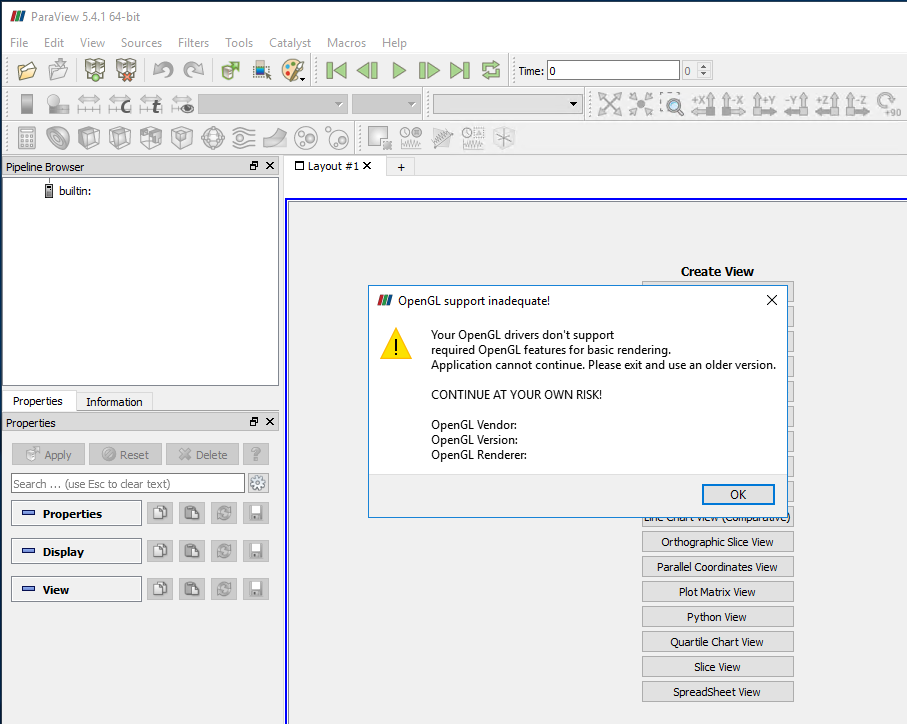 I am running it via Amazon Appstream on a Server 2016 back end with a Nvidia M60 Tesla. Any suggestions are welcome. Thanks.
---
### Author:  [@mwestphal](https://discourse.paraview.org/u/mwestphal)
#### Post date: [February 6, 2020, 2:25am UTC](https://discourse.paraview.org/t/paraview-opengl-support-inadequate/3509/2 "2020-02-06T02:25:13Z")
Are you using ssh -X our ssh -Y ? If yes, it is not supported.
You need to run ParaView in client/server mode.
---
### Author:  [@wascott](https://discourse.paraview.org/u/wascott)
#### Post date: [February 6, 2020, 2:33am UTC](https://discourse.paraview.org/t/paraview-opengl-support-inadequate/3509/3 "2020-02-06T02:33:47Z")
Also Lori,
- You are runing ParaView 5.4.1. This is ancient. Update at the [paraview.org](http://paraview.org) website.
- If I read this correctly, you are trying to run ParaView remotely on an Amazon cloud? I read that OpenGL is available. You will need to make sure it is sufficient.
- The message says that wherever you are running doesn’t have sufficient OpenGL. We require OpenGL 3.2. Many out of the box OpenGL versions is 2.1, which frequently shows this error. If so, the Amazon cloud may not work for you.